5.1万

This post is based on my PGConf.EU 2026 talk, "The Primary Is Down. Are You Sure?".
A managed Postgres service needs to prevent any possible connections from writing into primary before promoting a new standby. This is called fencing, and it is important for preventing lost writes or split brain scenarios.
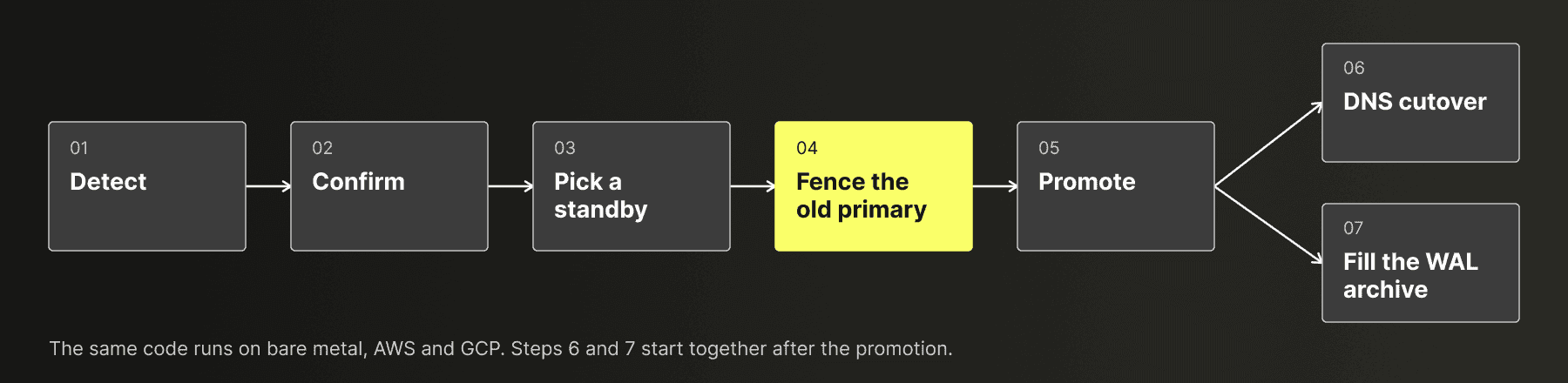
Why do we need to fence, if we are already promoting a standby?
To answer this, we need to first understand what a promotion looks like, and the steps involved to make a standby the new primary. Keep in mind that the old primary may not really be down. If we have a network partitioning where the client can connect to the primary but we cannot, the client can keep writing into the old primary.
Here are the steps:
-
We promote the standby by running
SELECT pg_promote(true, 300). At this point, this standby stops acknowledging commits from the primary. -
We refresh DNS records so new connections go to the new primary.
None of these steps stop the old primary from accepting writes, and that can cause a split brain scenario. The DNS part is clear: until the TTL expires, new clients can still go to the old primary, and the clients that are already connected just stay there. What about when we stop the commit acknowledgements from a standby? There are three scenarios where that doesn't help:
-
If we have a single standby, it is configured with async replication, so the primary does not wait for it. Even with two standbys, any session can turn the wait off for itself with
SET synchronous_commit = localoroff. -
If we have two standbys, we configure them with quorum commit (
ANY 1). After we promote one of them, as long as the other standby ACKs the commit, the old primary would commit. -
Even if both standbys are totally disconnected, a client that is still connected to the old primary can send a
COMMIT. Normally, Postgres waits for an acknowledgement, but if the client cancels the query (Ctrl+C in psql), or the old primary crashes and restarts, every session would see the commit in the old primary, because the commit is already written in the old primary's WAL (write-ahead log). This is a known Postgres synchronous replication behavior.
Therefore, we try to stop the old primary from accepting any writes before promoting the standby.
Minimizing downtime during fencing
Fencing is time-critical because we cannot promote a standby until fencing is complete. Any time spent fencing directly extends downtime. To minimize this, we attempt multiple fencing approaches in parallel and proceed with failover as soon as the first one completes successfully.
Ubicloud's control plane supports managed PostgreSQL across three environments: bare metal, AWS, and GCP. Each environment supports common fencing methods, complemented by additional platform-specific approaches. We combine these methods to fence the old primary as quickly as possible.
ClickHouse Managed Postgres runs on the open source Ubicloud control plane, which Ubicloud and ClickHouse build together. Several of us on both teams have been building managed Postgres together since the Citus Data and Microsoft days, and I'm one of them.
Common fencing mechanisms across environments
Let's assume the control plane has SSH access to the underlying VM, but Postgres itself is not healthy. We have two handy tools in our hands: pg_stop and hba.
pg_stop simply stops the cluster with pg_ctlcluster, but it has a problem with reboots. By default, the start.conf from postgresql-common has auto start baked in, and we keep it, because most of the time, we want the Postgres instance to auto restart in case of a VM reboot. However, that means, when we stop the cluster, if the VM reboots for whatever reason, we will have the primary running again.
The hba mechanism, on the other hand, writes a new pg_hba.conf and reloads Postgres, so it sticks after a reboot. However, the rules only apply to new connection attempts. The Postgres documentation says for each record type that the record "matches connection attempts". So every session that is already open doesn't go through the pg_hba validation again. These connections include long-lived PgBouncer server connections as well. Therefore, we really don't get anything from it for the existing connections.
Furthermore, both of these mechanisms depend on SSH access being available, so the control plane must be able to reach the underlying VM. If the VM itself is not reachable, the control plane needs a mechanism outside of the guest. This is where things start to branch out depending on the underlying VM provider.
Fencing on bare metal
On bare metal, the control plane also manages the host that runs the Postgres VM. So, we can fence from the host. Each VM gets its own network namespace on its host, and a veth pair connects the two. The vethi<vm> end is inside the namespace, and the vetho<vm> end stays on the host. The host routes the VM's public IPv4 and IPv6 addresses to vetho<vm>, and the encrypted private network, which carries replication, also goes through this pair.
So the fence is basically the following command being run on the host:
timeout 10 sudo ip link set vetho<vm> down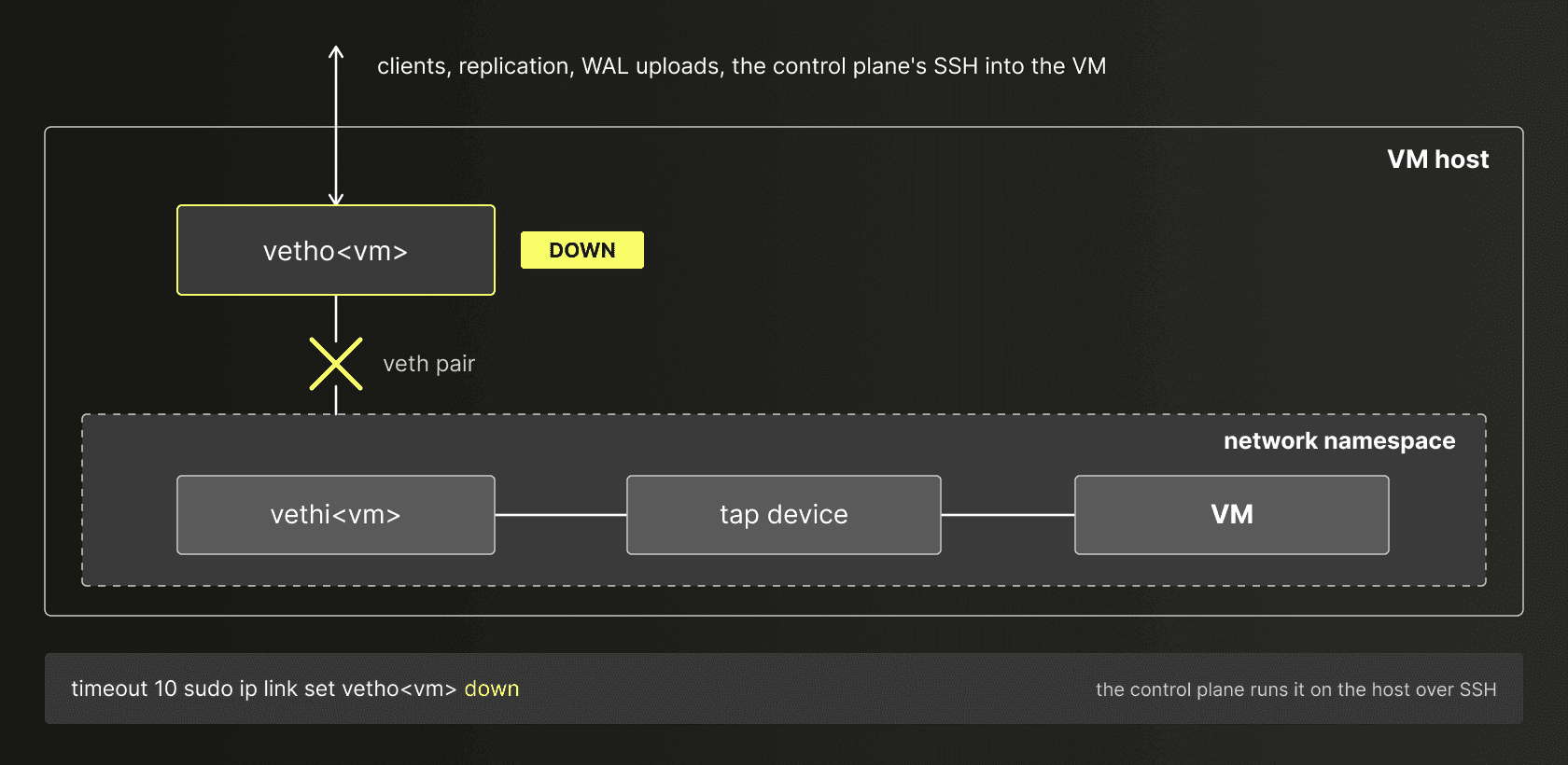
The veth(4) man page says: "When either device is down, the link state of the pair is down." Clients, replication, the WAL uploads to object storage and the control plane's own SSH into the VM all go through that pair, so all of them are cut. Postgres keeps running inside, but nothing outside the namespace can reach it, and the control plane can still destroy the VM through the host.
The fence needs the host to answer. If the host is unreachable, all three mechanisms fail, because pg_stop and hba also reach the guest through that host.
Fencing on AWS
On AWS, the control plane has no access to the host, so the only thing it can do outside the guest is to call the EC2 API. We evaluated three ways for fencing through that API, but none of them satisfied our needs.
stop-instances --forceis slow, as it waits for a graceful shutdown.- Since July 2025,
StopInstanceshas a skipOsShutdown parameter that skips the OS shutdown. We did not use it, because the method we found is actually faster and at the time of a failover, time is something we can definitely not waste.
- Since July 2025,
- Security groups are fast but stateful, so tracked connections remain active.
- Network ACLs (access control lists) are more complicated and create additional resources which will need cleanup.
The solution we ended up with is detaching the network interface (NIC). This cuts the traffic both for existing and new connections. The problem is that each EC2 instance has a primary network interface at device index 0, and it is not possible to detach primary network interface while the instance is running. However, it is possible to detach secondary network interfaces even while the instance is running.
So we designed the control plane to give every Postgres server on AWS a second NIC. The management NIC is at device index 0 and carries the control plane's SSH. The user NIC is at device index 1. It holds the public addresses and the database's DNS record also points to it. It also carries the clients and replication. This is the reverse of the management network example in the AWS documentation, where the primary interface takes the public traffic.
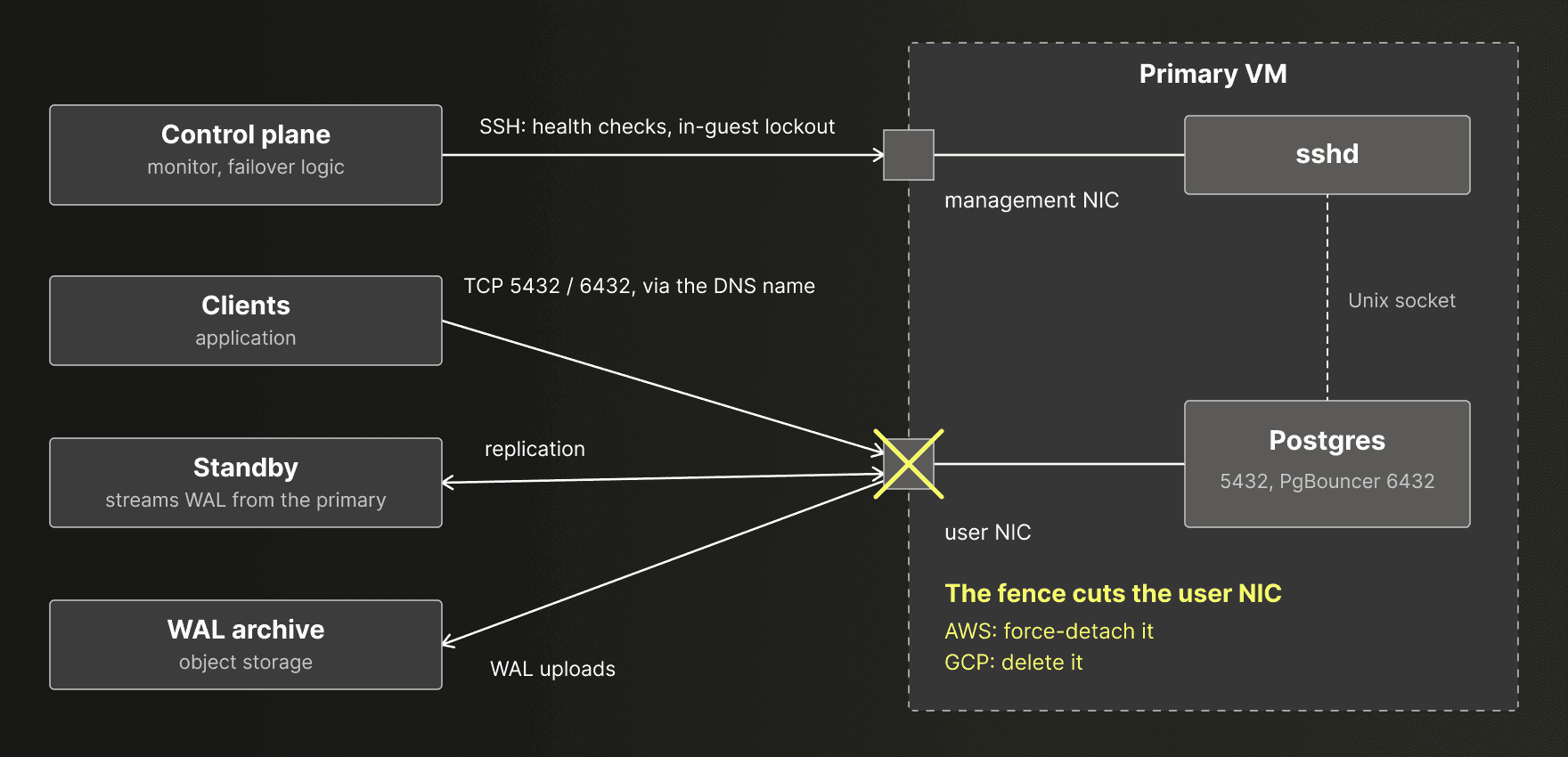
To fence, the control plane detaches the user NIC with force:
client.detach_network_interface(
attachment_id: network_interface.attachment.attachment_id,
force: true,
)The API reference says: "Use the Force parameter only as a last resort to detach a network interface from a failed instance." We are not reusing failed primaries. Nothing in the control plane attaches the user NIC again, and it stays detached until the old VM is destroyed, so it is OK to use the force option in our case.
Here is an example where this fencing mechanism works in real life. Below are control plane logs of a failover on AWS:
21:19:40 respirate.2 | {"ssh":{...,"cmd":"timeout 10 sudo pg_ctlcluster 18 main stop -m immediate","exit_code":2,...,"stdout":"Cluster is not running.\n",...}
21:19:40 respirate.1 | {"ssh":{...,"cmd":"timeout 10 sudo postgres/bin/lockout-hba 18","exit_code":1,...,"stderr":"... command failed: sudo pg_ctlcluster 18 main reload (CommandFail)...
21:19:42 respirate.1 | {"fenced_unresponsive_primary":{...,"mechanism":"detach_nic"},"message":"Fenced unresponsive primary",...}
21:19:42 respirate.2 | {"strand_hopped":{...,"from":"Postgres::PostgresServerNexus.wait_representative_lockout","to":"Postgres::PostgresServerNexus.prepare_taking_over"},...}The pg_stop mechanism found no running cluster, and hba could not reload, which is expected after a SIGKILL. So the detach was the only mechanism that succeeded, and the standby moved on to the promotion. Thirteen seconds later, the control plane saved the kernel log of the old primary over the management NIC, and this was its last line:
2026-08-26T21:19:42,694874+00:00 pcieport 0000:26:00.1: pciehp: Slot(36): Button press: will power off in 5 secFencing on Google Cloud
On Google Cloud (GCP), the control plane also has no access to the host, so outside the guest it can only call the Compute Engine API. We have evaluated multiple ways, and none of the obvious Compute Engine options works as a fence:
| Option | What happens |
|---|---|
| Firewall deny rule | "Existing connections persist, and their associated traffic remains unaffected." (docs) |
| Remove the external IP | Replication on the internal address keeps going, and on a VM with one NIC, the control plane also loses its SSH, which uses that address |
| Stop or delete the VM | The guest gets "up to a maximum of 120 seconds" to shut down (docs), and the Local SSD data is discarded. skipGuestOsShutdown skips the wait, but in our tests, Google marked the stop as done 16 to 19 seconds after the call |
| Add a secondary NIC | A regular secondary NIC cannot be detached |
Thankfully, Dynamic NICs have become generally available on GCP on October 30, 2025. A Dynamic NIC is a VLAN sub-interface of a regular NIC. The GCP documentation says: "Adding or removing Dynamic NICs doesn't require restarting or recreating the instance." It also says that a Dynamic NIC shares the bandwidth and the queues of its parent NIC.
On GCP, nic0 is the management NIC, in a separate VPC (virtual private cloud network) that lets the control plane's SSH in and denies all egress. The user NIC is a Dynamic NIC on VLAN 2 in the database's private subnet, and it carries the public addresses, replication and the default routes. The fence deletes the user NIC with one call to deleteNetworkInterface.
The documentation gives the usual delay for adding a Dynamic NIC and nothing about when traffic stops after a delete, so we measured it. In our trials, the last packet on any user flow came 0.7 to 2.5 seconds after the request, and Google marked the operation as done 5.0 to 7.0 seconds after it.
When all options fail
The old primary's state machine starts one child job per mechanism, all at the same time:
label def lockout
decr_lockout
resource.lockout_mechanisms.each do |mechanism|
bud Prog::Postgres::PostgresLockout, {"mechanism" => mechanism}
end
hop_wait_lockout_attempt
endIn this code, bud starts a child job, and hop moves the state machine to its next step. Each child tries its mechanism and reports lockout_succeeded when the command or the API call returns. An SSH error, a failed or timed-out command, or an error returned by the EC2 API makes it report lockout_failed. When no child is left, the old primary counts as locked out, whatever the children reported. The standby checks for that once a second, and then it promotes.
So when every mechanism fails, the control plane still promotes. We did that on purpose: the design is fail-open, and a test in the repository pins that behavior. A stricter design would page a person when no fence worked, and the database would have no primary until someone acted. In that trade-off, we chose availability.
Conclusion
The failover code is the same on AWS, on bare metal and on GCP, and the fence is the step that needs a different mechanism in each place. On AWS, every Postgres server that the control plane creates has a second NIC, and the fence is a forced detach of the user NIC. On bare metal, the fence is one ip link command on the host. On GCP, the fence deletes a Dynamic NIC. When every mechanism fails, the control plane still promotes, because the design is fail-open.
Two things from this work also apply outside the control plane. First, on servers with postgresql-common, check what start.conf says and what a stopped primary does at its next boot. Second, a fence that removes a NIC depends on which NICs the cloud can detach from a running VM. On AWS, that is every NIC except the one at device index 0, and on GCP, only Dynamic NICs, because regular NICs are set when the VM is created.
Get started with ClickHouse Managed Postgres today
Interested in seeing how ClickHouse Managed Postgres works on your data? Get started with ClickHouse Cloud in minutes and receive $300 in free credits.
Sign up