 5.1만
5.1만
A habit tracker looks like a CRUD app, but it makes one promise that is easy to break: one check-in per habit per day. Double-click a checkbox, retry a request on a flaky connection, or open the app in two tabs, and a naive implementation stores two rows for the same day or undoes the check it just made. The streak counter then shows the wrong number.
This article walks through a small Next.js app that keeps that promise in Postgres. It uses Next.js 16 with Server Components and Server Actions, Drizzle ORM with node-postgres, and ClickHouse Managed Postgres, provisioned with clickhousectl. The full code, with every setup command, is in the Habit Tracker example.
What you'll build
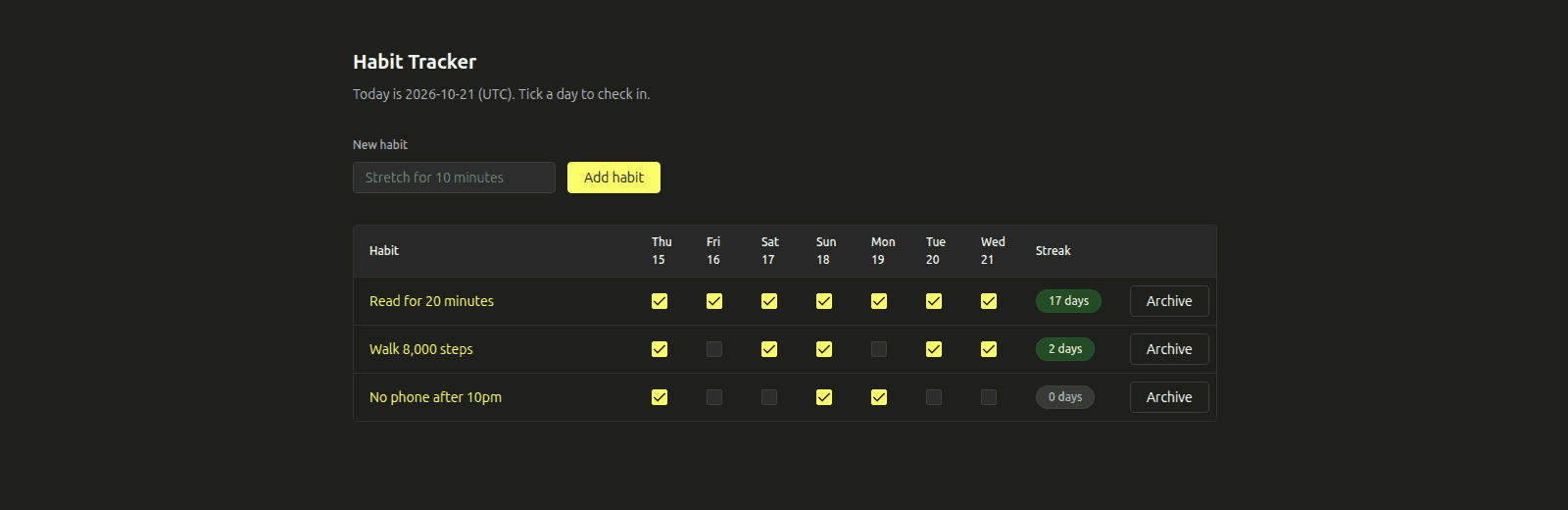
One screen lists your habits, each with a checkbox for each of the last seven days and the current streak. A second screen shows one habit's last 91 days as a heatmap, with its current and longest streak.
The promise: one check-in per day, whatever the client does
The user-facing rule is simple. If I ticked Tuesday, Tuesday is ticked once. That has to hold when:
- the user double-clicks;
- the browser retries a Server Action;
- two tabs tick the same day at the same moment.
An application-level check ("does a row exist? if not, insert") can't hold this rule. Two requests can both see "no row" before either inserts. The database has to enforce it.
Architecture and data model
The browser talks to a Next.js app whose Server Components read and whose Server Actions write through Drizzle and pg, over verified TLS, to ClickHouse Managed Postgres.
There are three tables in a habit_tracker schema: users, habits (with a nullable archived_at) and check_ins. The invariant lives in the Drizzle definition of check_ins.
export const checkIns = habitTracker.table(
"check_ins",
{
habitId: integer("habit_id")
.notNull()
.references(() => habits.id, { onDelete: "cascade" }),
day: date({ mode: "string" }).notNull(),
createdAt: timestamp("created_at", { withTimezone: true })
.notNull()
.defaultNow(),
},
// One check-in per habit per day. The primary key is the UNIQUE (habit_id, day)
// constraint that makes double clicks, retries and races harmless.
(t) => [primaryKey({ columns: [t.habitId, t.day] })],
);day is a Postgres date, not a timestamp. "Today" is computed once, in a configured time zone, and the row stores the calendar day it belongs to. The composite primary key (habit_id, day) is the whole invariant, so Postgres needs no help from a queue or a lock service.
The operations that keep the promise
Send the desired state, not "toggle"
A toggle endpoint can't be retried safely. Send it twice and the second request undoes the first. The checkbox instead sends the state it should end up in, done: true or done: false. Repeating that request changes nothing, so double clicks and retries are harmless.
Check in with INSERT … ON CONFLICT DO NOTHING
Checking a day is a single statement. INSERT … SELECT only produces a row when the habit is active and belongs to the user, and ON CONFLICT DO NOTHING turns a duplicate into a no-op.
await db
.insert(checkIns)
.select(
db
.select({
habitId: habits.id,
day: sql`${day}::date`.as("day"),
createdAt: sql`now()`.as("created_at"),
})
.from(habits)
.where(ownedActiveHabit(userId, habitId)),
)
.onConflictDoNothing();Unchecking is a DELETE with the same ownership condition, which is idempotent too. The Server Action validates the habit ID, the date and the seven-day window with Zod before calling this function.
Compute streaks in SQL with gaps and islands
A streak is a run of consecutive days. In a run, day - row_number() is the same for every row, because both increase by one each day. Grouping by that value gives one group per run.
sql`
with islands as (
select c.habit_id, c.day,
c.day - (row_number() over (partition by c.habit_id order by c.day))::int as island
from ${checkIns} c
join ${habits} h on h.id = c.habit_id
where h.user_id = ${userId} and h.archived_at is null
),
runs as (
select habit_id, max(day) as last_day, count(*)::int as length
from islands
group by habit_id, island
)
select habit_id,
coalesce(max(length) filter (where last_day >= ${today}::date - 1), 0)::int as current,
max(length)::int as longest
from runs
group by habit_id
`A run is current if it ends today or yesterday, since today's check-in may still be to come. Because the primary key guarantees one row per day, count(*) is the streak length. Duplicate rows would break this query without anyone noticing.
Connect Next.js and Drizzle to ClickHouse Managed Postgres
Create the service and download its CA certificate with clickhousectl:
clickhousectl cloud postgres create \
--org-id "$CH_ORG_ID" --name habit-tracker \
--provider aws --region "$PG_REGION" --size "$PG_SIZE" \
--pg-version 18 --ha-type none --tag project=habit-tracker \
--json > .deployment/postgres-create.json
clickhousectl cloud postgres certs get "$PG_SERVICE_ID" --org-id "$CH_ORG_ID" --output .deployment/ca.pemsrc/db.ts creates the only connection pool. It passes the CA with rejectUnauthorized: true, which verifies both the certificate and the hostname (the verify-full behaviour). It refuses a remote host without a CA, so a missing variable can't quietly fall back to an unencrypted connection.
export function tlsOptions(
connectionString: string,
caPath: string | undefined,
) {
if (caPath)
return { ca: readFileSync(caPath, "utf8"), rejectUnauthorized: true };
// Local Postgres from `clickhousectl local postgres` has no TLS. Anything
// else must have a CA, so a missing variable can't silently disable TLS.
if (LOCAL_HOSTS.has(new URL(connectionString).hostname)) return false;
throw new Error("Set PGSSLROOTCERT to the CA file for a remote database.");
}The pool has five connections, a 5-second statement timeout, and a globalThis singleton so next dev hot reloads don't leak pools. Migrations run with drizzle-kit as a migrator role, and the app connects as a role that has only SELECT, INSERT, DELETE and one UPDATE column. The README has the full sequence: roles, migrations, grants, seed data and the local Postgres loop.
Prove it
The integration suite runs as the app role against ClickHouse Managed Postgres. The core test fires 20 identical check-ins at once.
test("20 concurrent check-ins for the same day leave exactly one row", async () => {
const id = await newHabit();
await Promise.all(
Array.from({ length: 20 }, () =>
setCheckIn(db, DEMO_USER_ID, id, today, true),
),
);
assert.equal(await rowsFor(id, today), 1);
});✔ 20 concurrent check-ins for the same day leave exactly one row
✔ the database rejects a duplicate even without ON CONFLICT
✔ unchecking is idempotent too
✔ streaks are computed in SQL with gaps and islands
✔ list, history and archive
✔ another user's habit cannot be checked in
✔ the app role cannot run DDL
✔ managed Postgres connections use verified TLSIn the second test, a plain INSERT of a duplicate fails with 23505. The guarantee comes from the constraint, so it holds even for code that forgets ON CONFLICT.
Where to go next
Add real users by swapping the fixed demo user for your auth library's user ID. Store a time zone per user if your users span regions. If you later want product analytics across many users, such as completion rates by weekday or retention cohorts, replicate check_ins to ClickHouse with ClickPipes and keep Postgres for the writes.
Start a ClickHouse Cloud free trial with $300 in credits and run the Habit Tracker example on ClickHouse Managed Postgres.
Frequently asked questions
How do I connect Drizzle ORM to a managed Postgres with TLS?
Create a pg Pool with ssl: { ca, rejectUnauthorized: true }, using the provider's CA file, and pass it to drizzle({ client: pool }). Keep sslmode out of the connection URL, because pg lets URL parameters override the ssl object. drizzle-kit opens its own connection, so drizzle.config.ts needs the same ssl object.


