 50,5 k
OpenTelemetry (OTel) is an open-source framework for instrumenting software and collecting, processing and exporting telemetry. It gives applications a common way to produce traces, metrics and logs, then send them to an observability backend. OTel supplies the instrumentation and data pipeline; the backend stores the data and provides the queries, dashboards and alerts you use to investigate it.
This separation lets you instrument a service without tying its telemetry to one vendor's agent. You can change destinations through compatible exporters, while keeping the instrumentation. Moving dashboards, alerts and other backend-specific features is a separate part of a migration.
How does OpenTelemetry work?
An instrumented application records telemetry through an SDK and exports it to a destination. Often that destination is an OTel Collector, which receives, processes and forwards the data to a backend.
| Component | What it does |
|---|---|
| APIs and SDKs | Let application code create telemetry, then configure how it is processed and exported |
| Instrumentation libraries | Capture supported framework and library operations, such as HTTP requests or database calls |
| Semantic conventions | Give attributes shared names and meanings, such as service.name and http.request.method |
| OTLP | Carries telemetry between SDKs, Collectors and compatible backends over HTTP or gRPC |
| Collector | Runs configured receivers, processors and exporters to collect and route telemetry |
| Backend | Stores the data and supplies the query and investigation tools; this sits outside OTel |
Consistent attribute names make telemetry from different services easier to query together.
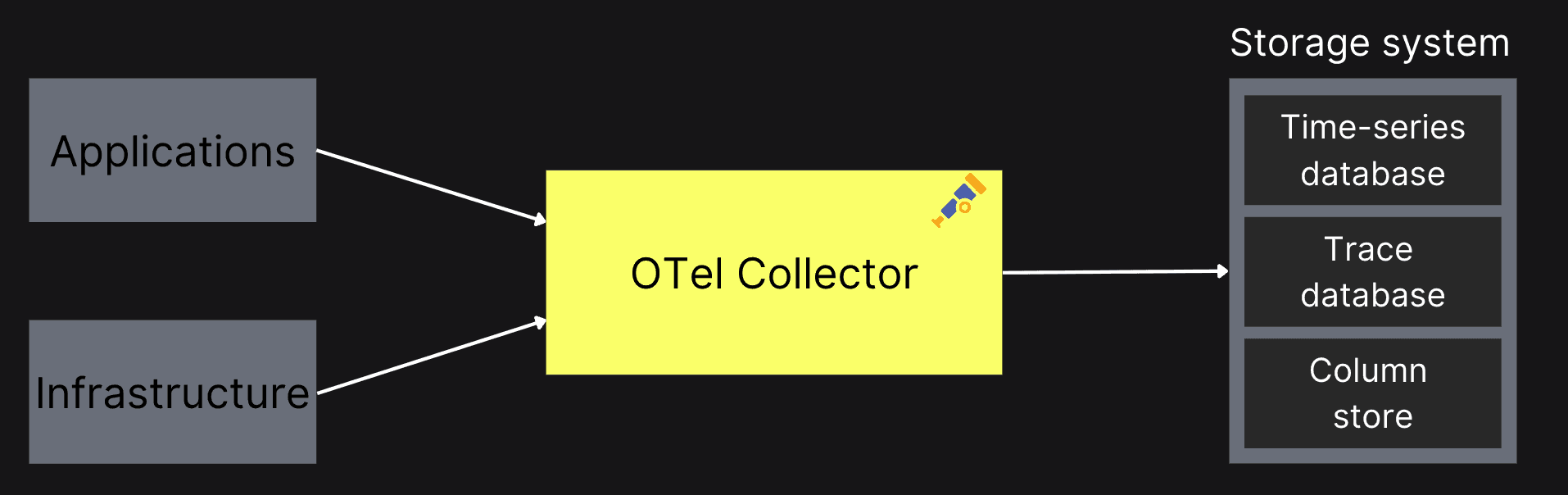
A Collector can combine application and infrastructure telemetry before forwarding it to storage. Direct export from an SDK to a compatible backend is another option.
What do metrics, traces and logs tell you?
Metrics summarize behavior over time, traces follow individual requests, and logs record events. These telemetry signals answer different questions about the same system.
| Signal | Question it helps answer | Checkout example |
|---|---|---|
| Metrics | How often is this happening, and how is it changing? | The checkout error rate rose after a deployment |
| Traces | Where did this request spend time or fail? | A checkout request waited on the payment service |
| Logs | What happened at that point? | The payment service recorded an authorization error |
OTel also has a Profiles signal, currently Alpha, for examining resource use within code. Profiles can help explain where CPU time or allocations go. Support depends on the profiler and backend, so check that path separately when adopting it.
How do you instrument an application?
You can combine automatic instrumentation for supported libraries with code instrumentation for application-specific work. An HTTP library can record a request automatically, while a custom span can capture an operation such as reserving inventory or calculating a quote.
Zero-code instrumentation uses language-specific mechanisms, such as a runtime agent, to instrument supported frameworks without changing application source. It covers the operations those integrations understand. Business operations and attributes that matter to your application can still require code.
The SDK configures how telemetry is processed and exported. Support varies by language and signal; the language status table is the place to check the combination you need. Set a recognizable service identity and configure the destination, protocol and credentials required by your backend or Collector.
Do you need an OpenTelemetry Collector?
A Collector is useful when you want to manage telemetry separately from application deployments. It can batch data, retry exports, filter or transform records, and send data to multiple destinations. A direct SDK-to-backend path can be enough when the backend accepts your SDK's output and you do not need that extra processing layer.
Starting a Collector does not automatically connect an application to it. The application must export to a reachable endpoint using the matching protocol. The Collector needs the right receivers and exporters, enabled in a pipeline for each signal. Defining a component without including it in a pipeline does not activate it. The Collector configuration guide shows how these pieces fit together.
You can run Collectors near applications as agents, centrally as gateways, or combine those patterns. The deployment choice depends on what you collect and where processing should happen.
What connects a log to a trace?
Trace context connects telemetry to a particular request. Instrumentation propagates that context across service calls, and a compatible logging integration can attach the active trace and span IDs to a log record.
For example, a checkout span and a log emitted during that operation can share a trace ID and span ID. Their resource attributes identify the service that produced them.
| Field | Meaning |
|---|---|
Resource service.name | Which service produced the telemetry, such as checkout |
TraceId | Which request execution the record belongs to |
SpanId | Which operation within that trace the record relates to |
Matching service names alone do not connect two records to the same request. Logs can arrive successfully yet lack trace context, leaving a backend unable to make that request-level connection. Conversely, correctly instrumented records can fail to arrive because the export path is misconfigured. These are different problems. Context propagation explains how the request relationship is carried between services.
Where do ClickHouse and ClickStack fit?
ClickHouse provides an analytical database for storing and querying telemetry. You can use it within a custom observability system, or use ClickStack for an integrated investigation experience built on ClickHouse.
| Your goal | A useful next step |
|---|---|
| Search and investigate OTel data with an observability UI | Explore ClickStack, which combines ClickHouse, the HyperDX UI and a configured OTel Collector distribution |
| Build a custom SQL-based observability system | Use the ClickHouse exporter with your chosen collection and visualization tools |
ClickStack supports log search, trace exploration, dashboards and correlation across signals. You can run the open-source stack yourself. With Managed ClickStack, ClickHouse Cloud operates the database and UI, while you run the Collector that sends your telemetry. The ClickStack overview explains the components and deployment choices.
To see what the collected data lets you investigate, try the hosted ClickStack demo. Our demo walkthrough follows failed checkout requests from logs to the payment-service trace, using preloaded data. When you are ready to send data yourself, the open-source quickstart takes you through sending an OTLP event and finding it in Search.
For the custom route, the OpenTelemetry integration guide covers the Collector and ClickHouse exporter. You choose the schema, queries, retention and UI for the system you are building. If your current backend already meets your needs, adopting OTel does not require changing it.


