51,1 k

This is a guest post from Qian Li, co-founder and CEO of DBOS.
Building reliable applications is hard because failures can happen at any step. A payment workflow might time out while waiting for customer approval, an LLM API might become unavailable, or a server might crash halfway through execution.
DBOS makes workflows durable by allowing them to recover from failures without restarting from scratch. But production systems face another challenge: how do you retain and analyze workflow history without overwhelming your operational database?
In this blog post, we'll walk through how to set up DBOS with ClickHouse Managed Postgres and use WalShadow to replicate workflow data into ClickHouse for scalable analytics and long-term auditing, retaining workflow history even after it's deleted from Postgres.
What is DBOS?
DBOS is an open-source, Postgres-native durable execution library for building reliable AI agents, background jobs, and workflows. It provides failure recovery, durable queues, scheduling, and high-throughput execution without requiring a separate orchestration server.
Architecturally, DBOS is deliberately simple. Instead of pushing reliability into an external orchestrator, it runs directly inside your application processes and stores execution state in Postgres, including workflow and step checkpoints, queues, schedules, messages, and application versions:
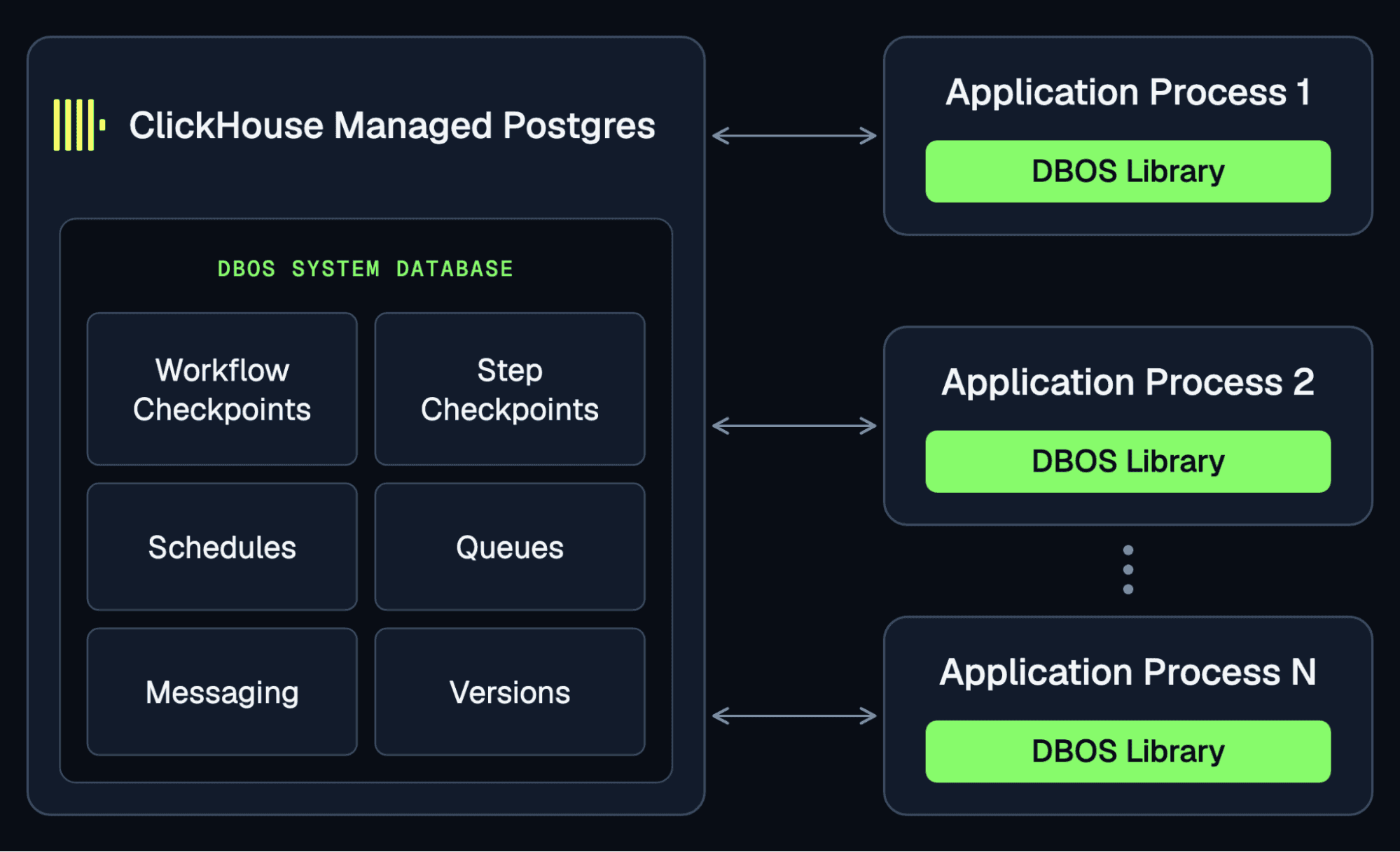
Postgres serves as both the source of truth for execution state and the recovery mechanism: if an application process fails or restarts, DBOS recovers its workflows from their last completed steps rather than starting over. To scale out, you add more processes, without introducing a separate orchestration server on the critical path.
With ClickHouse Managed Postgres, you can run DBOS on managed Postgres infrastructure with fast NVMe performance while keeping workflow execution state in the same familiar database.
Getting started with DBOS and ClickHouse Managed Postgres
We'll use the DBOS Python quickstart for this tutorial. DBOS also supports TypeScript, Go, Java, and Rust (pre-production).
1. Create a DBOS application
First, create and activate a Python virtual environment:
python3 -m venv dbos-app-starter/.venv
cd dbos-app-starter
source .venv/bin/activateInstall DBOS and FastAPI (used by the example application). Then initialize the starter application:
pip install dbos 'fastapi[standard]'
dbos init --template dbos-app-starter2. Connect to ClickHouse Managed Postgres
In the ClickHouse Cloud console, open your Managed Postgres service and navigate to "Connect". Copy the Postgres connection URL, including the password.
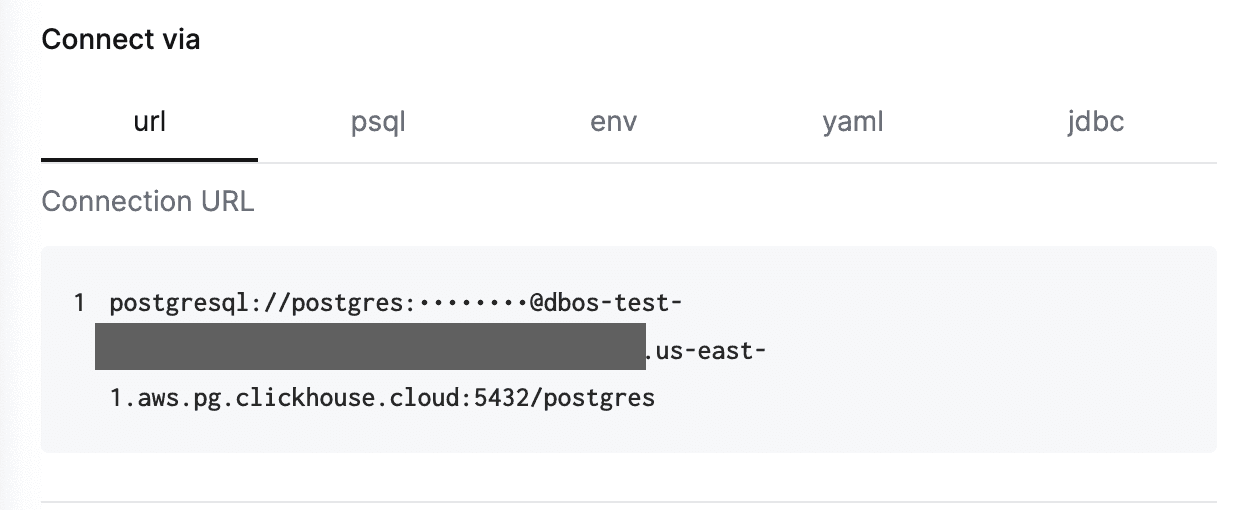
Set the DBOS_SYSTEM_DATABASE_URL environment variable to your connection string:
export DBOS_SYSTEM_DATABASE_URL="<your connection string>"DBOS will use this database to durably store and recover workflow execution state.
3. Run your first durable workflow
Now, launch your DBOS application:
python3 main.pyIt should successfully connect to your database, printing your masked database URL on startup. Open http://localhost:8000/ to access the demo application.
It should look like this:
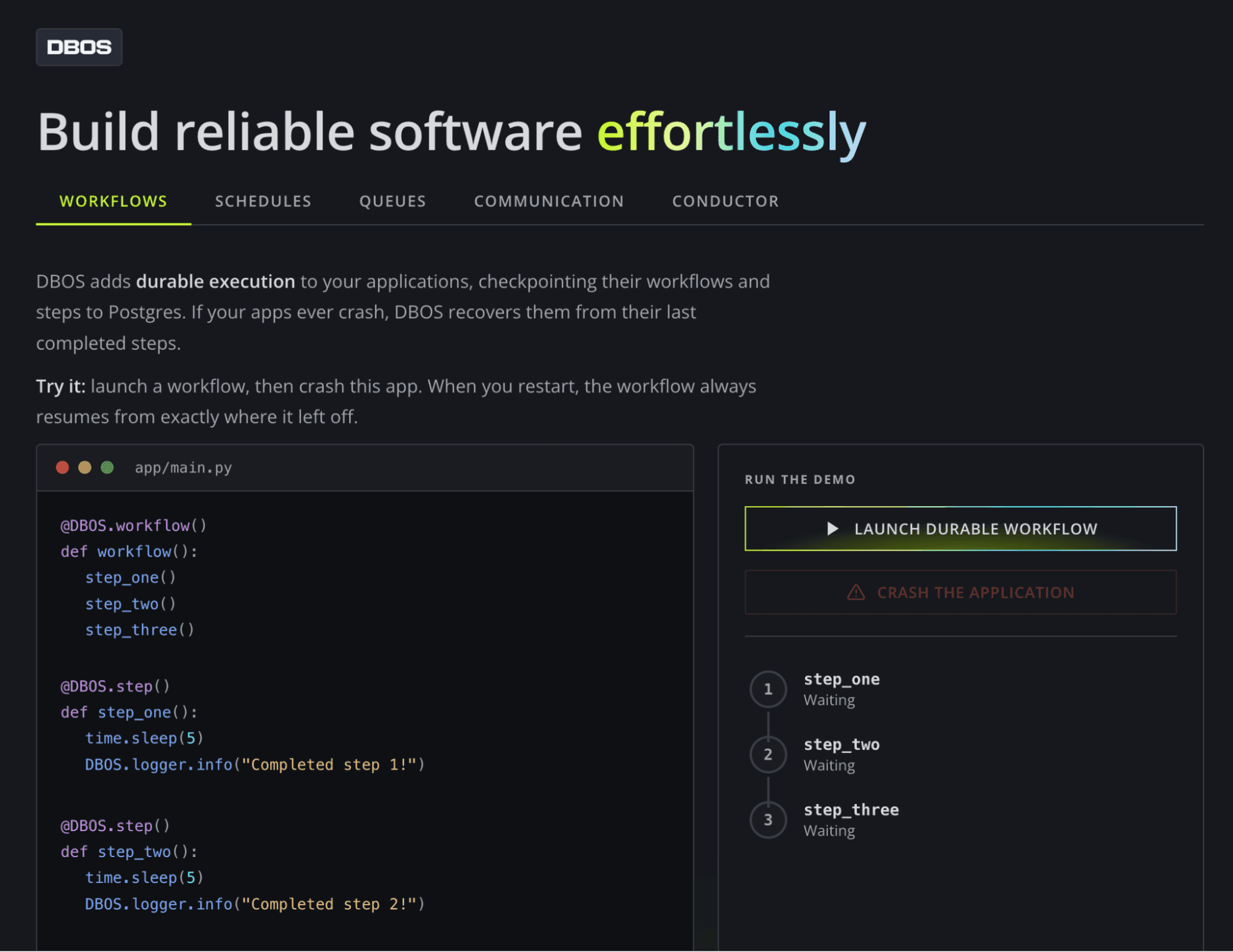
Now you can test durable execution yourself:
- Launch a workflow and watch it execute its three steps.
- Stop the application while the workflow is running.
- Restart it with
python3 main.py - Watch DBOS recover the workflow from its last completed step, without repeating previously checkpointed steps.
You can also navigate to other tabs to explore schedules/cron jobs, queues, and workflow communication/human-in-the-loop with DBOS.
4. Inspect workflow state in Postgres
Return to the ClickHouse Cloud console and open the SQL console for your Postgres service. Select the dbos schema to explore the DBOS tables used to persist workflow state, step results, and execution metadata.
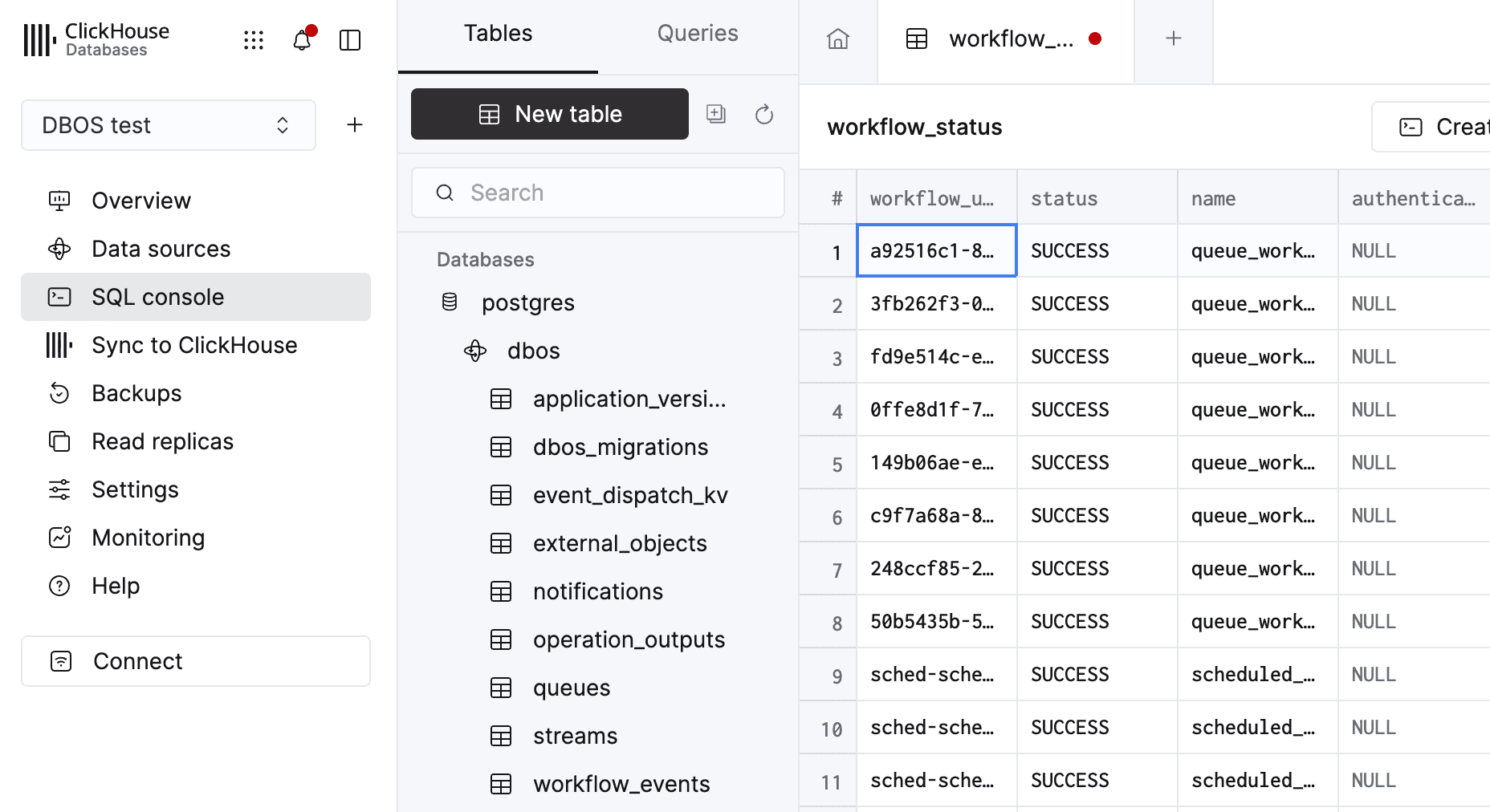
Every workflow's progress is durably recorded in Postgres, enabling recovery even after application failures.
Retaining workflow history with WalShadow and ClickHouse
So far, we've seen how DBOS uses ClickHouse Managed Postgres to durably execute workflows and recover from failures. But as applications scale, workflow history grows too. While Postgres is great for managing active workflows, retaining years of execution history can increase storage and maintenance overhead. To manage storage growth, DBOS users can configure retention policies in Conductor to automatically remove the history of old, completed workflows (running, enqueued, or delayed workflows are never deleted), or use DBOS.delete_workflows in the open-source library.
However, the business might need to retain historical workflow records longer (e.g., for three years) to meet its internal audit or regulatory requirements. Usually, it would require building and maintaining a custom data export pipeline. This becomes even more challenging for applications with high workflow throughput, generating large volumes of execution data.
WalShadow (currently in private preview) simplifies this by automatically replicating workflow data from Postgres to ClickHouse. It reads the Postgres WAL directly and is built for low-latency, high-throughput replication, so there is no custom export pipeline to build or maintain. You can request access to the private preview, or use ClickPipes in the meantime to replicate Postgres data to ClickHouse.
One useful WalShadow feature is soft deletes. WalShadow appends four metadata columns to every replicated row: _lsn, _xid, _commit_ts, and _is_deleted. A DELETE in Postgres arrives in ClickHouse as a new version of the row with _is_deleted = 1 and _commit_ts set to the commit time of the deleting transaction. By default the destination table is a ReplacingMergeTree that drops those versions during FINAL processing, so the row disappears from ClickHouse too. With soft deletes enabled, the tombstone is kept as the latest version instead. Queries over active workflows then need WHERE _is_deleted = 0; queries without that filter see deleted workflows as well.
This feature lets you retain historical workflow data in ClickHouse for auditing and analytics, even after deleting it from Postgres. For example, you may configure DBOS to retain completed workflow records for seven days, while keeping three years of replicated history in ClickHouse. This is especially useful for applications that need to investigate historical workflow executions, analyze failure patterns, or retain records for compliance reviews.
Here is an example of how to set up WalShadow replication and query historical workflow data.
Set up replication to ClickHouse
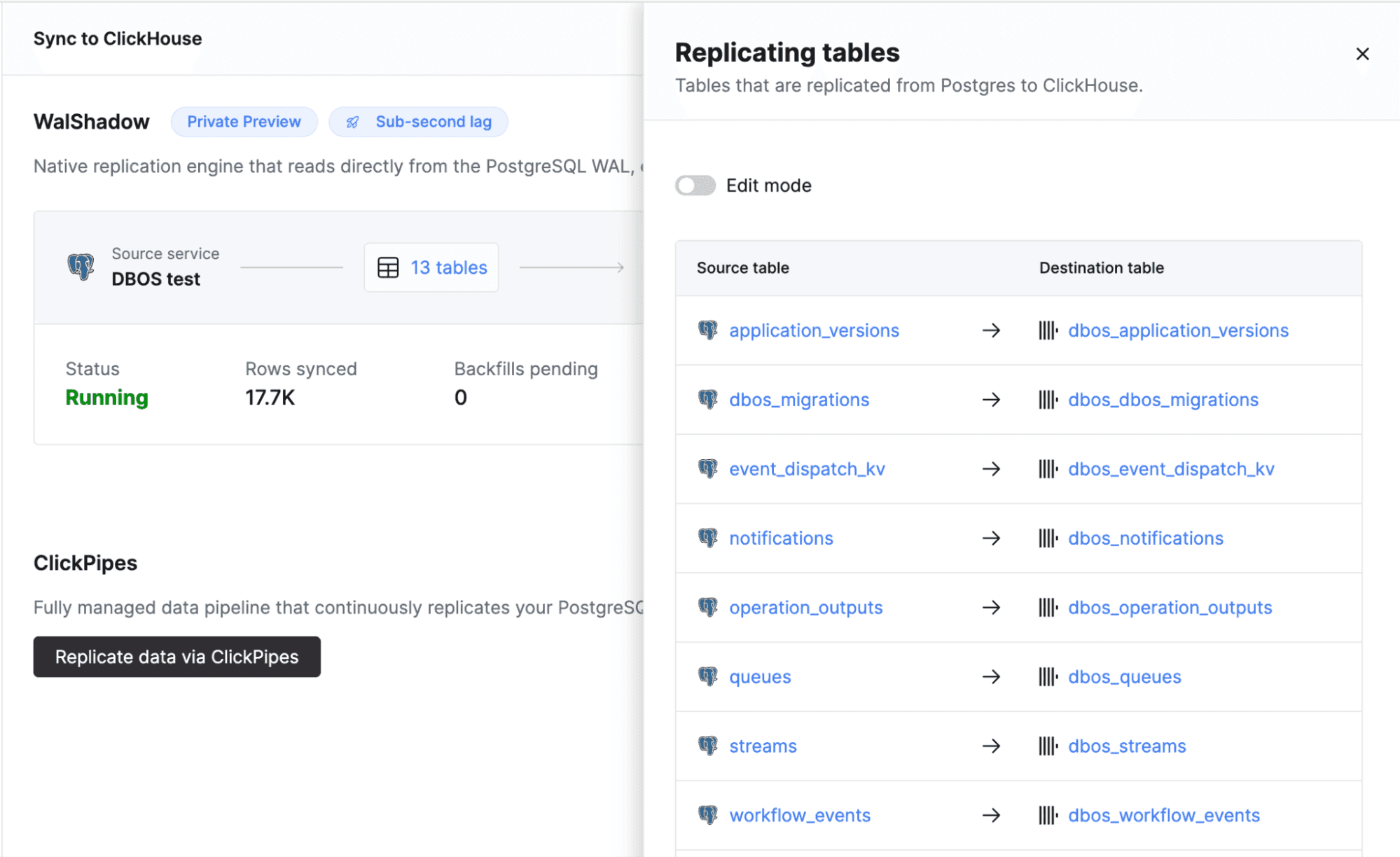
From your Postgres service in the ClickHouse Cloud console, open "Sync to ClickHouse" and click "Replicate data in ClickHouse". Choose WalShadow as the replication engine, keep the default "Initial load + CDC" replication method, pick the Postgres database your DBOS application uses, and select the tables in the dbos schema. Soft deletes are a WalShadow setting (soft_delete = true, see "Keep delete history" at https://github.com/ClickHouse/walshadow/blob/main/docs/destination-tables.md#keep-delete-history); during the private preview, ask the ClickHouse team to enable it when they provision your WalShadow service.
Once the pipeline shows status Running and Backfills pending 0, the DBOS tables are in ClickHouse and new changes arrive continuously.
Query historical workflows in ClickHouse
Open the SQL console for your ClickHouse service to explore the replicated DBOS workflow data. You can query workflow records and queues, and check which workflows retention removed from Postgres and when. Each tombstone row carries the workflow ID and the commit time of the delete, which gives you an audit trail of every workflow that existed and when it was removed, long after Postgres has forgotten it.
Example query:
-- which workflows retention removed, and when
SELECT workflow_uuid, _commit_ts AS deleted_at
FROM dbos_workflow_status FINAL
WHERE _is_deleted = 1;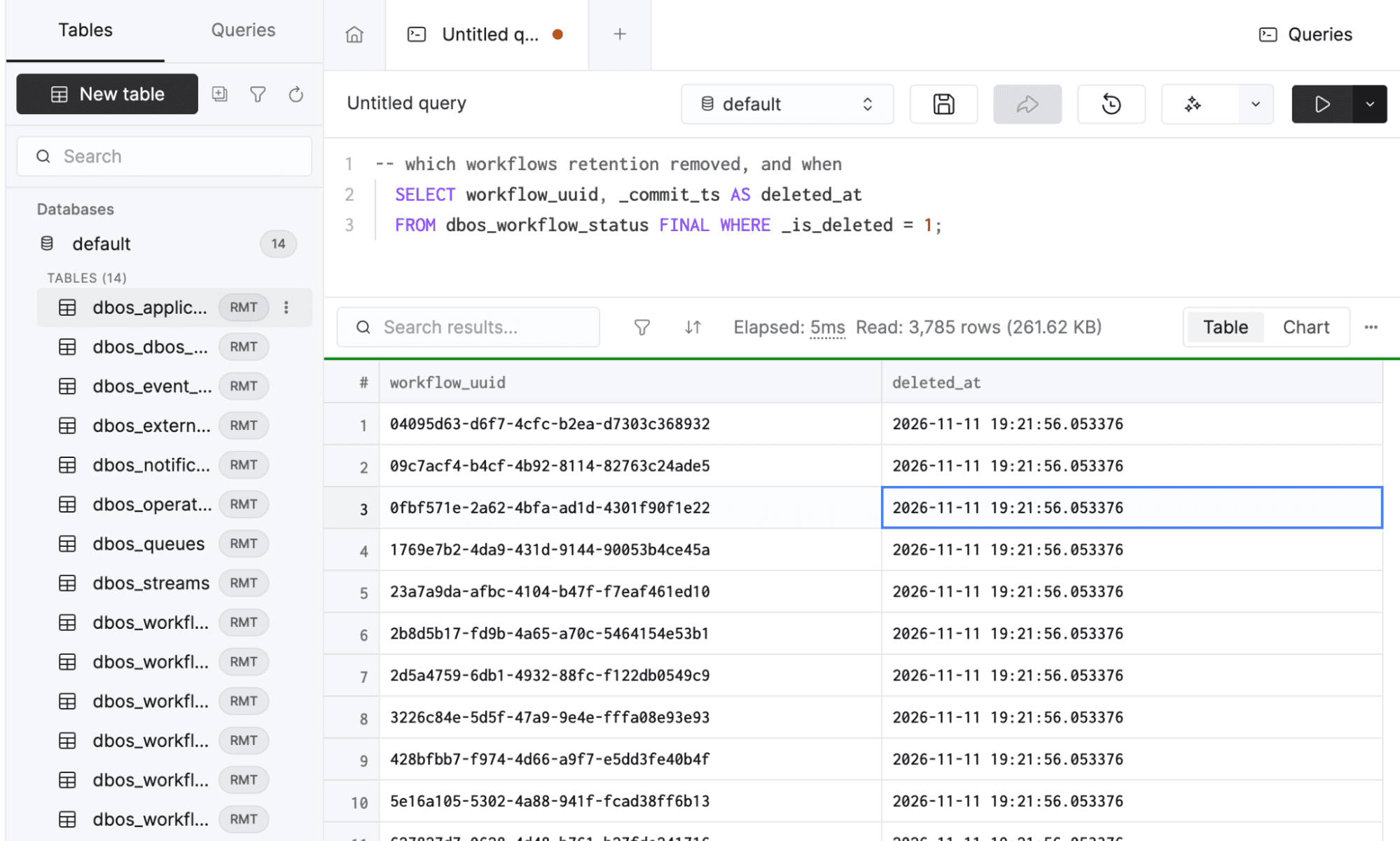
Because ClickHouse is designed for large-scale analytical queries, you can also use this data to build dashboards, investigate workflow failures, and analyze execution patterns across large volumes of workflows.
Build reliable workflows without losing history
Durable execution and long-term observability are both essential for production applications.
DBOS makes workflows durable. ClickHouse Managed Postgres provides the operational database, while WalShadow and ClickHouse make it easier to analyze and retain workflow data at scale. Together, DBOS and ClickHouse let developers run durable workflows directly on Postgres while retaining execution history for analytics and auditing, all without building a separate data export pipeline.
Get started with ClickHouse Managed Postgres today
Interested in seeing how ClickHouse Managed Postgres works on your data? Get started with ClickHouse Cloud in minutes and receive $300 in free credits.
Sign up