---
title: "ClickHouse vs. Elasticsearch: The Billion-Row Matchup"
date: "2024-05-07T09:04:34.709Z"
author: "Tom Schreiber"
category: "Engineering"
excerpt: "Read about our performance comparison of ClickHouse vs. Elasticsearch for workloads commonly present in large-scale data analytics and observability use cases – count(*) aggregations over billions of table rows. "
---
# ClickHouse vs. Elasticsearch: The Billion-Row Matchup
## Introduction
This blog examines the performance of ClickHouse vs. [Elasticsearch](https://www.elastic.co/) for workloads commonly present in large-scale data analytics and observability use cases – `count(*)` aggregations over billions of table rows. This type of analysis is fundamental to many [time-series database](https://clickhouse.com/resources/engineering/what-is-time-series-database) workloads, where understanding event frequency over time is critical. It shows that ClickHouse vastly outperforms Elasticsearch for running aggregation queries over large data volumes. Specifically:
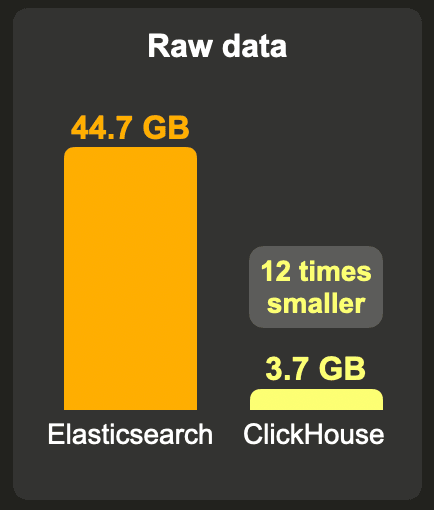
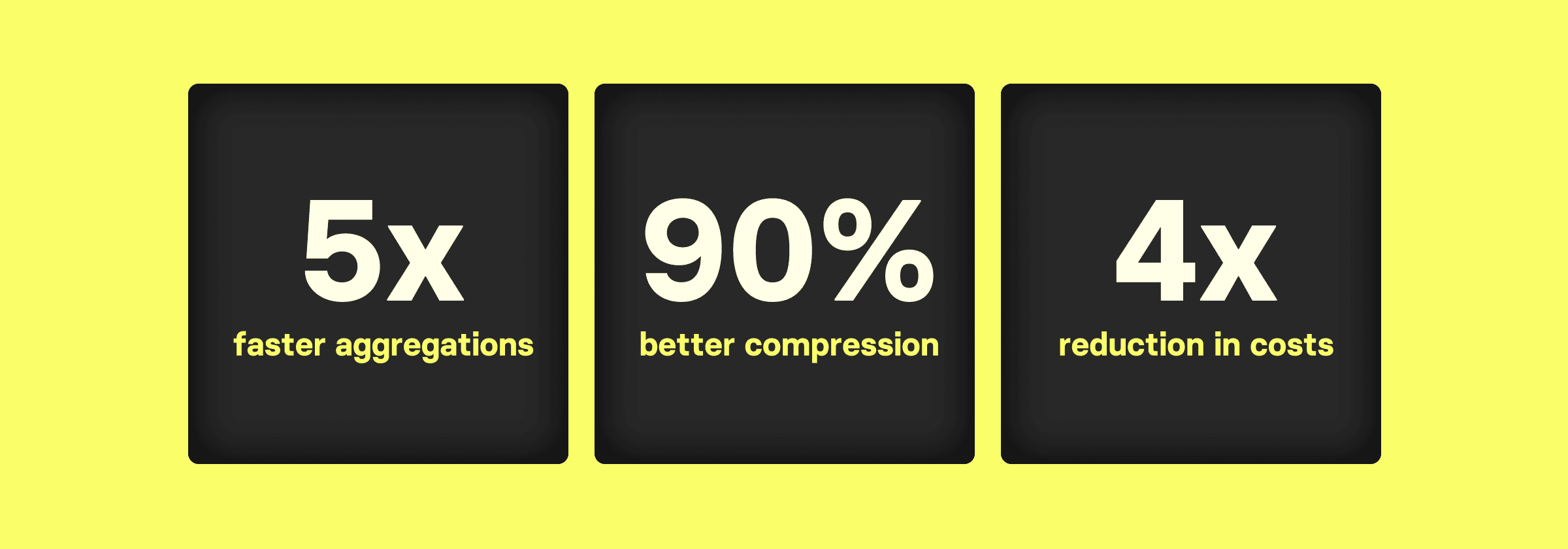
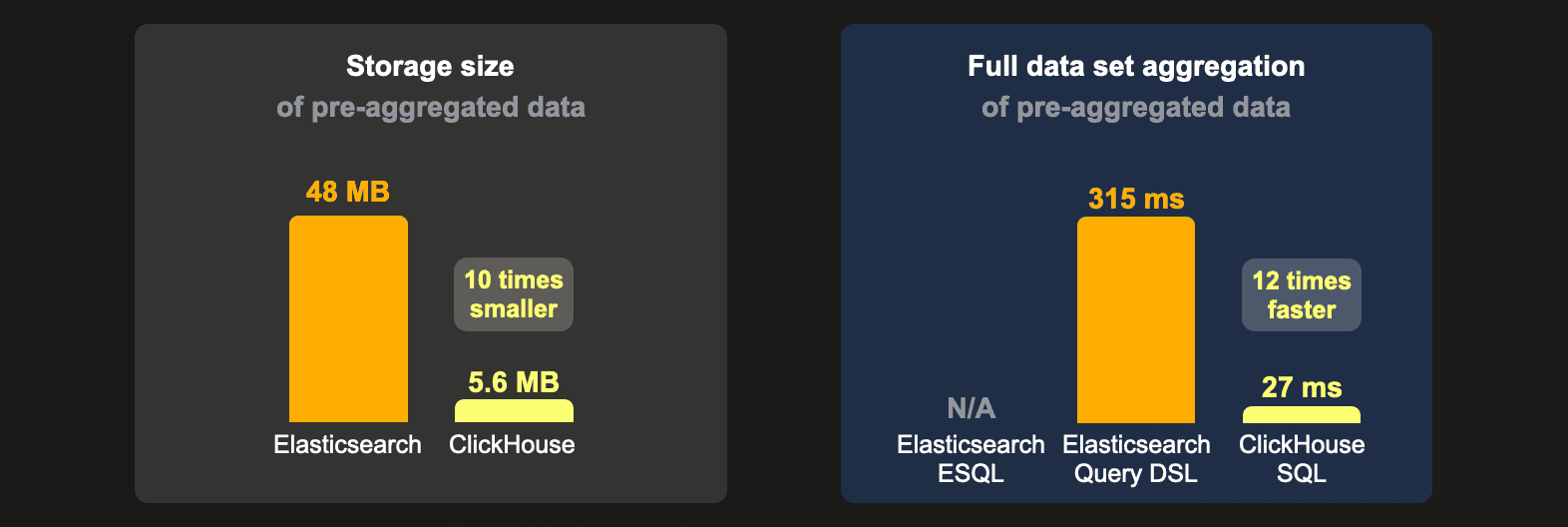
* ClickHouse compresses data much better than Elasticsearch, resulting in **12 to 19 times less storage space** for large data sets, allowing smaller and cheaper hardware to be used.

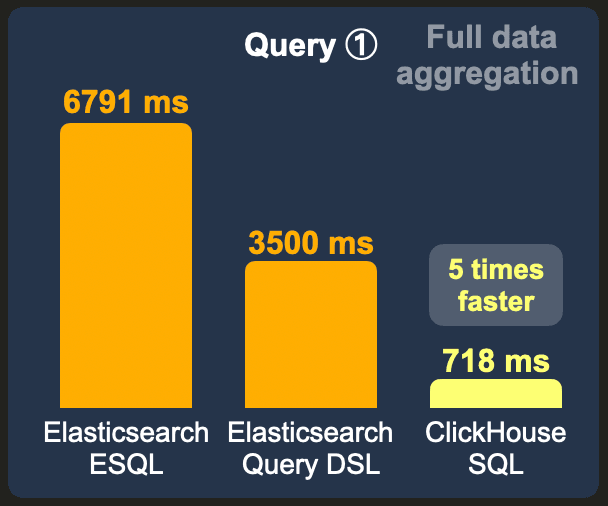
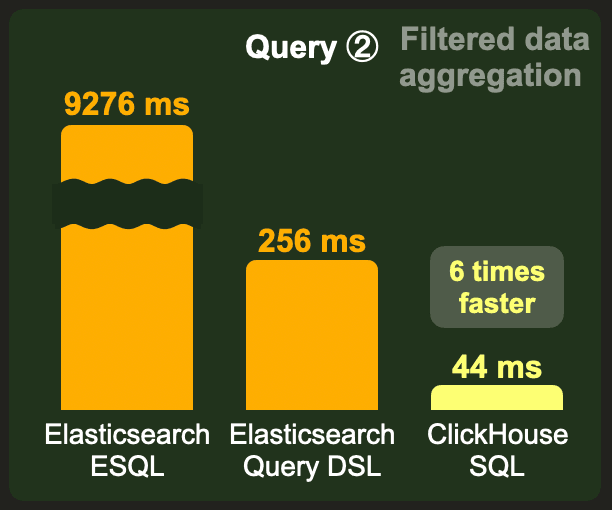
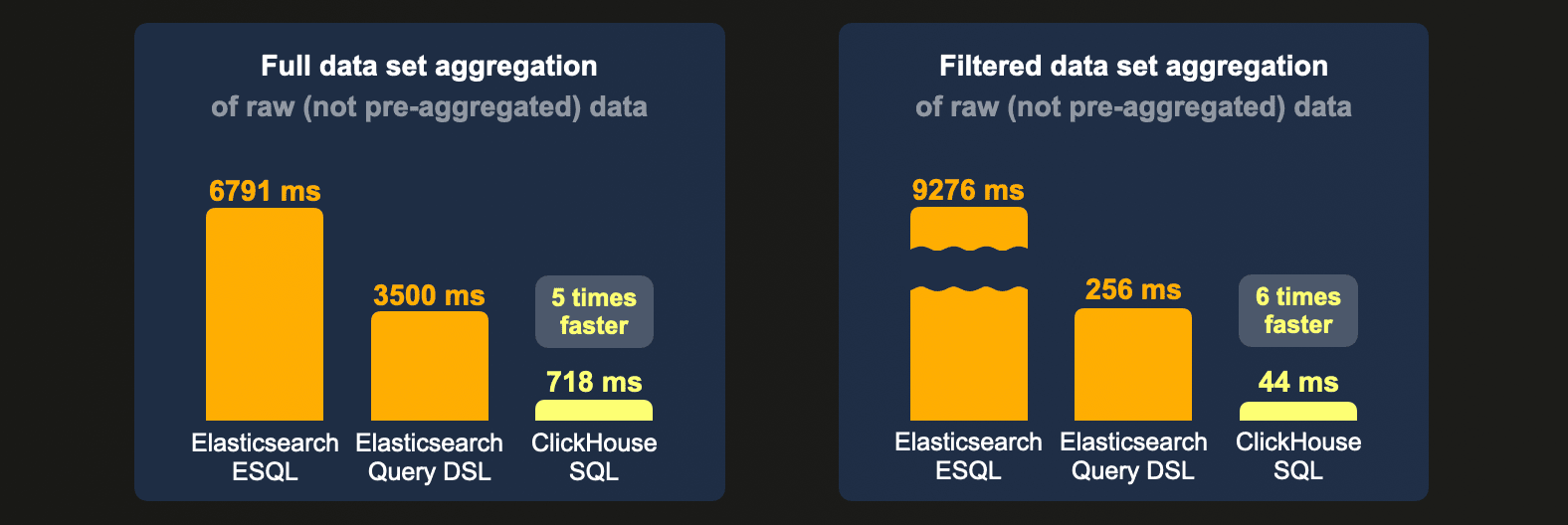
* `Count(*)` aggregation queries in ClickHouse [utilize](/blog/clickhouse_vs_elasticsearch_mechanics_of_count_aggregations#clickhouse) hardware highly efficiently, resulting in **at least 5 times lower latencies** for aggregating large data sets compared to Elasticsearch. This requires smaller and, as we will [demonstrate](/blog/clickhouse_vs_elasticsearch_the_billion_row_matchup#1-billion-rows---raw-data) later, **4 times cheaper hardware** for comparable Elasticsearch latencies.
* ClickHouse [features](/blog/clickhouse_vs_elasticsearch_mechanics_of_count_aggregations#clickhouse-3) a **much more storage- and compute-efficient continuous data summarization technique** – [ClickHouse materialized views vs Elasticsearch transforms](/blog/clickhouse_vs_elasticsearch_mechanics_of_count_aggregations#approaches-for-continuous-data-summarization), further lowering computing and storage costs.
For these above-mentioned reasons, we increasingly see users migrating from Elasticsearch to ClickHouse, with customers highlighting:
* [Drastically reducing the total cost of ownership (TCO) for petabyte-scale observability use cases](https://clickhouse.com/resources/engineering/observability-tco-cost-reduction):
> “Migrating from Elasticsearch to ClickHouse, reduced the cost of our Observability hardware by over 30%.” [Didi Tech](https://clickhouse.com/blog/didi-migrates-from-elasticsearch-to-clickHouse-for-a-new-generation-log-storage-system)
* Lifts in technical limitations of data analytics applications:
> “This unleashed potential for new features, growth and easier scaling.” [Contentsquare](https://clickhouse.com/blog/contentsquare-migration-from-elasticsearch-to-clickhouse)
* Drastic improvements in scalability and query latencies for monitoring platforms:
> “ClickHouse helped us to scale from millions to billions of rows monthly.”
“After the switch, we saw a 100x improvement on average read latencies” [The Guild](https://clickhouse.com/blog/100x-faster-graphql-hive-migration-from-elasticsearch-to-clickhouse)
In this post, we will compare storage sizes and `count(*)` aggregation query performance for a typical data analytics scenario. To keep the scope suitable for one blog, we will compare the single-node performance of running `count(*)` aggregation queries in isolation over large data sets.
The rest of this blog first motivates why we focussed on benchmarking `count(*)` aggregations. We then describe the benchmark setup and explain our `count(*)` aggregation performance test queries and benchmark methodology. Finally, we will present the benchmark results.
> While reading the benchmark results, you will likely wonder, "Why is ClickHouse so fast and efficient?" The short answer is [attention](https://youtu.be/CAS2otEoerM?si=zZtJ1APMMDH1HigI) to a myriad of details for how to optimize and parallelize large-scale data storage and aggregation execution. We suggest reading [ClickHouse vs. Elasticsearch: The Mechanics of Count Aggregations](/blog/clickhouse_vs_elasticsearch_mechanics_of_count_aggregations) for an in-depth technical answer to this question.
## Count aggregations in ClickHouse and Elasticsearch
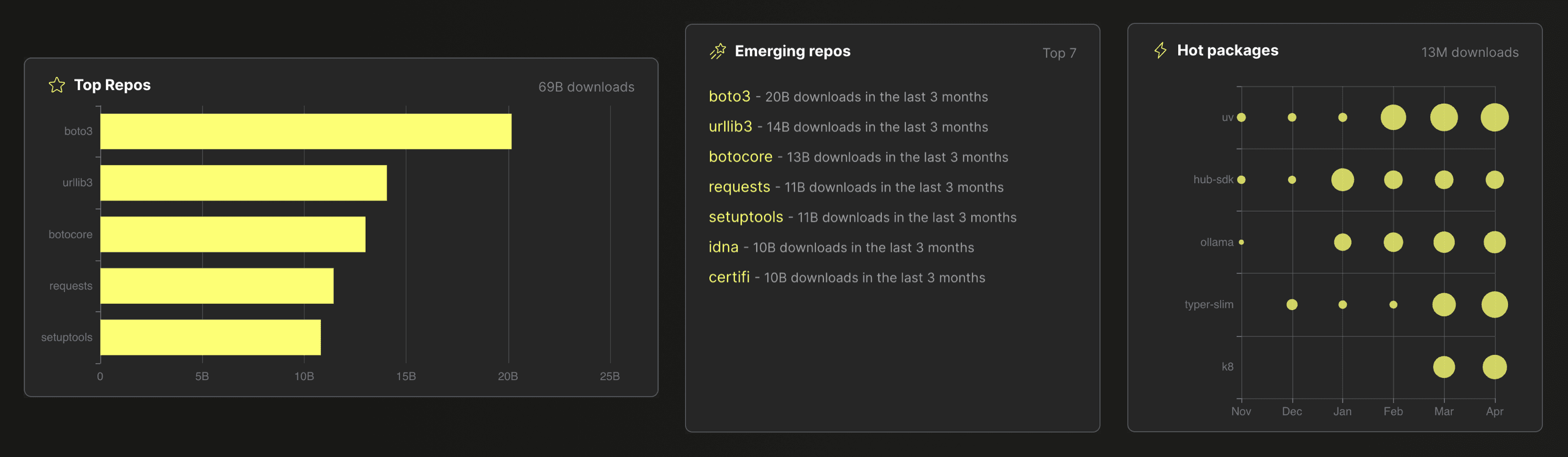
A common use case for aggregation in data analytics scenarios is calculating and ranking the frequency of values in a dataset. As an example, all data visualizations in this screenshot from the [ClickPy application](https://clickpy.clickhouse.com/) (analyzing almost 900 billion rows of [Python package download events](https://packaging.python.org/en/latest/guides/analyzing-pypi-package-downloads/#id10)) use a SQL `GROUP BY` clause in combination with a `count(*)` aggregation [under the hood](https://youtu.be/j_kKKX1bguw?si=8-kFAU9aaBJjVtlJ):
Similarly, in [logging use cases](https://clickhouse.com/blog/building-a-logging-platform-with-clickhouse-and-saving-millions-over-datadog) (or more generally [observability use cases](https://clickhouse.com/blog/overview-of-highlightio)), one of the most common applications for aggregations is to count how often specific log messages or events occur (and alerting in case the frequency is [unusual](https://grafana.com/docs/grafana-cloud/alerting-and-irm/machine-learning/configure/outlier-detection/)).
The equivalent to a ClickHouse `SELECT count(*) FROM ... GROUP BY ...` SQL query in Elasticsearch is the [terms aggregation](https://www.elastic.co/guide/en/elasticsearch/reference/current/search-aggregations-bucket-terms-aggregation.html), which is an Elasticsearch [bucket aggregation](https://www.elastic.co/guide/en/elasticsearch/reference/current/search-aggregations-bucket.html).
We describe how Elasticsearch and ClickHouse process such count aggregations under the hood in an [accompanying blog post](/blog/clickhouse_vs_elasticsearch_mechanics_of_count_aggregations). In this post, we will compare the performance of these `count(*)` aggregations.
## Benchmark setup
### Data
We are going to use the [public PyPI download statistics data set](https://packaging.python.org/en/latest/guides/analyzing-pypi-package-downloads/#id10). Each row in this (constantly growing) data set represents one download of a Python package by a user (using `pip` or a similar technique). Last year, my colleague [Dale](https://github.com/gingerwizard) [built](https://github.com/ClickHouse/clickpy) the above-mentioned analytics [application](https://clickpy.clickhouse.com/) on top of that data set analyzing almost 900 billion rows (as of May 2024) in real-time, [powered](https://youtu.be/j_kKKX1bguw?si=kwVFl8itXBIqrAUi) by ClickHouse aggregations.
We use a version of this data set hosted as Parquet files in a public GCS bucket.
From this bucket, we will load `1`, `10`, and `100`* billion rows into Elasticsearch and ClickHouse to benchmark the performance of typical data analytics queries.
> *We were [unable](https://github.com/ClickHouse/examples/tree/main/blog-examples/clickhouse-vs-elasticsearch#elasticsearch-3) to load the `100 billion row raw data` set into Elasticsearch.
### Hardware
This blog focuses on single-node data analytics performance. We leave benchmarks of multi-node setups for future blogs.
We use a single dedicated AWS [c6a.8xlarge](https://aws.amazon.com/ec2/instance-types/c6a/) instance for both Elasticsearch and ClickHouse. This has `32 CPU cores`, `64 GB RAM`, a locally attached SSD with 16k IOPS, and Ubuntu Linux as the OS.
Additionally, we compare the performance of a ClickHouse Cloud service consisting of nodes with similar specifications regarding the number of CPU cores and RAM.
### Data loading setup
We load the data from Parquet files hosted in a GCS bucket:
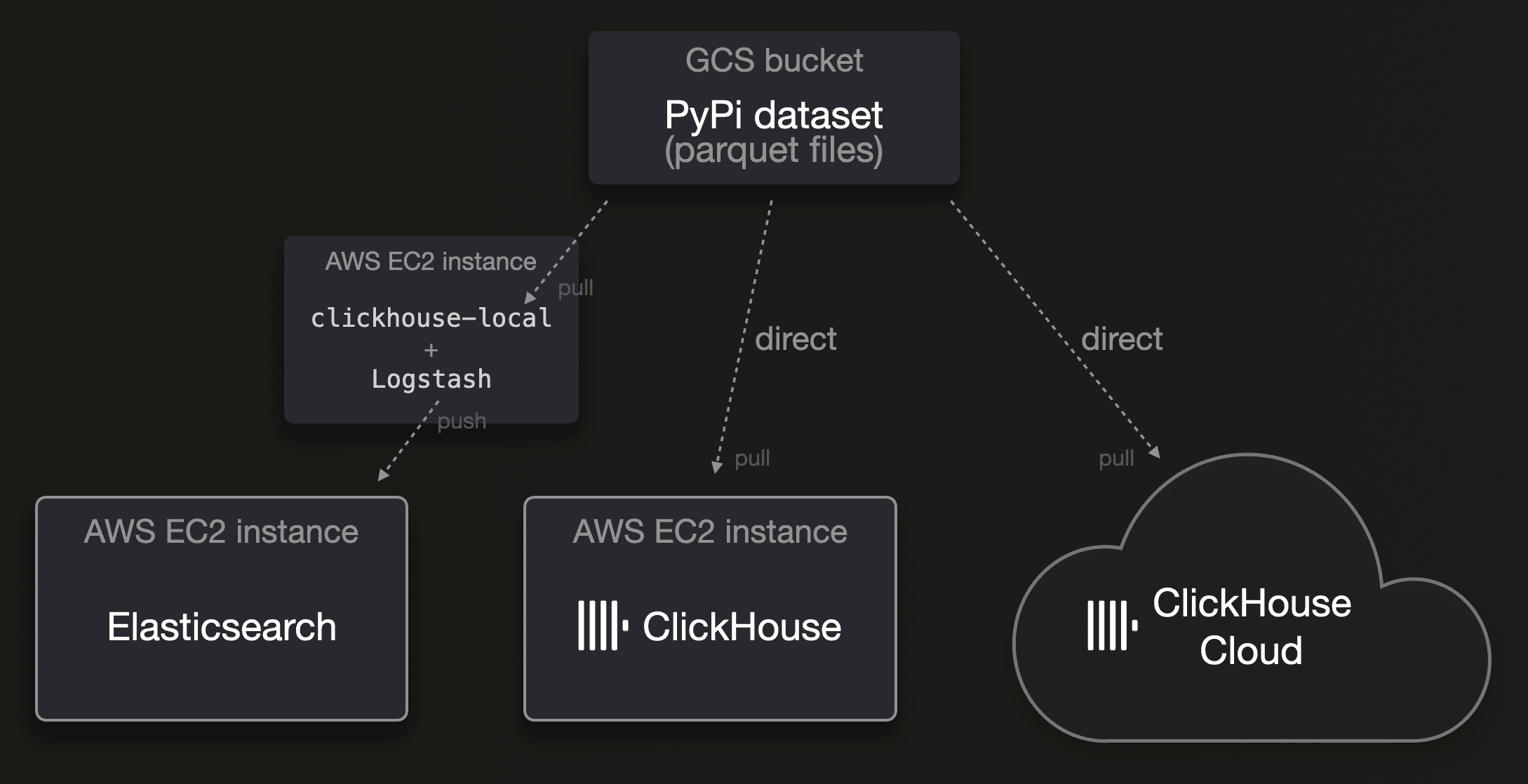
> Parquet is increasingly becoming the ubiquitous standard for distributing analytics data in 2024. While this is supported out-of-the-box by ClickHouse, Elasticsearch has no native support for this file format. Logstash, its recommended ETL tool, additionally has no support for this file format at the time of writing.
#### Elasticsearch
To load the data into Elasticsearch, we use [clickhouse-local](https://clickhouse.com/blog/extracting-converting-querying-local-files-with-sql-clickhouse-local) and [Logstash](https://www.elastic.co/logstash). Clickhouse-local is the ClickHouse database engine turned into a ([blazingly fast](https://clickhouse.com/blog/worlds-fastest-json-querying-tool-clickhouse-local)) command line utility. The ClickHouse database engine natively supports [90+](https://sql.clickhouse.com?query_id=9WOMEAY1CFZUVQN6DZXRY7) file formats and provides [50+](https://sql.clickhouse.com?query_id=9RNS3C9SDFSCDV2AOXW8A6) integration table functions and engines for connectivity with external systems and storage locations, meaning that it can read (pull) data in almost any format from virtually any data source. Out of the box. And highly [parallel](https://clickhouse.com/blog/supercharge-your-clickhouse-data-loads-part1#configuration-when-data-is-pulled-by-clickhouse-servers-1). Because ClickHouse is a relational database engine, we can utilize all of what SQL offers to filter, enrich, and transform this data on the fly with `clickhouse-local` before sending it to `Logstash`. [This](https://github.com/ClickHouse/examples/tree/main/blog-examples/clickhouse-vs-elasticsearch#logstash-configuration) is the configuration file used for Logstash, and this is the [command line call](https://github.com/ClickHouse/examples/tree/main/blog-examples/clickhouse-vs-elasticsearch#load-call) driving the data load into Elasticsearch.
> We could have utilized the ClickHouse [url table function](https://clickhouse.com/docs/en/sql-reference/table-functions/url) for sending the data directly to Elasticsearch’s REST API with clickhouse-local. However, Logstash allows easier tuning of batching and parallelism settings, supports sending data to multiple outputs (e.g. multiple Elasticsearch data streams with different settings), and has built-in resiliency, including backpressure and retries of failed batches with intermediate buffering and dead letter queues.
#### ClickHouse
Because, as mentioned above, ClickHouse can natively read Parquet files from object storage buckets of most cloud providers, we simply used [this](https://github.com/ClickHouse/examples/tree/main/blog-examples/clickhouse-vs-elasticsearch#load-sql-query) SQL insert statement to load the data into ClickHouse and ClickHouse Cloud. For ClickHouse Cloud, we further increased the level of parallelism by [utilizing](https://clickhouse.com/blog/supercharge-your-clickhouse-data-loads-part1#parallel-servers) all service nodes for the data load.
> We did not try to optimize the ingest throughput, as this blog is not about comparing the ingest throughputs of ClickHouse and Elasticsearch. We leave this for future blogs. That said, through our testing, we did find that Elasticsearch took significantly longer to load the data, even with some tuning of LogStash’s batching and parallelism settings. It took 4 days to load ~30 billion rows when we tried to load the 100 billion rows data set for which we were planning to include benchmark results for Elasticsearch, but we were [unable](https://github.com/ClickHouse/examples/tree/main/blog-examples/clickhouse-vs-elasticsearch#elasticsearch-3) to load that data amount successfully into Elasticsearch. Our ClickHouse instance required significantly less time (less than one day) to load the full 100 billion rows data set.
### Elasticsearch setup
#### Elasticsearch configuration
We installed Elasticsearch version 8.12.2 ([output](https://gist.github.com/tom-clickhouse/d1dcd582d55ff1e35ee147118b77f4e1) of `GET /`) on a [single](/blog/clickhouse_vs_elasticsearch_the_billion_row_matchup#hardware) machine, which, therefore, has all [roles](https://www.elastic.co/guide/en/elasticsearch/reference/current/modules-node.html#node-roles) and, by default, uses half of the available 64 GB RAM for the heap of the bundled JVM ([output](https://gist.github.com/tom-clickhouse/b7192b3a23b79e6b32ec225ad8f64ba4) of `GET _nodes/jvm`). An Elasticsearch node startup log entry `heap size [30.7gb], compressed ordinary object pointers [true]` confirmed that the JVM can use space-efficient compressed object pointers because we don’t [cross](https://www.elastic.co/guide/en/elasticsearch/guide/current/heap-sizing.html#compressed_oops) the 32 GB heap size limit. Elasticsearch will indirectly leverage the remaining half of the machine’s available 64 GB RAM for caching data loaded from disk in the OS file system cache.
#### Data streams
We used [data streams](https://www.elastic.co/guide/en/elasticsearch/reference/current/data-streams.html) for ingesting the data, where each data stream is backed by a sequence of automatically [rolled over](https://www.elastic.co/guide/en/elasticsearch/reference/current/indices-rollover-index.html) indices.
> Since version 8.5, Elasticsearch also supports specialized [time series data streams](https://www.elastic.co/guide/en/elasticsearch/reference/8.5/tsds.html#tsds) for timestamped metrics data. Comparing performance for metrics use cases is left for a future blog.
#### ILM policy
For the rollover thresholds, we used an [index lifecycle management](https://www.elastic.co/guide/en/elasticsearch/reference/current/index-lifecycle-management.html) policy [configuring](https://github.com/ClickHouse/examples/tree/main/blog-examples/clickhouse-vs-elasticsearch#ilm-policy) the [recommended best practices](https://www.elastic.co/guide/en/elasticsearch/reference/current/size-your-shards.html#shard-size-recommendation) for optimal shard sizes (up to 200M documents per shard or a shard size between 10GB and 50GB). Additionally, to [improve](https://opster.com/guides/elasticsearch/operations/force-merge-operations/#:~:text=Elasticsearch%27s%20force%20merge%20operation%20is,and%20freeing%20up%20disk%20space.) search speed and free up disk space, we [configured](https://github.com/ClickHouse/examples/blob/main/blog-examples/clickhouse-vs-elasticsearch/README.md#ilm-policy) that [segments](https://github.com/ClickHouse/examples/blob/main/blog-examples/clickhouse-vs-elasticsearch/on-disk-format-and-insert-processing/README.md#elasticsearch) of a rolled-over index are [force merged](https://www.elastic.co/guide/en/elasticsearch/reference/current/ilm-forcemerge.html) into a single segment.
#### Index settings
##### Number of shards
We [configured](https://github.com/ClickHouse/examples/tree/main/blog-examples/clickhouse-vs-elasticsearch#settings) the data stream’s backing indexes to consist of 1 primary and 0 replica shards. As described [here](/blog/clickhouse_vs_elasticsearch_mechanics_of_count_aggregations#elasticsearch), Elasticsearch uses one parallel query processing thread per shard for `terms aggregations` (which we use in our queries). Therefore, for optimal search performance, the number of shards should ideally match the number of 32 CPU cores available on our test machine. However, given the large ingested data amounts (billions of rows), the data stream’s automatic index rollovers will already create many shards. Furthermore, this is also a more realistic setup for a real-time streaming scenario (the original PyPi dataset is constantly growing).
##### Index codec
We tested storage sizes optionally with the heavier `best_compression`, which uses the `DEFLATE` instead of the default `LZ4` codec.
##### Index sorting
To support an [optimal](https://github.com/ClickHouse/examples/blob/main/blog-examples/clickhouse-vs-elasticsearch/on-disk-format-and-insert-processing/README.md#on-disk-data-ordering) compression ratio for the index codec and compact and access-efficient encoding of doc-ids for [doc_values](https://github.com/ClickHouse/examples/blob/main/blog-examples/clickhouse-vs-elasticsearch/on-disk-format-and-insert-processing/README.md#logical-and-physical-on-disk-data-structures), we enabled [index sorting](https://github.com/ClickHouse/examples/blob/main/blog-examples/clickhouse-vs-elasticsearch/on-disk-format-and-insert-processing/README.md#on-disk-data-ordering) and used all existing indexed fields for sorting [stored fields](https://github.com/ClickHouse/examples/blob/main/blog-examples/clickhouse-vs-elasticsearch/on-disk-format-and-insert-processing/README.md#logical-and-physical-on-disk-data-structures) (especially [_source](https://github.com/ClickHouse/examples/blob/main/blog-examples/clickhouse-vs-elasticsearch/on-disk-format-and-insert-processing/README.md#logical-and-physical-on-disk-data-structures)) and `doc_values` on disk. We [listed](https://github.com/ClickHouse/examples/tree/main/blog-examples/clickhouse-vs-elasticsearch#index-sorting-lz4-codec) the index sorting fields by their cardinality in ascending order (this [ensures](https://clickhouse.com/docs/en/optimize/sparse-primary-indexes#optimal-compression-ratio-of-data-files) the highest possible compression rate).
#### Index mappings
We [used](https://github.com/ClickHouse/examples/tree/main/blog-examples/clickhouse-vs-elasticsearch#templates) component templates to [create](https://github.com/ClickHouse/examples/tree/main/blog-examples/clickhouse-vs-elasticsearch#data-streams) the PyPi data streams for Elasticsearch. The following diagram sketches a PyPi data stream:
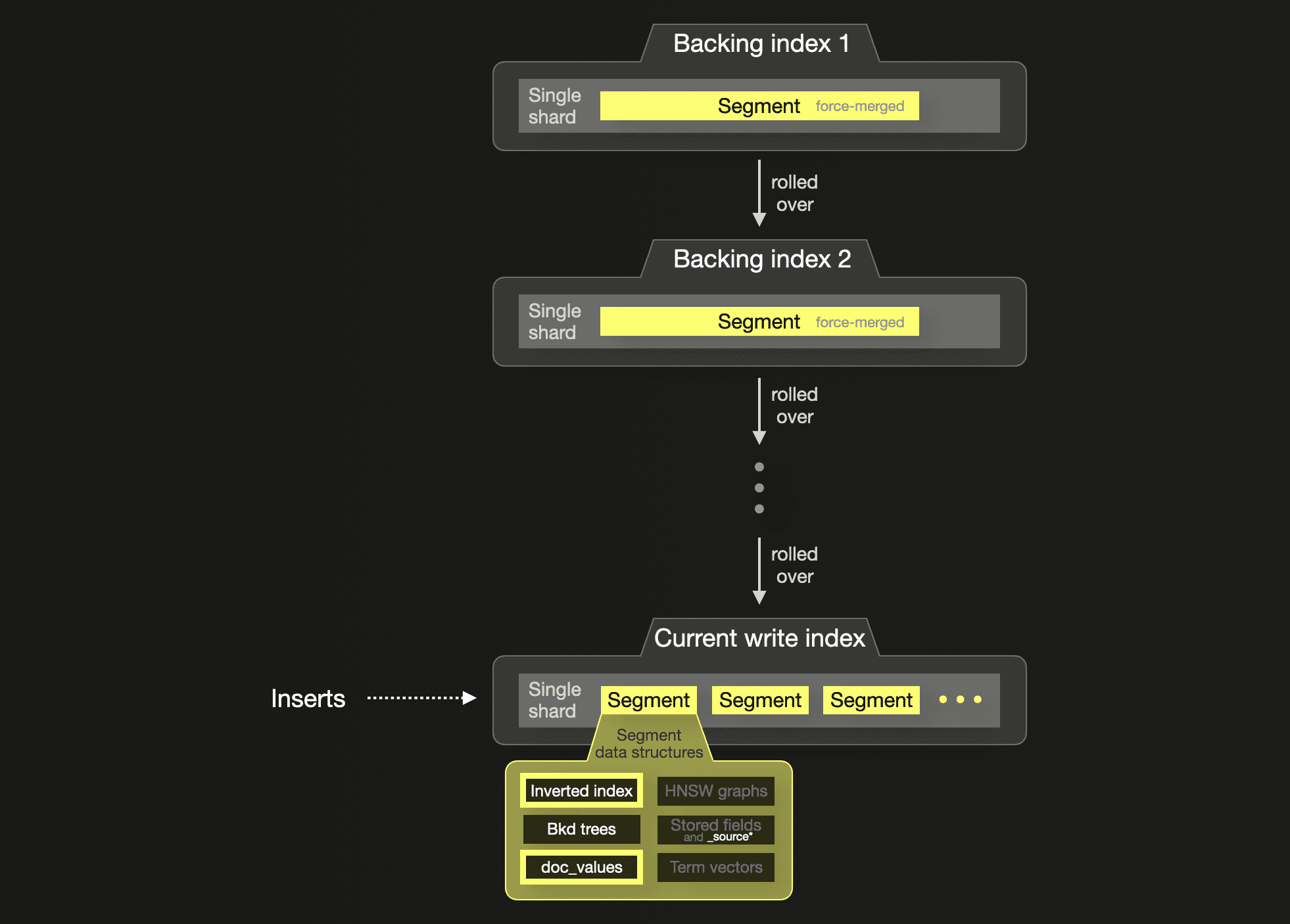
The inserted documents contain 4 fields that we store in the index:
* `country_code`
* `project`
* `url`
* `timestamp`
For a fair storage and performance comparison with ClickHouse, we switched off all [segment data structures](https://github.com/ClickHouse/examples/blob/main/blog-examples/clickhouse-vs-elasticsearch/on-disk-format-and-insert-processing/README.md#elasticsearch) except `inverted index`, `doc_values`, and `Bkd trees`** for these fields by utilizing only the [keyword](https://www.elastic.co/guide/en/elasticsearch/reference/current/keyword.html) and [date](https://www.elastic.co/guide/en/elasticsearch/reference/current/date.html) data types in our [index mappings](https://github.com/ClickHouse/examples/tree/main/blog-examples/clickhouse-vs-elasticsearch#mappings). These aforementioned 3 data structures are relevant for data analytics access patterns like aggregations and sorts.
The `keyword` type populates the `inverted index` (to enable fast filtering) and `doc_values` (for aggregations and sorting). Additionally, for the `inverted index` the `keyword` type implies that there is no [normalization](https://www.elastic.co/guide/en/elasticsearch/reference/current/analysis-normalizers.html) and [tokenization](https://www.elastic.co/guide/en/elasticsearch/reference/current/analysis-tokenizers.html) of the field values. Instead, they are inserted unmodified into the inverted index to support [exact match filtering](https://www.elastic.co/guide/en/elasticsearch/reference/current/query-dsl-term-query.html).
> With this, the Elasticsearch inverted index (a lexicographically sorted list of all [unique](https://www.elastic.co/guide/en/elasticsearch/reference/current/documents-indices.html) tokens pointing to document ID lists, with [binary search](https://en.wikipedia.org/wiki/Binary_search_algorithm) lookups) becomes the approximate equivalent of the ClickHouse [primary index](https://clickhouse.com/docs/en/optimize/sparse-primary-indexes#clickhouse-index-design) (sparse lexicographically sorted list of primary key column values pointing to row blocks, with binary search lookups).
We could have further optimized the Elasticsearch data storage by disabling the `inverted index` for all fields (e.g. `project` and `url`) that our [benchmark queries](/blog/clickhouse_vs_elasticsearch_the_billion_row_matchup#benchmark-queries) don’t filter on. This is possible by setting the `index` [parameter](https://www.elastic.co/guide/en/elasticsearch/reference/current/keyword.html#keyword-params) for the `keyword` type to `false` in the index mapping. However, because these fields (`project` and `url`) are also part of our ClickHouse table’s primary key (and therefore, the ClickHouse primary index [data structure](https://github.com/ClickHouse/examples/blob/main/blog-examples/clickhouse-vs-elasticsearch/on-disk-format-and-insert-processing/README.md#logical-and-physical-on-disk-data-structures-1) is populated with values from these fields), we also kept the Elasticsearch `inverted index` for these fields.
The `date` type [is](https://www.elastic.co/guide/en/elasticsearch/reference/current/date.html) internally stored as a `long` number in both `doc_values` (to support aggregations and sorting) and `Bkd trees` (queries on dates [are](https://www.elastic.co/guide/en/elasticsearch/reference/current/date.html) internally converted to range queries [utilizing](https://www.elastic.co/blog/numeric-and-date-ranges-in-elasticsearch-just-another-brick-in-the-wall) Bkd trees). Because we [use](https://github.com/ClickHouse/examples/tree/main/blog-examples/clickhouse-vs-elasticsearch#tables) the date column also as a primary key column in ClickHouse, we didn’t switch off Bkd trees for the date field in Elasticsearch.
> **In this blog, we focus on comparing the aggregation performance of the column-oriented `doc_values` data structure with ClickHouse’s columnar storage format and leave comparisons of other data structures for future blogs.
##### _source
To compare storage implications of [_source](https://www.elastic.co/guide/en/elasticsearch/reference/current/mapping-source-field.html), we used two different [index mappings](https://github.com/ClickHouse/examples/tree/main/blog-examples/clickhouse-vs-elasticsearch#mappings):
1. one that stores `_source` (see the [segment data structure](https://github.com/ClickHouse/examples/blob/main/blog-examples/clickhouse-vs-elasticsearch/on-disk-format-and-insert-processing/README.md#elasticsearch) internals)
2. one that doesn’t store `_source`
Note that by disabling `_source`, we [reduce](/blog/clickhouse_vs_elasticsearch_the_billion_row_matchup#storage-size) the data storage size. However, [reindex](https://www.elastic.co/guide/en/elasticsearch/reference/current/docs-reindex.html) (index to index copy) operations (e.g. for changing an index mapping in hindsight or to [upgrade](https://www.elastic.co/guide/en/elasticsearch/reference/current/setup-upgrade.html#upgrade-index-compatibility) an index to a new major version) and [update](https://www.elastic.co/guide/en/elasticsearch/reference/current/docs-update.html) operations are [no longer possible](https://www.elastic.co/guide/en/elasticsearch/reference/current/mapping-source-field.html#disable-source-field). Some queries also suffer with respect to performance because `_source` is the fastest way to retrieve field values in scenarios where all or a large subset of the indexed document fields are requested. Despite its [much lower](https://staging.clickhouse.com/blog/clickhouse_vs_elasticsearch_the_billion_row_matchup#storage-size) storage requirements, ClickHouse always allows [table-to-table copy](https://clickhouse.com/docs/en/sql-reference/statements/insert-into#inserting-the-results-of-select) and [update](https://clickhouse.com/docs/en/guides/developer/lightweight-update) operations.
#### Transforms
For [continuous data transformation](/blog/clickhouse_vs_elasticsearch_mechanics_of_count_aggregations#approaches-for-continuous-data-summarization), we [created](https://github.com/ClickHouse/examples/tree/main/blog-examples/clickhouse-vs-elasticsearch#elasticsearch---transforms) transforms for pre-calculating aggregations.
We [optimized](https://github.com/ClickHouse/examples/tree/main/blog-examples/clickhouse-vs-elasticsearch#mappings-for-by-country_code-project-transforms-destination-indexes) the automatically deduced index mappings for the transformed destination indexes to eliminate [_source](https://www.elastic.co/guide/en/elasticsearch/reference/current/mapping-source-field.html).
### ClickHouse setup
Configuring ClickHouse is much simpler compared to Elasticsearch and requires less upfront planning and setup code.
#### ClickHouse configuration
ClickHouse is deployed as a native binary. We installed ClickHouse version 24.4 with default settings. No memory settings need to be configured. The ClickHouse server process needs about 1 GB of RAM plus the peak memory usage of executed queries. Like Elasticsearch, ClickHouse will utilize the rest of the machine’s available memory for caching data loaded from disk in the OS-level filesystem cache.
#### Tables
We [created](https://github.com/ClickHouse/examples/tree/main/blog-examples/clickhouse-vs-elasticsearch#tables) tables storing different sizes of the PyPi dataset with different compression codecs.
##### Column compression codec
[Similar to Elasticsearch](/blog/clickhouse_vs_elasticsearch_the_billion_row_matchup#index-codec), we tested storage sizes optionally with the heavier `ZSTD` instead of the default `LZ4` [column compression codec](https://clickhouse.com/docs/en/sql-reference/statements/create/table#column-compression-codecs).
##### Table sorting
For a fair storage comparison, we use the [same](/blog/clickhouse_vs_elasticsearch_the_billion_row_matchup#index-sorting) data sorting scheme as in Elasticsearch to support an [optimal](https://github.com/ClickHouse/examples/blob/main/blog-examples/clickhouse-vs-elasticsearch/on-disk-format-and-insert-processing/README.md#on-disk-data-ordering-1) compression ratio for the column compression codec. For this, we [added](https://github.com/ClickHouse/examples/blob/main/blog-examples/clickhouse-vs-elasticsearch/README.md#tables) all of the table’s columns to the table’s [primary key](https://clickhouse.com/docs/en/optimize/sparse-primary-indexes#data-is-stored-on-disk-ordered-by-primary-key-columns), ordered by cardinality in ascending order (as this [ensures](https://clickhouse.com/docs/en/optimize/sparse-primary-indexes#optimal-compression-ratio-of-data-files) the highest possible compression rate).
##### Table schema
The following diagram sketches a PyPi ClickHouse table:

Because ClickHouse runs on a [single](/blog/clickhouse_vs_elasticsearch_the_billion_row_matchup#hardware) machine, each table consists, by default, of a single shard. Inserts create [parts that are merged in the background](https://github.com/ClickHouse/examples/blob/main/blog-examples/clickhouse-vs-elasticsearch/on-disk-format-and-insert-processing/README.md#clickhouse).
The inserted rows contain exactly the [same](/blog/clickhouse_vs_elasticsearch_the_billion_row_matchup#index-mappings) 4 fields as in the documents ingested into Elasticsearch. We store these in 4 columns in our ClickHouse table:
* `country_code`
* `project`
* `url`
* `timestamp`
Based on our table [schema](https://github.com/ClickHouse/examples/tree/main/blog-examples/clickhouse-vs-elasticsearch#tables), [column data files](https://github.com/ClickHouse/examples/blob/main/blog-examples/clickhouse-vs-elasticsearch/on-disk-format-and-insert-processing/README.md#clickhouse) are created for all 4 of our table’s columns. A [sparse](https://clickhouse.com/docs/en/optimize/sparse-primary-indexes#clickhouse-index-design) primary index file is created and populated from the values of the table’s [sorting key columns](https://github.com/ClickHouse/examples/tree/main/blog-examples/clickhouse-vs-elasticsearch#tables). All other [part data structures](https://github.com/ClickHouse/examples/blob/main/blog-examples/clickhouse-vs-elasticsearch/on-disk-format-and-insert-processing/README.md#clickhouse) have to be explicitly configured and are not utilized by our benchmark queries.
Note that we [use](https://github.com/ClickHouse/examples/tree/main/blog-examples/clickhouse-vs-elasticsearch#tables) the [LowCardinality](https://clickhouse.com/docs/en/sql-reference/data-types/lowcardinality) type for the `country_code` column to dictionary-encode its string values. While this is a best practice for low cardinality columns in ClickHouse, it is not the primary reason for ClickHouse’s much lower storage requirements in this benchmark. In this case, with the PyPi data set, the storage saving is [negligible](https://github.com/ClickHouse/examples/tree/main/blog-examples/clickhouse-vs-elasticsearch#clickhouse-pypi-table-without-lowcardinality-type) compared to using the full `String` type for the `country_code` column, as the column’s low cardinality values are just 2-letter codes that compress well when the data is [sorted](/blog/clickhouse_vs_elasticsearch_the_billion_row_matchup#table-sorting) by `country_code`.
#### Materialized views
For [continuous data transformation](/blog/clickhouse_vs_elasticsearch_mechanics_of_count_aggregations#approaches-for-continuous-data-summarization), we [created](https://github.com/ClickHouse/examples/tree/main/blog-examples/clickhouse-vs-elasticsearch#clickhouse---materialized-views) materialized views equivalent to the created [Elasticsearch transforms](/blog/clickhouse_vs_elasticsearch_the_billion_row_matchup#transforms) for pre-calculating aggregations.
### ClickHouse Cloud setup
As a side experiment, we run the same benchmark also on [ClickHouse Cloud](https://clickhouse.com/cloud).
For this, we created the same aforementioned tables and materialized views and loaded the same data amount into a ClickHouse Cloud service featuring approximately the same hardware specifications as our [EC2 test machines](/blog/clickhouse_vs_elasticsearch_the_billion_row_matchup#hardware): 30 CPU cores and 120 GB RAM per compute node is the closest match. Note that ClickHouse uses a 1:4 CPU to Memory ratio. Furthermore, storage and compute are [separated](https://clickhouse.com/blog/clickhouse-cloud-boosts-performance-with-sharedmergetree-and-lightweight-updates#clickhouse-cloud-enters-the-stage). All horizontally and vertically scalable ClickHouse compute nodes have access to the same physical data stored in object storage and are effectively multiple replicas of a single limitless shard:
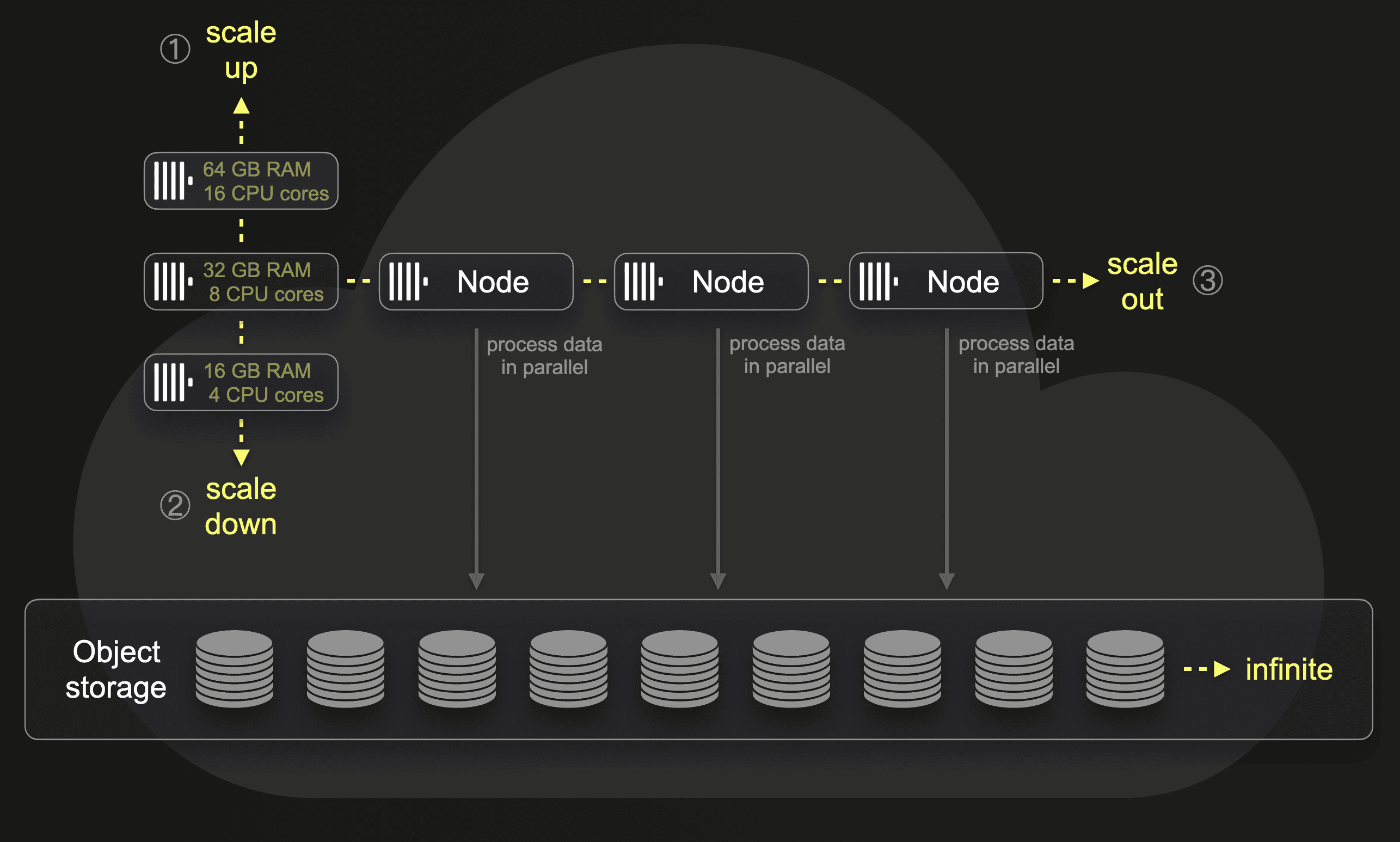
By default, each ClickHouse Cloud service features three compute nodes. Incoming queries are routed via a load balancer to one specific node that runs the query. It is straightforward to (manually or automatically) scale the size or number of compute nodes. Per [parallel replicas](https://clickhouse.com/blog/clickhouse-release-23-03#parallel-replicas-for-utilizing-the-full-power-of-your-replicas-nikita-mikhailov) setting, it is possible to process a single query in parallel by multiple nodes. This doesn’t require any physical resharding or rebalancing of the actual data.
We will run some of our benchmark queries with both a single node and multiple numbers of parallel nodes in our ClickHouse Cloud service.
## Benchmark queries
The equivalent to a ClickHouse `count(*)` aggregation (using a SQL `GROUP BY` clause with a `count(*)` aggregate function) in Elasticsearch is the [terms aggregation](https://www.elastic.co/guide/en/elasticsearch/reference/current/search-aggregations-bucket-terms-aggregation.html). We describe how Elasticsearch and ClickHouse process such queries under the hood [here](/blog/clickhouse_vs_elasticsearch_mechanics_of_count_aggregations).
We test the ([cold run](/blog/clickhouse_vs_elasticsearch_the_billion_row_matchup#benchmark-methodology)) performance of the following `count(*)` aggregation queries on the raw (not pre-aggregated) data sets:
* **Query ① - Top 3 most popular PyPi projects**: this is a full data scan aggregating the whole data set, sorting the aggregated data, and returning the top 3 buckets/groups
* [ClickHouse SQL query](https://github.com/ClickHouse/examples/tree/main/blog-examples/clickhouse-vs-elasticsearch#clickhouse-sql)
* [Elasticsearch DSL query](https://github.com/ClickHouse/examples/tree/main/blog-examples/clickhouse-vs-elasticsearch#elasticsearch-query-dsl)
* [Elasticsearch ESQL query](https://github.com/ClickHouse/examples/tree/main/blog-examples/clickhouse-vs-elasticsearch#elasticsearch-esql)
* **Query ② - Top 3 PyPi projects for a specific country**: this query filters the data set before applying aggregation, sorting, and a limit.
* [ClickHouse SQL query](https://github.com/ClickHouse/examples/tree/main/blog-examples/clickhouse-vs-elasticsearch#clickhouse-sql-1)
* [Elasticsearch DSL query](https://github.com/ClickHouse/examples/tree/main/blog-examples/clickhouse-vs-elasticsearch#elasticsearch-query-dsl-1)
* [Elasticsearch ESQL query](https://github.com/ClickHouse/examples/tree/main/blog-examples/clickhouse-vs-elasticsearch#elasticsearch-esql-1)
We further test the performance of the same queries from above when they run over [pre-aggregated data sets](/blog/clickhouse_vs_elasticsearch_mechanics_of_count_aggregations#approaches-for-continuous-data-summarization):
* **Query ①**
* [ClickHouse SQL query](https://github.com/ClickHouse/examples/tree/main/blog-examples/clickhouse-vs-elasticsearch#clickhouse-sql-2)
* [Elasticsearch DSL query](https://github.com/ClickHouse/examples/tree/main/blog-examples/clickhouse-vs-elasticsearch#elasticsearch-query-dsl-2)**
* ~~Elasticsearch ESQL query~~** (unsupported)
* **Query ②**
* [ClickHouse SQL query](https://github.com/ClickHouse/examples/tree/main/blog-examples/clickhouse-vs-elasticsearch#clickhouse-sql-3)
* [Elasticsearch DSL query](https://github.com/ClickHouse/examples/tree/main/blog-examples/clickhouse-vs-elasticsearch#elasticsearch-query-dsl-3)**
* ~~Elasticsearch ESQL query~~** (unsupported)
Note that for Elasticsearch we didn’t increase the term aggregation’s [shard size](https://www.elastic.co/guide/en/elasticsearch/reference/current/search-aggregations-bucket-terms-aggregation.html#search-aggregations-bucket-terms-aggregation-shard-size) parameter value in our benchmark.
**We noticed a slight issue when using Elasticsearch transforms for pre-calculating bucket sizes. For example, to pre-calculate the count per project. The way to do that is to [group](https://github.com/ClickHouse/examples/tree/main/blog-examples/clickhouse-vs-elasticsearch#by-project-transforms) by `project` and then use a [terms aggregation](https://github.com/ClickHouse/examples/tree/main/blog-examples/clickhouse-vs-elasticsearch#by-project-transforms) (also on `project`) to pre-calculate the count per project. The corresponding documents ingested into the destination index by the transform look like this:
```
{
"project_group": "boto3",
"project": {
"terms": {
"boto3": 28202786
}
}
}
```
The transforms destination index mapping is this:
```
{
"project_group": {
"type": "keyword"
},
"project": {
"properties": {
"terms": {
"type": "flattened"
}
}
}
}
```
Note the use of the [flattened](https://www.elastic.co/guide/en/elasticsearch/reference/current/flattened.html) field type. It makes sense to use this type for the result values of the terms aggregation. Otherwise, each unique project name would need its own mapping entry, which is impossible to do upfront (we don’t know which projects exist) and would lead to a [mapping explosion](https://www.elastic.co/guide/en/elasticsearch/reference/current/mapping-explosion.html) with [dynamic mapping](http://mapping).
This creates two issues for our benchmark queries:
1. The flattened type is currently [unsupported](https://www.elastic.co/guide/en/elasticsearch/reference/current/esql-limitations.html#_unsupported_types) by ESQL.
2. All values [are](https://www.elastic.co/guide/en/elasticsearch/reference/current/flattened.html#supported-operations) treated as keywords. When sorting, this implies that our numerical pre-calculated count values are compared lexicographically instead of in numerical order. Therefore, the Elasticsearch query running over indexes for transforms needs to [use](https://github.com/ClickHouse/examples/tree/main/blog-examples/clickhouse-vs-elasticsearch#elasticsearch-query-dsl-2) a small [painless](https://www.elastic.co/guide/en/elasticsearch/reference/current/modules-scripting-painless.html) script to enable numerical sorting on the pre-calculated count values.
## Benchmark methodology
With enabled caches, especially query result caches, both Elasticsearch and ClickHouse serve results almost instantaneously by just fetching them from a cache. We are interested in running aggregation queries with cold caches, where the query processing engine must load and scan the data and calculate the aggregation result from scratch.
### Query Runtimes
We run all [benchmark queries](/blog/clickhouse_vs_elasticsearch_the_billion_row_matchup#benchmark-queries) over the data sets that:
* Are compressed with the Elasticsearch and ClickHouse standard `LZ4` codec
* Don’t store `_source` in Elasticsearch
All queries are executed three times with cold caches. We execute one query at a time i.e., measure latency only. In our charts in this blog, we take the average execution time as the final result and link to the detailed benchmark run results.
#### Elasticsearch
We run Elasticsearch queries (DSL) via the [Search REST API](https://www.elastic.co/guide/en/elasticsearch/reference/current/search.html) and use the JSON response body’s [took](https://www.elastic.co/guide/en/elasticsearch/reference/current/search-search.html#search-api-response-body) time, representing the total server-side execution time.
ESQL queries are executed with the [ESQL REST API](https://www.elastic.co/guide/en/elasticsearch/reference/current/esql-query-api.html). Responses of Elasticsearch ESQL queries don’t include any runtime information. Server-side execution times for ESQL queries are logged in Elasticsearch’s [log file](https://www.elastic.co/guide/en/elasticsearch/reference/current/logging.html), though.
We know that query runtimes are also available in the [search slow log](https://www.elastic.co/guide/en/elasticsearch/reference/current/index-modules-slowlog.html#search-slow-log), but only on a per-shard level and not in consolidated form for the complete query execution over all involved shards.
#### ClickHouse
All ClickHouse SQL queries are executed via [ClickHouse client](https://clickhouse.com/docs/en/interfaces/cli), and the server-side execution time is taken from the [query_log](https://clickhouse.com/docs/en/operations/system-tables/query_log) system table (from the `query_duration_ms` field).
### Disabling caches
#### Elasticsearch
For query processing, Elasticsearch [leverages](https://www.elastic.co/blog/elasticsearch-caching-deep-dive-boosting-query-speed-one-cache-at-a-time) the operating-system-level [filesystem cache](https://en.wikipedia.org/wiki/Page_cache), the shard-level [request cache](https://www.elastic.co/guide/en/elasticsearch/reference/current/shard-request-cache.html), and the segment-level [query cache](https://www.elastic.co/guide/en/elasticsearch/reference/current/query-cache.html).
For DSL queries, we disabled the `request cache` on a per-request basis with the request_cache-[query-string parameter](https://www.elastic.co/guide/en/elasticsearch/reference/current/shard-request-cache.html#_enabling_and_disabling_caching_per_request). For ESQL queries, this is not possible, though.
The `query cache` can only be enabled or disabled [per](https://www.elastic.co/guide/en/elasticsearch/reference/current/query-cache.html#query-cache-index-settings) index, but not per request. Instead, we manually dropped the request and query caches via the [clear cache API](https://www.elastic.co/guide/en/elasticsearch/reference/current/indices-clearcache.html) before each query run.
There is no Elasticsearch API or setting for dropping or ignoring the `filesystem cache`, so we drop it manually using a simple [process](https://github.com/ClickHouse/examples/tree/main/blog-examples/clickhouse-vs-elasticsearch#process-for-dropping-filesystem-cache-for-elasticsearch).
#### ClickHouse
Like Elasticsearch, ClickHouse utilizes the OS `filesystem cache` and a [query cache](https://clickhouse.com/docs/en/operations/query-cache) for query processing.
Both caches can be manually dropped with a [SYSTEM DROP CACHE statement](https://clickhouse.com/docs/en/sql-reference/statements/system).
We disabled both caches per query with the query’s [SETTINGS clause](https://clickhouse.com/docs/en/sql-reference/statements/select#settings-in-select-query):
`… SETTINGS enable_filesystem_cache=0, use_query_cache=0;`
### Query peak memory usages
#### ClickHouse
We use the ClickHouse [query_log](https://clickhouse.com/docs/en/operations/system-tables/query_log) system table to track and report queries' peak memory consumption (`memory_usage` field). As a bonus, we also report the data processing throughput (`rows/s` and `GB/s`) for some queries, as reported by the ClickHouse client. This can also be calculated from `query_log` fields (e.g. `read_rows` and `read_bytes` divided by `query_duration_ms`).
#### Elasticsearch
Elasticsearch runs all queries within the Java JVM, with half of the machine's available 64 GB RAM allocated at startup. Elasticsearch doesn’t directly track queries' peak memory consumptions within the JVM memory. The [search profiling API](https://www.elastic.co/guide/en/elasticsearch/reference/current/search-profile.html), used under the hood of Kibana’s graphical [search profiler](https://www.elastic.co/guide/en/kibana/current/xpack-profiler.html), only profiles queries' CPU usage. Likewise, the [search slow log](https://www.elastic.co/guide/en/elasticsearch/reference/current/index-modules-slowlog.html#search-slow-log) only tracks runtimes but not memory. The [Cluster stats API](https://www.elastic.co/guide/en/elasticsearch/reference/current/cluster-stats.html) returns cluster and node-level metrics and statistics like current peak JVM memory usage, e.g. returned by this call:
`GET /_nodes/stats?filter_path=nodes.*.jvm.mem.pools.old`. It can be tricky to correlate these statistics with a specific query run as these are node-level metrics that consider all queries and wider processes, including [background segment merges](https://github.com/ClickHouse/examples/blob/main/blog-examples/clickhouse-vs-elasticsearch/on-disk-format-and-insert-processing/README.md#elasticsearch) which can be memory intensive. Therefore, our benchmark results don’t report peak memory usage for the Elasticsearch queries.
## Benchmark results
### Summary
Before we present the benchmark results in full detail, we provide a brief summary.
#### 1 billion rows data sets
ClickHouse requires 12 times less disk space than Elasticsearch to store the 1 billion row data set on disk. Aggregation query ① (performing a full data set aggregation) runs 5 times faster over the raw (not pre-aggregated) data with ClickHouse than with Elasticsearch (Query DSL). Aggregation query ② (aggregating the filtered data set) runs 6 times faster with ClickHouse than with Elasticsearch (Query DSL).