> ## Documentation Index
> Fetch the complete documentation index at: https://clickhouse.com/docs/llms.txt
> Use this file to discover all available pages before exploring further.

> ThoughtSpot 是一款 AI 驱动的分析平台，可帮助您实时搜索、探索和可视化数据。

# ThoughtSpot

export const PartnerBadge = () => {
  return <div className="PartnerBadge">
            <div className="PartnerBadgeIcon">
                <svg width="16" height="16" viewBox="0 0 16 16" fill="none" xmlns="http://www.w3.org/2000/svg">
                    <polyline points="12.5 9.5 10 12 6 11 2.5 8.5" stroke="currentColor" strokeLinecap="round" strokeLinejoin="round" strokeWidth="1" />
                    <polyline points="4.54 4.41 8 3.5 11.46 4.41" stroke="currentColor" strokeLinecap="round" strokeLinejoin="round" strokeWidth="1" />
                    <path d="M2.15,3.78 L0.55,6.95 A0.5,0.5 0,0,0 0.77,7.62 L2.5,8.5 L4.54,4.41 L2.82,3.55 A0.5,0.5 0,0,0 2.15,3.78 Z" stroke="currentColor" strokeLinecap="round" strokeLinejoin="round" strokeWidth="1" />
                    <path d="M13.5,8.5 L15.23,7.62 A0.5,0.5 0,0,0 15.45,6.95 L13.85,3.78 A0.5,0.5 0,0,0 13.18,3.55 L11.46,4.41 Z" stroke="currentColor" strokeLinecap="round" strokeLinejoin="round" strokeWidth="1" />
                    <path d="M11.5,4.5 L9,4.5 L6.15,7.27 A0.5,0.5 0,0,0 6.24,8.05 C7.33,8.74 8.81,8.72 10,7.5 L12.5,9.5 L13.5,8.5" stroke="currentColor" strokeLinecap="round" strokeLinejoin="round" strokeWidth="1" />
                    <polyline points="7.75 13.5 5.15 12.85 3.5 11.67" stroke="currentColor" strokeLinecap="round" strokeLinejoin="round" strokeWidth="1" />
                </svg>
            </div>
            合作伙伴集成
        </div>;
};

<PartnerBadge />

ThoughtSpot 可以通过其原生 ClickHouse 连接器连接到 ClickHouse Cloud 或本地部署的 ClickHouse。

<Steps>
  <Step title="收集连接信息" id="1-gather-your-connection-details">
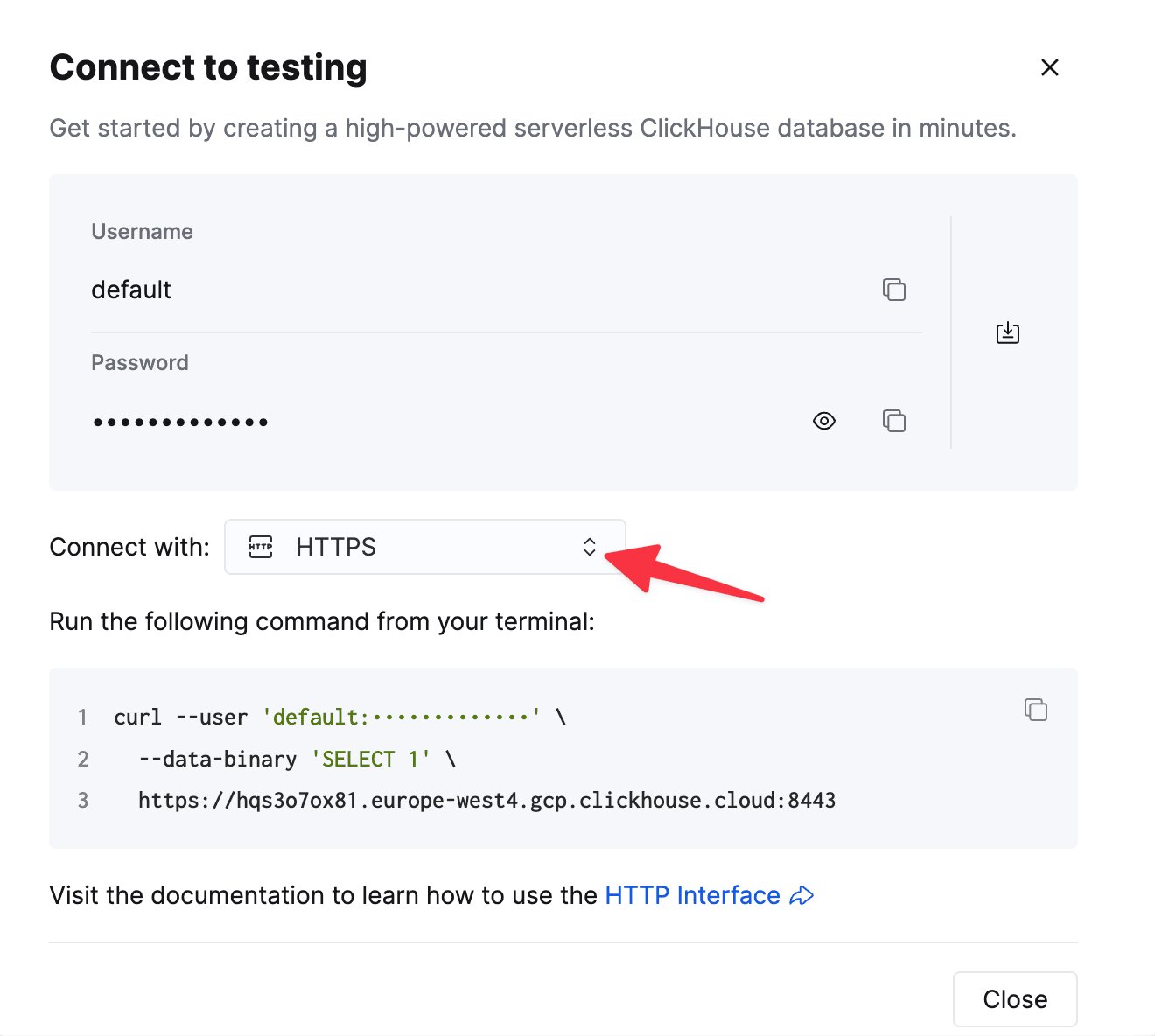
    要通过 HTTP(S) 连接到 ClickHouse，你需要以下信息：

    | Parameter(s) | Description |
    | - | - |
    | `HOST` and `PORT` | 通常，使用 TLS 时端口为 8443；不使用 TLS 时端口为 8123。 |
    | `DATABASE NAME` | 默认情况下，存在一个名为 `default` 的数据库。请使用你要连接的数据库名称。 |
    | `USERNAME` and `PASSWORD` | 默认情况下，用户名为 `default`。请根据你的使用场景使用相应的用户名。 |

    你的 ClickHouse Cloud 服务的连接信息可在 ClickHouse Cloud 控制台中查看。
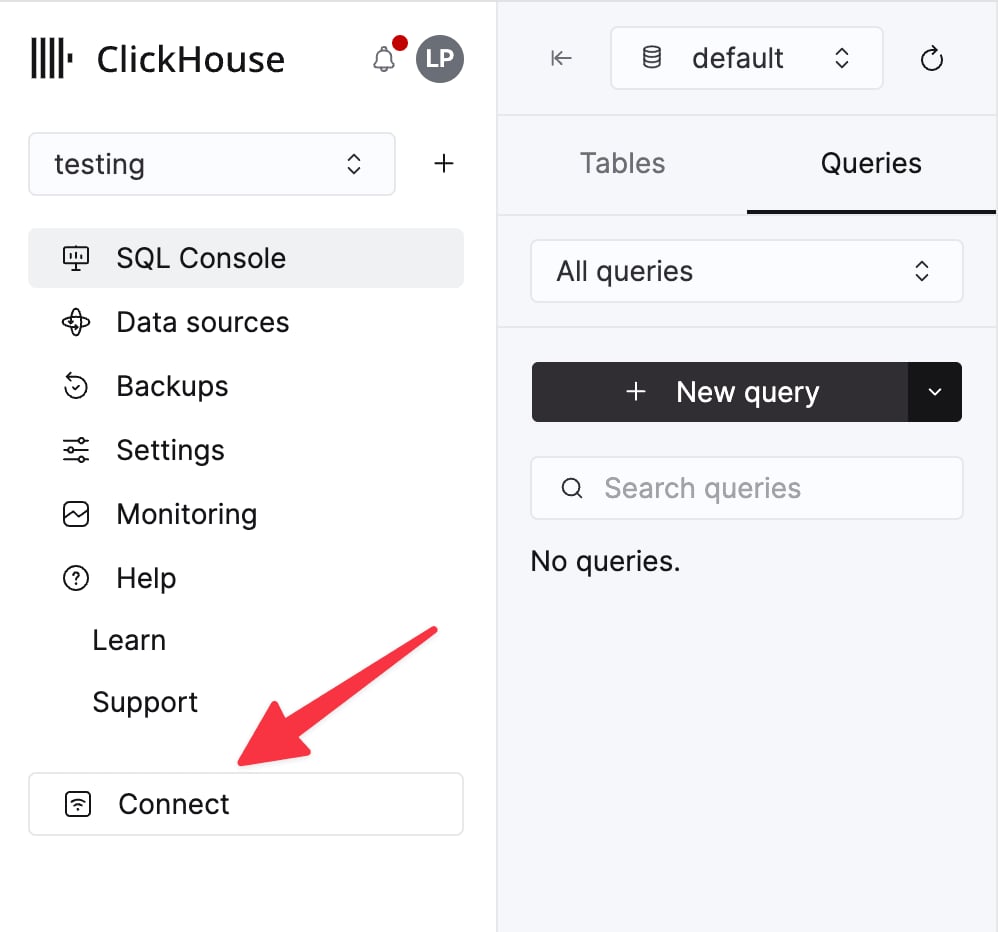
    选择一个服务，然后点击 **Connect**：

    <div className="ch-image-md">
      <Frame>
        <img src="https://mintcdn.com/private-7c7dfe99/EDr8ydtGBgFPOQea/images/_snippets/cloud-connect-button.webp?fit=max&auto=format&n=EDr8ydtGBgFPOQea&q=85&s=97d6a020a443f1b365b017488b39d0c8" alt="ClickHouse Cloud 服务连接按钮" width="998" height="932" data-path="images/_snippets/cloud-connect-button.webp" />
      </Frame>
    </div>

    选择 **HTTPS**。连接信息会显示在示例 `curl` 命令中。

    <div className="ch-image-md">
      <Frame>
        <img src="https://mintcdn.com/private-7c7dfe99/EDr8ydtGBgFPOQea/images/_snippets/connection-details-https.webp?fit=max&auto=format&n=EDr8ydtGBgFPOQea&q=85&s=80369fc90cd1ac3108fe455f2426c19a" alt="ClickHouse Cloud HTTPS 连接信息" width="1320" height="1184" data-path="images/_snippets/connection-details-https.webp" />
      </Frame>
    </div>

    如果你使用的是自管理 ClickHouse，则连接信息由你的 ClickHouse 管理员配置。
  </Step>

  <Step title="在 ThoughtSpot 中创建 ClickHouse 连接" id="2-create-a-clickhouse-connection-in-thoughtspot">
    1. 前往 **Data workspace** > **Connections**。

    2. 点击 **+ Create connection**，选择 **ClickHouse** 卡片，然后点击 **Next**。

    3. 输入连接名称、描述 (可选) ，以及在上一步中收集的 ClickHouse 连接信息，然后点击 **Next**。有关各属性的详细说明，请参阅 ThoughtSpot 文档中的 [ClickHouse connection reference](https://docs.thoughtspot.com/cloud/latest/connections-clickhouse-reference)。

    4. (可选) 如需配置查询级别的超时时间，请打开 **Advanced Config** 菜单，在 **Key** 中输入 `queryTimeoutSeconds`，在 **Value** 中输入超时时间 (以秒为单位) 。建议不超过 10 分钟。

    5. (可选) 如需添加其他键值对，请打开 **Advanced Config** 菜单并输入 **Key** 和 **Value**。点击加号 (**+**) 可添加更多键值对。

    <Note>
      您输入的所有键值对都必须已在 ClickHouse 数据源中定义。键值对区分大小写。
    </Note>

    6. 选择要使用的表和列，然后点击 **Create connection**。系统会显示一条消息，确认已添加的表和列数量。

    此后，该连接将显示在 **Data workspace** > **Connections** 页面中。您可以在 ThoughtSpot 中搜索 ClickHouse 数据，并对已关联的表执行实时查询。
  </Step>
</Steps>