> ## Documentation Index
> Fetch the complete documentation index at: https://clickhouse.com/docs/llms.txt
> Use this file to discover all available pages before exploring further.

> 使用 Erathos 将数据同步到 ClickHouse，Erathos 是一个提供控制与可观测性的 ELT 平台

# 将 Erathos 连接到 ClickHouse

export const CommunityMaintainedBadge = () => {
  return <div className="CommunityMaintainedBadge">
            <div className="CommunityMaintainedIcon">
            <svg xmlns="http://www.w3.org/2000/svg" width="20" height="20" fill="currentColor" viewBox="0 0 256 256">
                <path d="M244.8,150.4a8,8,0,0,1-11.2-1.6A51.6,51.6,0,0,0,192,128a8,8,0,0,1-7.37-4.89,8,8,0,0,1,0-6.22A8,8,0,0,1,192,112a24,24,0,1,0-23.24-30,8,8,0,1,1-15.5-4A40,40,0,1,1,219,117.51a67.94,67.94,0,0,1,27.43,21.68A8,8,0,0,1,244.8,150.4ZM190.92,212a8,8,0,1,1-13.84,8,57,57,0,0,0-98.16,0,8,8,0,1,1-13.84-8,72.06,72.06,0,0,1,33.74-29.92,48,48,0,1,1,58.36,0A72.06,72.06,0,0,1,190.92,212ZM128,176a32,32,0,1,0-32-32A32,32,0,0,0,128,176ZM72,120a8,8,0,0,0-8-8A24,24,0,1,1,87.24,82a8,8,0,1,0,15.5-4A40,40,0,1,0,37,117.51,67.94,67.94,0,0,0,9.6,139.19a8,8,0,1,0,12.8,9.61A51.6,51.6,0,0,1,64,128,8,8,0,0,0,72,120Z"></path>
            </svg>
        </div>
            由社区维护
        </div>;
};

<CommunityMaintainedBadge />

<a href="https://erathos.com/" target="_blank">Erathos</a> 是一个 ELT 平台，让团队能够轻松掌控从 SaaS 工具和数据库同步到仓库的每个同步作业。

<div id="overview">
  ## 概述
</div>

Erathos 可让团队全面掌握和控制从 SaaS 工具、ERP 和 CRM 同步到 ClickHouse 的每个同步作业。Erathos 不再将管道作为不透明的定时作业来管理，而是让您能够实时监控和控制同步，更轻松地及早发现问题，并确保仓库中的数据保持最新。

<div id="connecting-erathos-to-clickhouse">
  ## 将 Erathos 连接到 ClickHouse
</div>

<Steps>
  <Step title="查找您的 ClickHouse 凭据" id="1-find-your-clickhouse-credentials">
    在 ClickHouse Cloud 中创建服务后，找到以下必填信息：

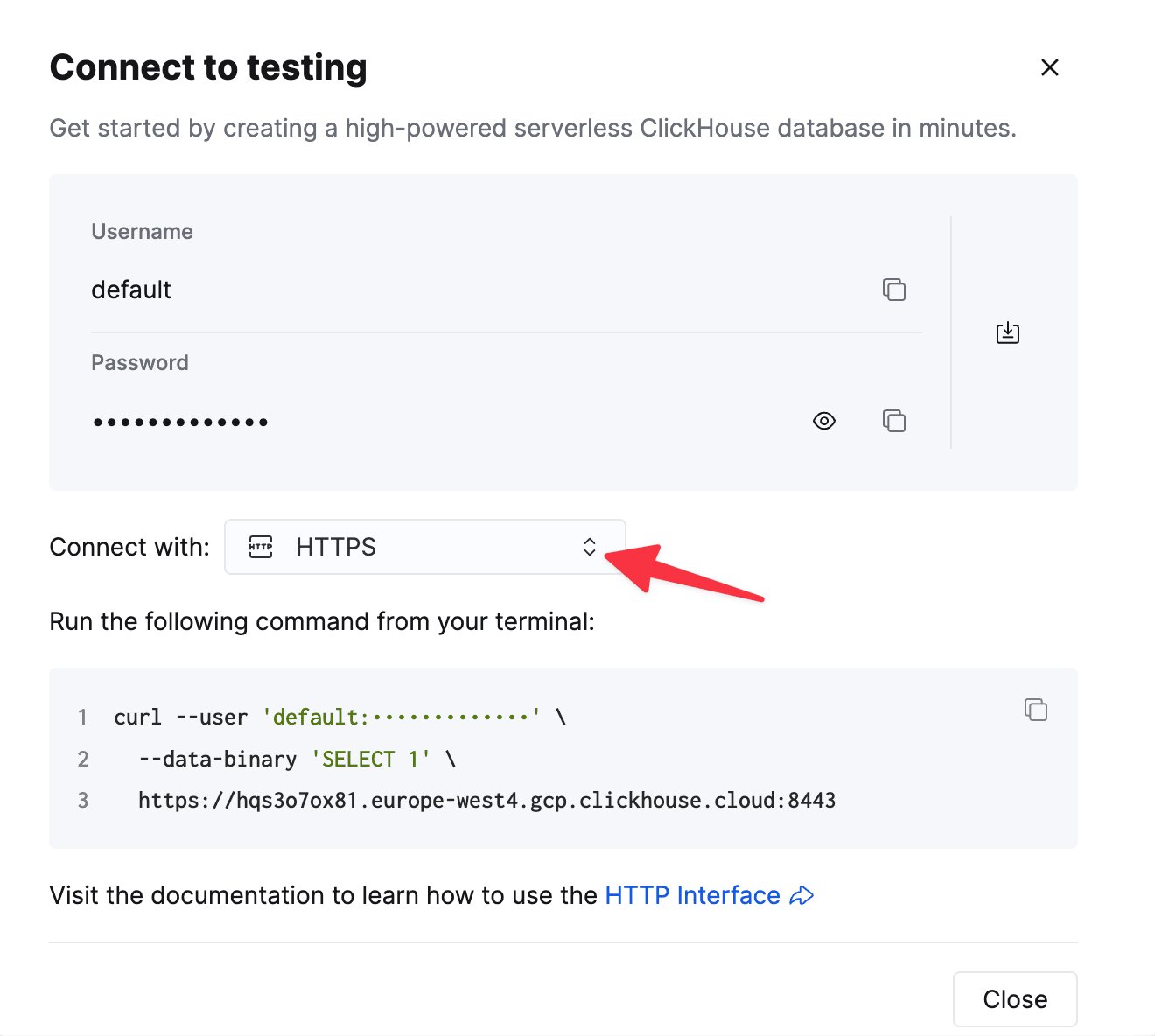
    To connect to ClickHouse with HTTP(S) you need this information:

    | Parameter(s)              | Description                                                                                                    |
    | ------------------------- | -------------------------------------------------------------------------------------------------------------- |
    | `HOST` and `PORT`         | Typically, the port is 8443 when using TLS or 8123 when not using TLS.                                         |
    | `DATABASE NAME`           | Out of the box, there is a database named `default`, use the name of the database that you want to connect to. |
    | `USERNAME` and `PASSWORD` | Out of the box, the username is `default`. Use the username appropriate for your use case.                     |

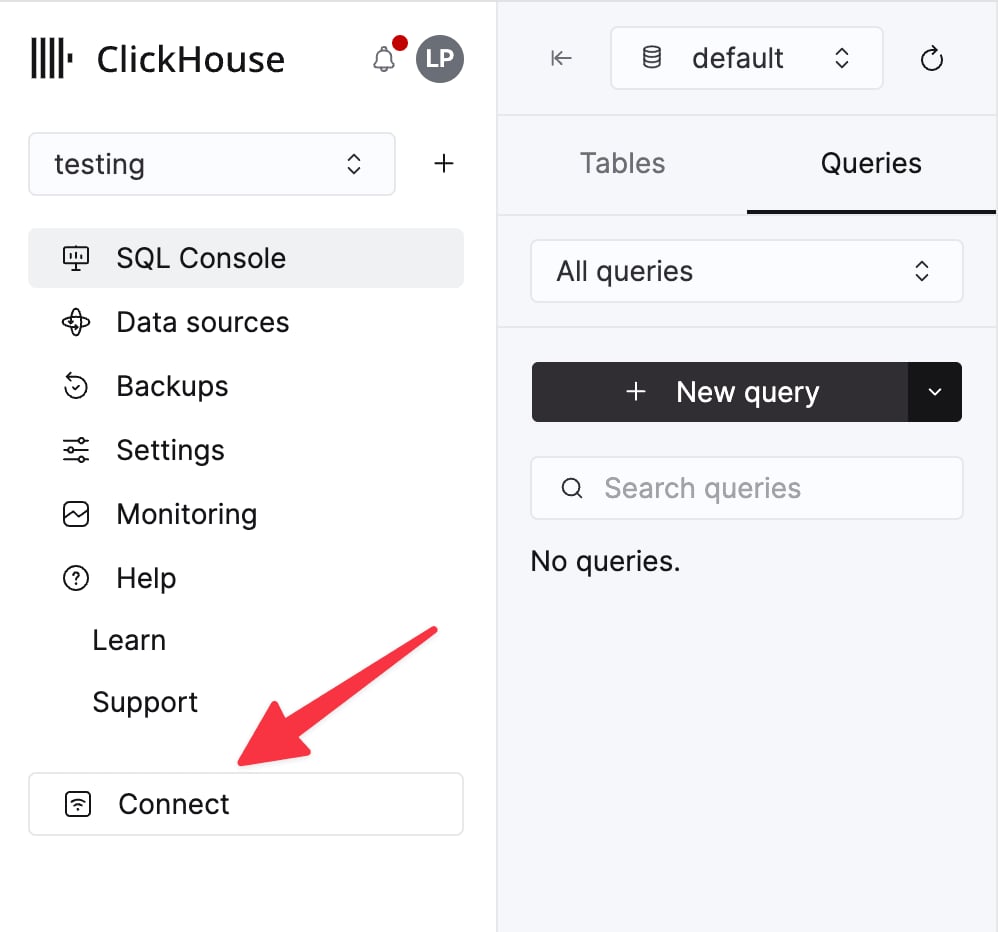
    The details for your ClickHouse Cloud service are available in the ClickHouse Cloud console.
    Select a service and click **Connect**:

    <div className="ch-image-md">
      <Frame>
        <img src="https://mintcdn.com/private-7c7dfe99/EDr8ydtGBgFPOQea/images/_snippets/cloud-connect-button.webp?fit=max&auto=format&n=EDr8ydtGBgFPOQea&q=85&s=97d6a020a443f1b365b017488b39d0c8" alt="ClickHouse Cloud service connect button" width="998" height="932" data-path="images/_snippets/cloud-connect-button.webp" />
      </Frame>
    </div>

    Choose **HTTPS**. Connection details are displayed in an example `curl` command.

    <div className="ch-image-md">
      <Frame>
        <img src="https://mintcdn.com/private-7c7dfe99/EDr8ydtGBgFPOQea/images/_snippets/connection-details-https.webp?fit=max&auto=format&n=EDr8ydtGBgFPOQea&q=85&s=80369fc90cd1ac3108fe455f2426c19a" alt="ClickHouse Cloud HTTPS connection details" width="1320" height="1184" data-path="images/_snippets/connection-details-https.webp" />
      </Frame>
    </div>

    If you're using self-managed ClickHouse, the connection details are set by your ClickHouse administrator.
  </Step>

  <Step title="在 Erathos 中配置目标端" id="2-configure-the-destination-in-erathos">
    在 Erathos 中，前往 **设置 > 目标端**，选择 **ClickHouse**，然后填写以下信息：

    * **主机** — 您的 ClickHouse 服务 URL (ClickHouse Cloud URL 通常以 `.clickhouse.cloud` 结尾)
    * **端口** — HTTPS 连接通常使用 `8443`
    * **用户名** — 通常为 `default`
    * **密码** — 上述账户的密码

    保存配置以完成连接。

    <Note>
      如果要连接自托管的 ClickHouse 实例，请确保已在防火墙白名单中允许 Erathos 的 IP 地址 (`35.212.87.86`) 。
    </Note>
  </Step>
</Steps>

<div id="additional-resources">
  ## 其他资源
</div>

欲了解更多信息，请参阅 <a href="https://docs.erathos.com/destinations/what-is-a-destination/clickhouse" target="_blank">Erathos 的 ClickHouse 目标端文档</a>，或联系 <a href="mailto:support@erathos.com">[support@erathos.com](mailto:support@erathos.com)</a>。