> ## Documentation Index
> Fetch the complete documentation index at: https://clickhouse.com/docs/llms.txt
> Use this file to discover all available pages before exploring further.
# 使用 clickhouse-local 迁移到 ClickHouse
> 介绍如何使用 clickhouse-local 迁移到 ClickHouse 的指南
export const Image = ({img, alt, size = "lg"}) => {
const normalizedSize = ["sm", "md", "lg"].includes(size) ? size : "lg";
return ;
};
您可以使用 ClickHouse,更准确地说,是使用 [`clickhouse-local`](/docs/zh/concepts/features/tools-and-utilities/clickhouse-local)
作为 ETL 工具,将数据从当前的数据库系统迁移到 ClickHouse Cloud,前提是当前数据库系统具备以下之一:
ClickHouse 提供的[integration 表引擎](/docs/zh/reference/engines/table-engines/index#integration-engines) 或 [表函数](/docs/zh/reference/functions/table-functions/index),
或者由相应厂商提供的 JDBC 驱动或 ODBC 驱动。
我们有时将这种迁移方法称为 "中转" 方法,因为它会借助一个中间中转点,将数据从源数据库迁移到目标端数据库。比如,出于安全要求,私有网络或内部网络中可能只允许出站连接,此时就需要采用这种方法:先用 clickhouse-local 从源数据库拉取数据,再将数据推送到目标端 ClickHouse 数据库,而 clickhouse-local 就充当这个中转点。
ClickHouse 为 [MySQL](/docs/zh/reference/engines/table-engines/integrations/mysql)、[PostgreSQL](/docs/zh/reference/engines/table-engines/integrations/postgresql)、[MongoDB](/docs/zh/reference/engines/table-engines/integrations/mongodb) 和 [SQLite](/docs/zh/reference/engines/table-engines/integrations/sqlite) 提供 integration 表引擎 和 表函数 (可动态创建 integration 表引擎) 。
对于其他所有常见数据库系统,则可以使用由相应厂商提供的 JDBC 驱动或 ODBC 驱动。
## 什么是 clickhouse-local?
通常,ClickHouse 以集群形式运行,即多个 ClickHouse 数据库引擎实例以分布式方式运行在不同的服务器上。
在单台服务器上,ClickHouse 数据库引擎作为 `clickhouse-server` 程序的一部分运行。数据库访问 (路径、用户、安全等) 通过服务器配置文件进行配置。
`clickhouse-local` 工具让你能够以隔离的命令行工具形式使用 ClickHouse 数据库引擎,对大量输入和输出执行极速的 SQL 数据处理,而无需配置并启动 ClickHouse server。
## 安装 clickhouse-local
你需要为 `clickhouse-local` 准备一台主机,并确保该主机能够通过网络同时访问当前的源数据库系统和 ClickHouse Cloud 目标服务。
在这台主机上,根据你的操作系统下载相应的 `clickhouse-local` 构建包:
1. 在本地下载 `clickhouse-local` 最简单的方式是运行以下命令:
```bash theme={null}
curl https://clickhouse.com/ | sh
```
1. 运行 `clickhouse-local` (它只会打印版本信息) :
```bash theme={null}
./clickhouse-local
```
1. 在本地下载 `clickhouse-local` 最简单的方式是运行以下命令:
```bash theme={null}
curl https://clickhouse.com/ | sh
```
1. 运行 `clickhouse-local` (它只会打印版本信息) :
```bash theme={null}
./clickhouse local
```
**重要**
本指南中的示例均使用 Linux 上运行 `clickhouse-local` 的命令 (`./clickhouse-local`) 。
如果要在 Mac 上运行 `clickhouse-local`,请使用 `./clickhouse local`。
**将远程系统添加到你的 ClickHouse Cloud 服务 IP Access List**
要使 `remoteSecure` 函数能够连接到你的 ClickHouse Cloud 服务,远程系统的 IP 地址必须已在 IP Access List 的允许范围内。更多信息,请展开此提示下方的 **管理你的 IP Access List**。
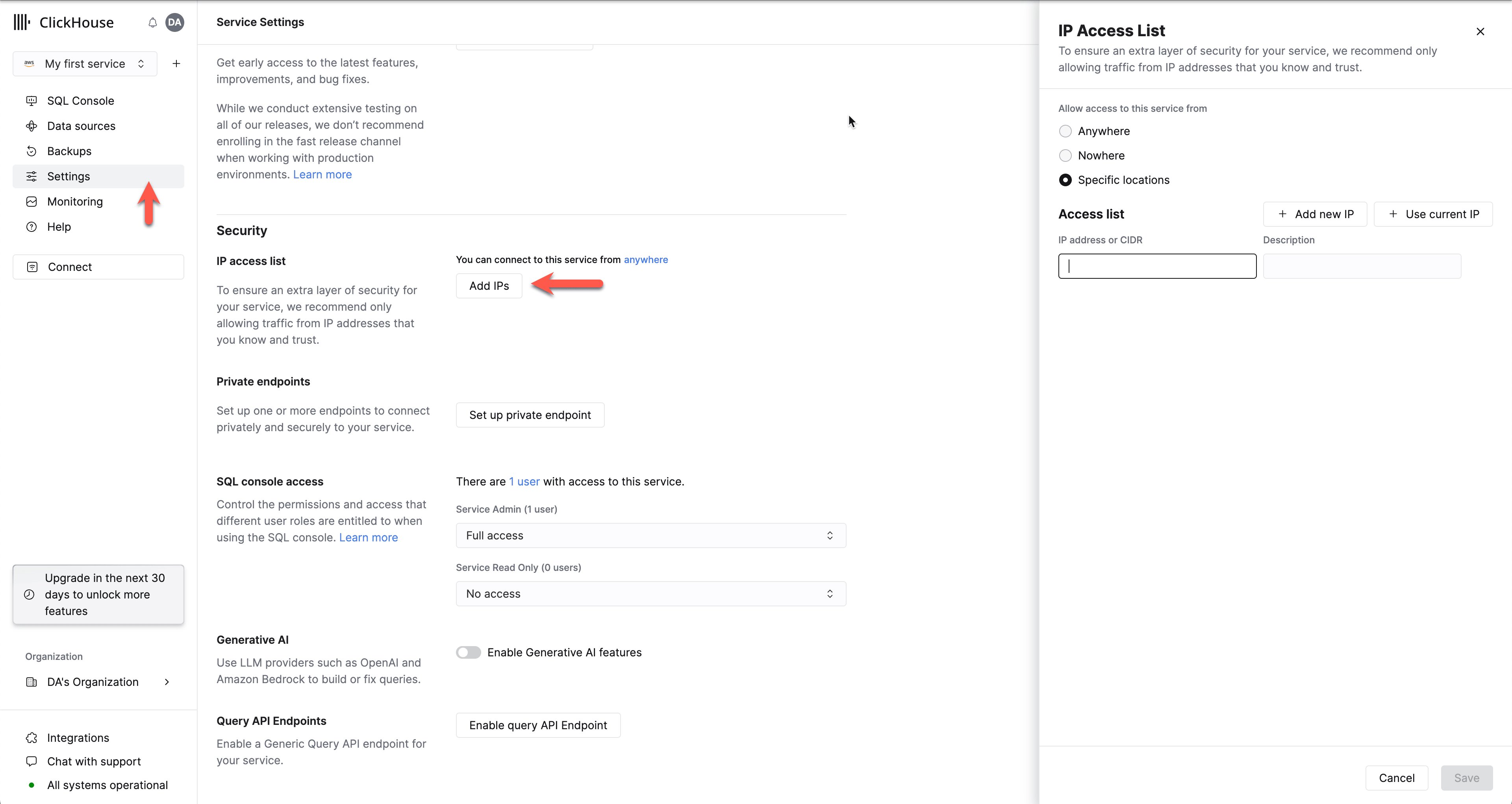
在 ClickHouse Cloud 服务列表中,选择要使用的服务,然后切换到 **设置**。如果 IP Access List 中没有包含需要连接到您的 ClickHouse Cloud 服务的远程系统 IP 地址或地址范围,可以通过 **Add IPs** 解决此问题:
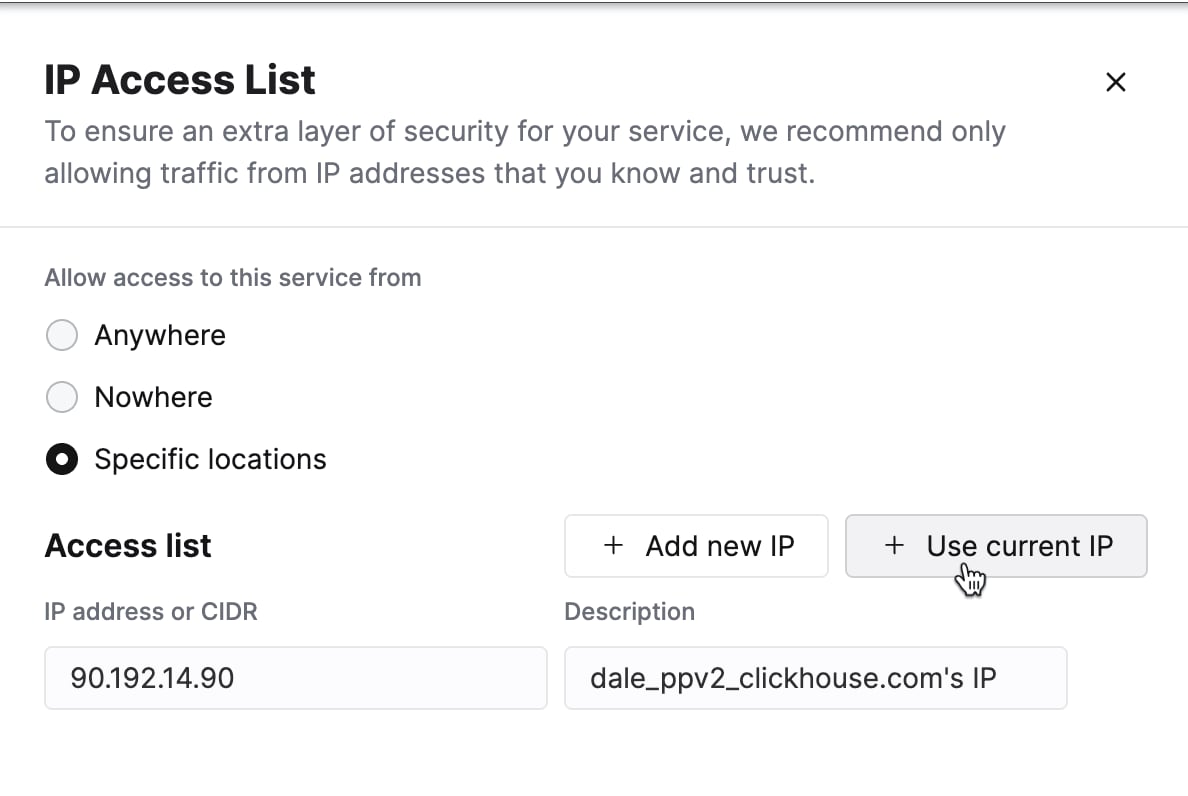
添加单个 IP 地址,或添加需要连接到您的 ClickHouse Cloud 服务的地址范围。按需修改表单,然后点击 **保存**。
## 示例:使用 Integration 引擎从 MySQL 迁移到 ClickHouse Cloud
我们将使用 [integration 表引擎](/docs/zh/reference/engines/table-engines/integrations/mysql) (由 [mysql 表函数](/docs/zh/reference/functions/table-functions/mysql) 即时创建) 从源 MySQL 数据库读取数据,并使用 [remoteSecure 表函数](/docs/zh/reference/functions/table-functions/remote)
将数据写入您的 ClickHouse Cloud 服务中的目标端表。
### 在目标端 ClickHouse Cloud 服务上:
#### 创建目标端数据库:
```sql theme={null}
CREATE DATABASE db
```
#### 创建一个与 MySQL 表 schema 等效的目标端表:
```sql theme={null}
CREATE TABLE db.table ...
```
ClickHouse Cloud 目标端表的 schema 必须与源 MySQL 表的 schema 对齐 (列名和顺序必须一致,且列的数据类型必须兼容) 。
### 在 clickhouse-local 所在主机上:
#### 运行 clickhouse-local 并执行迁移查询:
```sql theme={null}
./clickhouse-local --query "
INSERT INTO FUNCTION
remoteSecure('HOSTNAME.clickhouse.cloud:9440', 'db.table', 'default', 'PASS')
SELECT * FROM mysql('host:port', 'database', 'table', 'user', 'password');"
```
数据不会存储在本地的 `clickhouse-local` 主机上。而是先从源 MySQL 表中读取数据,
然后立即将其写入 ClickHouse Cloud 服务中的目标端表。