> ## Documentation Index
> Fetch the complete documentation index at: https://clickhouse.com/docs/llms.txt
> Use this file to discover all available pages before exploring further.

> 제어 및 관측성을 위한 ELT 플랫폼인 Erathos를 사용하여 데이터를 ClickHouse로 동기화합니다

# Erathos를 ClickHouse에 연결

export const CommunityMaintainedBadge = () => {
  return <div className="CommunityMaintainedBadge">
            <div className="CommunityMaintainedIcon">
            <svg xmlns="http://www.w3.org/2000/svg" width="20" height="20" fill="currentColor" viewBox="0 0 256 256">
                <path d="M244.8,150.4a8,8,0,0,1-11.2-1.6A51.6,51.6,0,0,0,192,128a8,8,0,0,1-7.37-4.89,8,8,0,0,1,0-6.22A8,8,0,0,1,192,112a24,24,0,1,0-23.24-30,8,8,0,1,1-15.5-4A40,40,0,1,1,219,117.51a67.94,67.94,0,0,1,27.43,21.68A8,8,0,0,1,244.8,150.4ZM190.92,212a8,8,0,1,1-13.84,8,57,57,0,0,0-98.16,0,8,8,0,1,1-13.84-8,72.06,72.06,0,0,1,33.74-29.92,48,48,0,1,1,58.36,0A72.06,72.06,0,0,1,190.92,212ZM128,176a32,32,0,1,0-32-32A32,32,0,0,0,128,176ZM72,120a8,8,0,0,0-8-8A24,24,0,1,1,87.24,82a8,8,0,1,0,15.5-4A40,40,0,1,0,37,117.51,67.94,67.94,0,0,0,9.6,139.19a8,8,0,1,0,12.8,9.61A51.6,51.6,0,0,1,64,128,8,8,0,0,0,72,120Z"></path>
            </svg>
        </div>
            커뮤니티 유지 관리
        </div>;
};

<CommunityMaintainedBadge />

<a href="https://erathos.com/" target="_blank">Erathos</a>는 불필요한 오버헤드 없이 완벽한 제어 기능을 제공하도록 설계된 ELT 플랫폼으로, 팀이 SaaS 도구와 데이터베이스에서 웨어하우스로의 모든 동기화 작업을 관리할 수 있습니다.

<div id="overview">
  ## 개요
</div>

Erathos는 SaaS 도구, ERP, CRM에서 ClickHouse로 데이터가 이동하는 과정에서 모든 동기화 작업을 확인하고 제어할 수 있도록 지원합니다. 파이프라인을 내부를 알 수 없는 예약 작업으로 관리하는 대신, Erathos를 사용하면 동기화를 실시간으로 모니터링하고 제어할 수 있으므로 문제를 조기에 발견하고 웨어하우스를 최신 상태로 유지하기가 더 쉬워집니다.

<div id="connecting-erathos-to-clickhouse">
  ## Erathos를 ClickHouse에 연결하기
</div>

<Steps>
  <Step title="ClickHouse 자격 증명 확인" id="1-find-your-clickhouse-credentials">
    ClickHouse Cloud에서 서비스를 생성한 후 다음 필수 설정을 확인하십시오.

    To connect to ClickHouse with HTTP(S) you need this information:

    | Parameter(s)              | Description                                                                                                    |
    | ------------------------- | -------------------------------------------------------------------------------------------------------------- |
    | `HOST` and `PORT`         | Typically, the port is 8443 when using TLS or 8123 when not using TLS.                                         |
    | `DATABASE NAME`           | Out of the box, there is a database named `default`, use the name of the database that you want to connect to. |
    | `USERNAME` and `PASSWORD` | Out of the box, the username is `default`. Use the username appropriate for your use case.                     |

    The details for your ClickHouse Cloud service are available in the ClickHouse Cloud console.
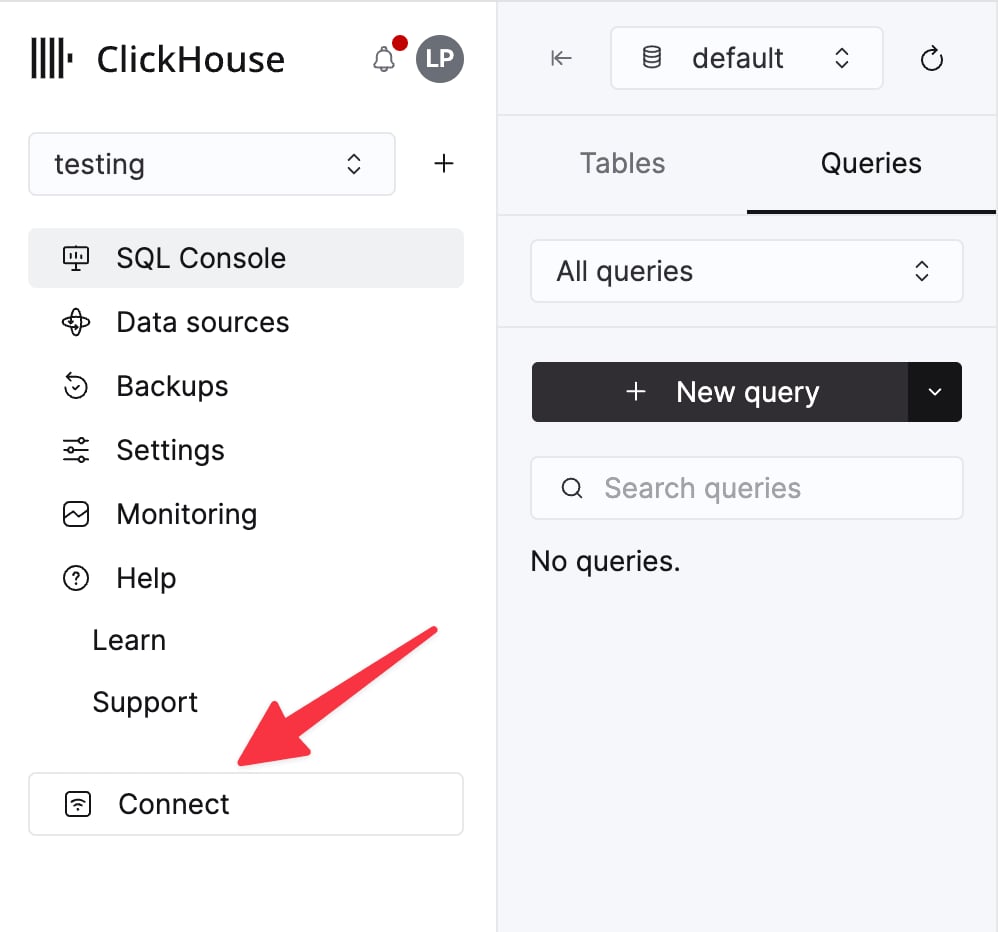
    Select a service and click **Connect**:

    <div className="ch-image-md">
      <Frame>
        <img src="https://mintcdn.com/private-7c7dfe99/EDr8ydtGBgFPOQea/images/_snippets/cloud-connect-button.webp?fit=max&auto=format&n=EDr8ydtGBgFPOQea&q=85&s=97d6a020a443f1b365b017488b39d0c8" alt="ClickHouse Cloud service connect button" width="998" height="932" data-path="images/_snippets/cloud-connect-button.webp" />
      </Frame>
    </div>

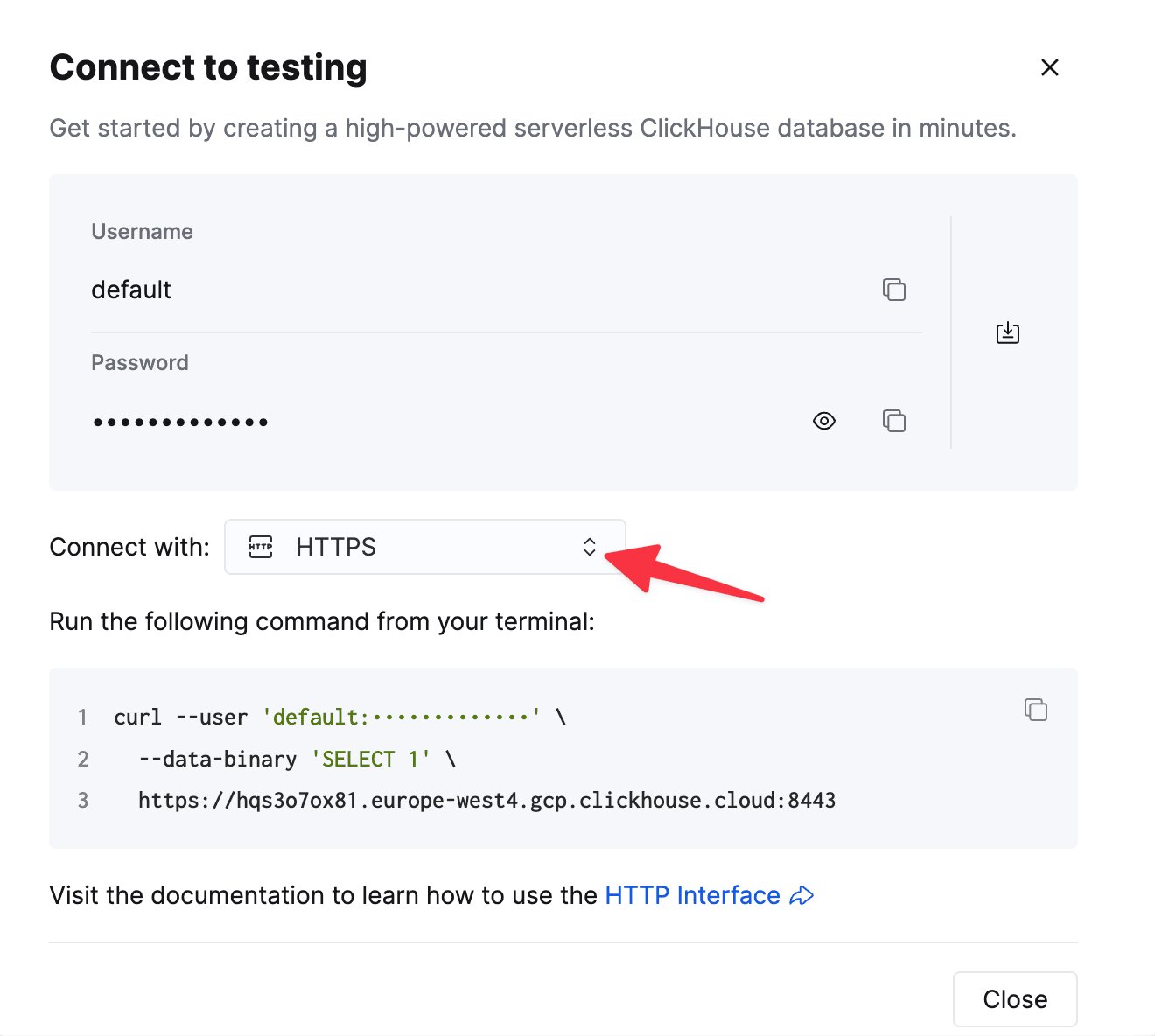
    Choose **HTTPS**. Connection details are displayed in an example `curl` command.

    <div className="ch-image-md">
      <Frame>
        <img src="https://mintcdn.com/private-7c7dfe99/EDr8ydtGBgFPOQea/images/_snippets/connection-details-https.webp?fit=max&auto=format&n=EDr8ydtGBgFPOQea&q=85&s=80369fc90cd1ac3108fe455f2426c19a" alt="ClickHouse Cloud HTTPS connection details" width="1320" height="1184" data-path="images/_snippets/connection-details-https.webp" />
      </Frame>
    </div>

    If you're using self-managed ClickHouse, the connection details are set by your ClickHouse administrator.
  </Step>

  <Step title="Erathos에서 대상 구성" id="2-configure-the-destination-in-erathos">
    Erathos에서 **Settings > Destination**으로 이동해 **ClickHouse**를 선택한 후 다음 정보를 입력하십시오.

    * **Host** — ClickHouse 서비스 URL(ClickHouse Cloud URL은 일반적으로 `.clickhouse.cloud`로 끝납니다)
    * **Port** — HTTPS 연결에는 일반적으로 `8443`
    * **Username** — 일반적으로 `default`
    * **Password** — 위 계정의 비밀번호

    구성을 저장하여 연결을 완료하십시오.

    <Note>
      자체 호스팅 ClickHouse 인스턴스에 연결하는 경우, 방화벽 허용 목록에 Erathos의 IP 주소(`35.212.87.86`)를 추가하십시오.
    </Note>
  </Step>
</Steps>

<div id="additional-resources">
  ## 추가 리소스
</div>

자세한 내용은 <a href="https://docs.erathos.com/destinations/what-is-a-destination/clickhouse" target="_blank">Erathos의 ClickHouse 대상 커넥터 문서</a>를 참조하거나 <a href="mailto:support@erathos.com">[support@erathos.com](mailto:support@erathos.com)</a>로 문의하십시오.