> ## Documentation Index
> Fetch the complete documentation index at: https://clickhouse.com/docs/llms.txt
> Use this file to discover all available pages before exploring further.

> ThoughtSpot は AI を活用した分析プラットフォームで、データをリアルタイムに検索、探索、可視化できます。

# ThoughtSpot

export const PartnerBadge = () => {
  return <div className="PartnerBadge">
            <div className="PartnerBadgeIcon">
                <svg width="16" height="16" viewBox="0 0 16 16" fill="none" xmlns="http://www.w3.org/2000/svg">
                    <polyline points="12.5 9.5 10 12 6 11 2.5 8.5" stroke="currentColor" strokeLinecap="round" strokeLinejoin="round" strokeWidth="1" />
                    <polyline points="4.54 4.41 8 3.5 11.46 4.41" stroke="currentColor" strokeLinecap="round" strokeLinejoin="round" strokeWidth="1" />
                    <path d="M2.15,3.78 L0.55,6.95 A0.5,0.5 0,0,0 0.77,7.62 L2.5,8.5 L4.54,4.41 L2.82,3.55 A0.5,0.5 0,0,0 2.15,3.78 Z" stroke="currentColor" strokeLinecap="round" strokeLinejoin="round" strokeWidth="1" />
                    <path d="M13.5,8.5 L15.23,7.62 A0.5,0.5 0,0,0 15.45,6.95 L13.85,3.78 A0.5,0.5 0,0,0 13.18,3.55 L11.46,4.41 Z" stroke="currentColor" strokeLinecap="round" strokeLinejoin="round" strokeWidth="1" />
                    <path d="M11.5,4.5 L9,4.5 L6.15,7.27 A0.5,0.5 0,0,0 6.24,8.05 C7.33,8.74 8.81,8.72 10,7.5 L12.5,9.5 L13.5,8.5" stroke="currentColor" strokeLinecap="round" strokeLinejoin="round" strokeWidth="1" />
                    <polyline points="7.75 13.5 5.15 12.85 3.5 11.67" stroke="currentColor" strokeLinecap="round" strokeLinejoin="round" strokeWidth="1" />
                </svg>
            </div>
            パートナーインテグレーション
        </div>;
};

<PartnerBadge />

ThoughtSpot は、ネイティブの ClickHouse コネクタを使用して、ClickHouse Cloud またはオンプレミス環境に接続できます。

<Steps>
  <Step title="接続情報を収集する" id="1-gather-your-connection-details">
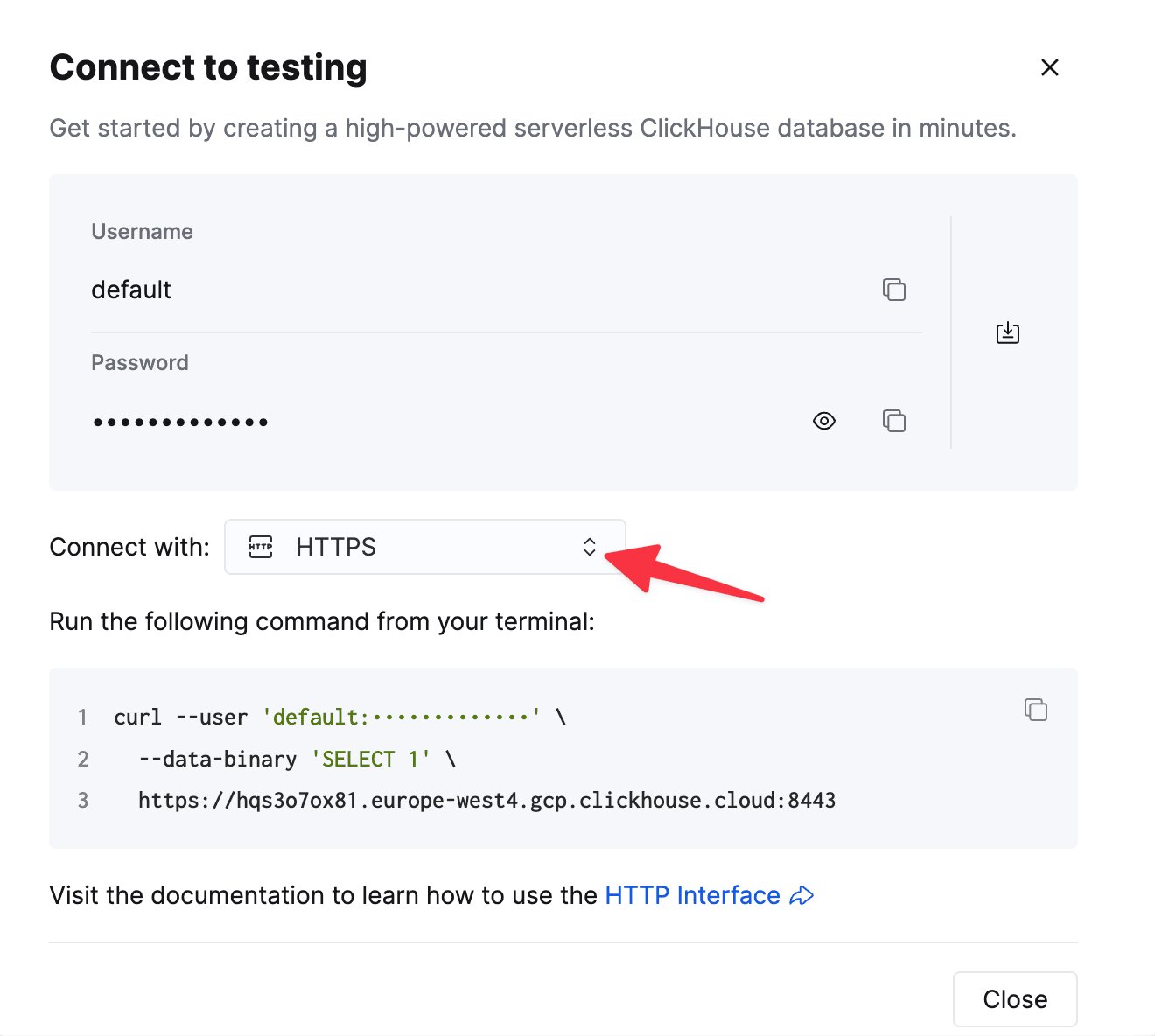
    HTTP(S) で ClickHouse に接続するには、次の情報が必要です。

    | Parameter(s) | Description |
    | - | - |
    | `HOST` and `PORT` | 通常、TLS を使用する場合のポートは 8443、TLS を使用しない場合は 8123 です。 |
    | `DATABASE NAME` | デフォルトでは `default` という名前のデータベースがあります。接続先のデータベース名を使用してください。 |
    | `USERNAME` and `PASSWORD` | デフォルトのユーザー名は `default` です。用途に応じたユーザー名を使用してください。 |

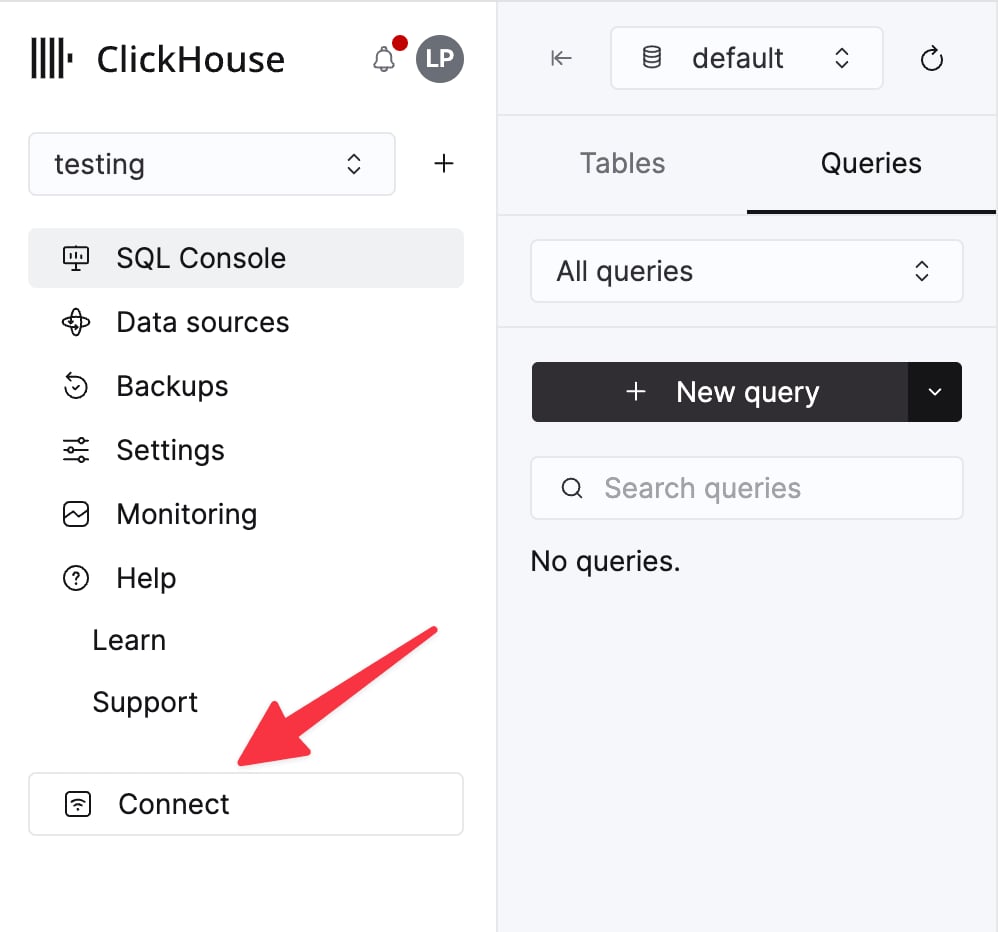
    ClickHouse Cloud サービスの詳細は、ClickHouse Cloud コンソールで確認できます。
    サービスを選択し、**Connect** をクリックします。

    <div className="ch-image-md">
      <Frame>
        <img src="https://mintcdn.com/private-7c7dfe99/EDr8ydtGBgFPOQea/images/_snippets/cloud-connect-button.webp?fit=max&auto=format&n=EDr8ydtGBgFPOQea&q=85&s=97d6a020a443f1b365b017488b39d0c8" alt="ClickHouse Cloud サービスの接続ボタン" width="998" height="932" data-path="images/_snippets/cloud-connect-button.webp" />
      </Frame>
    </div>

    **HTTPS** を選択します。接続情報は `curl` コマンドの例として表示されます。

    <div className="ch-image-md">
      <Frame>
        <img src="https://mintcdn.com/private-7c7dfe99/EDr8ydtGBgFPOQea/images/_snippets/connection-details-https.webp?fit=max&auto=format&n=EDr8ydtGBgFPOQea&q=85&s=80369fc90cd1ac3108fe455f2426c19a" alt="ClickHouse Cloud HTTPS 接続情報" width="1320" height="1184" data-path="images/_snippets/connection-details-https.webp" />
      </Frame>
    </div>

    セルフマネージド ClickHouse を使用している場合、接続情報は ClickHouse 管理者によって設定されます。
  </Step>

  <Step title="ThoughtSpot で ClickHouse 接続を作成する" id="2-create-a-clickhouse-connection-in-thoughtspot">
    1. **Data workspace** > **Connections** に移動します。

    2. **+ Create connection** をクリックし、**ClickHouse** タイルを選択して **Next** をクリックします。

    3. 接続名、説明(任意)、および前の手順で収集した ClickHouse の接続情報を入力し、**Next** をクリックします。各属性の詳細については、ThoughtSpot ドキュメントの [ClickHouse connection reference](https://docs.thoughtspot.com/cloud/latest/connections-clickhouse-reference) を参照してください。

    4. (任意)クエリ単位のタイムアウトを設定するには、**Advanced Config** メニューを開き、**Key** に `queryTimeoutSeconds` を、**Value** にタイムアウト値を秒単位で入力します。上限は 10 分程度にすることを推奨します。

    5. (任意)キー・バリューのペアを追加で指定するには、**Advanced Config** メニューを開き、**Key** と **Value** を入力します。さらにペアを追加するには、プラス記号(**+**)をクリックします。

           <Note>
             入力するキー・バリューのペアは、ClickHouse データソースで定義されている必要があります。キー・バリューのペアでは大文字と小文字が区別されます。
           </Note>

    6. 使用するテーブルとカラムを選択し、**Create connection** をクリックします。追加されたテーブルとカラムの数を示すメッセージが表示されます。

    作成した接続は **Data workspace** > **Connections** ページに表示されます。これで、ThoughtSpot で ClickHouse のデータを検索し、リンクされたテーブルに対してライブクエリを実行できます。
  </Step>
</Steps>