> ## Documentation Index
> Fetch the complete documentation index at: https://clickhouse.com/docs/llms.txt
> Use this file to discover all available pages before exploring further.

> Fabi.ai is an all-in-one collaborate data analysis platform. You can leverage SQL, Python, AI, and no-code to build dashboard and data workflows faster than ever before

# Connecting ClickHouse to Fabi.ai

export const CommunityMaintainedBadge = () => {
  return <div className="CommunityMaintainedBadge">
            <div className="CommunityMaintainedIcon">
            <svg xmlns="http://www.w3.org/2000/svg" width="20" height="20" fill="currentColor" viewBox="0 0 256 256">
                <path d="M244.8,150.4a8,8,0,0,1-11.2-1.6A51.6,51.6,0,0,0,192,128a8,8,0,0,1-7.37-4.89,8,8,0,0,1,0-6.22A8,8,0,0,1,192,112a24,24,0,1,0-23.24-30,8,8,0,1,1-15.5-4A40,40,0,1,1,219,117.51a67.94,67.94,0,0,1,27.43,21.68A8,8,0,0,1,244.8,150.4ZM190.92,212a8,8,0,1,1-13.84,8,57,57,0,0,0-98.16,0,8,8,0,1,1-13.84-8,72.06,72.06,0,0,1,33.74-29.92,48,48,0,1,1,58.36,0A72.06,72.06,0,0,1,190.92,212ZM128,176a32,32,0,1,0-32-32A32,32,0,0,0,128,176ZM72,120a8,8,0,0,0-8-8A24,24,0,1,1,87.24,82a8,8,0,1,0,15.5-4A40,40,0,1,0,37,117.51,67.94,67.94,0,0,0,9.6,139.19a8,8,0,1,0,12.8,9.61A51.6,51.6,0,0,1,64,128,8,8,0,0,0,72,120Z"></path>
            </svg>
        </div>
            Community Maintained
        </div>;
};

export const Image = ({img, alt, size = "lg"}) => {
  const normalizedSize = ["sm", "md", "lg"].includes(size) ? size : "lg";
  return <div className={`ch-image-${normalizedSize}`}>
      <Frame>
        <img src={img} alt={alt} />
      </Frame>
    </div>;
};

<CommunityMaintainedBadge />

<a href="https://www.fabi.ai/" target="_blank">Fabi.ai</a> is an all-in-one collaborate data analysis platform. You can leverage SQL, Python, AI, and no-code to build dashboard and data workflows faster than ever before. Combined with the scale and power of ClickHouse, you can build and share your first highly performant dashboard on a massive dataset in minutes.

<Image size="md" img="https://mintcdn.com/private-7c7dfe99/PWQnWTwcu17exYX2/images/integrations/data-visualization/fabi_01.webp?fit=max&auto=format&n=PWQnWTwcu17exYX2&q=85&s=a38fb1fb1fd83b3aa6d64194fc816769" alt="Fabi.ai data exploration and workflow platform" border width="2932" height="1652" data-path="images/integrations/data-visualization/fabi_01.webp" />

<h2 id="gather-your-connection-details">
  Gather Your Connection Details
</h2>

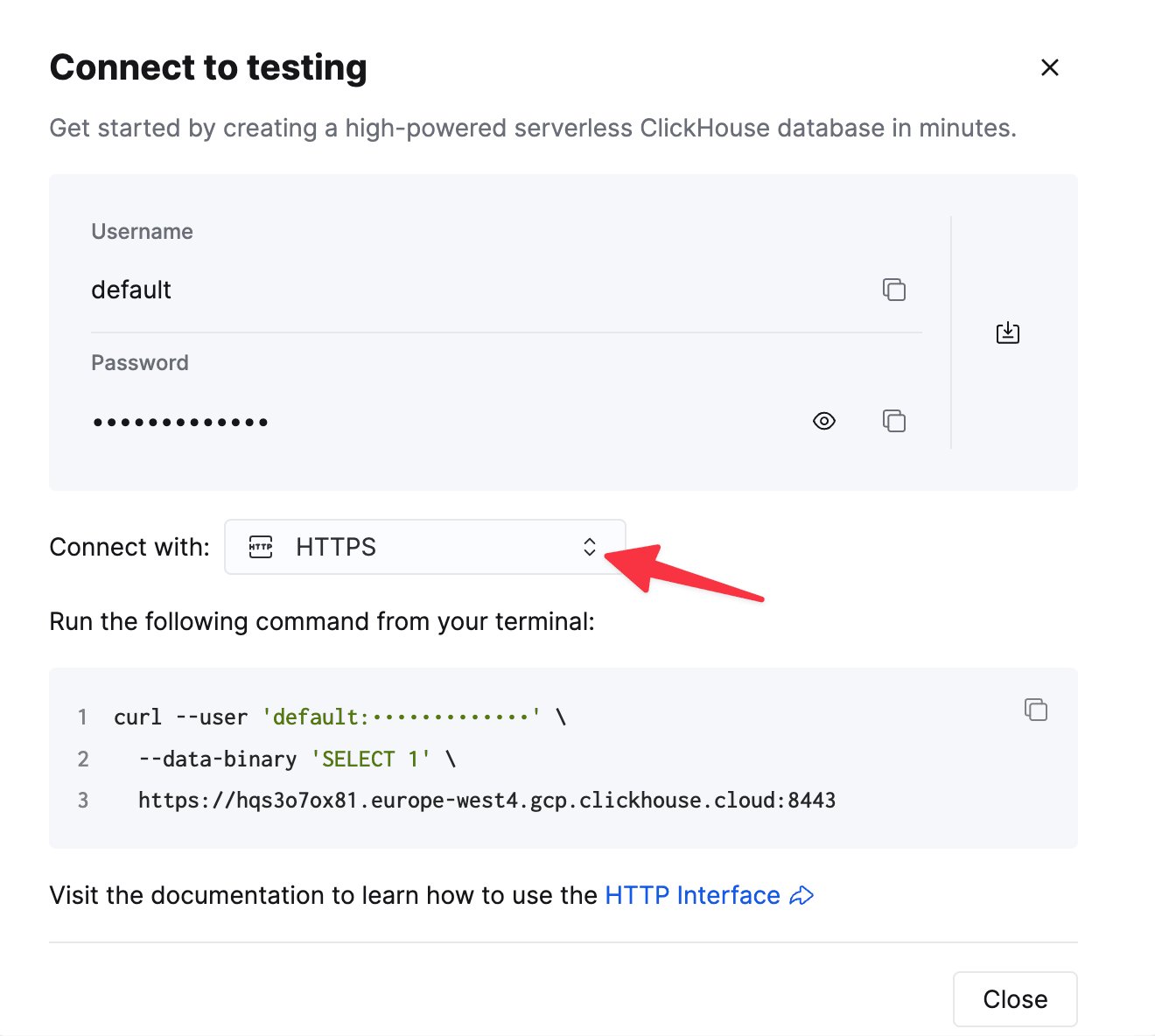
To connect to ClickHouse with HTTP(S) you need this information:

| Parameter(s)              | Description                                                                                                    |
| ------------------------- | -------------------------------------------------------------------------------------------------------------- |
| `HOST` and `PORT`         | Typically, the port is 8443 when using TLS or 8123 when not using TLS.                                         |
| `DATABASE NAME`           | Out of the box, there is a database named `default`, use the name of the database that you want to connect to. |
| `USERNAME` and `PASSWORD` | Out of the box, the username is `default`. Use the username appropriate for your use case.                     |

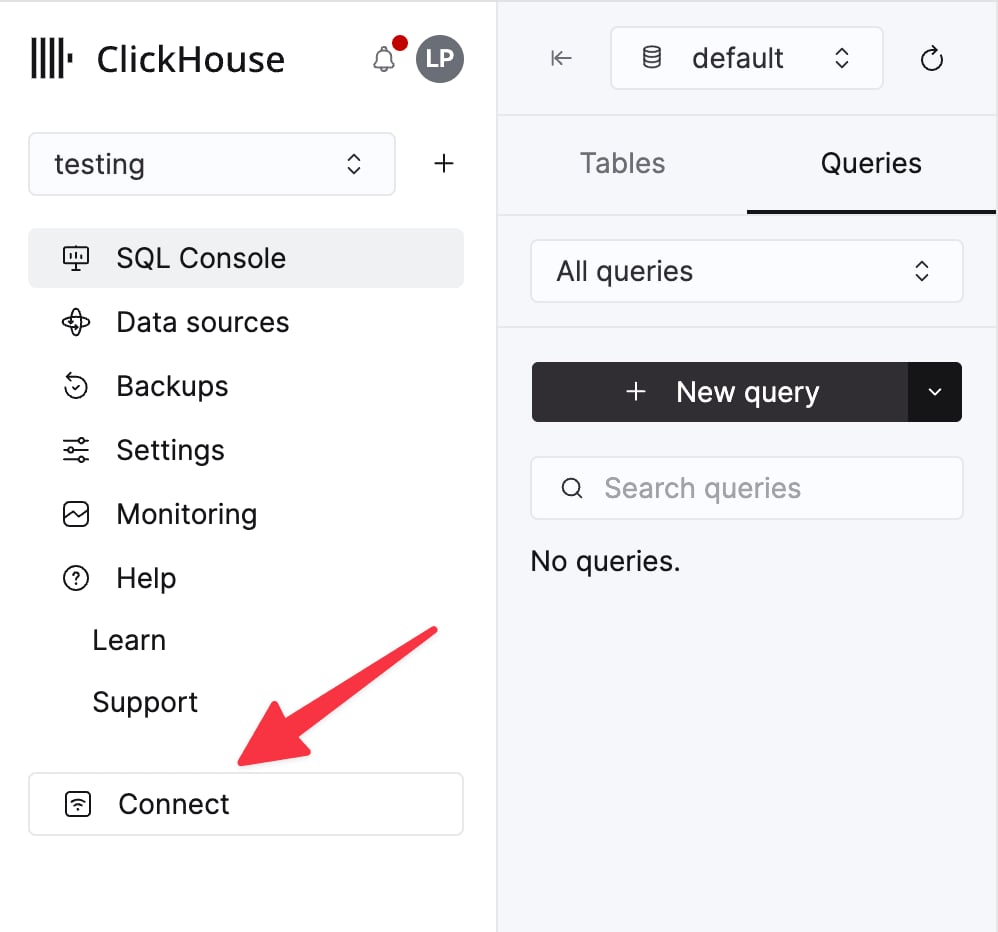
The details for your ClickHouse Cloud service are available in the ClickHouse Cloud console.
Select a service and click **Connect**:

<div className="ch-image-md">
  <Frame>
    <img src="https://mintcdn.com/private-7c7dfe99/CFFsa2agBPbviR4r/images/_snippets/cloud-connect-button.webp?fit=max&auto=format&n=CFFsa2agBPbviR4r&q=85&s=ec0a298a33ca841e947fa5e8bae47362" alt="ClickHouse Cloud service connect button" width="998" height="932" data-path="images/_snippets/cloud-connect-button.webp" />
  </Frame>
</div>

Choose **HTTPS**. Connection details are displayed in an example `curl` command.

<div className="ch-image-md">
  <Frame>
    <img src="https://mintcdn.com/private-7c7dfe99/CFFsa2agBPbviR4r/images/_snippets/connection-details-https.webp?fit=max&auto=format&n=CFFsa2agBPbviR4r&q=85&s=cb0fbd98aa2b5b7ca484c9f53395ee07" alt="ClickHouse Cloud HTTPS connection details" width="1320" height="1184" data-path="images/_snippets/connection-details-https.webp" />
  </Frame>
</div>

If you're using self-managed ClickHouse, the connection details are set by your ClickHouse administrator.

<h2 id="connect-to-clickhouse">
  Create your Fabi.ai account and connect ClickHouse
</h2>

Log in or create your Fabi.ai account: [https://app.fabi.ai/](https://app.fabi.ai/)

1. You’ll be prompted to connect your database when you first create your account, or if you already have an account, click on the data source panel on the left of any Smartbook and select Add Data Source.

   <Image size="lg" img="https://mintcdn.com/private-7c7dfe99/PWQnWTwcu17exYX2/images/integrations/data-visualization/fabi_02.webp?fit=max&auto=format&n=PWQnWTwcu17exYX2&q=85&s=7297f55be14fd49e5cd2fa274b217a3f" alt="Add data source" border width="2026" height="1408" data-path="images/integrations/data-visualization/fabi_02.webp" />

2. You’ll then be prompted to enter your connection details.

   <Image size="md" img="https://mintcdn.com/private-7c7dfe99/PWQnWTwcu17exYX2/images/integrations/data-visualization/fabi_03.webp?fit=max&auto=format&n=PWQnWTwcu17exYX2&q=85&s=529d4da3995af4b0b56e7d47ffb0382c" alt="ClickHouse credentials form" border width="1052" height="1386" data-path="images/integrations/data-visualization/fabi_03.webp" />

3. Congratulations! You have now integrated ClickHouse into Fabi.ai.

<h2 id="querying-clickhouse">
  Querying ClickHouse.
</h2>

Once you’ve connected Fabi.ai to ClickHouse, go to any [Smartbook](https://docs.fabi.ai/analysis_and_reporting/smartbooks) and create a SQL cell. If you only have one data source connected to your Fabi.ai instance, the SQL cell will automatically default to ClickHouse, otherwise you can choose the source to query from the source dropdown.

<Image size="lg" img="https://mintcdn.com/private-7c7dfe99/PWQnWTwcu17exYX2/images/integrations/data-visualization/fabi_04.webp?fit=max&auto=format&n=PWQnWTwcu17exYX2&q=85&s=4f10555b511027d543b54d2f76ac0991" alt="Querying ClickHouse" border width="1476" height="320" data-path="images/integrations/data-visualization/fabi_04.webp" />

<h2 id="additional-resources">
  Additional Resources
</h2>

[Fabi.ai](https://www.fabi.ai) documentation: [https://docs.fabi.ai/introduction](https://docs.fabi.ai/introduction)

[Fabi.ai](https://www.fabi.ai) getting started tutorial videos: [https://www.youtube.com/playlist?list=PLjxPRVnyBCQXxxByw2CLC0q7c-Aw6t2nl](https://www.youtube.com/playlist?list=PLjxPRVnyBCQXxxByw2CLC0q7c-Aw6t2nl)