> ## Documentation Index
> Fetch the complete documentation index at: https://clickhouse.com/docs/llms.txt
> Use this file to discover all available pages before exploring further.

> Astrato brings true Self-Service BI to Enterprises & Data Businesses by putting analytics in the hands of every user, enabling them to build their own dashboards, reports and data apps, enabling the answering of data questions without IT help. Astrato accelerates adoption, speeds up decision-making, and unifies analytics, embedded analytics, data input, and data apps in one platform. Astrato unites action and analytics in one,  introduce live write-back, interact with ML models, accelerate your analytics with AI – go beyond dashboarding, thanks to pushdown SQL support in Astrato.

# Connecting Astrato to ClickHouse

export const CommunityMaintainedBadge = () => {
  return <div className="CommunityMaintainedBadge">
            <div className="CommunityMaintainedIcon">
            <svg xmlns="http://www.w3.org/2000/svg" width="20" height="20" fill="currentColor" viewBox="0 0 256 256">
                <path d="M244.8,150.4a8,8,0,0,1-11.2-1.6A51.6,51.6,0,0,0,192,128a8,8,0,0,1-7.37-4.89,8,8,0,0,1,0-6.22A8,8,0,0,1,192,112a24,24,0,1,0-23.24-30,8,8,0,1,1-15.5-4A40,40,0,1,1,219,117.51a67.94,67.94,0,0,1,27.43,21.68A8,8,0,0,1,244.8,150.4ZM190.92,212a8,8,0,1,1-13.84,8,57,57,0,0,0-98.16,0,8,8,0,1,1-13.84-8,72.06,72.06,0,0,1,33.74-29.92,48,48,0,1,1,58.36,0A72.06,72.06,0,0,1,190.92,212ZM128,176a32,32,0,1,0-32-32A32,32,0,0,0,128,176ZM72,120a8,8,0,0,0-8-8A24,24,0,1,1,87.24,82a8,8,0,1,0,15.5-4A40,40,0,1,0,37,117.51,67.94,67.94,0,0,0,9.6,139.19a8,8,0,1,0,12.8,9.61A51.6,51.6,0,0,1,64,128,8,8,0,0,0,72,120Z"></path>
            </svg>
        </div>
            Community Maintained
        </div>;
};

export const Image = ({img, alt, size = "lg"}) => {
  const normalizedSize = ["sm", "md", "lg"].includes(size) ? size : "lg";
  return <div className={`ch-image-${normalizedSize}`}>
      <Frame>
        <img src={img} alt={alt} />
      </Frame>
    </div>;
};

<CommunityMaintainedBadge />

Astrato uses Pushdown SQL to query ClickHouse Cloud or on-premise deployments directly. This means you can access all of the data you need, powered by the industry-leading performance of ClickHouse.

<h2 id="connection-data-required">
  Connection data required
</h2>

When setting up your data connection, you'll need to know:

* Data connection: Hostname, Port

* Database Credentials: Username, Password

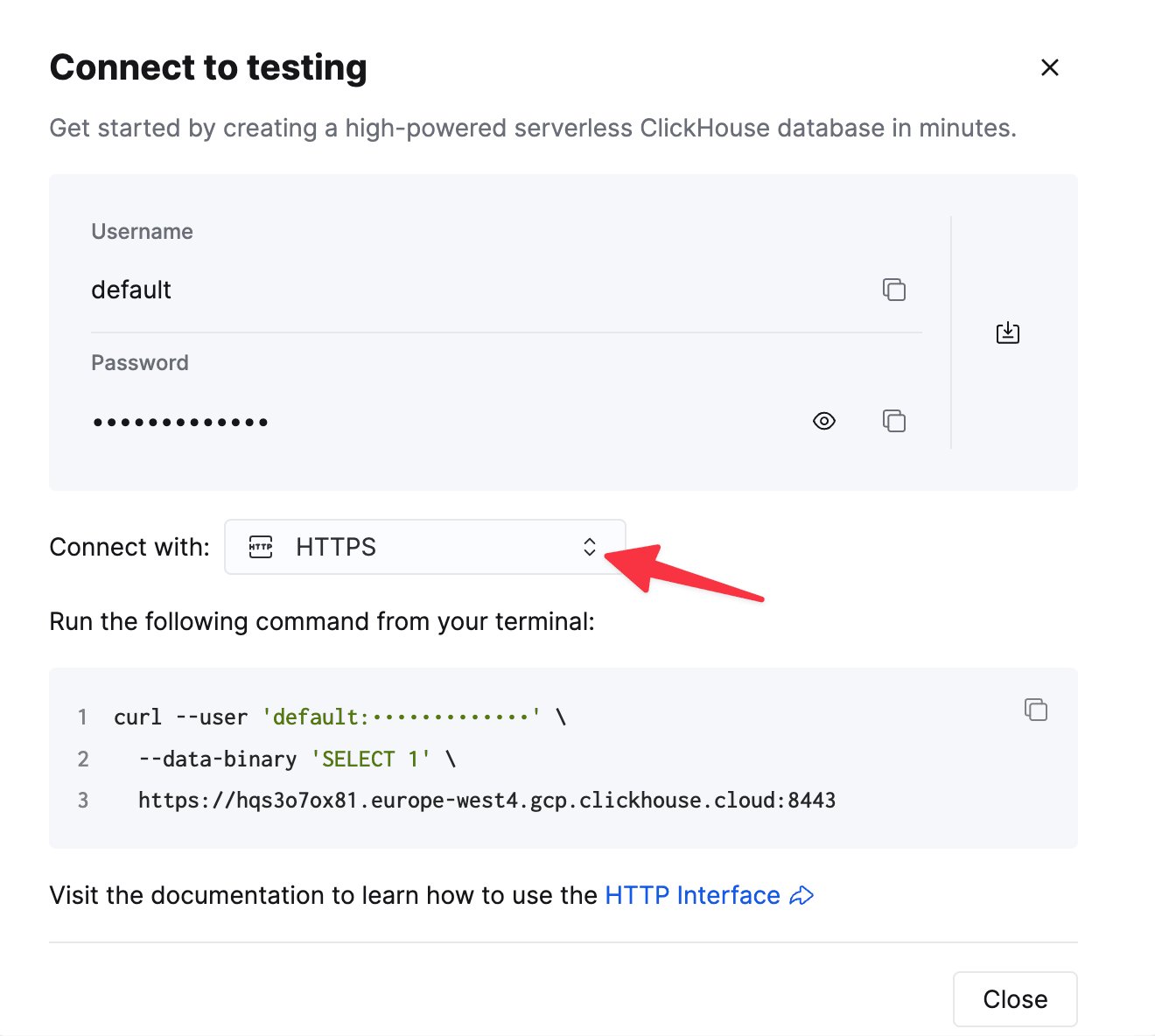
To connect to ClickHouse with HTTP(S) you need this information:

| Parameter(s)              | Description                                                                                                    |
| ------------------------- | -------------------------------------------------------------------------------------------------------------- |
| `HOST` and `PORT`         | Typically, the port is 8443 when using TLS or 8123 when not using TLS.                                         |
| `DATABASE NAME`           | Out of the box, there is a database named `default`, use the name of the database that you want to connect to. |
| `USERNAME` and `PASSWORD` | Out of the box, the username is `default`. Use the username appropriate for your use case.                     |

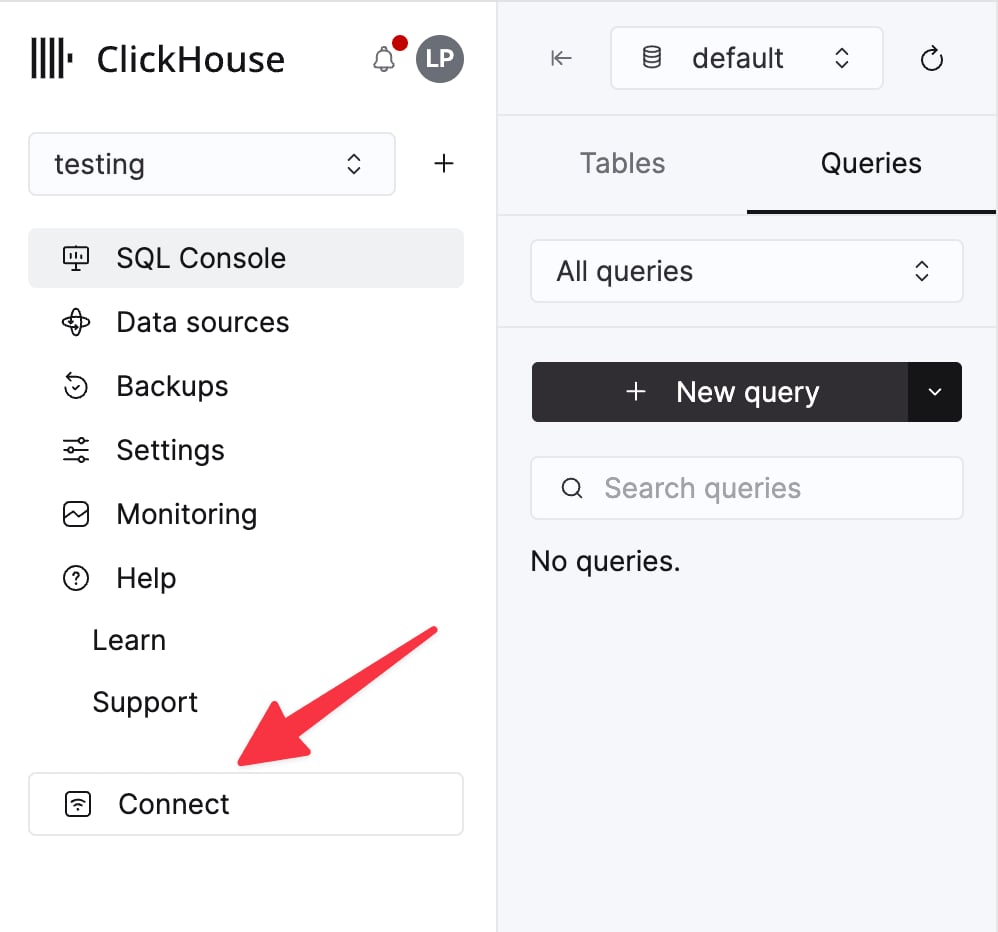
The details for your ClickHouse Cloud service are available in the ClickHouse Cloud console.
Select a service and click **Connect**:

<div className="ch-image-md">
  <Frame>
    <img src="https://mintcdn.com/private-7c7dfe99/CFFsa2agBPbviR4r/images/_snippets/cloud-connect-button.webp?fit=max&auto=format&n=CFFsa2agBPbviR4r&q=85&s=ec0a298a33ca841e947fa5e8bae47362" alt="ClickHouse Cloud service connect button" width="998" height="932" data-path="images/_snippets/cloud-connect-button.webp" />
  </Frame>
</div>

Choose **HTTPS**. Connection details are displayed in an example `curl` command.

<div className="ch-image-md">
  <Frame>
    <img src="https://mintcdn.com/private-7c7dfe99/CFFsa2agBPbviR4r/images/_snippets/connection-details-https.webp?fit=max&auto=format&n=CFFsa2agBPbviR4r&q=85&s=cb0fbd98aa2b5b7ca484c9f53395ee07" alt="ClickHouse Cloud HTTPS connection details" width="1320" height="1184" data-path="images/_snippets/connection-details-https.webp" />
  </Frame>
</div>

If you're using self-managed ClickHouse, the connection details are set by your ClickHouse administrator.

<h2 id="creating-the-data-connection-to-clickhouse">
  Creating the data connection to ClickHouse
</h2>

* Select **Data** in the sidebar, and select the **Data Connection** tab
  (or, navigate to this link: [https://app.astrato.io/data/sources](https://app.astrato.io/data/sources))
  ​
* Click on the **New Data Connection** button in the top right side of the screen.

<Image size="sm" img="https://mintcdn.com/private-7c7dfe99/PWQnWTwcu17exYX2/images/integrations/data-visualization/astrato_1_dataconnection.webp?fit=max&auto=format&n=PWQnWTwcu17exYX2&q=85&s=806b01cd8d8ae2b482f28368b3e28317" alt="Astrato Data Connection" border width="396" height="165" data-path="images/integrations/data-visualization/astrato_1_dataconnection.webp" />

* Select **ClickHouse**.

<Image size="sm" img="https://mintcdn.com/private-7c7dfe99/PWQnWTwcu17exYX2/images/integrations/data-visualization/astrato_2a_clickhouse_connection.webp?fit=max&auto=format&n=PWQnWTwcu17exYX2&q=85&s=91feeabc20a7665402c8382934173ae9" alt="Astrato ClickHouse Data Connection" border width="235" height="164" data-path="images/integrations/data-visualization/astrato_2a_clickhouse_connection.webp" />

* Complete the required fields in the connection dialogue box

<Image size="sm" img="https://mintcdn.com/private-7c7dfe99/PWQnWTwcu17exYX2/images/integrations/data-visualization/astrato_2b_clickhouse_connection.webp?fit=max&auto=format&n=PWQnWTwcu17exYX2&q=85&s=9926d9a8ec14e804e428a7d33ea53502" alt="Astrato connect to ClickHouse required fields" border width="486" height="601" data-path="images/integrations/data-visualization/astrato_2b_clickhouse_connection.webp" />

* Click **Test Connection**. If the connection is successful, give the data connection a **name** and click **Next.**

* Set the **user access** to the data connection and click **connect.**

<Image size="md" img="https://mintcdn.com/private-7c7dfe99/PWQnWTwcu17exYX2/images/integrations/data-visualization/astrato_3_user_access.webp?fit=max&auto=format&n=PWQnWTwcu17exYX2&q=85&s=59617eb5f2eaa17d07552ae3b142b78a" alt="Astrato connect to ClickHouse User Access" border width="1973" height="1651" data-path="images/integrations/data-visualization/astrato_3_user_access.webp" />

* A connection is created and a dataview is created.

<Note>
  if a duplicate is created, a timestamp is added to the data source name.
</Note>

<h2 id="creating-a-semantic-model--data-view">
  Creating a semantic model / data view
</h2>

In our Data View editor, you will see all of your Tables and Schemas in ClickHouse, select some to get started.

<Image size="lg" img="https://mintcdn.com/private-7c7dfe99/PWQnWTwcu17exYX2/images/integrations/data-visualization/astrato_4a_clickhouse_data_view.webp?fit=max&auto=format&n=PWQnWTwcu17exYX2&q=85&s=398fe1932fc832d619799aa0d379b5b2" alt="Astrato connect to ClickHouse User Access" border width="1210" height="671" data-path="images/integrations/data-visualization/astrato_4a_clickhouse_data_view.webp" />

Now that you have your data selected, go to define the **data view**. Click define on the top right of the webpage.

In here, you're able to join data, as well as, **create governed dimensions and measures** - ideal for driving consistency in business logic across various teams.

<Image size="lg" img="https://mintcdn.com/private-7c7dfe99/PWQnWTwcu17exYX2/images/integrations/data-visualization/astrato_4b_clickhouse_data_view_joins.webp?fit=max&auto=format&n=PWQnWTwcu17exYX2&q=85&s=879a1a1ebc0e1c1f230e35f5ae844043" alt="Astrato connect to ClickHouse User Access" border width="1208" height="669" data-path="images/integrations/data-visualization/astrato_4b_clickhouse_data_view_joins.webp" />

**Astrato intelligently suggests joins** using your meta data, including leveraging the keys in ClickHouse. Our suggested joins make it easy for you to gets started, working from your well-governed ClickHouse data, without reinventing the wheel. We also show you **join quality** so that you have the option to review all suggestions, in detail, from Astrato.

<Image size="lg" img="https://mintcdn.com/private-7c7dfe99/PWQnWTwcu17exYX2/images/integrations/data-visualization/astrato_4c_clickhouse_completed_data_view.webp?fit=max&auto=format&n=PWQnWTwcu17exYX2&q=85&s=33668dda643494290403bf9ec908081f" alt="Astrato connect to ClickHouse User Access" border width="1210" height="672" data-path="images/integrations/data-visualization/astrato_4c_clickhouse_completed_data_view.webp" />

<h2 id="creating-a-dashboard">
  Creating a dashboard
</h2>

In just a few steps, you can build your first chart in Astrato.

1. Open visuals panel
2. Select a visual (lets start with Column Bar Chart)
3. Add dimensions
4. Add measures

<Image size="lg" img="https://mintcdn.com/private-7c7dfe99/PWQnWTwcu17exYX2/images/integrations/data-visualization/astrato_5a_clickhouse_build_chart.webp?fit=max&auto=format&n=PWQnWTwcu17exYX2&q=85&s=08a51bb303040f0f31692ec7fc11be71" alt="Astrato connect to ClickHouse User Access" border width="1215" height="675" data-path="images/integrations/data-visualization/astrato_5a_clickhouse_build_chart.webp" />

<h3 id="view-generated-sql-supporting-each-visualization">
  View generated SQL supporting each visualization
</h3>

Transparency and accuracy are at the heart of Astrato. We ensure that every query generated is visible, letting you keep full control. All compute happens directly in ClickHouse, taking advantage of its speed while maintaining robust security and governance.

<Image size="lg" img="https://mintcdn.com/private-7c7dfe99/PWQnWTwcu17exYX2/images/integrations/data-visualization/astrato_5b_clickhouse_view_sql.webp?fit=max&auto=format&n=PWQnWTwcu17exYX2&q=85&s=a1f85efb08f5bbf55285658e7cedd93c" alt="Astrato connect to ClickHouse User Access" border width="1215" height="675" data-path="images/integrations/data-visualization/astrato_5b_clickhouse_view_sql.webp" />

<h3 id="example-completed-dashboard">
  Example completed dashboard
</h3>

A beautiful complete dashboard or data app isn't far away now. To see more of what we've built, head to our demo gallery on our website. [https://astrato.io/gallery](https://astrato.io/gallery)
<Image size="lg" img="https://mintcdn.com/private-7c7dfe99/PWQnWTwcu17exYX2/images/integrations/data-visualization/astrato_5c_clickhouse_complete_dashboard.webp?fit=max&auto=format&n=PWQnWTwcu17exYX2&q=85&s=49402b740a457b5c97f0aa3e0236678f" alt="Astrato connect to ClickHouse User Access" border width="1306" height="800" data-path="images/integrations/data-visualization/astrato_5c_clickhouse_complete_dashboard.webp" />
