> ## Documentation Index
> Fetch the complete documentation index at: https://clickhouse.com/docs/llms.txt
> Use this file to discover all available pages before exploring further.
> Using HTTP Connector Sink with Kafka Connect and ClickHouse
# Confluent HTTP sink connector
export const Image = ({img, alt, size = "lg"}) => {
const normalizedSize = ["sm", "md", "lg"].includes(size) ? size : "lg";
return ;
};
The HTTP Sink Connector is data type agnostic and thus doesn't need a Kafka schema as well as supporting ClickHouse specific data types such as Maps and Arrays. This additional flexibility comes at a slight increase in configuration complexity.
Below we describe a simple installation, pulling messages from a single Kafka topic and inserting rows into a ClickHouse table.
The HTTP Connector is distributed under the [Confluent Enterprise License](https://docs.confluent.io/kafka-connect-http/current/overview.html#license).
Quick start steps
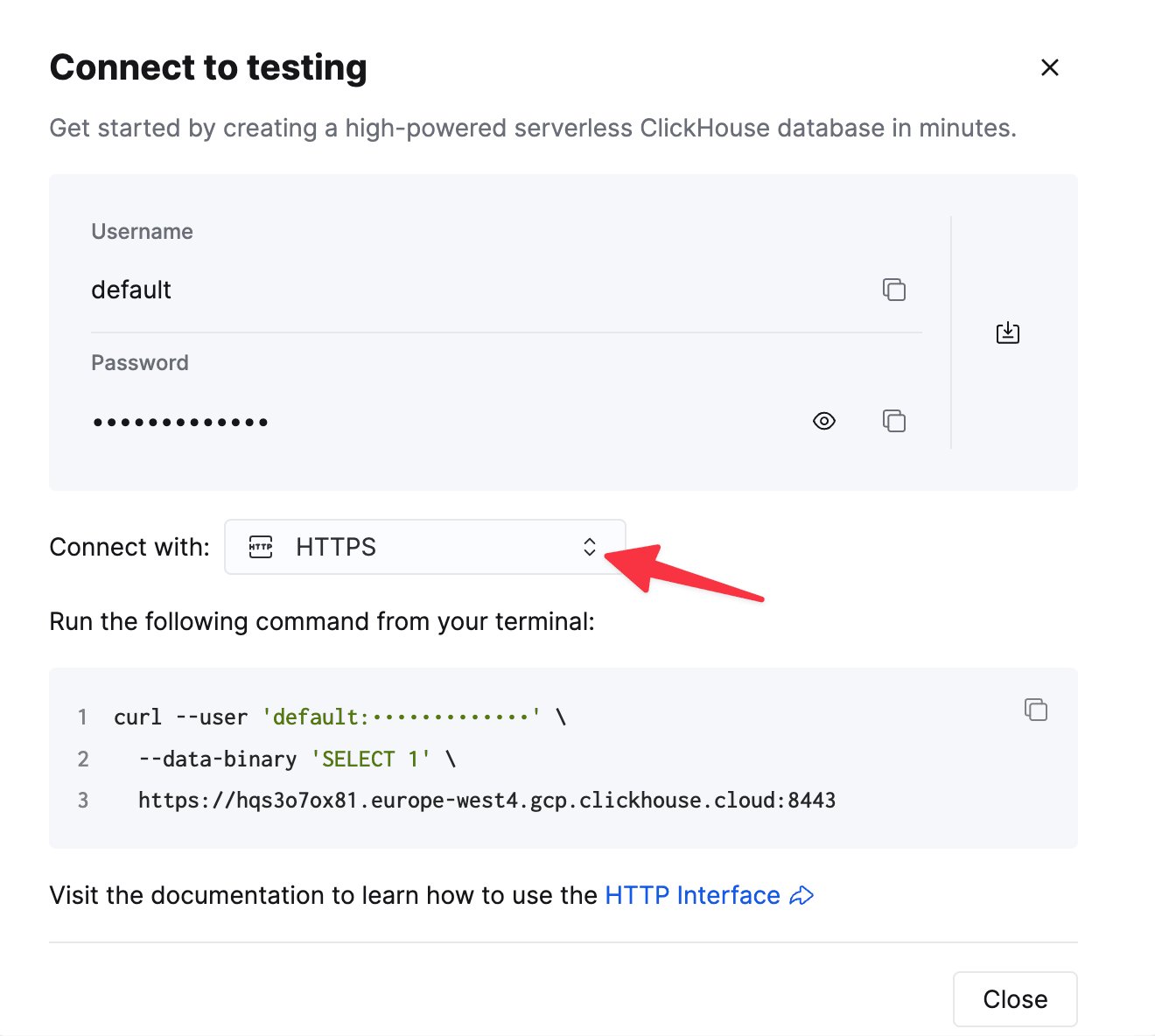
To connect to ClickHouse with HTTP(S) you need this information:
| Parameter(s) | Description |
| ------------------------- | -------------------------------------------------------------------------------------------------------------- |
| `HOST` and `PORT` | Typically, the port is 8443 when using TLS or 8123 when not using TLS. |
| `DATABASE NAME` | Out of the box, there is a database named `default`, use the name of the database that you want to connect to. |
| `USERNAME` and `PASSWORD` | Out of the box, the username is `default`. Use the username appropriate for your use case. |
The details for your ClickHouse Cloud service are available in the ClickHouse Cloud console.
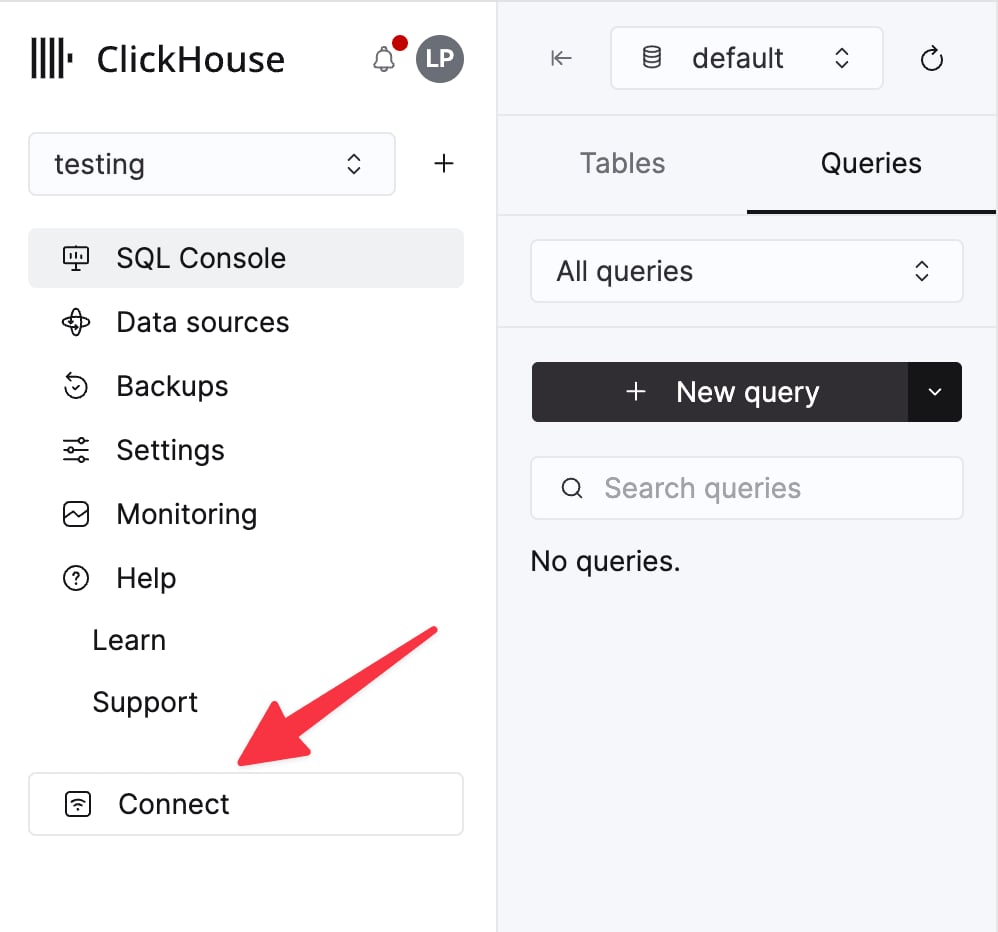
Select a service and click **Connect**:
Choose **HTTPS**. Connection details are displayed in an example `curl` command.
If you're using self-managed ClickHouse, the connection details are set by your ClickHouse administrator.
You have two options:
* **Self-managed:** Download the Confluent package and install it locally. Follow the installation instructions for installing the connector as documented [here](https://docs.confluent.io/kafka-connect-http/current/overview.html).
If you use the confluent-hub installation method, your local configuration files will be updated.
* **Confluent Cloud:** A fully managed version of HTTP Sink is available for those using Confluent Cloud for their Kafka hosting. This requires your ClickHouse environment to be accessible from Confluent Cloud.
The following examples are using Confluent Cloud.
Before the connectivity test, let's start by creating a test table in ClickHouse Cloud, this table will receive the data from Kafka:
```sql theme={null}
CREATE TABLE default.my_table
(
`side` String,
`quantity` Int32,
`symbol` String,
`price` Int32,
`account` String,
`userid` String
)
ORDER BY tuple()
```
Create a Kafka topic and an instance of HTTP Sink Connector:
Configure HTTP Sink Connector:
* Provide the topic name you created
* Authentication
* `HTTP Url` - ClickHouse Cloud URL with a `INSERT` query specified `://:?query=INSERT%20INTO%20.%20FORMAT%20JSONEachRow`. **Note**: the query must be encoded.
* `Endpoint Authentication type` - BASIC
* `Auth username` - ClickHouse username
* `Auth password` - ClickHouse password
This HTTP Url is error-prone. Ensure escaping is precise to avoid issues.
* Configuration
* `Input Kafka record value format`Depends on your source data but in most cases JSON or Avro. We assume `JSON` in the following settings.
* In `advanced configurations` section:
* `HTTP Request Method` - Set to POST
* `Request Body Format` - json
* `Batch batch size` - Per ClickHouse recommendations, set this to **at least 1000**.
* `Batch json as array` - true
* `Retry on HTTP codes` - 400-500 but adapt as required e.g. this may change if you have an HTTP proxy in front of ClickHouse.
* `Maximum Reties` - the default (10) is appropriate but feel to adjust for more robust retries.
Create an message in a topic configured by your HTTP Sink
and verify the created message's been written to your ClickHouse instance.
Troubleshooting
HTTP Sink doesn't batch messages
From the [Sink documentation](https://docs.confluent.io/kafka-connectors/http/current/overview.html#http-sink-connector-for-cp):
> The HTTP Sink connector doesn't batch requests for messages containing Kafka header values that are different.
1. Verify your Kafka records have the same key.
2. When you add parameters to the HTTP API URL, each record can result in a unique URL. For this reason, batching is disabled when using additional URL parameters.
400 bad request
CANNOT\_PARSE\_QUOTED\_STRING
If HTTP Sink fails with the following message when inserting a JSON object into a `String` column:
```response theme={null}
Code: 26. DB::ParsingException: Cannot parse JSON string: expected opening quote: (while reading the value of key key_name): While executing JSONEachRowRowInputFormat: (at row 1). (CANNOT_PARSE_QUOTED_STRING)
```
Set `input_format_json_read_objects_as_strings=1` setting in URL as encoded string `SETTINGS%20input_format_json_read_objects_as_strings%3D1`
Load the GitHub dataset (optional)
Note that this example preserves the Array fields of the Github dataset. We assume you have an empty github topic in the examples and use [kcat](https://github.com/edenhill/kcat) for message insertion to Kafka.
Follow [these instructions](https://docs.confluent.io/cloud/current/cp-component/connect-cloud-config.html#set-up-a-local-connect-worker-with-cp-install) for setting up Connect relevant to your installation type, noting the differences between a standalone and distributed cluster. If using Confluent Cloud, the distributed setup is relevant.
The most important parameter is the `http.api.url`. The [HTTP interface](/docs/concepts/features/interfaces/http) for ClickHouse requires you to encode the INSERT statement as a parameter in the URL. This must include the format (`JSONEachRow` in this case) and target database. The format must be consistent with the Kafka data, which will be converted to a string in the HTTP payload. These parameters must be URL escaped. An example of this format for the Github dataset (assuming you're running ClickHouse locally) is shown below:
```response theme={null}
://:?query=INSERT%20INTO%20.%20FORMAT%20JSONEachRow
http://localhost:8123?query=INSERT%20INTO%20default.github%20FORMAT%20JSONEachRow
```
The following additional parameters are relevant to using the HTTP Sink with ClickHouse. A complete parameter list can be found [here](https://docs.confluent.io/kafka-connect-http/current/connector_config.html):
* `request.method` - Set to **POST**
* `retry.on.status.codes` - Set to 400-500 to retry on any error codes. Refine based expected errors in data.
* `request.body.format` - In most cases this will be JSON.
* `auth.type` - Set to BASIC if you security with ClickHouse. Other ClickHouse compatible authentication mechanisms aren't currently supported.
* `ssl.enabled` - set to true if using SSL.
* `connection.user` - username for ClickHouse.
* `connection.password` - password for ClickHouse.
* `batch.max.size` - The number of rows to send in a single batch. Ensure this set is to an appropriately large number. Per ClickHouse [recommendations](/docs/reference/statements/insert-into#performance-considerations) a value of 1000 should be considered a minimum.
* `tasks.max` - The HTTP Sink connector supports running one or more tasks. This can be used to increase performance. Along with batch size this represents your primary means of improving performance.
* `key.converter` - set according to the types of your keys.
* `value.converter` - set based on the type of data on your topic. This data doesn't need a schema. The format here must be consistent with the FORMAT specified in the parameter `http.api.url`. The simplest here is to use JSON and the org.apache.kafka.connect.json.JsonConverter converter. Treating the value as a string, via the converter org.apache.kafka.connect.storage.StringConverter, is also possible - although this will require the user to extract a value in the insert statement using functions. [Avro format](/docs/reference/formats/Avro/Avro) is also supported in ClickHouse if using the io.confluent.connect.avro.AvroConverter converter.
A full list of settings, including how to configure a proxy, retries, and advanced SSL, can be found [here](https://docs.confluent.io/kafka-connect-http/current/connector_config.html).
Example configuration files for the Github sample data can be found [here](https://github.com/ClickHouse/clickhouse-docs/tree/main/docs/integrations/data-ingestion/kafka/code/connectors/http_sink), assuming Connect is run in standalone mode and Kafka is hosted in Confluent Cloud.
Ensure the table has been created. An example for a minimal github dataset using a standard MergeTree is shown below.
```sql theme={null}
CREATE TABLE github
(
file_time DateTime,
event_type Enum('CommitCommentEvent' = 1, 'CreateEvent' = 2, 'DeleteEvent' = 3, 'ForkEvent' = 4,'GollumEvent' = 5, 'IssueCommentEvent' = 6, 'IssuesEvent' = 7, 'MemberEvent' = 8, 'PublicEvent' = 9, 'PullRequestEvent' = 10, 'PullRequestReviewCommentEvent' = 11, 'PushEvent' = 12, 'ReleaseEvent' = 13, 'SponsorshipEvent' = 14, 'WatchEvent' = 15, 'GistEvent' = 16, 'FollowEvent' = 17, 'DownloadEvent' = 18, 'PullRequestReviewEvent' = 19, 'ForkApplyEvent' = 20, 'Event' = 21, 'TeamAddEvent' = 22),
actor_login LowCardinality(String),
repo_name LowCardinality(String),
created_at DateTime,
updated_at DateTime,
action Enum('none' = 0, 'created' = 1, 'added' = 2, 'edited' = 3, 'deleted' = 4, 'opened' = 5, 'closed' = 6, 'reopened' = 7, 'assigned' = 8, 'unassigned' = 9, 'labeled' = 10, 'unlabeled' = 11, 'review_requested' = 12, 'review_request_removed' = 13, 'synchronize' = 14, 'started' = 15, 'published' = 16, 'update' = 17, 'create' = 18, 'fork' = 19, 'merged' = 20),
comment_id UInt64,
path String,
ref LowCardinality(String),
ref_type Enum('none' = 0, 'branch' = 1, 'tag' = 2, 'repository' = 3, 'unknown' = 4),
creator_user_login LowCardinality(String),
number UInt32,
title String,
labels Array(LowCardinality(String)),
state Enum('none' = 0, 'open' = 1, 'closed' = 2),
assignee LowCardinality(String),
assignees Array(LowCardinality(String)),
closed_at DateTime,
merged_at DateTime,
merge_commit_sha String,
requested_reviewers Array(LowCardinality(String)),
merged_by LowCardinality(String),
review_comments UInt32,
member_login LowCardinality(String)
) ENGINE = MergeTree ORDER BY (event_type, repo_name, created_at)
```
Insert messages to Kafka. Below we use [kcat](https://github.com/edenhill/kcat) to insert 10k messages.
```bash theme={null}
head -n 10000 github_all_columns.ndjson | kcat -b : -X security.protocol=sasl_ssl -X sasl.mechanisms=PLAIN -X sasl.username= -X sasl.password= -t github
```
A simple read on the target table "Github" should confirm the insertion of data.
```sql theme={null}
SELECT count() FROM default.github;
| count\(\) |
| :--- |
| 10000 |
```