---
title: "State of Geospatial in ClickHouse in March 2026"
date: "2026-07-30T10:53:15.438Z"
author: "Mark Needham"
category: "Product"
excerpt: "Everything you need to know about ClickHouse as a geospatial analytics engine: its type system, indexing grids, strengths, and limitations."
---
# State of Geospatial in ClickHouse in March 2026
ClickHouse is best known as an analytics engine built for speed at scale, but over the past several years it has grown a surprisingly complete set of geospatial capabilities.
In this post we're going to take a tour of where things stand today: the type system, the functions, the sharp edges, a look at where ClickHouse fits and where it does not.
## A brief history {#a-brief-history}
Geospatial support in ClickHouse has grown steadily over time rather than arriving all at once.
ClickHouse uses a YY.MM versioning scheme - version 20.1 shipped in January 2020, 21.9 in September 2021, and so on. The earliest geospatial functions predate this scheme and appear under version 1.x in the function catalog.
Those early functions were a handful of coordinate-distance functions: `greatCircleDistance` and eventually `geoDistance`. There were no geometry types - functions just took raw coordinate values as parameters.
In 2020 (version 20.1), the grid-based indexing systems arrived: `geohashEncode`/`geohashDecode` and [H3](https://h3geo.org/) (Uber's hexagonal hierarchical grid) both landed in that release. [S2](https://s2geometry.io/) (Google's spherical geometry library) followed in 2021 (version 21.9). These cover a huge share of real-world spatial analytics use cases - binning observations into cells, aggregating by region at a chosen resolution, proximity lookups - and ClickHouse handles them extremely fast.
`Point`, `Ring`, `Polygon`, and `MultiPolygon` arrived in v20.5 (May 2020), initially behind an experimental flag. They are custom names layered over ClickHouse's existing primitives - `Tuple` and `Array` - rather than a separate storage format. The experimental flag was removed in v23.5, making them production-ready. WKT parsing functions like `readWKTPolygon` and `svg` followed in v21.4. `LineString` came later still, added in v24.6.
The most significant recent additions both landed in 2025. The `Geometry` type, introduced in v25.11, uses the [`Variant`](https://clickhouse.com/docs/en/sql-reference/data-types/variant) type and can hold any geometry subtype in a single column - points alongside polygons alongside linestrings - without splitting into separate columns or tables. WKB (Well-Known Binary) support arrived around the same time (v25.7–v25.12), enabling direct import from [PostGIS](https://postgis.net) and other GIS tools without a text parsing round-trip.
If you want to trace this history yourself, you can use the `system.functions` table, which records which version each function was introduced in:
SELECT
    splitByChar('.', introduced_in)[1] AS major_version,
    count(),
    bar(count(), 0, 40, 40) AS chart
FROM system.functions
WHERE categories LIKE '%Geo%'
GROUP BY major_version
ORDER BY major_version ASC
```shell
┌─major_version─┬─count()─┬─chart───────────────────────────────────┐
│ 1 │ 5 │ █████ │
│ 20 │ 17 │ █████████████████ │
│ 21 │ 39 │ ███████████████████████████████████████ │
│ 22 │ 23 │ ███████████████████████ │
│ 25 │ 15 │ ███████████████ │
└───────────────┴─────────┴─────────────────────────────────────────┘
```
The big batch of functions in 2021 reflects the arrival of WKT parsing functions, S2 support, and additional H3 functions all within that release year.
To see the full list with exact versions, [`sortableSemVer`](https://clickhouse.com/blog/semantic-versioning-udf) lets you sort version strings correctly (ClickHouse's built-in `version` type won't sort `20.1` before `21.4` lexicographically for example):
CREATE FUNCTION sortableSemVer AS version ->
    arrayMap(
        x -> toUInt32OrZero(x),
        splitByChar('.', extract(version, '(\d+(\.\d+)+)'))
    );

SELECT name, introduced_in
FROM system.functions
WHERE categories LIKE '%Geo%'
ORDER BY sortableSemVer(introduced_in) ASC;
There are more than 90 functions, so we won't list them all here.
## The type system {#the-type-system}
As of the 26.1 release, ClickHouse has six [concrete geometry types](https://clickhouse.com/docs/en/sql-reference/data-types/geo). Each one is a named alias over a primitive type:
| Type | Stored as | Description |
|---|---|---|
| `Point` | `Tuple(Float64, Float64)` | A single (x, y) coordinate |
| `Ring` | `Array(Point)` | A closed polygon ring without holes |
| `LineString` | `Array(Point)` | An open or closed polyline |
| `MultiLineString` | `Array(LineString)` | Multiple lines |
| `Polygon` | `Array(Ring)` | A polygon; first ring is the outer boundary, subsequent rings are holes |
| `MultiPolygon` | `Array(Polygon)` | Multiple polygons |
Because these are aliases over primitives, you can cast from the underlying primitive type to the named geo type using `::` syntax:
SELECT
    (51.5, -0.12) AS tuple, toTypeName(tuple),
    tuple::Point AS point, toTypeName(point),
    [(0,0),(1,1),(2,0)] AS arr, toTypeName(arr),
    arr::LineString AS linestring, toTypeName(linestring);
```shell
Row 1:
──────
tuple: (51.5,-0.12)
toTypeName(tuple): Tuple(Float64, Float64)
point: (51.5,-0.12)
toTypeName(point): Point
arr: [(0,0),(1,1),(2,0)]
toTypeName(arr): Array(Tuple(UInt8, UInt8))
linestring: [(0,0),(1,1),(2,0)]
toTypeName(linestring): LineString
```
The geometry types themselves are order-agnostic - `Point` is just a `Tuple(Float64, Float64)` with no built-in notion of which value is longitude and which is latitude. However, ClickHouse's geo functions follow the **(longitude, latitude)** convention - x first, y second. This catches a lot of people who are used to the lat/lon convention from GPS or mapping APIs.
You can create typed columns directly. For example, the following table has a `Point` column and a `Polygon` column:
CREATE TABLE places (
    name    String,
    location Point,
    boundary Polygon
)
ORDER BY name;
### The `Geometry` type {#the-geometry-type}
`Geometry` is a [`Variant`](https://clickhouse.com/docs/en/sql-reference/data-types/variant)`(Point, LineString, MultiLineString, Ring, Polygon, MultiPolygon)`. It can hold any of the above in a single column, which means you can store mixed-geometry data - points alongside polygons alongside linestrings - without splitting into separate columns or tables.
You can cast any concrete type to `Geometry` and extract it back using dot notation:
SELECT
    (51.5, -0.12)::Point AS point, toTypeName(point),
    point::Geometry AS geom, toTypeName(geom),
    geom.Point AS point2, toTypeName(point2)
FORMAT Vertical;
```shell
Row 1:
──────
point: (51.5,-0.12)
toTypeName(point): Point
geom: (51.5,-0.12)
toTypeName(geom): Geometry
point2: (51.5,-0.12)
toTypeName(point2): Nullable(Point)
```
Dot notation returns `Nullable(T)` rather than `T` - because in a real table, a given row might hold a `Polygon` or `LineString` instead of a `Point`, in which case `geom.Point` would be `NULL`. If we need a plain `Point`, we can cast with `::Point` to strip the `Nullable`:
SELECT
    (51.5, -0.12)::Point AS point, toTypeName(point),
    point::Geometry AS geom, toTypeName(geom),
    geom.Point::Point AS point2, toTypeName(point2)
FORMAT Vertical;
```shell
Row 1:
──────
point: (51.5,-0.12)
toTypeName(point): Point
geom: (51.5,-0.12)
toTypeName(geom): Geometry
point2: (51.5,-0.12)
toTypeName(point2): Point
```
Let's have a look at an example. The following table has a `Geometry` column:
CREATE TABLE geo (
    id UInt32,
    geom Geometry
)
ORDER BY id;
We can ingest various geospatial values into the table using their underlying primitive representations - a tuple for a `Point`, an array of tuples for a `LineString`, an array of rings for a `Polygon`:
-- a Point
INSERT INTO geo VALUES (1, (51.5, -0.12));

-- a LineString
INSERT INTO geo VALUES (3, [(0,0),(1,1),(2,0)]);

-- a Polygon
INSERT INTO geo VALUES (2, [[(0,0),(1,0),(1,1),(0,1),(0,0)]]);
Because `Geometry` is a [`Variant`](https://clickhouse.com/docs/sql-reference/data-types/variant), you can inspect and extract the underlying type at query time. [`variantType`](https://clickhouse.com/docs/sql-reference/data-types/variant) returns the concrete type of each row, and dot notation (e.g. `geom.Polygon`, `geom.LineString`) extracts the value as that specific subtype - returning an empty value if the row holds a different type:
SELECT geom, toTypeName(geom), variantType(geom),
       geom.Polygon, geom.LineString, geom.Point
FROM geo;
```shell
Row 1:
──────
geom: [[(0,0),(1,0),(1,1),(0,1),(0,0)]]
toTypeName(geom): Geometry
variantType(geom): Polygon
geom.Polygon: [[(0,0),(1,0),(1,1),(0,1),(0,0)]]
geom.LineString: []
geom.Point: ᴺᵁᴸᴸ
Row 2:
──────
geom: (51.5,-0.12)
toTypeName(geom): Geometry
variantType(geom): Point
geom.Polygon: []
geom.LineString: []
geom.Point: (51.5,-0.12)
Row 3:
──────
geom: [(0,0),(1,1),(2,0)]
toTypeName(geom): Geometry
variantType(geom): LineString
geom.Polygon: []
geom.LineString: [(0,0),(1,1),(2,0)]
geom.Point: ᴺᵁᴸᴸ
```
## Ingesting geospatial data via WKT {#ingesting-geospatial-data-via-wkt}
[WKT (Well-Known Text)](https://en.wikipedia.org/wiki/Well-known_text_representation_of_geometry) is the standard text format for geometry, used by PostGIS, [QGIS](https://qgis.org), and most GIS tools.
We can use the [`readWKT`](https://clickhouse.com/docs/sql-reference/functions/geo/geometry) function to parse WKT strings into `Geometry` values:
SELECT readWKT('POINT(0.1 51.5)') AS geom, toTypeName(geom)
UNION ALL
SELECT readWKT('POLYGON((0 0,1 0,1 1,0 1,0 0))') AS geom, toTypeName(geom)
UNION ALL
SELECT readWKT('MULTIPOLYGON(((0 0,1 0,1 1,0 1,0 0)))') AS geom, toTypeName(geom);
```shell
┌─geom────────────────────────────────┬─toTypeName(geom)─┐
│ (0.1,51.5) │ Geometry │
│ [[[(0,0),(1,0),(1,1),(0,1),(0,0)]]] │ Geometry │
│ [[(0,0),(1,0),(1,1),(0,1),(0,0)]] │ Geometry │
└─────────────────────────────────────┴──────────────────┘
```
Alongside `readWKT`, there are also specific functions that return the concrete sub-type:
SELECT readWKTPoint('POINT(0.1 51.5)') AS geom, toTypeName(geom)
UNION ALL
SELECT readWKTPolygon('POLYGON((0 0,1 0,1 1,0 1,0 0))') AS geom, toTypeName(geom)
UNION ALL
SELECT readWKTLineString('LINESTRING(0 0,1 1,2 0)') AS geom, toTypeName(geom)
UNION ALL
SELECT readWKTMultiPolygon('MULTIPOLYGON(((0 0,1 0,1 1,0 1,0 0)))') AS geom,
       toTypeName(geom)
UNION ALL
SELECT readWKTMultiLineString('MULTILINESTRING((0 0,1 1),(2 0,3 1))') AS geom,
    toTypeName(geom);
```shell
┌─geom────────────────────────────────┬─toTypeName(geom)─┐
│ (0.1,51.5) │ Point │
│ [[(0,0),(1,0),(1,1),(0,1),(0,0)]] │ Polygon │
│ [(0,0),(1,1),(2,0)] │ LineString │
│ [[[(0,0),(1,0),(1,1),(0,1),(0,0)]]] │ MultiPolygon │
│ [[(0,0),(1,1)],[(2,0),(3,1)]] │ MultiLineString │
└─────────────────────────────────────┴──────────────────┘
```
If we want to go from the concrete sub-types to `Geometry`, we can cast using `::Geometry`:
SELECT readWKTPoint('POINT(0.1 51.5)') AS subtype, toTypeName(subtype),
       subtype::Geometry AS geom, toTypeName(geom)
UNION ALL
SELECT readWKTPolygon('POLYGON((0 0,1 0,1 1,0 1,0 0))') AS subtype, toTypeName(subtype),
       subtype::Geometry AS geom, toTypeName(geom)
UNION ALL
SELECT readWKTLineString('LINESTRING(0 0,1 1,2 0)') AS subtype, toTypeName(subtype),
       subtype::Geometry AS geom, toTypeName(geom)
FORMAT Vertical;
```shell
Row 1:
──────
subtype: (0.1,51.5)
toTypeName(subtype): Point
geom: (0.1,51.5)
toTypeName(geom): Geometry
Row 2:
──────
subtype: [[(0,0),(1,0),(1,1),(0,1),(0,0)]]
toTypeName(subtype): Polygon
geom: [[(0,0),(1,0),(1,1),(0,1),(0,0)]]
toTypeName(geom): Geometry
Row 3:
──────
subtype: [(0,0),(1,1),(2,0)]
toTypeName(subtype): LineString
geom: [(0,0),(1,1),(2,0)]
toTypeName(geom): Geometry
```
## Ingesting geospatial data via WKB {#ingesting-geospatial-data-via-wkb}
[WKB (Well-Known Binary)](https://en.wikipedia.org/wiki/Well-known_text_representation_of_geometry#Well-known_binary) is the binary equivalent of WKT. You will encounter it when pulling data from PostGIS (where `ST_AsBinary` or `ST_AsEWKB` gives you raw bytes), when reading [GeoParquet](https://geoparquet.org) files (GeoParquet stores geometry as WKB in a binary column and has become the standard interchange format for large geospatial datasets like [Overture Maps](https://overturemaps.org) and [Natural Earth](https://www.naturalearthdata.com)), or from any GIS pipeline using [OGR/GDAL](https://gdal.org).
We can use the `readWKB` function to parse WKB bytes into a `Geometry` value:
In the upcoming 26.3 release, ClickHouse will be able to parse GeoParquet files directly, including columns with mixed geometry types (e.g. both Polygons and MultiPolygons in the same column):
SELECT
    left(toString(geometry), 50),
    toTypeName(geometry),
    variantType(geometry) AS variant_type
FROM url('https://github.com/opengeospatial/geoparquet/raw/main/examples/example.parquet')
SETTINGS max_http_get_redirects = 10;
```shell
Row 1:
──────
left(toString(geometry), 50): [[[(180,-16.067132663642447),(180,-16.555216566639
toTypeName(geometry): Geometry
variant_type: MultiPolygon
Row 2:
──────
left(toString(geometry), 50): [[(33.90371119710453,-0.9500000000000001),(34.0726
toTypeName(geometry): Geometry
variant_type: Polygon
Row 3:
──────
left(toString(geometry), 50): [[(-8.665589565454809,27.656425889592356),(-8.6651
toTypeName(geometry): Geometry
variant_type: Polygon
Row 4:
──────
left(toString(geometry), 50): [[[(-122.84000000000003,49.000000000000114),(-122.
toTypeName(geometry): Geometry
variant_type: MultiPolygon
Row 5:
──────
left(toString(geometry), 50): [[[(-122.84000000000003,49.000000000000114),(-120,
toTypeName(geometry): Geometry
variant_type: MultiPolygon
```
On versions prior to 26.3, mixed geometry columns will fail with `ClickHouse does not support multiple geo types in one column`. The workaround was to disable the GeoParquet parser and use `readWKB` explicitly:
SELECT readWKB(geometry) AS geom
FROM url(
    'https://github.com/opengeospatial/geoparquet/raw/main/examples/example.parquet',
    Parquet,
    'geometry String'
)
SETTINGS max_http_get_redirects = 10,
         input_format_parquet_allow_geoparquet_parser = 0;
## The coordinate order problem {#the-coordinate-order-problem}
ClickHouse geometry functions expect **(longitude, latitude)** - x first, y second - following the mathematical convention and the WKT/WKB standard. Many data sources, particularly GPS tracks, [OpenStreetMap](https://www.openstreetmap.org) exports, and various APIs, give you (latitude, longitude). If your points are appearing in the ocean when they should be on land, this is why.
Use `flipCoordinates` to swap them:
```shell
┌─flipCoordina⋯5 -0.12)'))─┐
│ (-0.12,51.5) │
└──────────────────────────┘
```
`flipCoordinates` works on all geometry types including `Geometry`.
## Exporting geospatial data as WKT {#exporting-geospatial-data-as-wkt}
`wkt()` converts any geometry value back to a WKT string - the reverse of `readWKT`. It accepts both `Geometry` and concrete subtypes:
SELECT wkt(geom)
FROM geo;
```shell
┌─wkt(geom)──────────────────────────────┐
│ POINT(51.5 -0.12) │
│ MULTILINESTRING((0 0,1 0,1 1,0 1,0 0)) │
│ LINESTRING(0 0,1 1,2 0) │
└────────────────────────────────────────┘
```
## Exporting geospatial data as WKB {#exporting-geospatial-data-as-wkb}
`wkb()` is the inverse of `readWKB` - it converts any geometry value to its WKB binary representation. The raw output is not human-readable:
SELECT wkb(geom)
FROM geo;
```shell
Row 1:
──────
wkb(geom): �I@���Q���
Row 2:
──────
wkb(geom): �?�?�?�?
Row 3:
──────
wkb(geom): �?�?@
...
```
We can wrap it in `hex()` to get a printable representation:
SELECT hex(wkb(geom))
FROM geo;
```shell
Row 1:
──────
hex(wkb(geom)): 01050000000100000001020000000500000000000000000000000000000000000000000000000000F03F0000000000000000000000000000F03F000000000000F03F0000000000000000000000000000F03F00000000000000000000000000000000
Row 2:
──────
hex(wkb(geom)): 01010000000000000000C04940B81E85EB51B8BEBF
Row 3:
──────
hex(wkb(geom)): 01020000000300000000000000000000000000000000000000000000000000F03F000000000000F03F00000000000000400000000000000000
```
The practical use is exporting to a GeoParquet file. Name the WKB column `geometry` and set `output_format_parquet_geometadata = 1` to write the geometry column metadata that makes it a valid GeoParquet file:
SELECT id, wkb(geom) AS geometry
FROM geo
INTO OUTFILE 'geo_export.parquet'
FORMAT Parquet
SETTINGS output_format_parquet_geometadata = 1;
Any tool that reads GeoParquet (QGIS, GeoPandas, ClickHouse, and others) can now consume this file directly.
## Spatial operations {#spatial-operations}
ClickHouse also has a number of functions for spatial operations.
### Distance {#distance}
ClickHouse has two functions for point-to-point distance: `greatCircleDistance` and `geoDistance`. They both take (lon1, lat1, lon2, lat2) in degrees and return meters:
`greatCircleDistance` uses the Haversine formula (spherical Earth). The following query works out the distance from London to Paris, ~342 km
```shell
┌─greatCircleD⋯.35, 48.86)─┐
│ 342211.3799805301 │
└──────────────────────────┘
```
If you have `Point` columns, extract the coordinates using `.1` (longitude) and `.2` (latitude):
WITH
    (-0.12, 51.5)::Point AS london,
    (2.35, 48.86)::Point AS paris
SELECT greatCircleDistance(london.1, london.2, paris.1, paris.2);
This will return the same output as the previous query.
We can also use `geoDistance`, which uses the WGS-84 ellipsoid. This function is more accurate, but can be slightly slower:
SELECT geoDistance(-0.12, 51.5, 2.35, 48.86);
```shell
┌─geoDistance(⋯.35, 48.86)─┐
│ 342580.40445145103 │
└──────────────────────────┘
```
For most use cases the difference between the two is small. `geoDistance` is more accurate near the poles.
### Area and perimeter {#area-and-perimeter}
For computing area and perimeter, ClickHouse has four functions covering two coordinate systems:
| Function | Coordinate system | Unit |
|---|---|---|
| `areaCartesian(geom)` | Flat/2D | coordinate units squared |
| `perimeterCartesian(geom)` | Flat/2D | coordinate units |
| `areaSpherical(geom)` | Spherical | steradians (unit sphere) |
| `perimeterSpherical(geom)` | Spherical | radians (unit sphere) |
`areaSpherical` and `perimeterSpherical` operate on a unit sphere with radius 1, returning steradians and radians respectively. They do not return square meters or meters. To get physical units, you need to multiply by Earth's radius yourself:
WITH readWKTPolygon(
    'POLYGON((-0.1 51.5, 0.0 51.5, 0.0 51.6, -0.1 51.6, -0.1 51.5))'
) AS geom
SELECT
    abs(areaSpherical(geom)) * pow(6371007.18, 2) AS area_m2,
    abs(areaSpherical(geom)) * pow(6371007.18, 2) / 1e6 AS area_km2,
    perimeterSpherical(geom) * 6371007.18 AS perimeter_m;
```shell
┌──────────area_m2─┬──────────area_km2─┬───────perimeter_m─┐
│ 76885325.3526875 │ 76.88532535268749 │ 36067.92002218744 │
└──────────────────┴───────────────────┴───────────────────┘
```
The `abs()` is needed because the sign of the area depends on the winding order of the polygon vertices (clockwise vs counterclockwise). Data from most external sources will produce a negative value.
### Point-in-polygon {#point-in-polygon}
Next, let's check if a point is inside a polygon, using the `pointInPolygon` function.
The Tower of London is famous for being inside the City of London, so let's check if it is:
WITH
    (-0.0759, 51.5081)::Point AS towerOfLondon,
    [(-0.1, 51.5), (0.0, 51.5), (0.0, 51.6), (-0.1, 51.6), (-0.1, 51.5)] AS centralLondon
SELECT pointInPolygon(towerOfLondon, centralLondon);
```shell
┌─pointInPolyg⋯tralLondon)─┐
│ 1 │
└──────────────────────────┘
```
`pointInPolygon` is well-optimized and handles non-convex polygons correctly. For a single polygon this is fine, but if you need to match points against a large table of boundary polygons - for example, enriching millions of GPS coordinates with their region or neighborhood - a polygon dictionary is a much better approach.
### Polygon dictionaries {#polygon-dictionaries}
A [polygon dictionary](https://clickhouse.com/docs/en/sql-reference/dictionaries) is a specialised ClickHouse dictionary backed by a spatial index. Instead of calling `pointInPolygon` against every row in a polygons table (a full scan), `dictGet` resolves which polygon a point falls in using the index - making point-in-polygon lookups against many boundaries fast.
To demonstrate, let's enrich the NYC taxi pickups with the borough each trip started in. First we need a source table for the borough boundaries. The [NYC Open Data borough boundaries](https://gist.githubusercontent.com/ix4/6f44e559b29a72c4c5d130ac13aad317/raw/a7a3a37f2fe054ebc18871b34b023d312668f035/nyc.geojson) are available as [GeoJSON](https://geojson.org/), so we can query them directly with `url()`:
WITH arrayJoin(json.features::Array(JSON)) AS feature,
     JSONExtract(assumeNotNull(
        toJSONString(feature.geometry.coordinates)), 'MultiPolygon') AS polygon
SELECT
    feature.properties.boro_name AS name,
    left(wkt(polygon), 50)
FROM url('https://gist.githubusercontent.com/ix4/6f44e559b29a72c4c5d130ac13aad317/raw/a7a3a37f2fe054ebc18871b34b023d312668f035/nyc.geojson', JSONAsObject)
SETTINGS max_http_get_redirects = 10;
CREATE TABLE nyc_boroughs (
    name    String,
    polygon MultiPolygon
)
ORDER BY name;
And ingest the borough multi polygons:
INSERT INTO nyc_boroughs
WITH arrayJoin(json.features::Array(JSON)) AS feature,
     JSONExtract(assumeNotNull(
        toJSONString(feature.geometry.coordinates)), 'MultiPolygon') AS polygon
SELECT feature.properties.boro_name AS name, polygon
FROM url('https://gist.githubusercontent.com/ix4/6f44e559b29a72c4c5d130ac13aad317/raw/a7a3a37f2fe054ebc18871b34b023d312668f035/nyc.geojson', JSONAsObject)
SETTINGS max_http_get_redirects = 10;
Now, we'll create the polygon dictionary from that table. The `POLYGON` layout builds the spatial index; `STORE_POLYGON_KEY_COLUMN 1` keeps the polygon geometry accessible alongside the attributes:
CREATE DICTIONARY nyc_borough_dict (
    name    String,
    polygon MultiPolygon
)
PRIMARY KEY polygon
SOURCE(CLICKHOUSE(TABLE 'nyc_boroughs'))
LAYOUT(POLYGON(STORE_POLYGON_KEY_COLUMN 1))
LIFETIME(MIN 0 MAX 0);
With the dictionary in place, `dictGet` resolves the borough for any point in a single indexed lookup:
SELECT
    dictGet('nyc_borough_dict', 'name', (pickup_longitude, pickup_latitude)) AS borough,
    pickup_longitude,
    pickup_latitude
FROM trips_small
LIMIT 5;
```shell
┌─borough───┬───pickup_longitude─┬───pickup_latitude─┐
│ Manhattan │ -73.97540283203125 │ 40.75189971923828 │
│ Manhattan │ -73.98404693603516 │ 40.73202133178711 │
│ Manhattan │ -73.97335052490234 │ 40.76108932495117 │
│ Manhattan │ -73.9787368774414 │ 40.78765869140625 │
│ Manhattan │ -74.0101089477539 │ 40.72054672241211 │
└───────────┴────────────────────┴───────────────────┘
```
We can now aggregate across all 10 million trips by borough - something that would require a full `pointInPolygon` scan against a polygons table without the dictionary:
SELECT
    dictGet('nyc_borough_dict', 'name', (pickup_longitude, pickup_latitude)) AS borough,
    count() AS trips,
    round(avg(fare_amount), 2) AS avg_fare
FROM trips_small
WHERE pickup_longitude IS NOT NULL
GROUP BY borough
ORDER BY trips DESC;
```shell
┌─borough───────┬───trips─┬─avg_fare─┐
│ Manhattan │ 9044239 │ 11.6 │
│ Queens │ 625563 │ 34.26 │
│ Brooklyn │ 174932 │ 13.95 │
│ │ 148193 │ 16.39 │
│ Bronx │ 7768 │ 14.4 │
│ Staten Island │ 145 │ 29.58 │
└───────────────┴─────────┴──────────┘
```
The empty borough row is worth investigating - `dictGet` returns an empty string when no polygon matches. We can look at where those unmatched trips are geographically:
SELECT
    round(pickup_longitude, 2) AS lon,
    round(pickup_latitude, 2) AS lat,
    count() AS trips
FROM trips_small
WHERE pickup_longitude IS NOT NULL
  AND dictGet('nyc_borough_dict', 'name', (pickup_longitude, pickup_latitude)) = ''
GROUP BY lon, lat
ORDER BY trips DESC
LIMIT 10;
SELECT
    countIf(pickup_longitude = 0 OR pickup_latitude = 0) AS zero_coords,
    countIf(pickup_longitude NOT BETWEEN -75 AND -72) AS bad_lon,
    countIf(pickup_latitude NOT BETWEEN 39 AND 42) AS bad_lat
FROM trips_small
WHERE dictGet('nyc_borough_dict', 'name', (pickup_longitude, pickup_latitude)) = '';
```shell
┌─zero_coords─┬─bad_lon─┬─bad_lat─┐
│ 136783 │ 136954 │ 136943 │
└─────────────┴─────────┴─────────┘
```
Of the 148,193 unmatched trips, 136,783 have coordinates exactly at (0, 0) - missing GPS data stored as zero rather than `NULL`.
The remaining ~11,000 have plausible coordinates that fall just outside the borough boundaries, mostly pickups in New Jersey (the coordinates cluster around the Newark/Bayonne area). Those could be captured by extending the dictionary with NJ county boundaries from a source like the US Census Bureau TIGER/Line files.
The zero-coordinate trips are unrecoverable bad data regardless. This is a data quality issue that `dictGet` surfaces naturally: those zero coordinates return no match rather than being silently bucketed into a valid cell, as happened with the `ifNull(pickup_longitude, 0)` workaround in the H3 table.
### Polygon set operations {#polygon-set-operations}
ClickHouse has a set of polygon operations for computing intersections, unions, differences, and convex hulls. All functions come in `Cartesian` and `Spherical` variants - use `Cartesian` for projected coordinates and `Spherical` for longitude/latitude.
Let's demonstrate with two overlapping squares: a 2×2 square at the origin and a second 2×2 square shifted one unit to the right:
WITH
    [[(0,0),(2,0),(2,2),(0,2),(0,0)]]::Polygon AS poly1,
    [[(1,0),(3,0),(3,2),(1,2),(1,0)]]::Polygon AS poly2
SELECT
    polygonsIntersectCartesian(poly1, poly2) AS intersects,
    wkt(polygonsUnionCartesian(poly1, poly2)) AS union_wkt,
    wkt(polygonsIntersectionCartesian(poly1, poly2)) AS intersection_wkt,
    wkt(polygonsSymDifferenceCartesian(poly1, poly2)) AS sym_diff_wkt,
    polygonsWithinCartesian(poly1, poly2) AS poly1_within_poly2
FORMAT Vertical;
```shell
Row 1:
──────
intersects: 1
union_wkt: MULTIPOLYGON(((3 2,3 0,1 0,0 0,0 2,3 2)))
intersection_wkt: MULTIPOLYGON(((1 2,2 2,2 0,1 0,1 2)))
sym_diff_wkt: MULTIPOLYGON(((1 2,1 0,0 0,0 2,1 2)),((2 2,3 2,3 0,2 0,2 2)))
poly1_within_poly2: 0
```
The intersection is the 1×2 strip where the two squares overlap (x from 1 to 2). The symmetric difference is the two non-overlapping portions. Neither polygon is fully within the other, so `polygonsWithinCartesian` returns 0.
`polygonConvexHullCartesian` returns the smallest convex polygon that contains all the vertices:
WITH [[(0,0),(2,0),(1,2),(0,0)]]::Polygon AS concave_poly
SELECT wkt(polygonConvexHullCartesian(concave_poly));
```shell
┌─wkt(polygonCo⋯ncave_poly))─┐
│ POLYGON((0 0,1 2,2 0,0 0)) │
└────────────────────────────┘
```
## Grid-based spatial analytics {#grid-based-spatial-analytics}
This is arguably where ClickHouse is strongest for geospatial work. Instead of precise geometric operations, you discretize space into a grid and aggregate - which maps perfectly to ClickHouse's columnar aggregation model.
ClickHouse supports three grid systems: Geohash, S2, and H3. Let's go through each of them in turn.
### Geohash {#geohash}
Geohash is a geocoding system that encodes a latitude/longitude pair into a short base-32 string. For example, the coordinates `(40.7128, -74.0060)` — New York City — encode to `dr5regw` at precision 7. The longer the string, the smaller and more precise the cell.
The diagram below shows the geohash grid around San Francisco. Each cell is identified by a short string, and can be recursively subdivided by appending more characters:
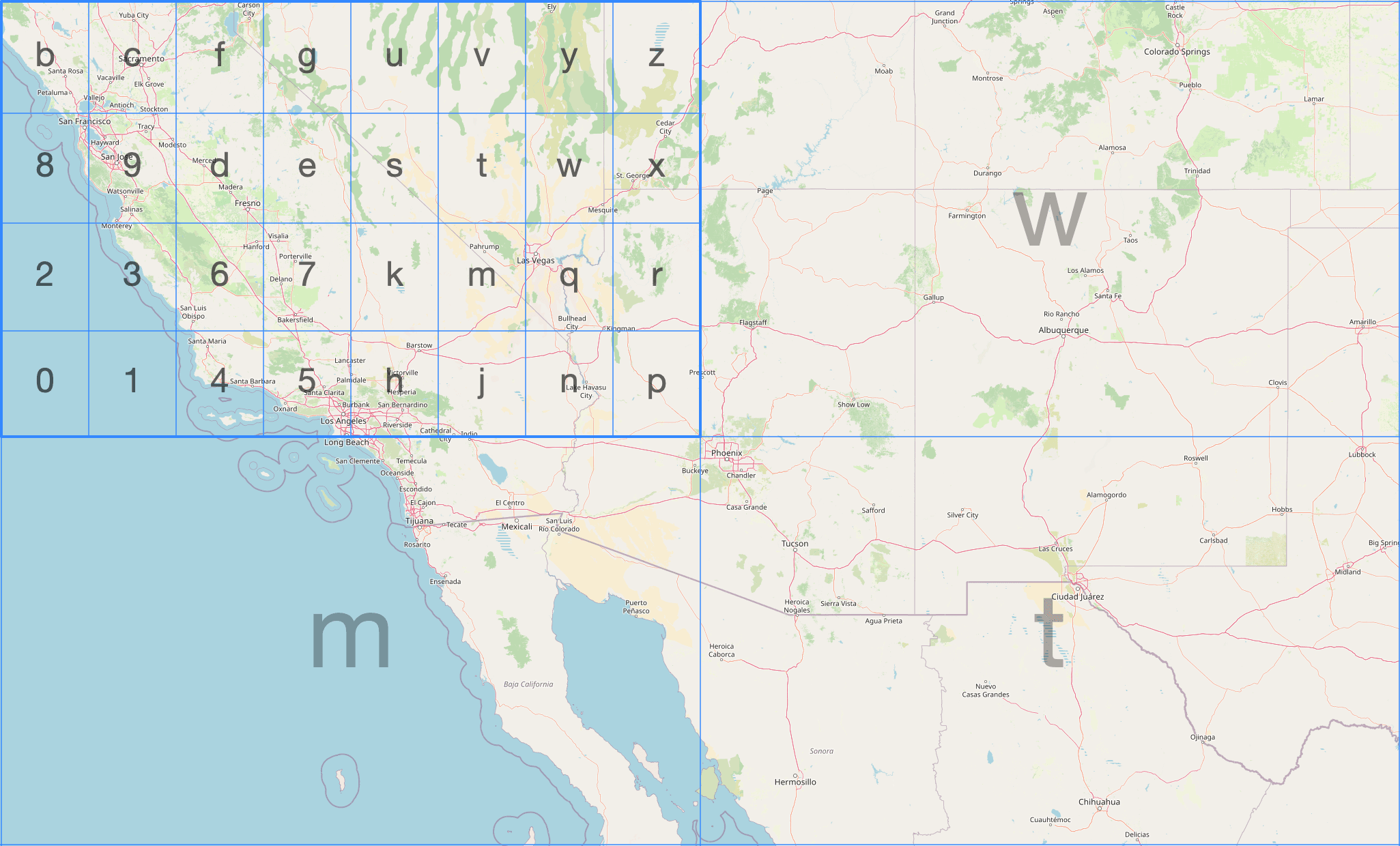
ClickHouse has [three geohash functions](https://clickhouse.com/docs/en/sql-reference/functions/geo/geohash). We can encode a point at a given precision (1–12) using `geohashEncode`:
SELECT geohashEncode(-0.12, 51.5, 6);
```shell
┌─geohashEncode(-0.12, 51.5, 6)─┐
│ gcpuvr │
└───────────────────────────────┘
```
We can then decode back to the (longitude, latitude) of the cell center using the `geoHashDecode` function:
SELECT geohashDecode('gcpuvr');
```shell
┌─geohashDecode('gcpuvr')──────────┐
│ { ↴│
│↳ "longitude": -0.1153564453125,↴│
│↳ "latitude": 51.50115966796875 ↴│
│↳} │
└──────────────────────────────────┘
```
We can also find all the geohash cells within a bounding box at a given precision using the `geohashesInBox` function:
SELECT geohashesInBox(-0.5, 51.3, 0.3, 51.7, 4);
```shell
Row 1:
──────
geohashesInB⋯3, 51.7, 4): ['gcpe','gcps','gcpt','gcpw','gcpg','gcpu','gcpv','gcpy','u105','u10h','u10j','u10n']
```
Geohash cells are rectangles, not equal-area, and cells at the same level vary in size by latitude. It is simple and widely supported but not ideal for aggregations where you care about equal-area bucketing.
### H3 {#h3}
[H3](https://h3geo.org/) is Uber's hexagonal hierarchical indexing system. Hexagons tessellate without gaps, are roughly equal-area at a given resolution, and the hierarchy is clean - each cell has exactly 7 children at the next finer resolution (with a small number of pentagon exceptions).
The diagram below from the [H3 docs](https://h3geo.org/docs/highlights/indexing) shows the indexing system being applied to part of San Francisco:
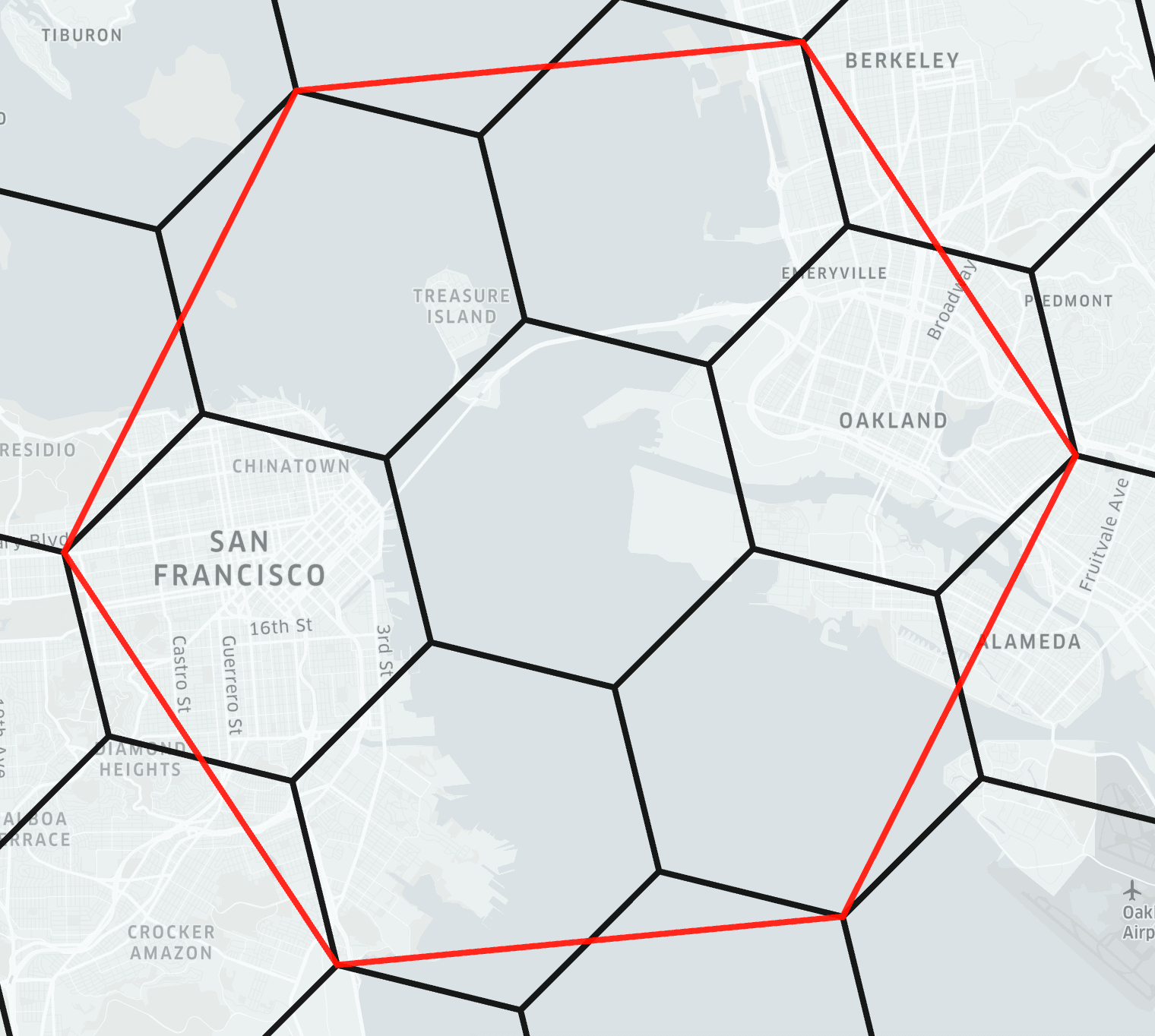
ClickHouse has [40+ H3 functions](https://clickhouse.com/docs/en/sql-reference/functions/geo/h3). We can encode a point to an H3 index at a given resolution using `geoToH3`. Note that unlike most ClickHouse geo functions, `geoToH3` takes **(latitude, longitude)** order - matching H3's own convention:
SELECT geoToH3(51.5, -0.12, 9);
```shell
┌─geoToH3(51.5, -0.12, 9)─┐
│ 617438095026421759 │
└─────────────────────────┘
```
We can then decode back to the cell center using `h3ToGeo`:
SELECT h3ToGeo(617438095026421759);
```shell
┌─h3ToGeo(617438095026421759)────────┐
│ { ↴│
│↳ "latitude": 51.50008600604051, ↴│
│↳ "longitude": -0.1214503427323559↴│
│↳} │
└────────────────────────────────────┘
```
We can find the k-ring - the cell itself and all cells within k steps, using `h3kRing`:
SELECT h3kRing(617438095026421759, 2);
```shell
Row 1:
──────
h3kRing(6174⋯6421759, 2): [617438095026421759,617438095026159615,617438095025111039,617438095025373183,617438095021441023,617438095022489599,617438095522922495,617438095522660351,617439388697624575,617438095026683903,617438095025635327,617438095025897471,617438095014100991,617438095013576703,617438095021703167,617438095020916735,617438095021965311,617438095522398207,617438095522136063]
```
We can find the parent cell at a coarser resolution using `h3ToParent`:
SELECT h3ToParent(617438095026421759, 6);
```shell
┌─h3ToParent(6⋯6421759, 6)─┐
│ 603927296197263359 │
└──────────────────────────┘
```
We can find the area of a cell in square meters using `h3CellAreaM2`:
SELECT h3CellAreaM2(617438095026421759);
```shell
┌─h3CellAreaM2⋯5026421759)─┐
│ 94179.9099582598 │
└──────────────────────────┘
```
We can find the grid distance between two cells using `h3Distance`:
```shell
┌─h3Distance(g⋯ -0.11, 9))─┐
│ 6 │
└──────────────────────────┘
```
H3 is excellent for aggregating observations by geography, computing catchment areas, and building hexagonal heatmaps. ClickHouse covers the full H3 API surface. We haven't covered all of them here - other useful ones include `h3PolygonToCells` (all cells covering a polygon), `h3ToChildren` (the inverse of `h3ToParent`), `h3ToGeoBoundary` (the polygon boundary of a cell, useful for visualization), and `h3IsValid` (validate a cell ID).
### S2 {#s2}
[S2](https://s2geometry.io/) is Google's spherical geometry library. It starts by projecting the six faces of a cube onto the unit sphere, giving six top-level cells. Each cell is then subdivided into four children recursively, producing a hierarchy of quadrilateral cells at increasing levels of detail.
The image below, from the [S2 docs](https://s2geometry.io/devguide/s2cell_hierarchy), shows two of the six face cells, one of which has been subdivided several times:
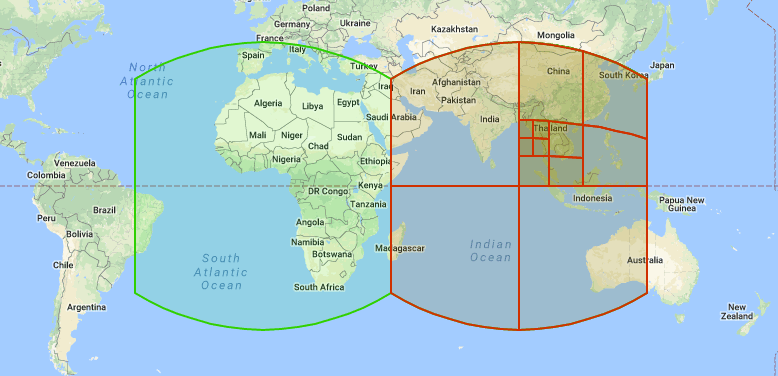
S2 is used in Google Maps and BigQuery.
ClickHouse has [10+ S2 functions](https://clickhouse.com/docs/en/sql-reference/functions/geo/s2). We can encode a point to an S2 cell ID using `geoToS2`:
SELECT geoToS2(-0.12, 51.5);
```shell
┌─geoToS2(-0.12, 51.5)─┐
│ 5221366071371671575 │
└──────────────────────┘
```
We can decode back to the (longitude, latitude) of the cell center using `s2ToGeo`:
SELECT s2ToGeo(5221366071371671575);
```shell
┌─s2ToGeo(5221366071371671575)──────────────┐
│ (-0.11999997687890043,51.499999963181374) │
└───────────────────────────────────────────┘
```
We can find the neighboring cells using `s2GetNeighbors`:
SELECT s2GetNeighbors(5221366071371671575);
```shell
Row 1:
──────
s2GetNeighbo⋯1371671575): [5221366071371671613,5221366071371671577,5221366071371671569,5221366071371671573]
```
We can check whether two cells share any area using `s2CellsIntersect`:
```shell
┌─s2CellsInter⋯1371671613)─┐
│ 0 │
└──────────────────────────┘
```
Adjacent cells share an edge but not area, so `s2CellsIntersect` returns 0.
For most use cases, H3 is the better choice. The main reason to reach for S2 is if your data comes from or needs to interoperate with BigQuery, which uses S2 natively via `S2_CELLIDFROMPOINT` and `S2_COVERINGCELLIDS`.
### Which grid system to use? {#which-grid-system-to-use}
| | Geohash | H3 | S2 |
|---|---|---|---|
| Cell shape | Rectangle | Hexagon | Square (projected) |
| Equal area? | No | Approximately | Approximately |
| Hierarchy | Clean | Clean (×7) | Clean (×4) |
| ClickHouse support | [3 functions](https://clickhouse.com/docs/en/sql-reference/functions/geo/geohash) | [40+ functions](https://clickhouse.com/docs/en/sql-reference/functions/geo/h3) | [10+ functions](https://clickhouse.com/docs/en/sql-reference/functions/geo/s2) |
| Ecosystem | Very widely supported | Widely supported | Google ecosystem |
For new projects, H3 is usually the right choice. Geohash is good when you need interoperability with systems that already use it. S2 if you are working with BigQuery or Google Maps data.
## Visualizing geometry {#visualizing-geometry}
`svg()` converts a geometry into an SVG element fragment - a `Point` becomes a ``, a `Polygon` becomes a ``, a `LineString` becomes a ``. Here we call it on a simplified London boundary polygon and the Tower of London point:
SELECT 'london' AS name, svg(readWKT('POLYGON((-0.51 51.63,-0.10 51.69,0.26 51.65,0.33 51.52,0.25 51.30,-0.06 51.28,-0.33 51.32,-0.51 51.45,-0.51 51.63))')) AS fragment
UNION ALL
SELECT 'tower_of_london' AS name, svg((-0.0759, 51.5081)) AS fragment;
```shell
Row 1:
──────
name: london
fragment:
Row 2:
──────
name: tower_of_london
fragment:
```
To build a viewable SVG, we can wrap the fragments in an `