---
title: " What's New in pg_clickhouse - JSONB Support, SQL value functions, Streaming, and more"
date: "2026-08-17T17:42:16.594Z"
author: "David Wheeler"
category: "Engineering"
excerpt: "The latest pg_clickhouse releases bring JSONB, date/time, and array function pushdown, plus HTTP result set streaming for lower memory usage."
---
# What's New in pg_clickhouse - JSONB Support, SQL value functions, Streaming, and more
We've been gratified by the community reception of [pg_clickhouse], the extension to query ClickHouse databases from Postgres. Recent uptake generated a ton of feedback, which we've been diligently addressing in the last few releases. These changes follow our constant mantra for pg_clickhouse: pushdown, pushdown, pushdown! Let's take a quick tour.
## Setup {#setup}
If you'd like to follow along, the following examples use this ClickHouse table:
CREATE TABLE events (
    id    UInt32,
    event String,
    tags  Array(String),
    at    DateTime64,
    props JSON
) ENGINE = MergeTree ORDER BY (event, id);

INSERT INTO events VALUES
    (
        1, 'order', ['a', 'b', 'c'], '2025-12-28 10:42:35.342',
        '{"cid": "C100", "address": {"city": "Paris, France", "code": "75001"}}'
    ),
    (
        2, 'order', ['d', 'e', 'f'], '2026-02-22 05:26:26.982',
        '{"cid": "C200", "address": {"city": "London, UK", "code": "SW1A"}}'
    ),
    (
        3, 'return', ['😀', '⚽️'], now64() - 86400 * 2,
        '{"cid": "C200", "address": {"city": "Manchester, UK", "code": "M2 1AB"}}'
    ),
    (
        4, 'order', ['x', 'y', 'z'], now64() - 86400,
        '{"cid": "C300", "address": {"city": "New York, USA", "code": "10030"}}'
    ),
    (
        5, 'deliver', [], now64(),
        '{"cid": "C500", "address": {"city": "Portland, USA", "code": "97212"}}'
    )
;
And this pg_clickhouse foreign table configuration in Postgres:
CREATE SERVER ch FOREIGN DATA WRAPPER clickhouse_fdw OPTIONS(driver 'http');
CREATE USER MAPPING FOR CURRENT_USER SERVER ch;
CREATE EXTENSION pg_clickhouse;
CREATE SCHEMA customer;
IMPORT FOREIGN SCHEMA "default" FROM SERVER ch INTO customer;
## JSONB accessors {#jsonb-accessors}
For Postgres [JSONB] columns mapped to the ClickHouse [JSON type],[^http]
pg_clickhouse [v0.1.10] added [JSONB accessor operator and function][JSONB
functions] pushdown outside `SELECT` clauses (generally in `WHERE`, `ORDER
BY`, and `HAVING` clauses). It does so by converting JSON property accessors
to the ClickHouse [sub-column syntax].
See, example, the `Remote SQL` output from this verbose `EXPLAIN` using `->>`
to compare a JSON object value to a string:
EXPLAIN (VERBOSE, COSTS OFF)
SELECT id, event, props
FROM customer.events
WHERE props ->> 'cid' = 'C200';
                                        QUERY PLAN
------------------------------------------------------------------------------------------
 Foreign Scan on customer.events
   Output: id, event, props
   Remote SQL: SELECT id, event, props FROM "default".events WHERE ((props.cid = 'C200'))
(3 rows)
This allows ClickHouse to filter "C100" directly. The output is just what
you'd expect:
SELECT id, event, props
FROM customer.events
WHERE props ->> 'cid' = 'C200';
 id | event  |                                  props
----+--------+--------------------------------------------------------------------------
  2 | order  | {"cid": "C200", "address": {"city": "London, UK", "code": "SW1A"}}
  3 | return | {"cid": "C200", "address": {"city": "Manchester, UK", "code": "M2 1AB"}}
(2 rows)
For the `->` operator, which returns a JSONB value, pg_clickhouse has
ClickHouse convert the value returned by the [sub-column syntax] to JSON in
order to compare values as Postgres does:
EXPLAIN (VERBOSE, COSTS OFF)
SELECT id, event, props
FROM customer.events
WHERE props -> 'cid' = '"C300"'::jsonb;
                                                QUERY PLAN
----------------------------------------------------------------------------------------------------------
 Foreign Scan on customer.events
   Output: id, event, props
   Remote SQL: SELECT id, event, props FROM "default".events WHERE ((toJSONString(props.cid) = '"C300"'))
(3 rows)
Executing the query returns the expected result:
SELECT id, event, props
FROM customer.events
WHERE props -> 'cid' = '"C300"'::jsonb;
 id | event |                                 props
----+-------+------------------------------------------------------------------------
  4 | order | {"cid": "C300", "address": {"city": "New York, USA", "code": "10030"}}
(1 row)
The same pattern applies to the [JSONB functions] `jsonb_extract_path()` and
`jsonb_extract_path_text()` functions, which also allowing multiple paths to
get to nested values, as visible in the `Remote SQL` for this plan:
EXPLAIN (VERBOSE, COSTS OFF)
SELECT id, event, props FROM customer.events
WHERE jsonb_extract_path_text(props, 'address', 'city') = 'Paris, France';
                                                 QUERY PLAN
------------------------------------------------------------------------------------------------------------
 Foreign Scan on customer.events
   Output: id, event, props
   Remote SQL: SELECT id, event, props FROM "default".events WHERE ((props.address.city = 'Paris, France'))
(3 rows)
Of course execution returns the expected results:
SELECT id, event, props
FROM customer.events
WHERE jsonb_extract_path_text(props, 'address', 'city') = 'Paris, France';
 id | event |                                 props
----+-------+------------------------------------------------------------------------
  1 | order | {"cid": "C100", "address": {"city": "Paris, France", "code": "75001"}}
(1 row)
And the same goes for pushing down comparisons to JSON values using
`jsonb_extract_path()`:
EXPLAIN (VERBOSE, COSTS OFF)
SELECT id, event, props
FROM customer.events
WHERE jsonb_extract_path(props, 'address', 'city') = '"New York, USA"';
                                                         QUERY PLAN
----------------------------------------------------------------------------------------------------------------------------
 Foreign Scan on customer.events
   Output: id, event, props
   Remote SQL: SELECT id, event, props FROM "default".events WHERE ((toJSONString(props.address.city) = '"New York, USA"'))
(3 rows)
SELECT id, event, props
FROM customer.events
WHERE jsonb_extract_path(props, 'address', 'city') = '"New York, USA"';
 id | event |                                 props
----+-------+------------------------------------------------------------------------
  4 | order | {"cid": "C300", "address": {"city": "New York, USA", "code": "10030"}}
(1 row)
## SQL value functions {#sql-value-functions}
One of our customers switched queries from Postgres to pg_clickhouse tables
and ran into failures using certain [date and time functions], like
`CURRENT_DATE` and `CURRENT_TIMESTAMP`. pg_clickhouse did not push down those
functions, which caused issues used in combination with functions like
`date_part()` and `date_trunc()`, which do.
pg_clickhouse [v0.2.0] improved the pushdown of all of the "current"-type date
and time functions, such that they all push down and produce values more
correctly relative to the local Postgres configuration than before.
For example, to look at records from before `CURRENT_DATE`, pg_clickhouse
produces this plan:
EXPLAIN (VERBOSE, COSTS OFF)
SELECT id FROM customer.events WHERE AT < CURRENT_DATE;
                                          QUERY PLAN
----------------------------------------------------------------------------------------------
 Foreign Scan on customer.events
   Output: id
   Remote SQL: SELECT id FROM "default".events WHERE ((at < toDate(now('America/New_York'))))
(3 rows)
It uses the time zone currently set in the Postgres session to ensure the date
is relative to the expected time zone. It does the same for
`CURRENT_TIMESTAMP`, also specifying precision `6`, the default precision for
Postgres timestamps:
EXPLAIN (VERBOSE, COSTS OFF)
SELECT id
FROM customer.events
WHERE AT < CURRENT_TIMESTAMP;
                                        QUERY PLAN
-------------------------------------------------------------------------------------------
 Foreign Scan on customer.events
   Output: id
   Remote SQL: SELECT id FROM "default".events WHERE ((at < now64(6, 'America/New_York')))
(3 rows)
Naturally passes an explicit precision:
EXPLAIN (VERBOSE, COSTS OFF)
SELECT id
FROM customer.events
WHERE AT < CURRENT_TIMESTAMP(3);
                                        QUERY PLAN
-------------------------------------------------------------------------------------------
 Foreign Scan on customer.events
   Output: id
   Remote SQL: SELECT id FROM "default".events WHERE ((at < now64(3, 'America/New_York')))
(3 rows)
In addition to these SQL-standard current date and time keywords, we've added
pushdown for the Postgres-specific timestamps functions `clock_timestamp()`,
`statement_timestamp()`, and `transaction_timestamp()`, which all push down to
the closest ClickHouse equivalent, [nowInBlock64]:
EXPLAIN (VERBOSE, COSTS OFF)
SELECT id
FROM customer.events
WHERE AT < clock_timestamp();
                                            QUERY PLAN
--------------------------------------------------------------------------------------------------
 Foreign Scan on customer.events
   Output: id
   Remote SQL: SELECT id FROM "default".events WHERE ((at < nowInBlock64(6, 'America/New_York')))
(3 rows)
These functions work properly with other pushdown functions like `date_part`:
EXPLAIN (VERBOSE, COSTS OFF)
SELECT id, at FROM customer.events
WHERE date_part('year', at) < date_part('year', CURRENT_DATE);
                                                                  QUERY PLAN
----------------------------------------------------------------------------------------------------------------------------------------------
 Foreign Scan on customer.events
   Output: id, at
   Remote SQL: SELECT id, at FROM "default".events WHERE ((toYear(at) < toYear(cast(toDate(now('America/New_York')), 'Nullable(DateTime)'))))
(3 rows)
SELECT id, at
FROM customer.events
WHERE date_part('year', at) < date_part('year', CURRENT_DATE);
 id |             at
----+----------------------------
  1 | 2025-12-28 05:42:35.342-05
(1 row)
As well as `date_trunc` — even with some interval date math thrown in:
EXPLAIN (VERBOSE, COSTS OFF)
SELECT id, at
FROM customer.events
WHERE date_trunc('day', at) >= date_trunc('day', CURRENT_DATE) - INTERVAL '1 day';
                                                               QUERY PLAN
-----------------------------------------------------------------------------------------------------------------------------------------
 Foreign Scan on customer.events
   Output: id, at
   Remote SQL: SELECT id, at FROM "default".events WHERE ((toStartOfDay(at) >= (toStartOfDay(toDate(now('America/New_York'))) - 86400)))
(3 rows)
SELECT id, at
FROM customer.events
WHERE date_trunc('day', at) >= date_trunc('day', CURRENT_DATE) - INTERVAL '1 day';
 id |             at
----+----------------------------
  5 | 2026-04-17 17:29:47.046-04
  4 | 2026-04-16 17:29:47.046-04
(2 rows)
## Array functions {#array-functions}
Following the http driver array parsing improvements in [v0.1.4],
pg_clickhouse [v0.2.0] added pushdown support for a slew of [array functions].
For example, `array_cat` maps to [arrayConcat]:
EXPLAIN (VERBOSE, COSTS OFF)
SELECT id, tags FROM customer.events WHERE array_cat(tags, ARRAY['🥏']) = ARRAY['😀','⚽️','🥏'];
                                                 QUERY PLAN
------------------------------------------------------------------------------------------------------------
 Foreign Scan on customer.events
   Output: id, tags
   Remote SQL: SELECT id, tags FROM "default".events WHERE ((arrayConcat(tags, ['🥏']) = ['😀','⚽️','🥏']))
(3 rows)
SELECT id, tags
FROM customer.events
WHERE array_cat(tags, ARRAY['🥏']) = ARRAY['😀','⚽️','🥏'];
 id |  tags
----+---------
  3 | {😀,⚽️}
(1 row)
`array_to_string` maps to [arrayStringConcat]:
EXPLAIN (VERBOSE, COSTS OFF)
SELECT id, tags
FROM customer.events
WHERE array_to_string(tags, '|') = 'a|b|c';
                                              QUERY PLAN
------------------------------------------------------------------------------------------------------
 Foreign Scan on customer.events
   Output: id, tags
   Remote SQL: SELECT id, tags FROM "default".events WHERE ((arrayStringConcat(tags, '|') = 'a|b|c'))
(3 rows)
SELECT id, tags
FROM customer.events
WHERE array_to_string(tags, '|') = 'a|b|c';
 id |  tags
----+---------
  1 | {a,b,c}
(1 row)
And `string_to_array` maps to [splitByString], here used in combination with
the [aforementioned JSONB accessors](#jsonb-accessors):
EXPLAIN (VERBOSE, COSTS OFF)
SELECT id, event, jsonb_extract_path_text(props, 'address', 'code')
FROM customer.events
WHERE string_to_array(jsonb_extract_path_text(props, 'address', 'city'), ', ') = ARRAY['Portland', 'USA'];
                                                                  QUERY PLAN
----------------------------------------------------------------------------------------------------------------------------------------------
 Foreign Scan on customer.events
   Output: id, event, tags, at, props
   Remote SQL: SELECT id, event, tags, at, props FROM "default".events WHERE ((splitByString(', ', props.address.city) = ['Portland','USA']))
(3 rows)
SELECT id, event, jsonb_extract_path_text(props, 'address', 'code')
FROM customer.events
WHERE string_to_array(jsonb_extract_path_text(props, 'address', 'city'), ', ') = ARRAY['Portland', 'USA'];
 id |  event  | jsonb_extract_path_text
----+---------+-------------------------
  5 | deliver | 97212
(1 row)
We mapped so many more! See [the full list] for the range of possibilities.
## HTTP result set streaming {#http-result-set-streaming}
Of course, we don't solely focus on pushdown; sometimes we need to address
push *back*, as it were.
By default, when a Postgres foreign data wrapper executes a foreign query, it
collects all of the results in memory before returning them to the caller.
This works great for small result sets such as those returned by typical
ClickHouse aggregate queries. But sometimes an app needs to process a
substantial amount of the data itself, which can lead to memory pressure
issues as Postgres pulls an entire data set into memory. Beware the [OOM
Killer]!
In pg_clickhouse [v0.1.10], we added query result streaming to the http
driver, which buffers a limited batch of results in memory (ca. 50MB by
default) and returns them before reusing the memory for the next batch. To see
it in action, we loaded the [NYC taxi data set] into ClickHouse, then spun up
a pre-streaming [pg_clickhouse v0.6.1 OCI image] and imported the
`trips_small` table into the `nyc_taxi` schema using the `http` driver:
docker run --name pg_clickhouse -p 6432:5432 -e POSTGRES_HOST_AUTH_METHOD=trust -d ghcr.io/clickhouse/pg_clickhouse:18
docker exec -it pg_clickhouse bash -c 'apt-get update && apt-get install ca-certificates'
psql -U postgres -h localhost -p 6432 <<EOF
CREATE EXTENSION pg_clickhouse;
CREATE SERVER my_ch FOREIGN DATA WRAPPER clickhouse_fdw OPTIONS(
    driver 'http', host 'abcdefghij.us-east-1.aws.clickhouse.cloud', port '8443'
);
CREATE USER MAPPING FOR CURRENT_USER SERVER my_ch OPTIONS(user 'default', password 'xxxxxxxxxxxxx');
CREATE SCHEMA nyc_taxi;
IMPORT FOREIGN SCHEMA nyc_taxi FROM SERVER my_ch INTO nyc_taxi;
EOF
We started a process to continually measure the memory consumption of the OCI
container:[^pg-mem]
while true; do
    docker stats --no-stream --format "{{.MemUsage}}" pg_clickhouse | \
        cut -d '/' -f 1 | xargs printf "%s %s\n" "$(date +%T)" | sed -e 's/MiB//g'
done
Finally, we ran the query:
psql -U postgres -h localhost -p 6432 -c 'SELECT * FROM nyc_taxi.trips_small' > /dev/null
Then we repeated the steps with the streaming-enabled [pg_clickhouse v0.2.0
OCI image] and compared the results. This graph nicely summarizes the
difference:
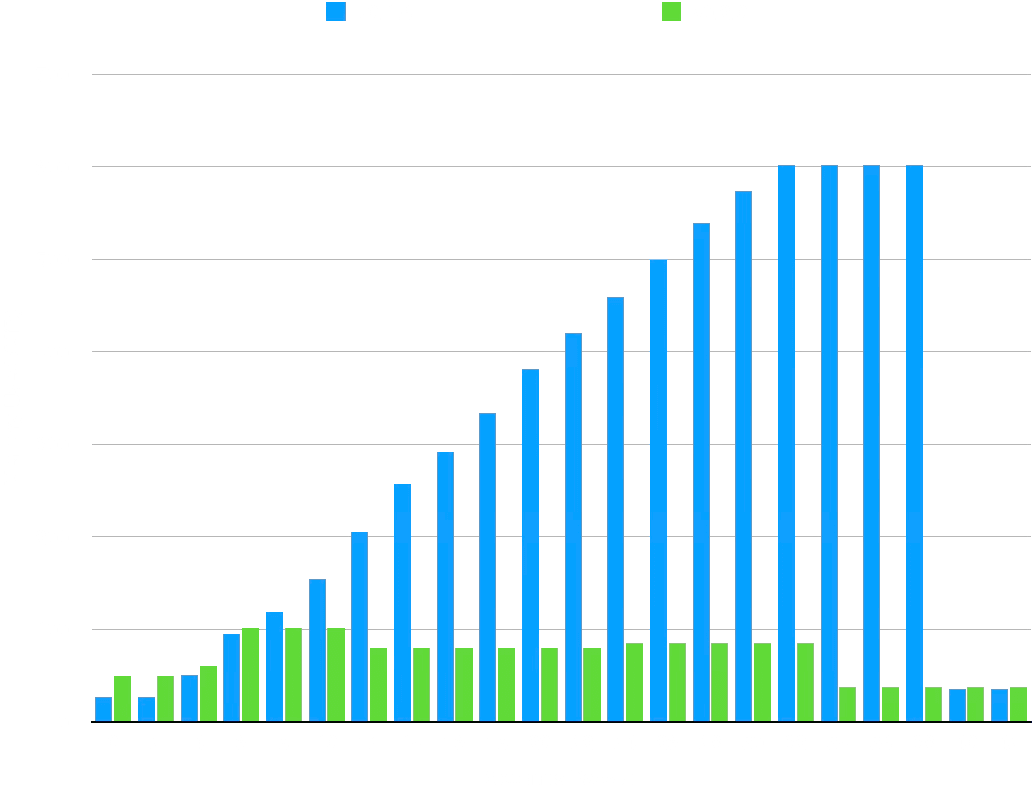
The data, massaged for the timings to line up, makes the case as well:
| Seconds | v0.1.10 | v0.2.0 |
| ------: | ------: | -----: |
| 0 | 26.65 | 49.7 |
| 2 | 26.63 | 49.6 |
| 4 | 50.8 | 60.5 |
| 6 | 95.6 | 101.4 |
| 8 | 118.7 | 101.4 |
| 10 | 155.0 | 101.4 |
| 12 | 205.2 | 79.9 |
| 14 | 257.2 | 79.9 |
| 16 | 292.1 | 79.9 |
| 18 | 333.6 | 79.9 |
| 20 | 381.6 | 79.9 |
| 22 | 420.4 | 79.9 |
| 24 | 459.1 | 85.5 |
| 26 | 499.6 | 85.5 |
| 28 | 538.6 | 85.5 |
| 30 | 573.8 | 85.5 |
| 32 | 601.8 | 85.5 |
| 34 | 601.8 | 37.7 |
| 36 | 601.8 | 37.7 |
| 38 | 601.8 | 37.7 |
| 40 | 35.78 | 37.7 |
| 42 | 35.78 | 37.7 |
While v0.6.0 spikes up to over 600MiB of memory consumption, v0.2.0, with
streaming enabled, never exceeds 86 MiB. It's a little faster, too! Of course
the bigger the result set the greater the memory savings. We plan to introduce
streaming in the binary driver in a future release, as well.
## What's next {#whats-next}
We've got more in the works. Watch this space for more news about window
function pushdown and regular expression compatibility. Until then, join us at
[PGConf.dev] to hear about what we learned [Building a Foreign Data Wrapper].
[^http]: Supported by the http driver only for now.
[^pg-mem]: As Postgres core hacker [Andres Freund explains], this type of brute
force memory measurement produces inaccurate results, generally showing
Postgres using far more memory that it does, in absolute terms. We deem it
acceptable here, however, for a relative comparison.
[pg_clickhouse]: https://github.com/ClickHouse/pg_clickhouse "pg_clickhouse on GitHub"
[v0.1.10]: https://github.com/ClickHouse/pg_clickhouse/releases/tag/v0.1.10
"pg_clickhouse v0.10.0 on GitHub"
[JSONB]: https://www.postgresql.org/docs/18/datatype-json.html
"Postgres Docs: JSON Types"
[JSON type]: https://clickhouse.com/docs/sql-reference/data-types/newjson
"ClickHouse Docs: JSON Data Type"
[sub-column syntax]: https://clickhouse.com/docs/sql-reference/data-types/newjson#reading-json-paths-as-sub-columns
"ClickHouse Docs: Reading JSON paths as sub-columns"
[JSONB functions]: https://www.postgresql.org/docs/18/functions-json.html
"Postgres Docs: JSON Functions and Operators"
[date and time functions]: https://www.postgresql.org/docs/18/functions-datetime.html
"Postgres Docs: Date/Time Functions and Operators"
[nowInBlock64]: https://clickhouse.com/docs/sql-reference/functions/date-time-functions#nowInBlock64
"ClickHouse Docs: nowInBlock64"
[v0.2.0]: https://github.com/ClickHouse/pg_clickhouse/releases/tag/v0.2.0
"pg_clickhouse v0.2.0 on GitHub"
[array functions]: https://www.postgresql.org/docs/18/functions-array.html
"Postgres Docs: Array Functions and Operators"
[v0.1.4]: https://github.com/ClickHouse/pg_clickhouse/releases/tag/v0.1.4
"pg_clickhouse v0.1.4 on GitHub"
[arrayConcat]: https://clickhouse.com/docs/sql-reference/functions/array-functions#arrayConcat
"ClickHouse Docs: arrayConcat"
[arrayStringConcat]: https://clickhouse.com/docs/sql-reference/functions/splitting-merging-functions#arrayStringConcat
"ClickHouse Docs: arrayStringConcat"
[splitByString]: https://clickhouse.com/docs/sql-reference/functions/splitting-merging-functions#splitByString
"ClickHouse Docs: splitByString"
[the full list]: https://pgxn.org/dist/pg_clickhouse/doc/pg_clickhouse.html#Pushdown.Functions
"pg_clickhouse Docs: Pushdown Functions"
[OOM Killer]: https://linuxhandbook.com/oom-killer/
"Linux Handbook: Understanding Out of Memory Killer (OOM Killer) in Linux"
[NYC taxi data set]: https://clickhouse.com/docs/getting-started/example-datasets/nyc-taxi
"ClickHouse Docs: New York taxi data"
[pg_clickhouse v0.6.1 OCI image]: https://github.com/ClickHouse/pg_clickhouse/pkgs/container/pg_clickhouse/773843442?tag=18-0.1.6
"Postgres 18 + pg_clickhouse v0.6.1 OCI image on GitHub"
[pg_clickhouse v0.2.0 OCI image]: https://github.com/ClickHouse/pg_clickhouse/pkgs/container/pg_clickhouse/795048501?tag=18-0.2.0
"Postgres 18 + pg_clickhouse v0.2.0 OCI image on GitHub"
[PGConf.dev]: https://2026.pgconf.dev/ "PGConf.dev 2026"
[Building a Foreign Data Wrapper]: https://2026.pgconf.dev/session/510
"PGConf.dev 2026: Building a Foreign Data Wrapper"
[Andres Freund explains]: https://blog.anarazel.de/2020/10/07/measuring-the-memory-overhead-of-a-postgres-connection/
"Postgres From Below: Measuring the Memory Overhead of a Postgres Connection"
---
## Try Postgres managed by ClickHouse
ClickHouse + Postgres has become the unified data stack for applications that scale. With Managed Postgres now available in ClickHouse Cloud, this stack is a day-1 decision.
[Get access](https://clickhouse.com/cloud/postgres?loc=blog-cta-1558-try-postgres-managed-by-clickhouse-get-access&utm_blogctaid=1558)
---