---
title: "Handling Updates and Deletes in ClickHouse"
date: "2023-03-10T09:52:14.355Z"
author: "Denys Golotiuk"
category: "Engineering"
excerpt: "With the recent addition of Lightweight Deletes, read about the latest best practices for handling updates and deletes in ClickHouse."
---
# Handling Updates and Deletes in ClickHouse
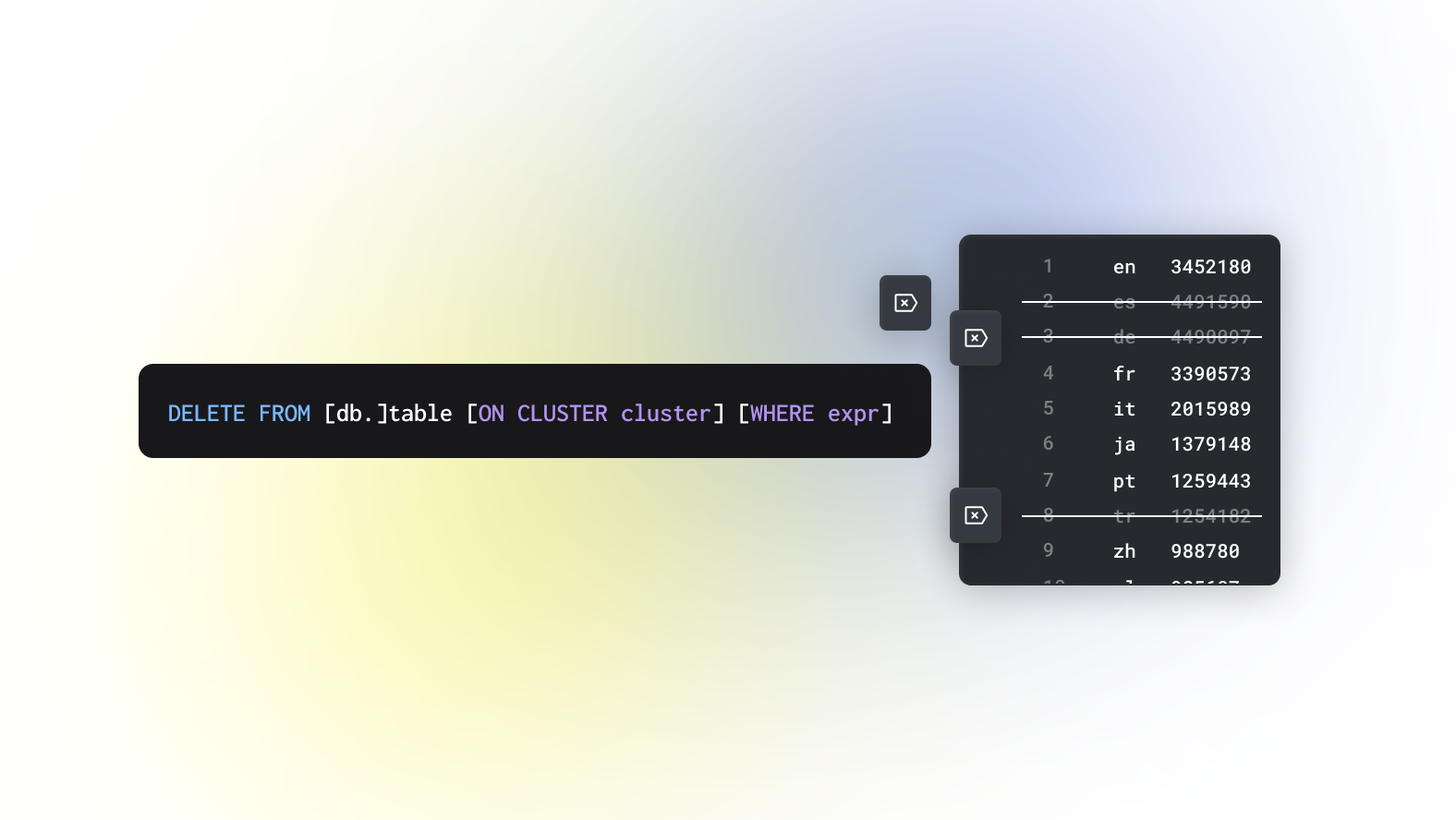
As the world’s fastest database for real-time analytics, many ClickHouse workloads involve large amounts of data that is written once and not frequently modified (for example, telemetry events generated by IOT devices or customer clicks generated by an e-commerce website). While these are typically immutable, additional data sets critical to providing context during analytics (e.g., lookup tables with information based on device or customer ID) may require modifications.
Historically there have been multiple approaches to updating and deleting data in ClickHouse, depending on your goals and performance requirements. The rest of this article describes each approach and its trade-offs, as well as some recent developments with Lightweight Deletes that address some common challenges. We recommend best practices and highlight some important considerations when considering an approach.
Before proceeding, determine whether updates are the best way to solve your problem. For example, for infrequently changed data, versioning the data may be a better option. ClickHouse is the number one analytics database in terms of storage efficiency and query performance, so just saving multiple versions of data instead of updating may work better in many cases.
## Lightweight Deletes
[Lightweight Deletes](https://clickhouse.com/docs/en/guides/developer/lightweght-delete/#lightweight-delete-internals) represent the preferred and most efficient way to remove data from ClickHouse. Exposed via the [`DELETE FROM`](https://clickhouse.com/docs/en/guides/developer/lightweght-delete/#lightweight-delete-internals) table syntax, users can specify a condition to remove specific rows as shown below:
```sql
DELETE FROM table WHERE col1 = 'Hi' AND col2 = 2
```
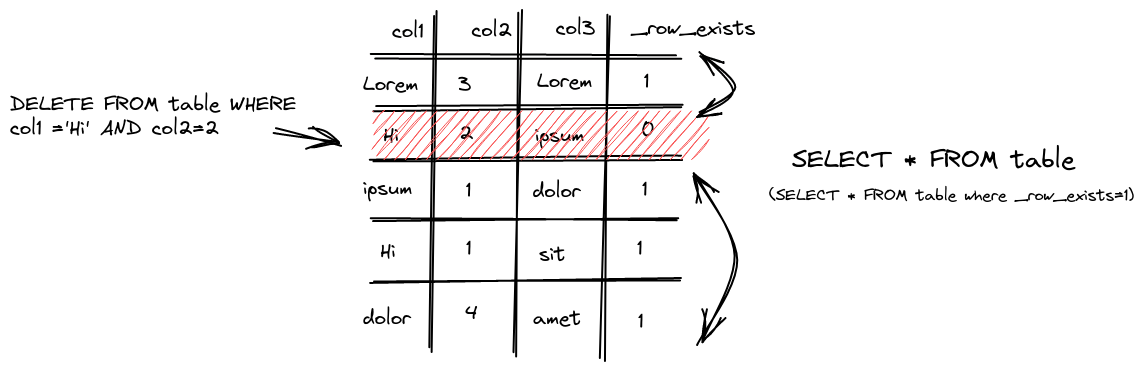
This operation is asynchronous by default unless the setting `mutations_sync` is set to 1 (see below). When executing the delete, ClickHouse saves a mask for each row, indicating whether it is deleted in a `_row_exists` column. Subsequent queries, in turn, exclude those deleted rows as shown below.
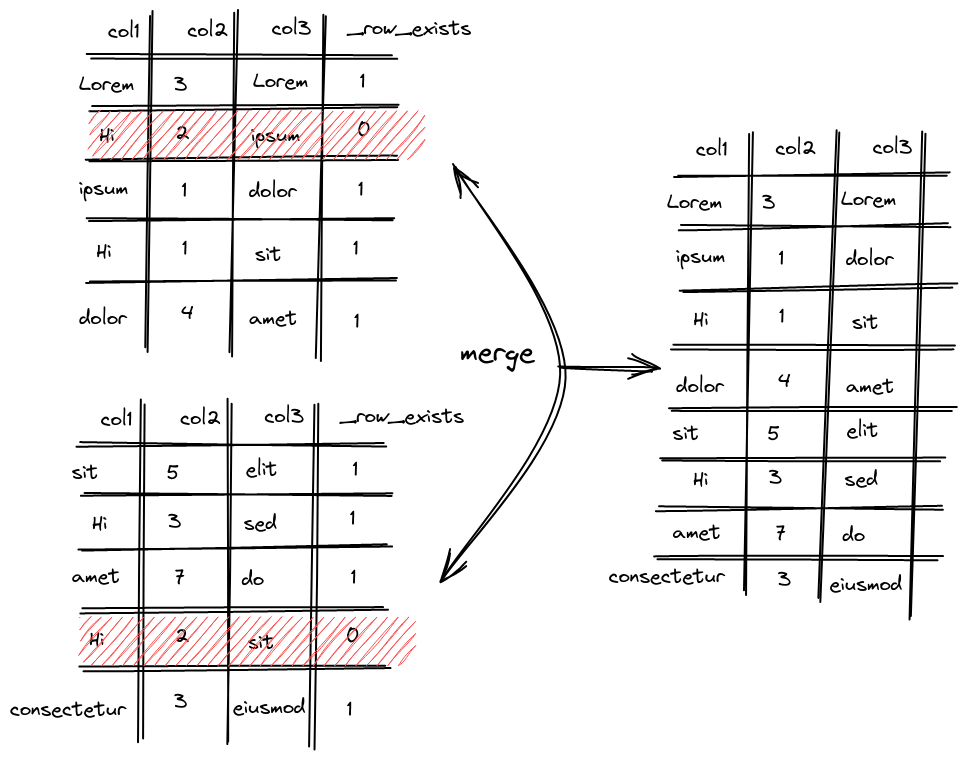
Internally, ClickHouse orders data into parts, each containing column data files and indices.
Regular merge cycles are responsible for combining (merging) and rewriting these parts. This ensures the number of files does not continue to grow as more data is inserted, keeping queries fast. These merges consider lightweight deletes, excluding those rows marked for deletion in the newly formed parts.
Released in 22.8, and still experimental as of the time of writing, lightweight deletes are on track to become production ready in one of the next releases. Until this time, the use of lightweight deletes requires setting `allow_experimental_lightweight_delete=true`.
Users should be aware that by relying on normal background merge cycles, rows will only be eventually removed from the disk. While excluded from search results, the rows will reside on disk until their part is merged. The time taken for this to happen is not deterministic. This has a few implications:
- Space savings will not be as immediate as issuing a deletion through mutations - see below. Consider using mutations if space savings are critical, e.g., insufficient disk space.
- With no guarantees for removal, users with compliance requirements may wish to use mutations to ensure data is deleted.
The cost of a lightweight delete operation depends on the number of matching rows in the WHERE clause and the current number of data parts. This operation will be most efficient when matching a small number of rows. Users should also be aware that Lightweight Deletes perform best on Wide parts, where the column data files are stored separately, vs. Compact parts, where a single file is used for all column data. The former allows the mask `_row_exists` to be stored as a separate file, thereby allowing it to be written independently of the other columns. Generally, compact parts will be formed after inserts. Once parts exceed a [certain size](https://clickhouse.com/docs/en/engines/table-engines/mergetree-family/mergetree/#mergetree-data-storage) (e.g., due to merging), the wide format is used. For most workloads, this shouldn’t be a concern.
Finally, note that Lightweight Delete uses the same mutation queue and background threads we describe below. We recommend the documentation [here](https://clickhouse.com/docs/en/guides/developer/lightweght-delete/#lightweight-delete-internals) for further details on the internal implementation.
## Mutations
### Updating Data using Mutations
The easiest way to update data in the ClickHouse table is to use [ALTER…UPDATE](https://clickhouse.com/docs/en/sql-reference/statements/alter/update/) statement.
```sql
ALTER TABLE table
UPDATE col1 = 'Hi' WHERE col2 = 2
```
This query will update `col1` on the `table` table using a given filter.
Unlike some databases, ClickHouse’s `ALTER UPDATE` statement is asynchronous by default. This means that the update occurs in the background and you will not get an instant effect on the table. This process of updating tables is called [mutations](https://clickhouse.com/docs/en/sql-reference/statements/alter/#mutations).
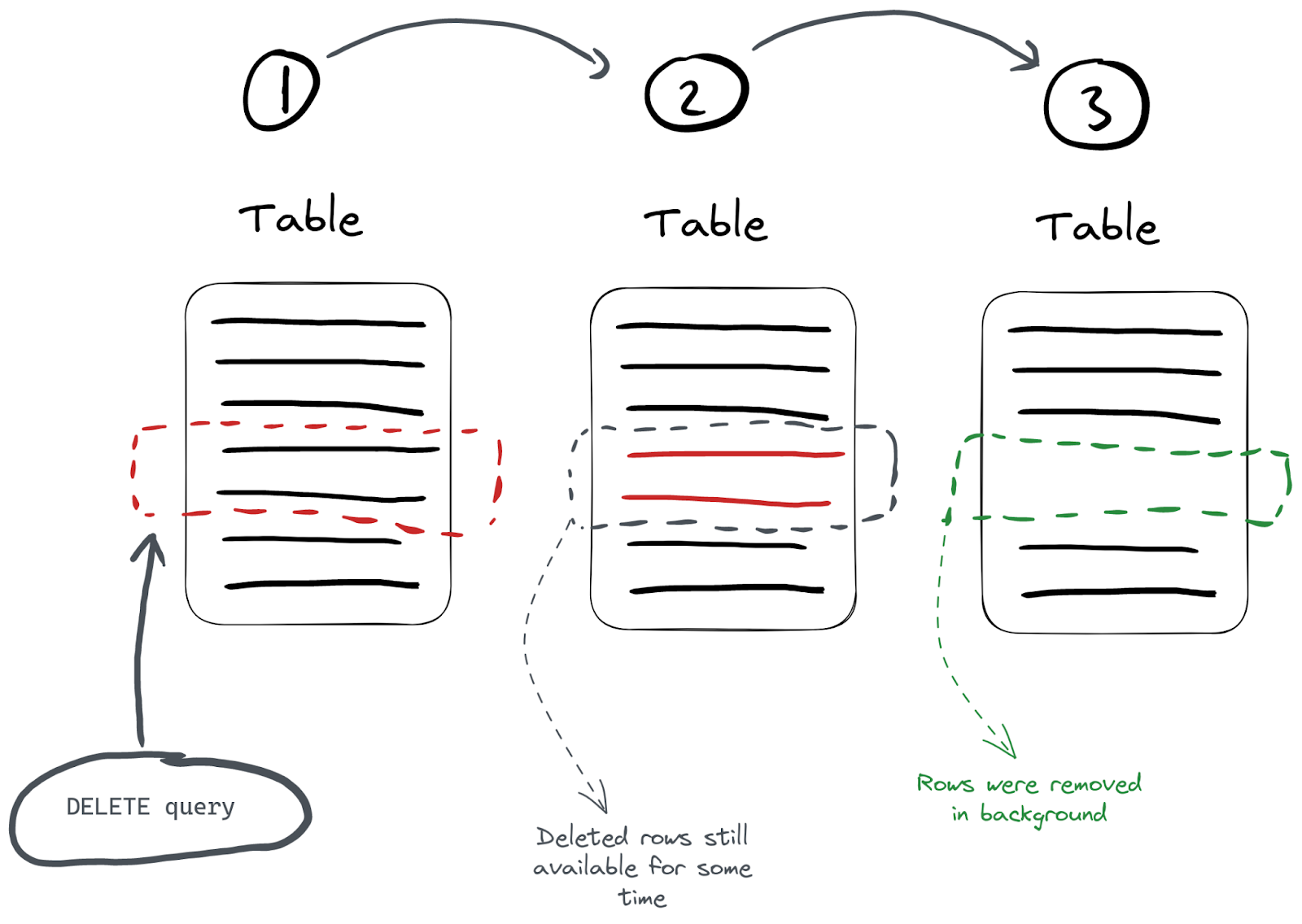
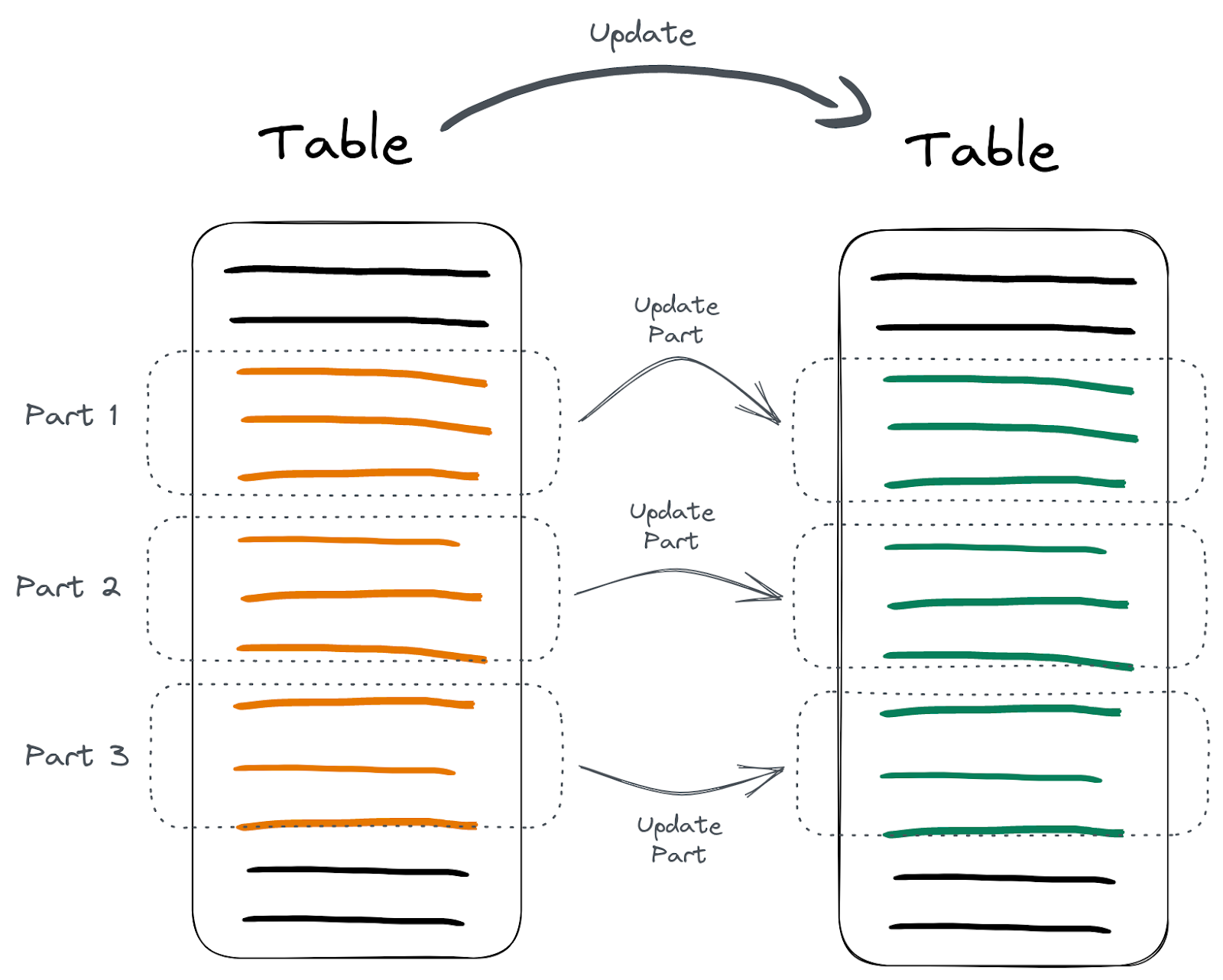
**An important note here** is that updating data is a heavy query because ClickHouse has to do a lot of work to optimize storage and processing. A mutation operation forces all data parts containing those rows to be deleted to be re-written, with the target rows excluded when forming the new part. This can cause considerable I/O and cluster overhead, so use this with caution or consider the alternatives discussed below.
### Deleting Data using mutations
Like updates, deletes are also possible with mutations and offer an alternative to Lightweight Deletes. In most cases, Lightweight Deletes are more appropriate for data removal due to the mutation cost of rewriting all columns. More specifically, unlike Lightweight Deletes, all columns are rewritten vs. just a `_row_exists` mask column.
However, given the “eventual deletion of data from disk” property of Lightweight Deletes, users may prefer this mutation-based approach to achieve guaranteed disk space savings. Furthermore, this approach can be appropriate when users need to guarantee data removal from the disk, e.g., due to compliance reasons.
```sql
ALTER TABLE table
DELETE WHERE col2 = 3
```
In this query, all rows with `col2` value of `3` are deleted. Similar to other mutations, deletes are also asynchronous by default. This can be made synchronous using the same `mutations_sync` setting described above.
### Checking Mutation Progress
Since mutations run asynchronously, monitoring can be performed via the `system.mutations` table. This allows users to need to check their progress for a specific mutation on a table.
```sql
SELECT
command,
is_done
FROM system.mutations
WHERE table = 'tablename'
┌─command───────────────────────────────┬─is_done─┐
│ UPDATE col1 = 'Hi' WHERE col2 = 2 │ 1 │
│ UPDATE col1 = 'All hi' WHERE col2 > 0 │ 0 │
└───────────────────────────────────────┴─────────┘
```
If the value of `is_done` is `0` for a specific mutation, it’s still being executed. Mutations are executed for each table part where mutated parts become available instantly:
### Synchronous Updates
For users requiring synchronous updates, the [mutations_sync](https://clickhouse.com/docs/en/operations/settings/settings/#mutations_sync) parameter can be set to a value of `1` (or `2` if we also want to wait till all replicas are also updated):
```sql
SET mutations_sync = 1
```
Now our update query will wait for the mutation to complete:
```sql
ALTER TABLE table
UPDATE col1 = 'bye' WHERE col2 > 0
0 rows in set. Elapsed: 1.182 sec.
```
Note how it took 1 second for this query to finish while ClickHouse waited for the background mutation to complete. Note this parameter also applies to Lightweight Deletes.
## Updating an Entire Table
In some cases, users need to update the values of an entire column. Initially, users may try to achieve this by using the `ALTER TABLE` query without a `WHERE` clause. This, however, fails, as shown below:
```sql
ALTER TABLE table UPDATE col1 = 'bye';
Syntax error: failed at position 38 (end of query):
ALTER TABLE table UPDATE col1 = 'bye';
```
ClickHouse won't let you update an entire table because updates are heavy. One way to force ClickHouse to accept this operation is with an always-true filter:
```sql
ALTER TABLE table
UPDATE col1 = 'bye' WHERE true
```
However, a more optimal approach is to create a new column with the new value as the default and then switch the old and new columns. For example:
```sql
ALTER TABLE table ADD COLUMN col1_new String DEFAULT 'global hi';
ALTER TABLE table
RENAME COLUMN col1 TO col1_old,
RENAME COLUMN col1_new TO col1,
DROP COLUMN col1_old;
```
We use the default value of the `col1_new` column to specify what we want to use as the updated value. This is safe and much more efficient since we skip the heavy mutation operation here.
## Updating and Deleting using JOINs
Sometimes, we need to delete or update rows based on relations; thus, we have to join tables. This is best achieved in ClickHouse using the [Join table engine](https://clickhouse.com/docs/en/engines/table-engines/special/join/) and [joinGet](https://clickhouse.com/docs/en/sql-reference/functions/other-functions/#joinget) function. Suppose we have two tables - one with all pageviews and the other with all logins tracked:
```sql
CREATE TABLE pageviews
(
`user_id` UInt64,
`time` DateTime,
`session_id` UInt64
)
ENGINE = MergeTree
ORDER BY time;
CREATE TABLE logins
(
`user_id` UInt64,
`time` DateTime
)
ENGINE = MergeTree
ORDER BY time;
```
The difference between the tables is that the `logins` table only stores a single event per session. Suppose at some point in time, we decided to add the `session_id` column to the `logins` table:
```sql
ALTER TABLE logins
ADD COLUMN `session_id` UInt64
```
We now need to update the `logins.session_id` column with corresponding values from the `pageviews` table using a JOIN on `user_id` and `time`:
SELECT *
FROM logins AS l
JOIN pageviews AS p ON (p.user_id = l.user_id) AND (p.time = l.time)

┌─user_id─┬────────────────time─┬─p.user_id─┬──────────────p.time─┬─session_id─┐
│       2 │ 2023-01-09 12:23:16 │         2 │ 2023-01-09 12:23:16 │ 2752888102 │
│       1 │ 2023-01-09 13:23:16 │         1 │ 2023-01-09 13:23:16 │ 4135462640 │
└─────────┴─────────────────────┴───────────┴─────────────────────┴────────────┘
First, we need to create and populate a special [`Join`](https://clickhouse.com/docs/en/engines/table-engines/special/join/) table:
```sql
CREATE TABLE pageviews_join
ENGINE = Join(ANY, LEFT, user_id, time) AS
SELECT *
FROM pageviews
```
This table will allow us to use the `joinGet` function to fetch values based on JOIN while executing an update query:
```sql
ALTER TABLE logins
UPDATE session_id = joinGet('pageviews_join', 'session_id', user_id, time) WHERE session_id = 0
```
And we can see, the `logins` table was updated accordingly with the JOIN:
```sql
SELECT * FROM logins
┌─user_id─┬────────────────time─┬─session_id─┐
│ 2 │ 2023-01-09 12:23:16 │ 2752888102 │
│ 1 │ 2023-01-09 13:23:16 │ 4135462640 │
└─────────┴─────────────────────┴────────────┘
```
Because we have altered the `logins` table by adding the `session_id` column, we can DROP the `pageviews_join` table once the changes are done (check the `system.mutations` table to be sure before dropping):
```sql
DROP TABLE pageviews_join
```
The same approach can be used to delete data with lightweight or mutation based deletes.
## Deleting Large Blocks Efficiently
If we have to delete big blocks of data, users can partition a table so that partitions can be dropped as required. This is a lightweight operation. Suppose we have the following table:
```sql
CREATE TABLE hits
(
`project` String,
`url` String,
`time` DateTime,
`hits` UInt32
)
ENGINE = MergeTree
PARTITION BY project
ORDER BY (project, path, time)
```
Having this table partitioned by the `project` column allows us to delete rows with a specific `project` value by dropping an entire partition. Let’s delete everything with `project` = `c`:
```sql
ALTER TABLE hits
DROP PARTITION 'c'
```
Here, `c` is the `project` column value we want to delete:
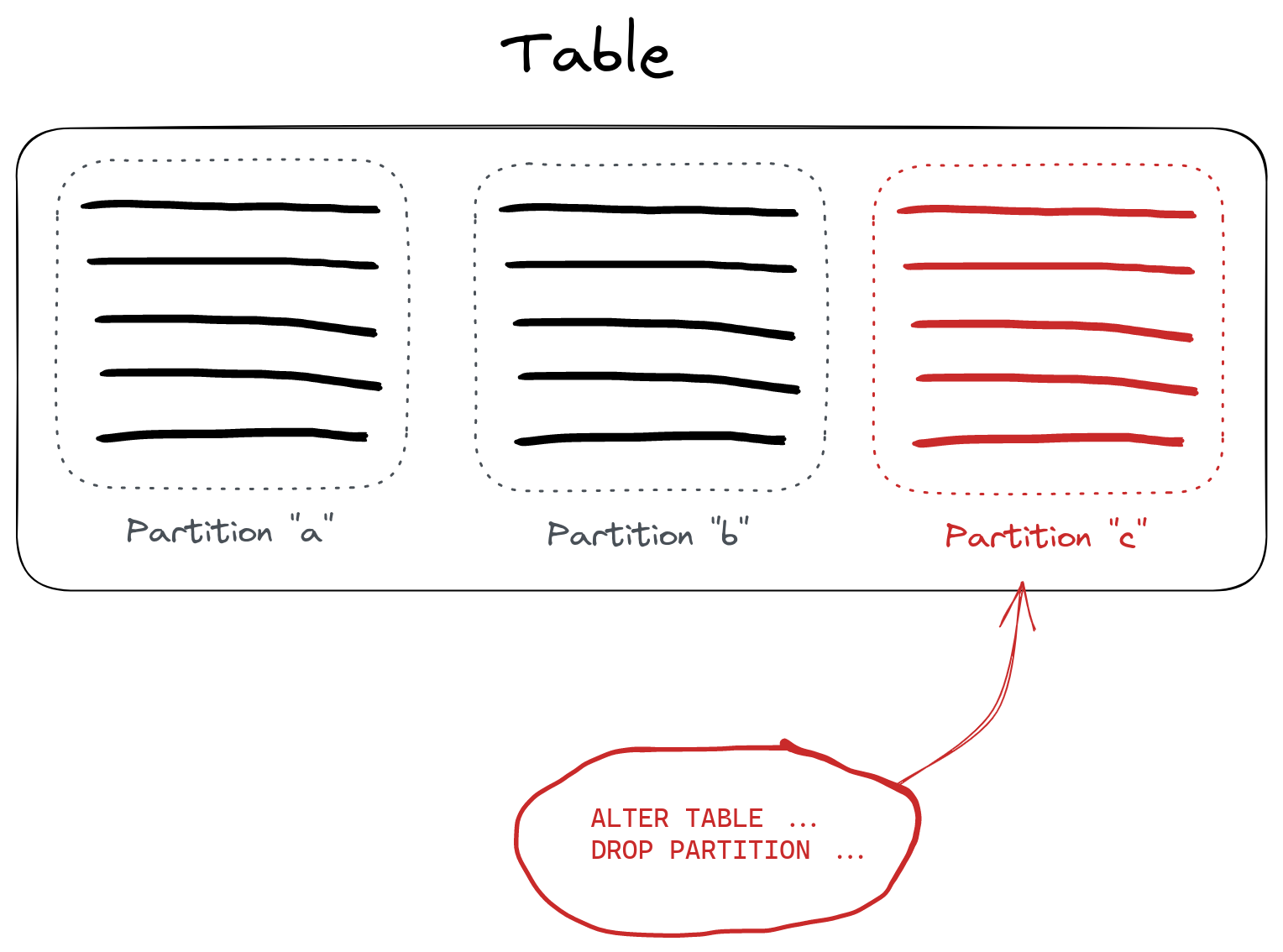
The list of available partitions can be found in the `system.parts` table:
```sql
SELECT partition
FROM system.parts
WHERE table = 'hits'
┌─partition─┐
│ c │
│ a │
│ b │
└───────────┘
```
We can also move partitions between tables (e.g., if we want to move data to a `trash` table instead of deleting it) using the DETACH and ATTACH statements.
When setting up partitioning in your DDL, be aware of the common pitfall of partitioning by a column or expression with high cardinality. This can cause many parts to be created, leading to performance issues.
## Deleting Old Data Regularly
In cases of [time-series data](https://docs.google.com/document/d/1CAmuBror9fGLZwFCiBUH5rt89LKq-ylA1Lpa6-FrJns/edit), we might want to delete outdated data regularly. ClickHouse has the [TTL](https://clickhouse.com/docs/en/engines/table-engines/mergetree-family/mergetree#table_engine-mergetree-ttl) feature for this exact use case. This requires configuring a table and specifying which data we want to be dropped and when. Suppose we want to delete data older than one month from our `hits` table:
```sql
ALTER TABLE hits
MODIFY TTL time + INTERVAL 1 MONTH
```
Here we ask ClickHouse to delete all rows that have a `time` column value more than one month ago from the current time. TTL can also be [set on columns](https://clickhouse.com/docs/en/engines/table-engines/mergetree-family/mergetree#mergetree-column-ttl) to reset their values to defaults after a period of time. This operation can be made more efficient by partitioning by date, rounded to an appropriate unit of time, e.g., days. ClickHouse will, in turn, automatically drop data in the most efficient way when executing a TTL rule. Again, tables should **not** be partitioned by time columns of high cardinality (e.g. millisecond granularity) to avoid high part counts. Typically partitioning by day or month is sufficient for most TTL operations.
## Deleting and Updating using CollapsingMergeTree
If we have to update individual rows frequently, we can use the [CollapsingMergeTree](https://clickhouse.com/docs/en/engines/table-engines/mergetree-family/collapsingmergetree/) engine to efficiently manage data updates.
Suppose we have a table with article stats to track each article's reading depth. We want a single row that shows how deeply each user has read each article. The challenge here is that we have to update the actual reading progress while the user reads an article. Let's create a table for our data:
```sql
CREATE TABLE article_reads
(
`user_id` UInt32,
`article_id` UInt32,
`read_to` UInt8,
`read_start` DateTime,
`read_end` DateTime,
`sign` Int8
)
ENGINE = CollapsingMergeTree(sign)
ORDER BY (read_start, article_id, user_id)
```
The special `sign` column is used for CollapsingMergeTree as a way to tell ClickHouse we want to update the specific row. If we insert `-1` for the `sign` column, the whole row is going to be deleted. If we insert a row with `sign = 1`, ClickHouse will keep the row. Rows to update are identified based on the sorting key used in the `ORDER BY ()` DDL statement when creating the table:
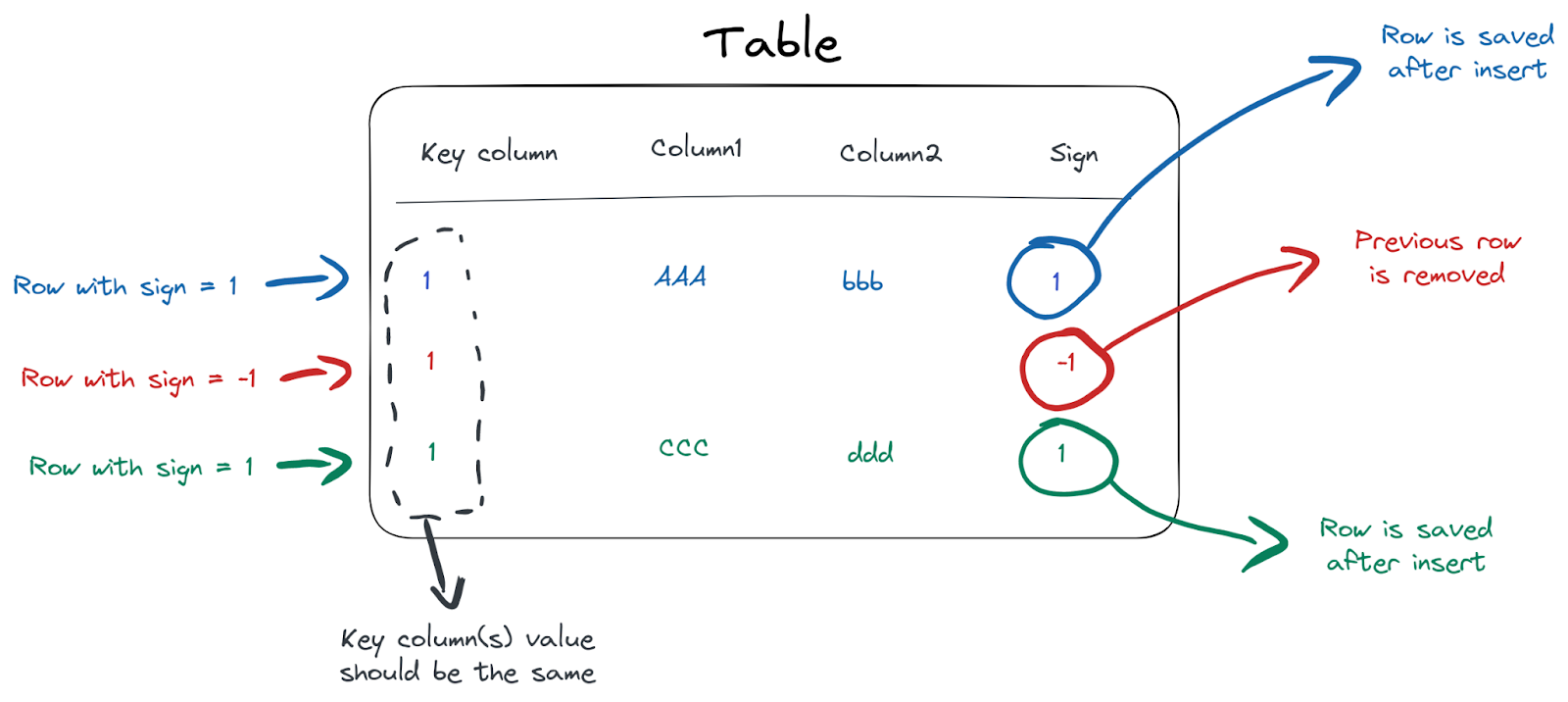
To satisfy the deduplication condition on the sorting key, we have to insert the same value for the `read_start, article_id, user_id` columns to update a row. For example, when a user starts reading an article, we insert the following row:
```sql
INSERT INTO article_reads
VALUES(1, 12, 0, now(), now(), 1);
```
We now have a single row in the table:
SELECT *
FROM article_reads

┌─user_id─┬─article_id─┬─read_to─┬──────────read_start─┬────────────read_end─┬─sign─┐
│       1 │         12 │       0 │ 2023-01-06 15:20:32 │ 2023-01-06 15:20:32 │    1 │
└─────────┴────────────┴─────────┴─────────────────────┴─────────────────────┴──────┘
A minute later, when the user reaches 70% of our article, we insert the following 2 rows:
```sql
INSERT INTO article_reads
VALUES(1, 12, 0, '2023-01-06 15:20:32', now(), -1),
(1, 12, 70, '2023-01-06 15:20:32', now(), 1);
```
The first row with `sign=-1` is used to tell ClickHouse it should delete the existing row (based on values in the ORDER BY tuple - `read_start`, `article_id` and `user_id` columns). The second inserted row (with `sign=1`) is the new row with the `read_to` column set to the new value of `70`.
Since data updates are [happening in the background](https://clickhouse.com/docs/en/engines/table-engines/mergetree-family/collapsingmergetree/#table_engine-collapsingmergetree-collapsing-algorithm), with eventual consistency of results, we should filter on the `sign` column to get correct results:
```sql
SELECT
article_id,
user_id,
max(read_end),
max(read_to)
FROM article_reads
WHERE sign = 1
GROUP BY
user_id,
article_id
┌─article_id─┬─user_id─┬───────max(read_end)─┬─max(read_to)─┐
│ 12 │ 1 │ 2023-01-06 15:21:59 │ 70 │
└────────────┴─────────┴─────────────────────┴──────────────┘
1 row in set. Elapsed: 0.004 sec.
```
The `CollapsingMergreTree` engine will now take care of removing canceled rows from storage efficiently in the background, so we don’t have to delete them manually. You can find further examples of using the CollapsingMergeTree engine [here](https://www.google.com/url?q=https://clickhouse.com/docs/en/engines/table-engines/mergetree-family/collapsingmergetree/%23example-of-use&sa=D&source=docs&ust=1678440218544759&usg=AOvVaw3vOSZ1Rbl24kvzHT48kuyp).
## Upserts using Versioning and ReplacingMergeTree
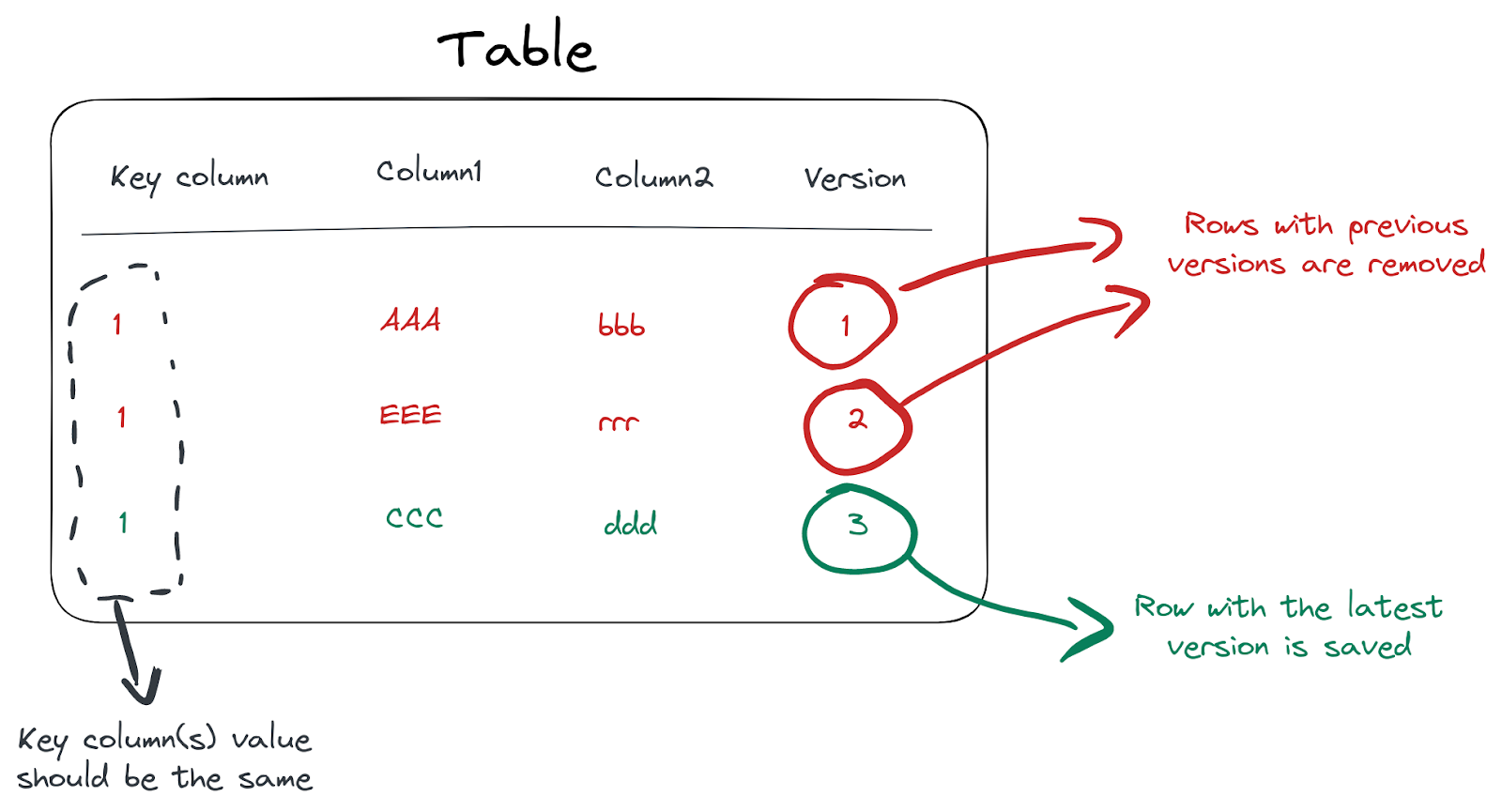
For more sophisticated cases, we might want to use versioning based on the [ReplacingMergeTree](https://clickhouse.com/docs/en/engines/table-engines/mergetree-family/replacingmergetree/) engine. This engine implements an efficient way of doing what’s known as `UPSERT` in other DBMSs, by using a special version column to track which rows should be removed. If multiple rows with the same sorting key are present, only the one with the largest version is kept in storage while others are removed:
For our previous example with articles reading, we can use the following structure:
```sql
CREATE TABLE article_reads
(
`user_id` UInt32,
`article_id` UInt32,
`read_to` UInt8,
`read_time` DateTime,
`version` Int32
)
ENGINE = ReplacingMergeTree(version)
ORDER BY (article_id, user_id)
```
Note the special `version` numeric column, which will be used by the ReplacingMergeTree engine to mark rows for removal. Let’s simulate a user reading an article over time from 0 to 80%:
```sql
INSERT INTO article_reads
VALUES(1, 12, 0, '2023-01-06 15:20:32', 1),
(1, 12, 30, '2023-01-06 15:21:42', 2),
(1, 12, 45, '2023-01-06 15:22:13', 3),
(1, 12, 80, '2023-01-06 15:23:10', 4);
```
Here we increase the `version` column value as reading progress is tracked. The process of row removal is also executed in the background through normal merge cycles, so we need to filter based on the latest version at query time:
```sql
SELECT *
FROM article_reads
WHERE (user_id = 1) AND (article_id = 12)
ORDER BY version DESC
LIMIT 1
┌─user_id─┬─article_id─┬─read_to─┬───────────read_time─┬─version─┐
│ 1 │ 12 │ 80 │ 2023-01-06 15:23:10 │ 5 │
└─────────┴────────────┴─────────┴─────────────────────┴─────────┘
```
Or we can use LIMIT 1 BY to get the list of rows with the latest version:
```sql
SELECT
user_id,
article_id,
read_to
FROM article_reads
ORDER BY version DESC
LIMIT 1 BY
user_id,
article_id
┌─user_id─┬─article_id─┬─read_to─┐
│ 1 │ 12 │ 80 │
└─────────┴────────────┴─────────┘
```
And again, we do not have to care about removal of old versions - this is done automatically by ClickHouse in the background.
## Summary
Updating and deleting data in analytical environments can be challenging and impact database performance dramatically. To address this ClickHouse provides multiple powerful ways to update and delete data efficiently for different cases:
* Lightweight Deletes via the [`DELETE FROM`](https://clickhouse.com/docs/en/sql-reference/statements/delete/#lightweight-delete-internals) syntax for removing data from ClickHouse. This is the most efficient way to delete data, provided that immediate disk space savings are not required, and users can tolerate deleted data “existing” on disk.
* Mutation-based deletes via [`ALTER…DELETE`](https://clickhouse.com/docs/en/sql-reference/statements/alter/delete/) in cases where immediate disk space savings are required. For example, compliance requirements require guarantees around removing data from disk.
* Mutation-based updates using [`ALTER…UPDATE`](https://clickhouse.com/docs/en/sql-reference/statements/alter/update/) in case of irregular and non-frequent changes
* Using [TTLs](https://clickhouse.com/docs/en/engines/table-engines/mergetree-family/mergetree#mergetree-table-ttl) for regular removal of (outdated) data based on date/time,
* Using [CollapsingMergeTree](https://clickhouse.com/docs/en/engines/table-engines/mergetree-family/collapsingmergetree/) to update or remove individual rows frequently.
* Using [ReplacingMergeTree](https://clickhouse.com/docs/en/engines/table-engines/mergetree-family/replacingmergetree/) to implement upsert (insert/update) based on versioning.
* [Dropping partitions](https://clickhouse.com/docs/en/sql-reference/statements/alter/partition/#drop-partitionpart) when removing large blocks of data regularly.
* Creating new columns (and dropping old ones) might also be a more efficient way to update entire tables.