We often find new users benefit from an example to fully comprehend the power of this capability and its core concepts. In this post, we will use the solution for the question “Which author has made commits for the most number of consecutive days?” from our recent analysis of the ClickHouse Git repository to introduce window functions. This query also provides us with the opportunity to utilize [array functions](https://clickhouse.com/docs/en/sql-reference/functions/array-functions/#arraycountfunc-arr1-): a powerful feature of ClickHouse that experienced users turn to when a specific operator is not available. All examples can be reproduced in our [play.clickhouse.com](https://sql.clickhouse.com?query_id=DCQPNPAIMAQXRLHYURLKVJ) environment (see the `git_clickhouse` database). Alternatively, if you want to dive deeper into this dataset, [ClickHouse Cloud](https://clickhouse.com/cloud) is a great starting point - spin up a cluster using a free trial, [load the data](https://clickhouse.com/docs/en/getting-started/example-datasets/github/#downloading-and-inserting-the-data), let us deal with the infrastructure, and get querying! ## Creating sequences Window functions allow users to perform a calculation on the current row based on the surrounding rows captured by the current query result. The number of rows is controlled by a “window”, which is defined by either a number of `ROWS` or a `RANGE`. A separate window can also be created for each of the unique values of a column - similar to an aggregate function, via a `PARTITION BY` clause. A value can be computed for the row using a function across the window values. The diagram below visualizes this window concept for some artificial data. In the example, we have three columns. The `country` column, is used to partition the data into multiple windows. An obvious example that might use these windows is a moving average per country - the following clause computes a moving average of the temperate over the last 5 points per country. ```sql avg(temperature) OVER (PARTITION BY country ORDER BY day ASC Rows BETWEEN 5 PRECEDING AND CURRENT ROW) AS moving_avg_temp ``` 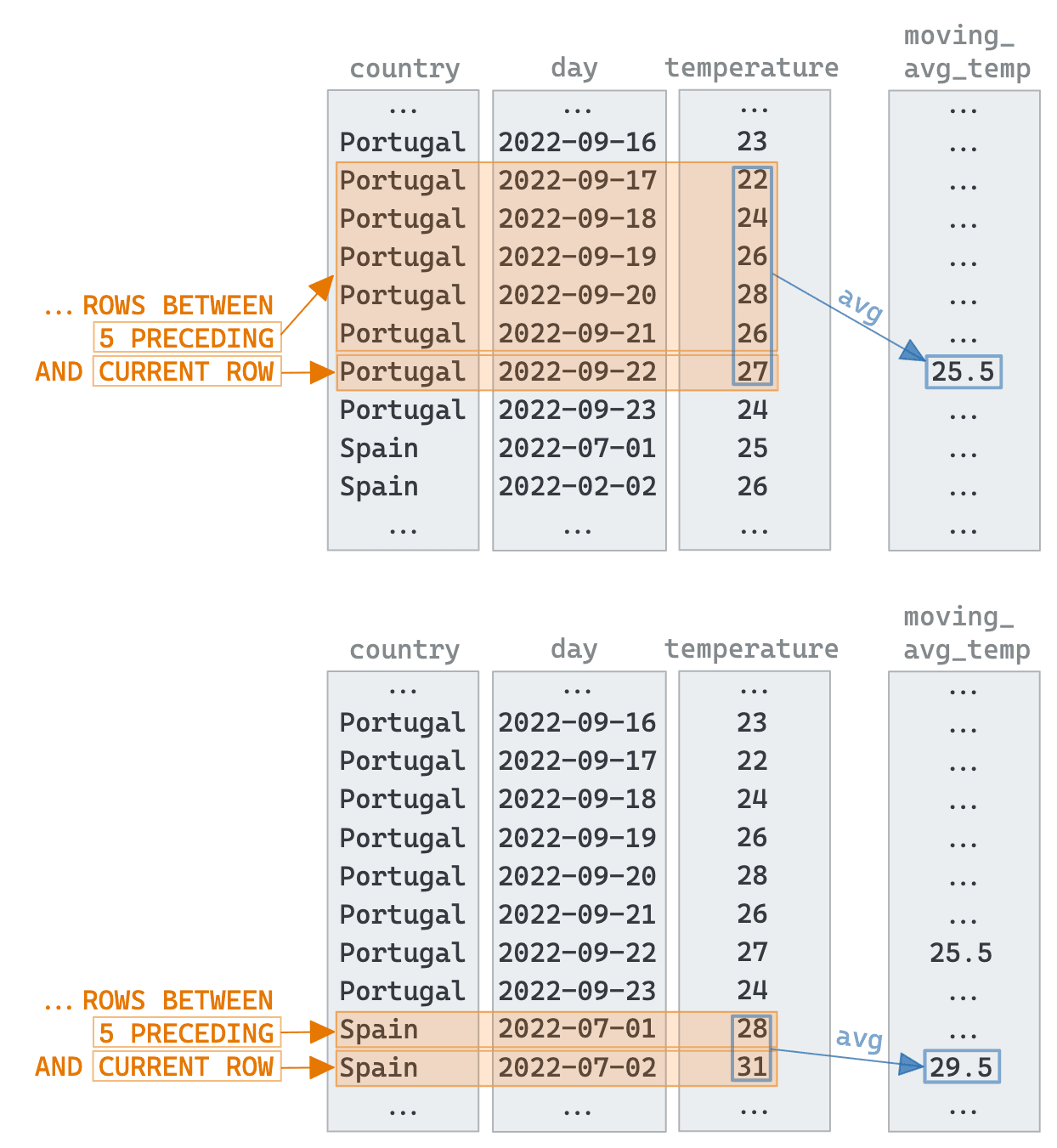 They are a few key parts to the syntax: * The `OVER` clause creates the window itself * The `PARTITION BY` creates a window per value of country * The `ORDER BY` controls the order of the peers of the current column. Without this, all of the other values in the result would be considered peers. * The `ROWS` clause defines the number of rows to consider, known as a frame. We have a [number of options](https://clickhouse.com/docs/en/sql-reference/window-functions/#functions) to define the range. Here we use `BETWEEN 5 PRECEDING AND CURRENT ROW` to specify a frame size starting from 5 rows preceding up to the current row (see the frames highlighted in orange in the drawing above). The `RANGE` clause is an alternative to this and defines the rows as a relationship to the current row, e.g., value difference. Now let's apply this functionality to our git commits and use this to solve our question. As you may recall from our [previous blog](https://clickhouse.com/blog/clickhouse-git-community-commits) and [documentation](https://clickhouse.com/docs/en/getting-started/example-datasets/github), the `git-import` tool generates a row for every commit in the repository. To answer our question, we only need two fields: `time` and `author`. Using these we need one row per author / day pair. This is solved with a trivial `GROUP BY` using the [toStartOfDay](https://clickhouse.com/docs/en/sql-reference/functions/date-time-functions/#tostartofday) function.A window function performs a calculation across a set of table rows that are somehow related to the current row. This is comparable to the type of calculation that can be done with an aggregate function. But unlike regular aggregate functions, the use of a window function does not cause rows to become grouped into a single output row - the rows retain their separate identities. The window function is able to access more than just the current row of the query result.
For each row, we now need to determine if it's consecutive, i.e., 1 day after the previous value. For this, we need to create a window per author via a `PARTITION BY`, and simply grab the preceding row using the [any](https://clickhouse.com/docs/en/sql-reference/aggregate-functions/reference/any/) function i.e., ```sql any(day) OVER (PARTITION BY author ORDER BY day ASC ROWS BETWEEN 1 PRECEDING AND CURRENT ROW) AS previous_commit ``` We visualize this step below. Note the importance of the `ORDER BY`, which sorts the values within each partition’s window: 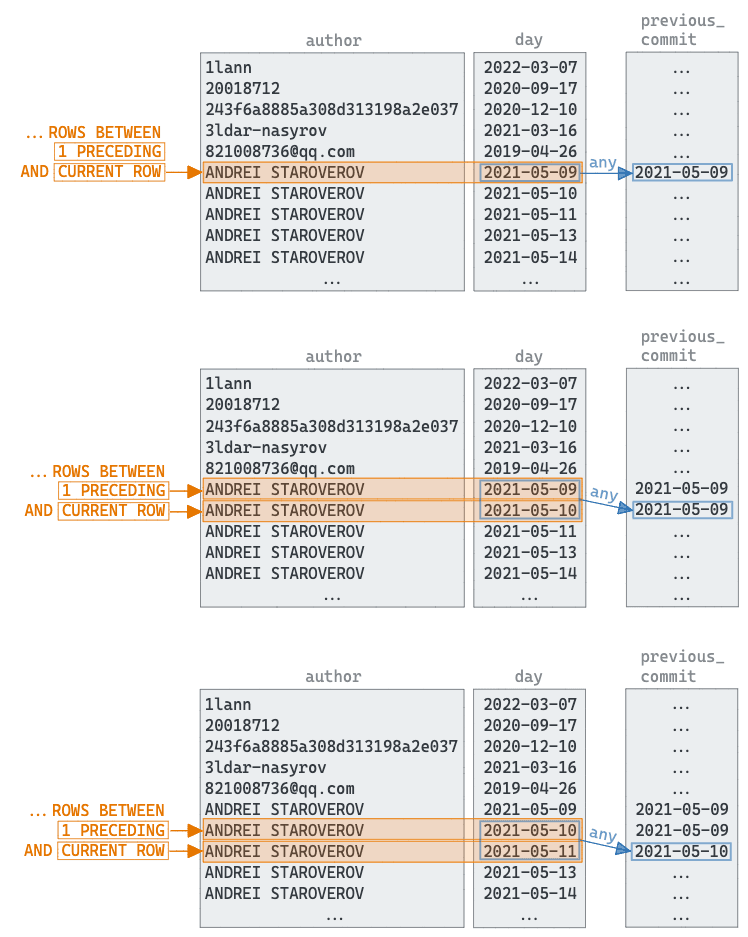 Now that we have the previous day as a column `previous_commit`, we can compute the difference in days with the current value using the [dateDiff](https://clickhouse.com/docs/en/sql-reference/functions/date-time-functions/#date_diff) function. Finally, we add a `consecutive` column [using a conditional ](https://clickhouse.com/docs/en/sql-reference/functions/conditional-functions/#if)- set to 1 if the difference is 1, 0 otherwise.SELECT author, toStartOfDay(time) AS day FROM git.commits GROUP BY author, day ORDER BY author ASC, day ASC LIMIT 10 ┌─author──────────────────────┬─────────────────day─┐ │ 1lann │ 2022-03-07 00:00:00 │ │ 20018712 │ 2020-09-17 00:00:00 │ │ 243f6a8885a308d313198a2e037 │ 2020-12-10 00:00:00 │ │ 3ldar-nasyrov │ 2021-03-16 00:00:00 │ │ 821008736@qq.com │ 2019-04-26 00:00:00 │ │ ANDREI STAROVEROV │ 2021-05-09 00:00:00 │ │ ANDREI STAROVEROV │ 2021-05-10 00:00:00 │ │ ANDREI STAROVEROV │ 2021-05-11 00:00:00 │ │ ANDREI STAROVEROV │ 2021-05-13 00:00:00 │ │ ANDREI STAROVEROV │ 2021-05-14 00:00:00 │ └─────────────────────────────┴─────────────────────┘ 10 rows in set. Elapsed: 0.362 sec. Processed 61.90 thousand rows, 389.87 KB (171.06 thousand rows/s., 1.08 MB/s.)✎
SELECT author, toDate(day) as day, any(day) OVER (PARTITION BY author ORDER BY day ASC ROWS BETWEEN 1 PRECEDING AND CURRENT ROW) AS previous_commit, dateDiff('day', previous_commit, day) AS day_diff, if(day_diff = 1, 1, 0) AS consecutive FROM ( SELECT author, toStartOfDay(time) AS day FROM git.commits GROUP BY author, day ORDER BY author ASC, day ASC ) LIMIT 10✎
At this point, we have our data in a structure that inherently has the answer. We simply need to identify the longest sequence of “1s” for the `consecutive` column for each author. To solve this, we turn to array functions. ## Counting consecutive values Arrays in ClickHouse are a first-class citizen and can be processed with a [wide range of functions](https://clickhouse.com/docs/en/sql-reference/functions/array-functions). These functions mean it can often be beneficial to orientate our data into an array to solve problems that otherwise appear pretty complex. Placing our earlier query in a CTE `commit_days`, we can find solve our consecutive 1s problem with a few lines: ```sql WITH commit_days AS ( // earlier query ) SELECT author, arrayMax(arrayMap(x -> length(x), arraySplit(x -> (x = 0), groupArray(consecutive)))) - 1 AS max_consecutive_days FROM commit_days GROUP BY author ORDER BY max_consecutive_days DESC LIMIT 10 ``` A lot is going on here, concealed by the fact that many array functions accept a [high order function](https://clickhouse.com/docs/en/sql-reference/functions/#higher-order-functions) (in this case another array function) as an input. Below, using `myrcc` as an example, we show how: - the [groupArray](https://clickhouse.com/docs/en/sql-reference/aggregate-functions/reference/grouparray/) function is used to produce a row per author with the `consecutive` values as an array - the [arraySplit](https://clickhouse.com/docs/en/sql-reference/functions/array-functions/#arraysplitfunc-arr1-) function converts this into a list of sub-arrays using a lambda conditional which splits on 0s. - Any consecutive sequences of 1s becomes a subarray with a leading 0 - An [arrayMap](https://clickhouse.com/docs/en/sql-reference/functions/array-functions/#arraymapfunc-arr1-) function next converts this into a list of the subarray lengths - The largest number in this list (minus 1) is, in effect, the author's longest sequence of commits. The [arrayMax](https://clickhouse.com/docs/en/sql-reference/functions/array-functions/#arraymax) function makes this trivial. 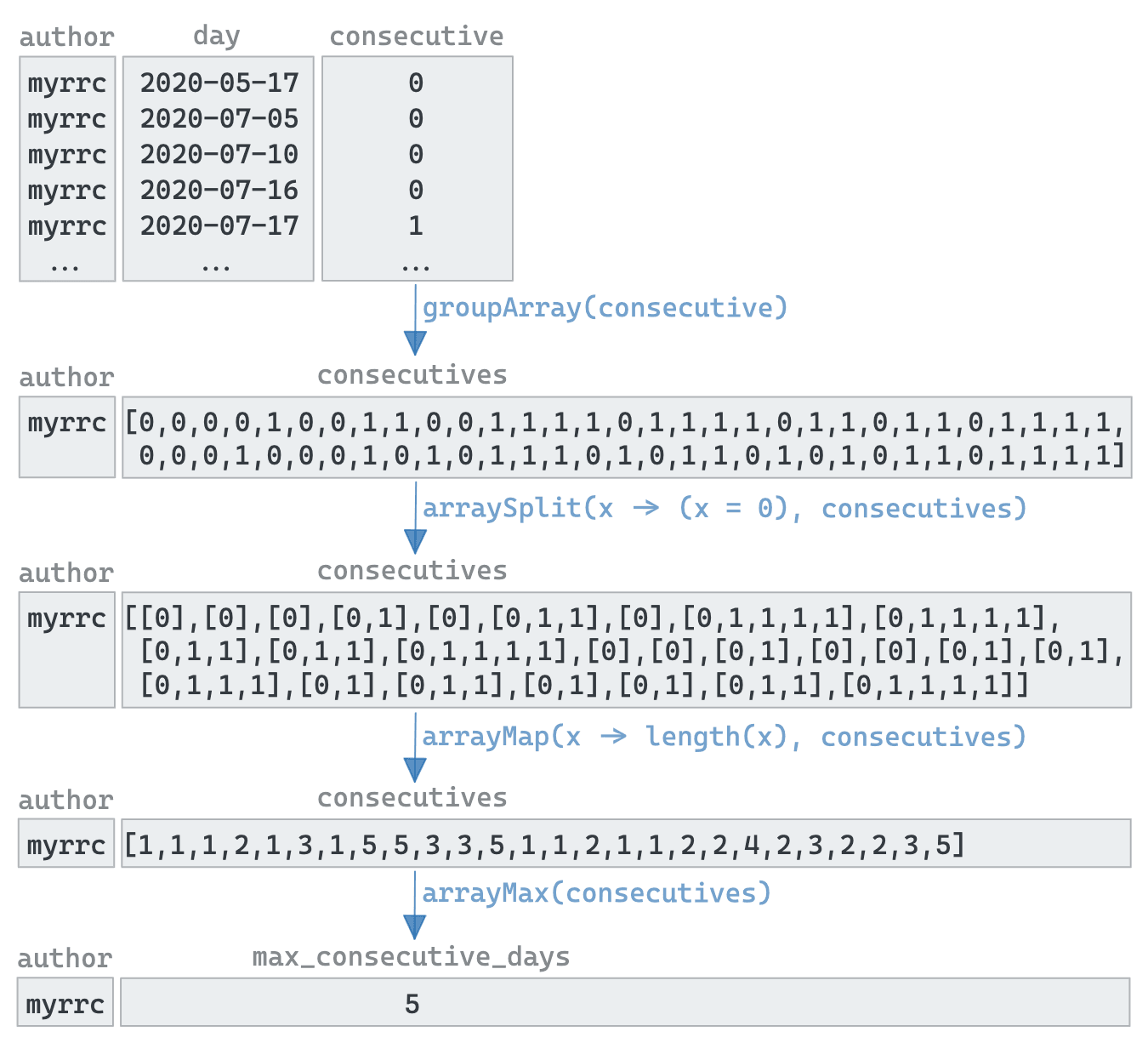 Putting this all together, we need to sort by the largest consecutive count first. So who is the committer with the longest sequence of uninterrupted work?┌─author──────────────────────┬────────day─┬─previous_commit─┬─day_diff─┬─consecutive─┐ │ 1lann │ 2022-03-07 │ 2022-03-07 │ 0 │ 0 │ │ 20018712 │ 2020-09-17 │ 2020-09-17 │ 0 │ 0 │ │ 243f6a8885a308d313198a2e037 │ 2020-12-10 │ 2020-12-10 │ 0 │ 0 │ │ 3ldar-nasyrov │ 2021-03-16 │ 2021-03-16 │ 0 │ 0 │ │ 821008736@qq.com │ 2019-04-26 │ 2019-04-26 │ 0 │ 0 │ │ ANDREI STAROVEROV │ 2021-05-09 │ 2021-05-09 │ 0 │ 0 │ │ ANDREI STAROVEROV │ 2021-05-10 │ 2021-05-09 │ 1 │ 1 │ │ ANDREI STAROVEROV │ 2021-05-11 │ 2021-05-10 │ 1 │ 1 │ │ ANDREI STAROVEROV │ 2021-05-13 │ 2021-05-11 │ 2 │ 0 │ │ ANDREI STAROVEROV │ 2021-05-14 │ 2021-05-13 │ 1 │ 1 │ └─────────────────────────────┴────────────┴─────────────────┴──────────┴─────────────┘ 10 rows in set. Elapsed: 0.020 sec. Processed 61.90 thousand rows, 389.87 KB (3.04 million rows/s., 19.17 MB/s.)
Well done to Kssenii ! ## Conclusion In this post, we’ve demonstrated how window and array functions can be used to solve sequence problems in ClickHouse. In our case, we’ve identified the author with the longest consecutive days of commits to our own repository. Similar techniques can, however, be applied to other datasets to find sequential patterns.WITH commit_days AS ( SELECT author, toDate(day) AS day, any(day) OVER (PARTITION BY author ORDER BY day ASC ROWS BETWEEN 1 PRECEDING AND CURRENT ROW) AS previous_commit, dateDiff('day', previous_commit, day) AS days_since_last, if(days_since_last = 1, 1, 0) AS consecutive FROM ( SELECT author, toStartOfDay(time) AS day FROM git.commits GROUP BY author, day ORDER BY author ASC, day ASC ) ) SELECT author, arrayMax(arrayMap(x -> length(x), arraySplit(x -> (x = 0), groupArray(consecutive)))) - 1 AS max_consecutive_days FROM commit_days GROUP BY author ORDER BY max_consecutive_days DESC LIMIT 5 ┌─author───────────┬─max_consecutive_days─┐ │ kssenii │ 32 │ │ Alexey Milovidov │ 30 │ │ alesapin │ 26 │ │ Azat Khuzhin │ 23 │ │ Nikolai Kochetov │ 15 │ └──────────────────┴──────────────────────┘ 5 rows in set. Elapsed: 0.028 sec. Processed 61.90 thousand rows, 389.87 KB (2.19 million rows/s., 13.78 MB/s.)✎