---
title: "ClickHouse Release 24.11"
date: "2024-12-05T15:47:31.530Z"
author: "ClickHouse"
category: "Engineering"
excerpt: "ClickHouse 24.11 is available. In this post, you will learn about new features, including the new BFloat16 type, parallel hash join becoming the default join strategy, prewarming the Mark cache, and more."
---

# ClickHouse Release 24.11

Another month goes by, which means it’s time for another release! 

<p>ClickHouse version 24.11 contains 9 new features &#x1F983; 15 performance optimizations &#x26F8;&#xFE0F; 68 bug fixes &#x1F3D5;&#xFE0F;</p>

In this release, parallel hash join becomes the default join strategy, `WITH FILL` gets a `STALENESS` modifier,  you can pre-warm the marks cache, and vector search gets faster with the `BFloat16` data type.

## New Contributors

As always, we send a special welcome to all the new contributors in 24.11\! ClickHouse's popularity is, in large part, due to the efforts of the community that contributes. Seeing that community grow is always humbling.

Below are the names of the new contributors:

*0xMihalich, Max Vostrikov, Payam Qorbanpour, Plasmaion, Roman Antonov, Romeo58rus, Zoe Steinkamp, kellytoole, ortyomka, qhsong, udiz, yun, Örjan Fors, Андрей*

Hint: if you’re curious how we generate this list… [here](https://gist.github.com/gingerwizard/5a9a87a39ba93b422d8640d811e269e9).

<iframe width="768" height="432" src="https://www.youtube.com/embed/0hpTvtq__4g?si=gu_2qx4YGy77r0ND" title="YouTube video player" frameborder="0" allow="accelerometer; autoplay; clipboard-write; encrypted-media; gyroscope; picture-in-picture; web-share" referrerpolicy="strict-origin-when-cross-origin" allowfullscreen></iframe>

You can also [view the slides from the presentation](https://presentations.clickhouse.com/release_24.11/).

## Parallel hash join is the default join strategy

## Contributed by Nikita Taranov

The parallel hash join algorithm is now the default join strategy, replacing hash join. 

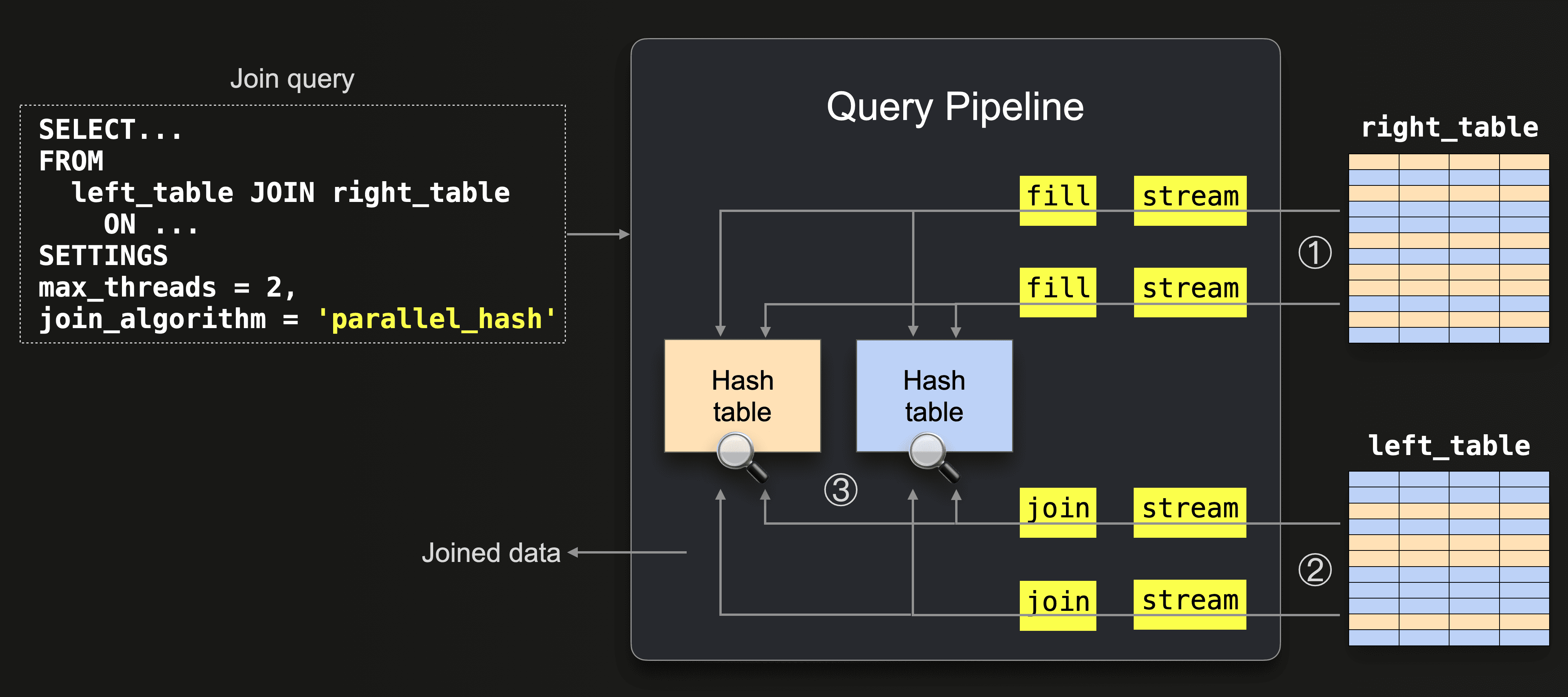
The parallel hash join algorithm is a variation of a hash join that splits the input data to build several hash tables concurrently in order to speed up the join at the expense of higher memory overhead. You can see a diagram of the algorithm's query pipeline below:  
![Parallel Hash Join.png](https://clickhouse.com/uploads/Parallel_Hash_Join_4b3e255dda.png)

You can learn more about parallel hash join in the [ClickHouse Joins Under the Hood - Hash Join, Parallel Hash Join, Grace Hash Join](https://clickhouse.com/blog/clickhouse-fully-supports-joins-hash-joins-part2) blog post.

As well as becoming the default, a performance optimization was done to the algorithm where blocks scattered between threads for parallel processing now [use zero-copy](https://github.com/ClickHouse/ClickHouse/pull/67782/files) instead of copying block columns each time. 

## STALENESS Modifier For ORDER BY WITH FILL

## Contributed by Mikhail Artemenko

This release introduces the `STALENESS` clause to `WITH FILL`. Let’s look at how to use it with help from the [MidJourney dataset](https://huggingface.co/datasets/vivym/midjourney-messages). Assuming we’ve downloaded the Parquet files, we can populate a table using the following queries:


<pre><code type='click-ui' language='sql'>
CREATE TABLE images (
    id String,
    timestamp DateTime64,
    height Int64,
    width Int64,
    size Int64

)
ENGINE = MergeTree
ORDER BY (size, height, width);


INSERT INTO images WITH data AS (
  SELECT
    assumeNotNull(timestamp) AS ts,
    assumeNotNull(id) AS id,
    assumeNotNull(height) AS height,
    assumeNotNull(width) AS width,
    assumeNotNull(size) AS size,
    parseDateTime64BestEffort(ts) AS ts2
  FROM file('data/0000{00..55}.parquet')
)
SELECT id, ts2 AS timestamp,  height, width, size
FROM data;
</code>
</pre>

Let’s say we want to count the number of images generated during one second on the 24th of March 2023. We’ll define start and end dates using parameters:

<pre>
  <code type='click-ui' language='sql'>
SET param_start = '2023-03-24 00:24:02', 
    param_end = '2023-03-24 00:24:03';
</code>
</pre>

We can then write this query to compute the count per 100 milliseconds using the `WITH FILL` clause to populate empty buckets with a zero value:

<pre><code type='click-ui' language='sql'>
SELECT
    toStartOfInterval(timestamp, toIntervalMillisecond(100)) AS bucket,
    count() AS count, 'original' as original
FROM MidJourney.images
WHERE (timestamp >= {start: String}) AND (timestamp <= {end: String})
GROUP BY ALL
ORDER BY bucket ASC
WITH FILL
FROM toDateTime64({start:String}, 3)
TO toDateTime64({end:String}, 3) STEP toIntervalMillisecond(100);
</code>
</pre>

```text
┌──────────────────bucket─┬─count─┬─original─┐
│ 2023-03-24 00:24:02.000 │     0 │          │
│ 2023-03-24 00:24:02.100 │     0 │          │
│ 2023-03-24 00:24:02.200 │     0 │          │
│ 2023-03-24 00:24:02.300 │     3 │ original │
│ 2023-03-24 00:24:02.400 │     0 │          │
│ 2023-03-24 00:24:02.500 │     0 │          │
│ 2023-03-24 00:24:02.600 │     1 │ original │
│ 2023-03-24 00:24:02.700 │     1 │ original │
│ 2023-03-24 00:24:02.800 │     2 │ original │
│ 2023-03-24 00:24:02.900 │     0 │          │
└─────────────────────────┴───────┴──────────┘

```

This release introduces the `STALENESS` clause. From the documentation:

> When `STALENESS const_numeric_expr` is defined, the query will generate rows until the difference from the previous row in the original data exceeds `const_numeric_expr`.

You can’t use `STALENESS` at the same time as the `WITH FILL...FROM` clause, so we’ll need to remove that, which leaves us with this query:

<pre><code type='click-ui' language='sql'>
SELECT
    toStartOfInterval(timestamp, toIntervalMillisecond(100)) AS bucket,
    count() AS count, 'original' as original
FROM MidJourney.images
WHERE (timestamp >= {start: String}) AND (timestamp <= {end: String})
GROUP BY ALL
ORDER BY bucket ASC
WITH FILL
TO toDateTime64({end:String}, 3) STEP toIntervalMillisecond(100);
</code>
</pre>

Removing the `WITH FILL...FROM` clause means that our result set will start from the first actual value rather than pre-filling with `0`s back to the specified timestamp.

```text
┌──────────────────bucket─┬─count─┬─original─┐
│ 2023-03-24 00:24:02.300 │     3 │ original │
│ 2023-03-24 00:24:02.400 │     0 │          │
│ 2023-03-24 00:24:02.500 │     0 │          │
│ 2023-03-24 00:24:02.600 │     1 │ original │
│ 2023-03-24 00:24:02.700 │     1 │ original │
│ 2023-03-24 00:24:02.800 │     2 │ original │
│ 2023-03-24 00:24:02.900 │     0 │          │
└─────────────────────────┴───────┴──────────┘
```

If we now add a `STALENESS` value of 200 milliseconds, it will only fill in empty rows until the difference from the previous row exceeds 200 milliseconds:

<pre><code type='click-ui' language='sql'>
SELECT
    toStartOfInterval(timestamp, toIntervalMillisecond(100)) AS bucket,
    count() AS count, 'original' as original
FROM MidJourney.images
WHERE (timestamp >= {start: String}) AND (timestamp <= {end: String})
GROUP BY ALL
ORDER BY bucket ASC
WITH FILL
TO toDateTime64({end:String}, 3) STEP toIntervalMillisecond(100)
STALENESS toIntervalMillisecond(200);
</code>
</pre>


```text
┌──────────────────bucket─┬─count─┬─original─┐
│ 2023-03-24 00:24:02.300 │     3 │ original │
│ 2023-03-24 00:24:02.400 │     0 │          │
│ 2023-03-24 00:24:02.600 │     1 │ original │
│ 2023-03-24 00:24:02.700 │     1 │ original │
│ 2023-03-24 00:24:02.800 │     2 │ original │
│ 2023-03-24 00:24:02.900 │     0 │          │
└─────────────────────────┴───────┴──────────┘
```

We lose the following row from the result set:

```text
│ 2023-03-24 00:24:02.500 │     0 │          │
```

## Exceptions in the HTTP interface

## Contributed by Sema Checherinda

The HTTP interface can now reliably detect errors even after the result has been streamed to the client. In previous versions if we ran the following query against the ClickHouse Server:

<pre><code type='click-ui' language='bash'>
curl http://localhost:8123/?output_format_parallel_formatting=0 -d "SELECT throwIf(number > 100000) FROM system.numbers FORMAT Values"
</code>
</pre>


We’d see a stream of values followed by this error message appended at the end:

```text
Code: 395. DB::Exception: Value passed to 'throwIf' function is non-zero: while executing 'FUNCTION throwIf(greater(number, 100000) :: 2) -> throwIf(greater(number, 100000)) UInt8 : 1'. (FUNCTION_THROW_IF_VALUE_IS_NON_ZERO) (version 24.3.1.465 (official build))
```

The exit code is 0, which suggests the query has run successfully. From 24.11, we’ll instead see the following output:

```text
Code: 395. DB::Exception: Value passed to 'throwIf' function is non-zero: while executing 'FUNCTION throwIf(greater(__table1.number, 100000_UInt32) :: 0) -> throwIf(greater(__table1.number, 100000_UInt32)) UInt8 : 1'. (FUNCTION_THROW_IF_VALUE_IS_NON_ZERO) (version 24.11.1.2557 (official build))
curl: (18) transfer closed with outstanding read data remaining
```

And we have a non-zero code of 18.

## Prewarming the Mark cache

## Contributed by Anton Popov

Marks map primary keys to offsets in every column's file, forming part of a table’s index. There is one mark file per table column. They can take considerable memory and are selectively loaded into the mark cache. 

From 24.11, you can pre-warm this cache using the `mark_cache_prewarm_ratio` setting, which is set to 95% by default.

The server eagerly brings marks to the cache in memory on every insert, merge, or fetch of data parts until it is almost full.

A new system command, `SYSTEM PREWARM MARK CACHE t,` will immediately load all marks into the cache.

## BFloat16 data type

## Contributed by Alexey Milovidov

The [Bfloat16 data type](https://en.wikipedia.org/wiki/Bfloat16_floating-point_format) was developed at Google Brain to represent vector embeddings. As the name suggests, it consists of 16 bits—a sign bit, an 8-bit exponent, and then 7 bits for the mantissa/fraction.

![2024-12-05_13-19-27.png](https://clickhouse.com/uploads/2024_12_05_13_19_27_8032f8f0bb.png)


It has the same exponent range as Float32 (single precision float), with fewer bits for the mantissa (7 bits instead of 23).

This data type is now available in ClickHouse and will help with AI and vector searches. You’ll need to configure the following setting to use the new type:

```sql
SET allow_experimental_bfloat16_type=1;
```

We ran the nearest neighbor search with a full scan over 28 million 384-dimensional vectors on a single machine, AWS c7a.metal-48xl, and saw the following results:

```bash
clickhouse-benchmark --query "WITH
[-0.02925783360957671,-0.03488947771094666,...,0.032484047621093616]::Array(BFloat16)
AS center SELECT d FROM (SELECT cosineDistance(vector, center) AS d
    FROM hackernews_llama_memory ORDER BY d LIMIT 10
) SETTINGS allow_experimental_bfloat16_type = 1"
```

```text
BFloat16: 0.061 sec, 301 GB/sec.
Float32: 0.146 sec, 276 GB/sec.
```