---
title: "ClickHouse Release 24.8 LTS"
date: "2024-09-03T09:27:22.997Z"
author: "ClickHouse"
category: "Engineering"
excerpt: "ClickHouse 24.8 LTS is available. In this post, you will learn about the new JOIN datatype and TimeSeries table engine."
---
# ClickHouse Release 24.8 LTS
Another month goes by, which means it’s time for another release!
ClickHouse version 24.8 contains 19 new features 🎁 18 performance optimisations 🛷 65 bug fixes 🐛
This release is an LTS (Long Term Support) one, which means it will be supported for 12 months after release. To learn more about Stable and LTS releases, [see the documentation](https://clickhouse.com/docs/en/faq/operations/production#how-to-choose-between-clickhouse-releases).
In this release, we’ve got the newly revamped JSON type, a table engine for time-series data, exactly-once processing of Kafka messages, and of course, join improvements!
## New Contributors
As always, we send a special welcome to all the new contributors in 24.9! ClickHouse's popularity is, in large part, due to the efforts of the community that contributes. Seeing that community grow is always humbling.
Below are the names of the new contributors:
_Graham Campbell, Halersson Paris, Jacob Reckhard, Lennard Eijsackers, Miсhael Stetsyuk, Peter Nguyen, Ruihang Xia, Samuele Guerrini, Sasha Sheikin, Vladimir Varankin, Zhukova, Maria, heguangnan, khodyrevyurii, sakulali, shiyer7474, xc0derx, zoomxi_
Hint: if you’re curious how we generate this list… [here](https://gist.github.com/gingerwizard/5a9a87a39ba93b422d8640d811e269e9).
You can also [view the slides from the presentation](https://presentations.clickhouse.com/release_24.8/).
## JSON data type
### Contributed by Pavel Kruglov
This release sees the experimental release of the new [JSON data type](https://clickhouse.com/docs/en/sql-reference/data-types/newjson). This has been in the works for a while, and in previous release posts, we’ve talked about a couple of types that it relies on—[Variant](https://clickhouse.com/docs/en/sql-reference/data-types/variant) and [Dynamic](https://clickhouse.com/docs/en/sql-reference/data-types/dynamic).
The JSON data type is used to store semi-structured data where the structure of each row might not be the same as that of other rows or where we don’t want to break it out into individual columns.
To use the JSON data type, we’ll need to enable the following:
```sql
SET allow_experimental_json_type=1;
```
We will try out this functionality using a football/soccer [dataset provided by StatsBomb](https://github.com/statsbomb/open-data/tree/master?tab=readme-ov-file). The dataset contains matches, lineups, and events.
The most interesting data for our purposes are events. These events could be passes, clearances, blocks, or other things that can happen in a match. Events of the same type have the same structure, but different event types have different fields.
If you want to follow along, you can download the dataset by running the following command:
```bash
wget https://github.com/statsbomb/open-data/archive/refs/heads/master.zip
```
Next, let’s have a quick look at the data we’ll be working with. We’ll read the data in `JsonAsObject` format so that ClickHouse doesn’t try to infer the types of each property in the JSON.
```sql
SELECT
replaceRegexpAll(splitByRegexp('/', _file)[-1], '.json', '') AS matchId,
json
FROM file('master.zip :: **/data/events/*.json', JSONAsObject)
LIMIT 1
FORMAT Vertical
Row 1:
──────
matchId: 15946
json: {"duration":0,"id":"9f6e2ecf-6685-45df-a62e-c2db3090f6c1","index":"1","minute":"0","period":"1","play_pattern":{"id":"1","name":"Regular Play"},"possession":"1","possession_team":{"id":"217","name":"Barcelona"},"second":"0","tactics":{"formation":"442","lineup":[{"jersey_number":"1","player":{"id":"20055","name":"Marc-André ter Stegen"},"position":{"id":"1","name":"Goalkeeper"}},{"jersey_number":"2","player":{"id":"6374","name":"Nélson Cabral Semedo"},"position":{"id":"2","name":"Right Back"}},{"jersey_number":"3","player":{"id":"5213","name":"Gerard Piqué Bernabéu"},"position":{"id":"3","name":"Right Center Back"}},{"jersey_number":"23","player":{"id":"5492","name":"Samuel Yves Umtiti"},"position":{"id":"5","name":"Left Center Back"}},{"jersey_number":"18","player":{"id":"5211","name":"Jordi Alba Ramos"},"position":{"id":"6","name":"Left Back"}},{"jersey_number":"5","player":{"id":"5203","name":"Sergio Busquets i Burgos"},"position":{"id":"9","name":"Right Defensive Midfield"}},{"jersey_number":"4","player":{"id":"5470","name":"Ivan Rakitić"},"position":{"id":"11","name":"Left Defensive Midfield"}},{"jersey_number":"20","player":{"id":"6379","name":"Sergi Roberto Carnicer"},"position":{"id":"12","name":"Right Midfield"}},{"jersey_number":"11","player":{"id":"5477","name":"Ousmane Dembélé"},"position":{"id":"16","name":"Left Midfield"}},{"jersey_number":"9","player":{"id":"5246","name":"Luis Alberto Suárez Díaz"},"position":{"id":"22","name":"Right Center Forward"}},{"jersey_number":"10","player":{"id":"5503","name":"Lionel Andrés Messi Cuccittini"},"position":{"id":"24","name":"Left Center Forward"}}]},"team":{"id":"217","name":"Barcelona"},"timestamp":"00:00:00.000","type":{"id":"35","name":"Starting XI"}}
```
This row represents a `Starting XI` event, but several hundred other event types exist. Let’s see how to load this data into ClickHouse.
Next, we’re going to create an `events` table. We’ll have a `json` column that will store the JSON for each event and a `matchId` column to store the match id, which we’ll extract from the file name.
When creating a ClickHouse table, we must define a sorting key that will impact how the data is sorted on disk. Our key will be the team ID, accessible under `possession_team.id. `
We can’t make a nested field the sorting key for a table at the moment, but this feature is [planned for future versions](https://github.com/ClickHouse/ClickHouse/issues/68428). For now, we’ll create a column of type `MATERIALIZED` that pulls the value from the JSON column. We’ll use the materialized column as the sorting key. The table creation query is shown below:
```sql
CREATE TABLE events
(
matchId String,
json JSON,
possession_team_id String MATERIALIZED getSubcolumn(json, 'possession_team.id')
)
ENGINE = MergeTree
ORDER BY possession_team_id;
```
We can then copy our previous `SELECT` query and prefix it with `INSERT INTO events` to load the data:
```sql
INSERT INTO events
SELECT
replaceRegexpAll(splitByRegexp('/', _file)[-1], '.json', '') AS matchId,
json
FROM file('master.zip :: **/data/events/*.json', JSONAsObject)
0 rows in set. Elapsed: 72.967 sec. Processed 12.08 million rows, 10.39 GB (165.60 thousand rows/s., 142.42 MB/s.)
Peak memory usage: 3.52 GiB.
```
It takes a little over one minute from the output to load 12 million events. We can then write a query that uses JSON dot syntax to find the most popular types of events:
```sql
SELECT
json.type.name,
count() AS count
FROM events
GROUP BY ALL
ORDER BY count DESC
LIMIT 10
┌─json.type.name─┬───count─┐
│ Pass │ 3358652 │
│ Ball Receipt* │ 3142664 │
│ Carry │ 2609610 │
│ Pressure │ 1102075 │
│ Ball Recovery │ 363161 │
│ Duel │ 255791 │
│ Clearance │ 157713 │
│ Block │ 130858 │
│ Dribble │ 121105 │
│ Goal Keeper │ 105390 │
└────────────────┴─────────┘
```
The dot syntax is useful when we want to read literal values, but it doesn’t work if we read subobjects. For example, the following query counts the most popular `possesion_team`:
```sql
SELECT
json.possession_team AS team,
count()
FROM events
GROUP BY team
ORDER BY count() DESC
LIMIT 10
┌─team─┬──count()─┐
│ ᴺᵁᴸᴸ │ 12083338 │
└──────┴──────────┘
```
Hmmm, all nulls!
The dot syntax doesn’t read nested objects for performance reasons. The data is stored so that reading literal values by paths is very efficient, but reading all subobjects by path requires much more data and can sometimes be slower.
When we want to return an object, we need to use `.^` instead. This special syntax can only be used to read nested objects from fields with the `JSON` data type:
```sql
SELECT
json.^possession_team AS team,
count()
FROM events
GROUP BY team
ORDER BY count() DESC
LIMIT 10
┌─team──────────────────────────────────────┬─count()─┐
│ {"id":"217","name":"Barcelona"} │ 1326515 │
│ {"id":"131","name":"Paris Saint-Germain"} │ 239930 │
│ {"id":"1","name":"Arsenal"} │ 154789 │
│ {"id":"904","name":"Bayer Leverkusen"} │ 147473 │
│ {"id":"220","name":"Real Madrid"} │ 135421 │
│ {"id":"968","name":"Arsenal WFC"} │ 131637 │
│ {"id":"746","name":"Manchester City WFC"} │ 131017 │
│ {"id":"971","name":"Chelsea FCW"} │ 115761 │
│ {"id":"212","name":"Atlético Madrid"} │ 110893 │
│ {"id":"169","name":"Bayern Munich"} │ 104804 │
└───────────────────────────────────────────┴─────────┘
```
If you’re reading down through multiple nested subobjects and want to return a subobject, you only need to use the `.^` syntax for the first object in the path. For example:
```sql
select json.^pass.body_part AS x, toTypeName(x)
FROM events
LIMIT 1;
┌─x───────────────────────────────┬─toTypeName(x)─┐
│ {"id":"40","name":"Right Foot"} │ JSON │
└─────────────────────────────────┴───────────────┘
```
This syntax is only intended for returning objects. If you try to use it to return a literal value, you’ll get back an empty JSON object:
```sql
SELECT
json.^possession_team.name AS team, toTypeName(team),
count()
FROM events
GROUP BY team
ORDER BY count() DESC
LIMIT 10;
┌─team─┬─toTypeName(team)─┬──count()─┐
│ {} │ JSON │ 12083338 │
└──────┴──────────────────┴──────────┘
```
We [plan to add a new operator](https://github.com/ClickHouse/ClickHouse/issues/68428), `.$`, which will return both literals and subobjects as a single subcolumn.
When we return literal values, their type will be `Dynamic`. We can use the `dynamicType` function to determine the underlying type for each value:
```sql
SELECT
json.possession_team.name AS team,
dynamicType(team) AS teamType,
json.duration AS duration,
dynamicType(duration) AS durationType
FROM events
LIMIT 1
┌─team────┬─teamType─┬─duration─┬─durationType─┐
│ Arsenal │ String │ 0.657763 │ Float64 │
└─────────┴──────────┴──────────┴──────────────┘
```
We can also use suffixes of`.:` to assume a data type and `::` to cast to a data type.
```sql
SELECT
json.possession_team.name AS team,
toTypeName(team),
json.possession_team.name.:String AS teamAssume,
toTypeName(teamAssume) AS assumeType,
json.possession_team.name::String AS teamCast,
toTypeName(teamCast) AS castType
FROM events
LIMIT 1;
┌─team────┬─toTypeName(team)─┬─teamAssume─┬─assumeType───────┬─teamCast─┬─castType─┐
│ Arsenal │ Dynamic │ Arsenal │ Nullable(String) │ Arsenal │ String │
└─────────┴──────────────────┴────────────┴──────────────────┴──────────┴──────────┘
```
One final thing to note is that columns with the `JSON` data type can be configured further. For example, if we want to exclude some parts of the JSON objects being stored, we can skip particular paths during JSON pathing using `SKIP` and `SKIP REGEXP`.
For example, the following table creation statement skips the `pass.body.part` path and any path that starts with the letter `t`:
```sql
CREATE TABLE events2
(
matchId String,
json JSON(
SKIP pass.body_part,
SKIP REGEXP 't.*'
),
possession_team_id String MATERIALIZED getSubcolumn(json, 'possession_team.id')
)
ENGINE = MergeTree
ORDER BY possession_team_id;
```
When ingesting data into a table with a JSON column with extra settings, ClickHouse won’t automatically cast the incoming data to the right type, but that will be fixed in a future version. For now, we need to define the JSON column type in our import query explicitly:
```sql
INSERT INTO events2
SELECT
replaceRegexpAll(splitByRegexp('/', _file)[-1], '.json', '') AS matchId,
json
FROM file(
'master.zip :: **/data/events/*.json',
JSONAsObject,
'`json` JSON(SKIP `pass.body_part`, SKIP REGEXP \'t.*\')'
);
0 rows in set. Elapsed: 75.122 sec. Processed 12.08 million rows, 10.39 GB (160.85 thousand rows/s., 138.33 MB/s.)
Peak memory usage: 3.52 GiB.
```
If we query `events2`, we’ll see that those subpaths aren’t there anymore:
```sql
SELECT json.^pass AS pass
FROM events3
WHERE empty(pass) != true
LIMIT 3
FORMAT Vertical;
Row 1:
──────
pass: {"angle":-3.1127546,"end_location":[49.6,39.7],"height":{"id":"1","name":"Ground Pass"},"length":10.404326,"recipient":{"id":"401732","name":"Jaclyn Katrina Demis Sawicki"},"type":{"id":"65","name":"Kick Off"}}
Row 2:
──────
pass: {"angle":2.9699645,"end_location":[28,44.2],"height":{"id":"1","name":"Ground Pass"},"length":22.835499,"recipient":{"id":"401737","name":"Hali Moriah Candido Long"}}
Row 3:
──────
pass: {"angle":-1.7185218,"end_location":[27.1,27.1],"height":{"id":"1","name":"Ground Pass"},"length":16.984993,"recipient":{"id":"389446","name":"Jessika Rebecca Macayan Cowart"}}
```
We can also supply type hints for paths:
```sql
CREATE TABLE events3
(
matchId String,
json JSON(
pass.height.name String,
pass.height.id Int64
),
possession_team_id String MATERIALIZED getSubcolumn(json, 'possession_team.id')
)
ENGINE = MergeTree
ORDER BY possession_team_id;
```
There are also a couple more settings: `max_dynamic_paths` and `max_dynamic_types`. These settings control how data is stored on disk. You can read more about them in the [JSON data type documentation](https://clickhouse.com/docs/en/sql-reference/data-types/newjson).
## Control Of Projections During Merges
### Contributed by ShiChao Jin
Tables in ClickHouse can have “projections,” i.e., hidden table copies kept in sync with the original table. A projection typically has a different primary key than the original table (and, therefore, a different row order). it is also possible to pre-compute aggregate values in projections incrementally.
When a user executes a query, ClickHouse chooses between reading from the original table or one of its projections. This is shown in the following diagram:
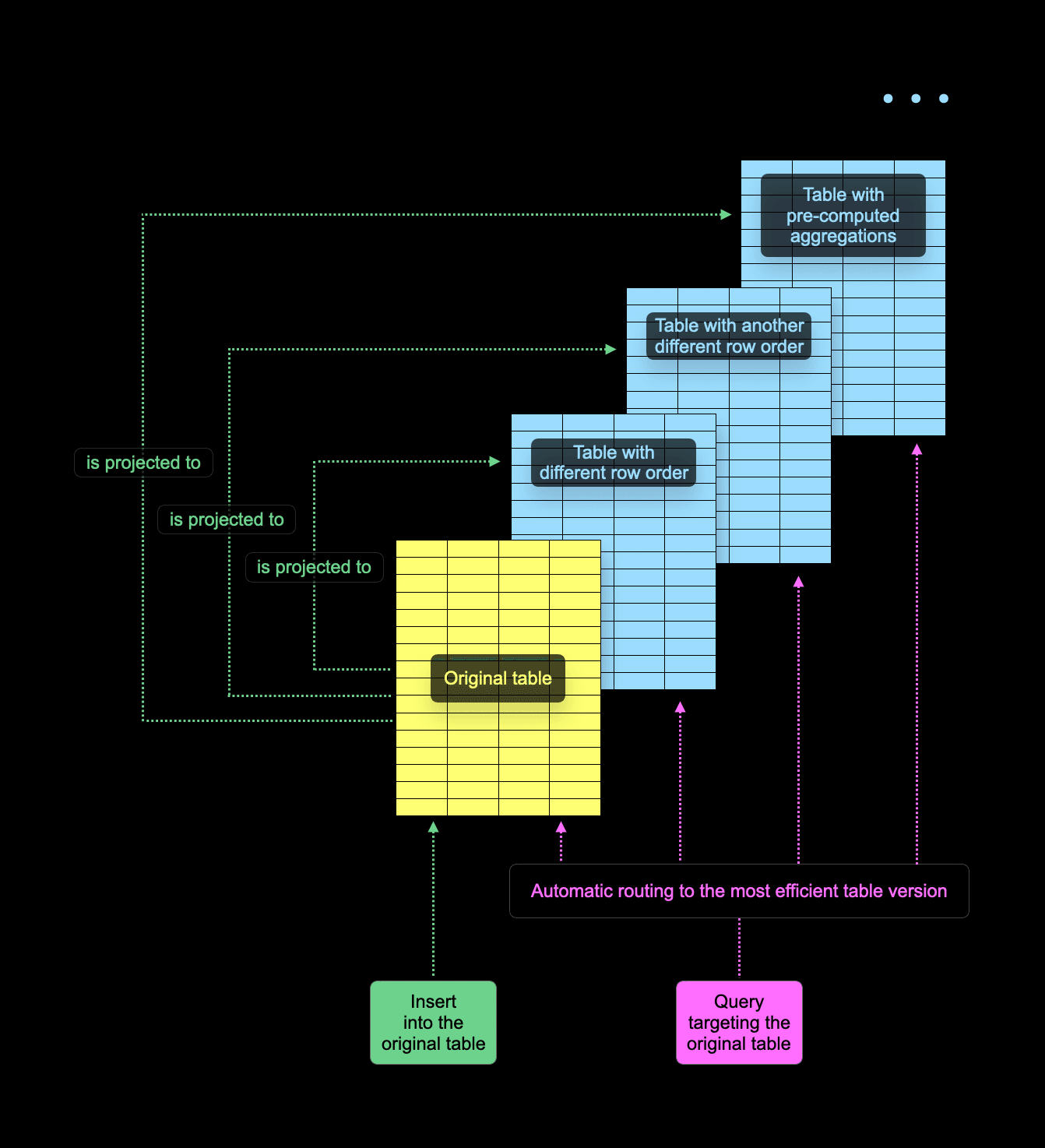
The decision to read from the original table or one of its projections is made individually per every table part. ClickHouse generally aims to read as little data as possible and employs a couple of tricks to identify the best part to read from, for example, sampling the primary key of a part. In some cases, source table parts have no corresponding projection parts. This can happen, for example, because creating a projection for a table in SQL is “lazy” by default - it only affects newly inserted data but keeps existing parts unaltered.
The following diagram shows a more concrete example of a query that computes the maximum price of [properties sold in the U.K.](https://clickhouse.com/docs/en/getting-started/example-datasets/uk-price-paid) grouped by town and street:
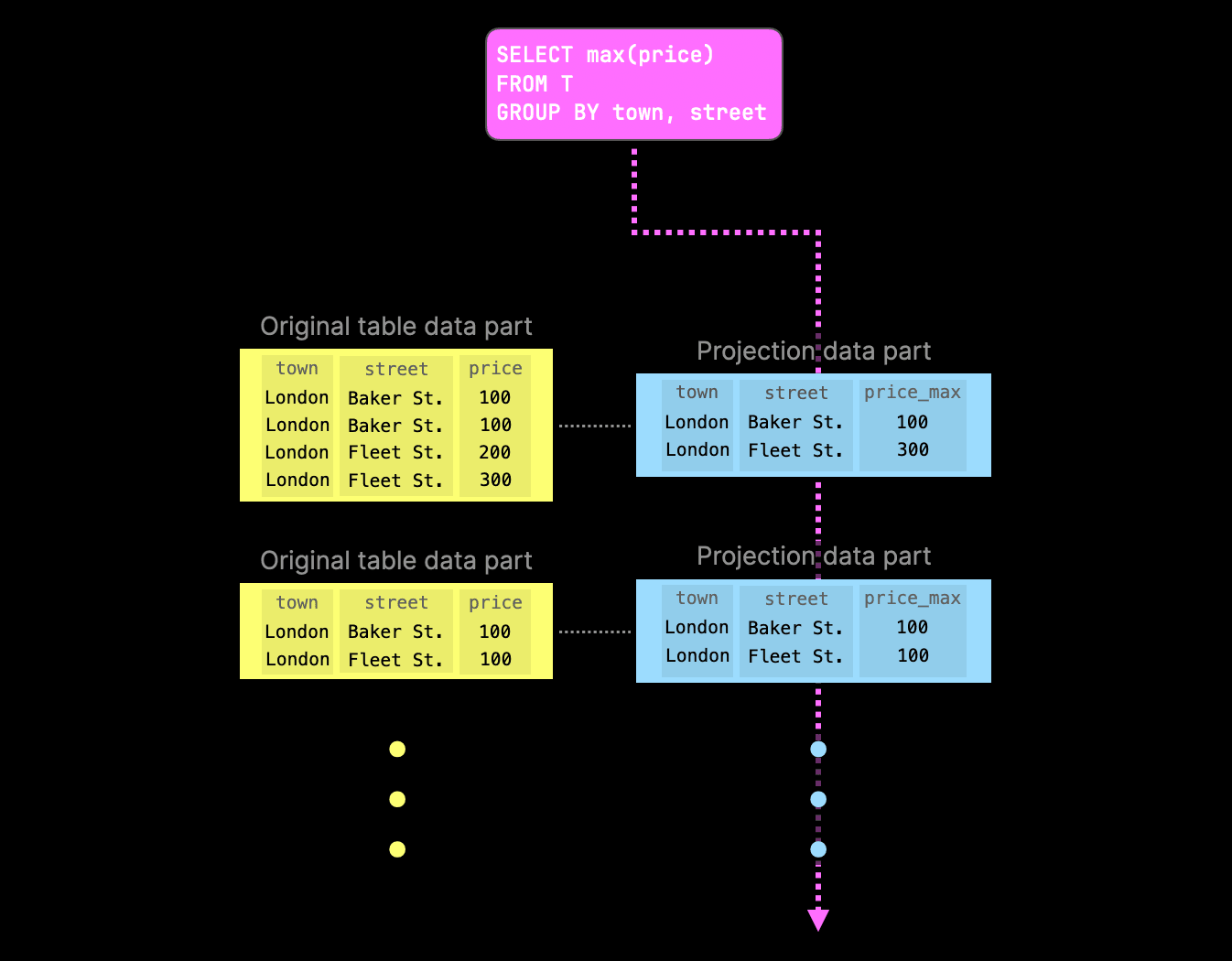
As one of the projections already contains the pre-computed aggregate values, ClickHouse tries to read from the corresponding projection parts to avoid aggregating at query runtime again. If a specific part lacks the corresponding projection part, query execution falls back to the original part.
But what happens if the rows in the original table change in a non-trivial way by non-trivial data part background merges?
For example, assume the table is stored using ClickHouse’s `ReplacingMergeTree` table engine. If the same row is detected in multiple input parts during merge, only the most recent row version (from the most recently inserted part) will be kept, while all older versions will be discarded.
Similarly, if the table is stored using the `AggregatingMergeTree` table engine, the merge operation may fold the same rows in the input parts (based on the primary key values) into a single row to update partial aggregation states.
Before ClickHouse v24.8, projection parts either silently got out of sync with the main data, or certain operations like updates and deletes could not be run at all as the database automatically threw an exception if the table had projections.
Since v24.8, a new table-level setting `deduplicate_merge_projection_mode` controls the behavior if the aforementioned non-trivial background merge operations occur in parts of the original table.
Delete mutations are another example of part merge operations that drop rows in the parts of the original table. Since v24.7, we also have a setting to control the behavior w.r.t. delete mutations triggered by lightweight deletes: `lightweight_mutation_projection_mode`.
Below are the possible values for both `deduplicate_merge_projection_mode` and` lightweight_mutation_projection_mode`:
* `throw`: an exception is thrown, preventing projection parts from going out of sync.
* `drop`: affected projection table parts are dropped. Queries will fall back to the original table part for affected projection parts.
* `rebuild`: the affected projection part is rebuilt to stay consistent with data in the original table part.
We demonstrate the `drop` behavior with two diagrams. The first diagram shows a row in the original table data part is deleted (by running a mutation merge operation). To prevent projection parts from becoming out-of-sync, the associated projection table data part is deleted:
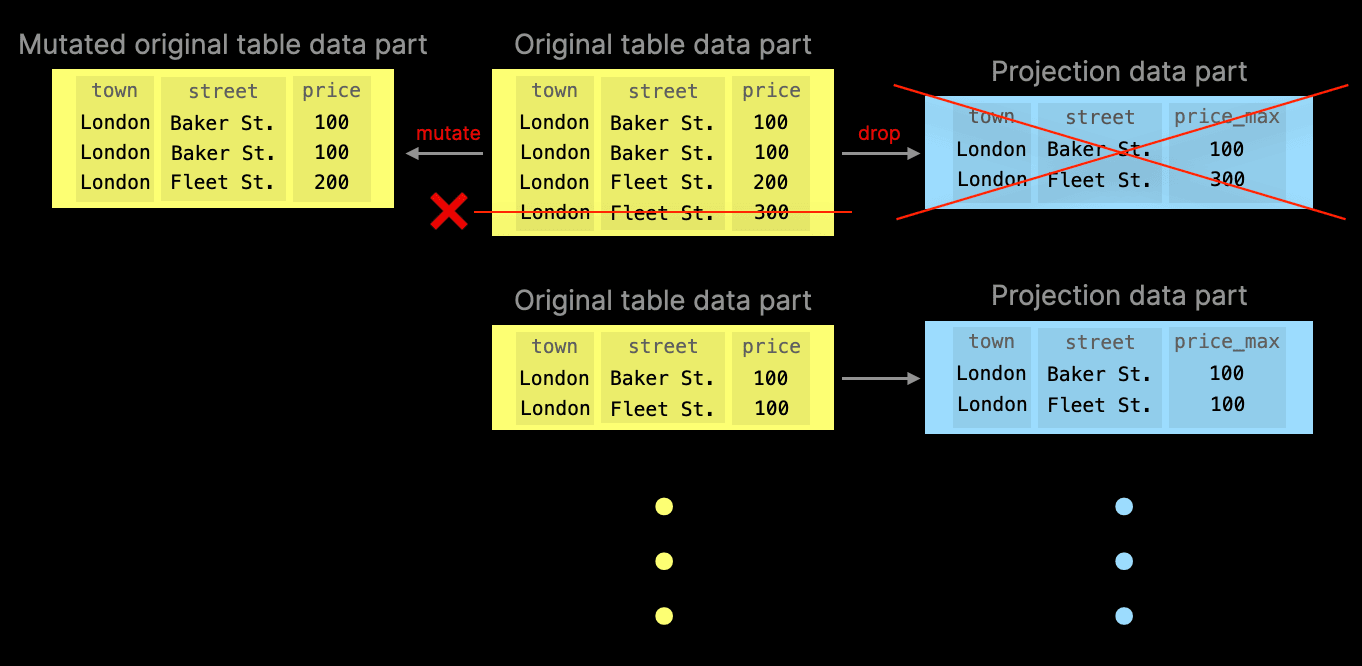
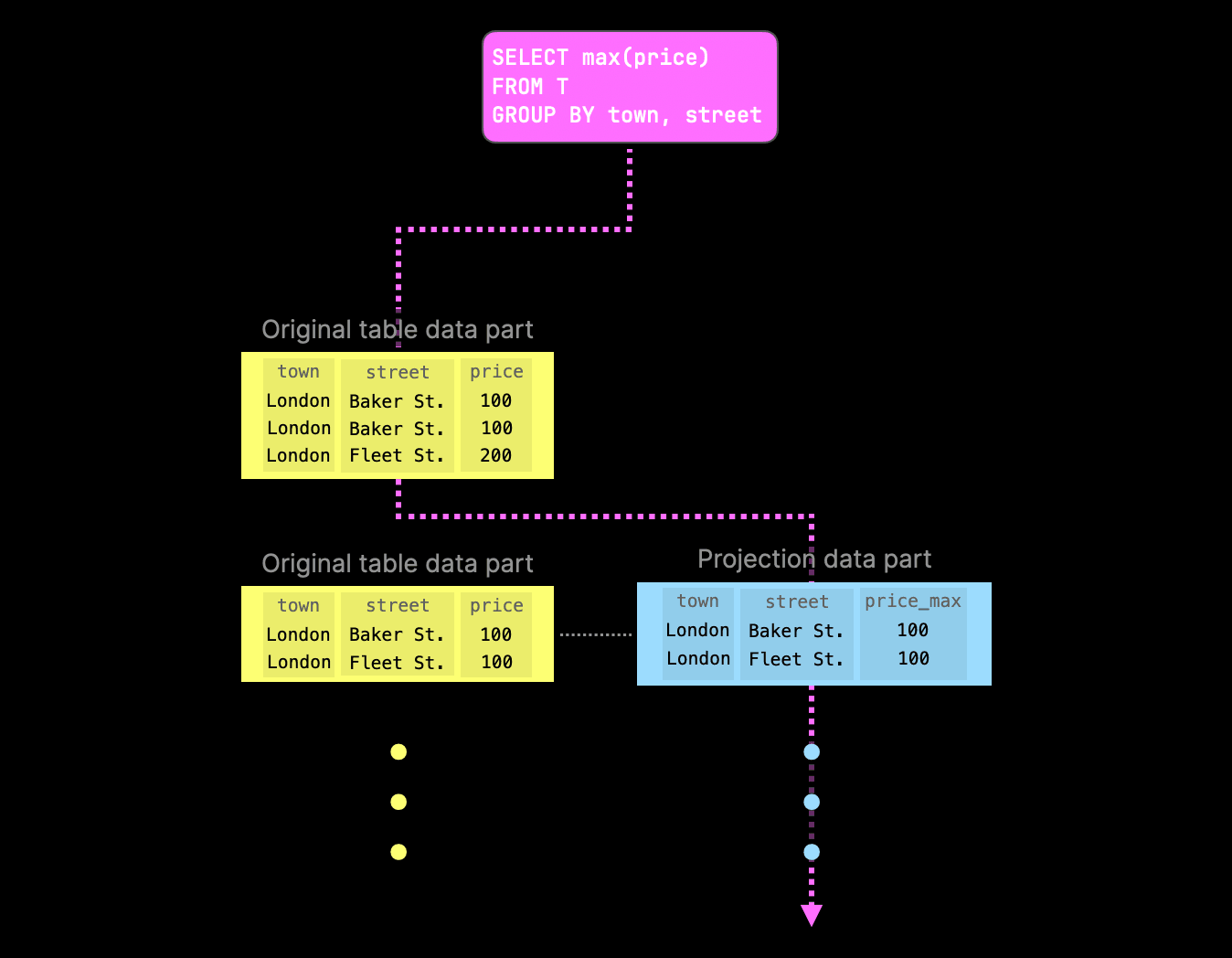
The example aggregation query would still be able to run (albeit slower) - it will simply fall back to the original table part for parts where it cannot find projection parts. However, when a projection part still exists, query execution would prefer these over the original table parts:
If `deduplicate_merge_projection_mode` is set to `rebuild`, ClickHouse will rebuild the projection table data part associated with the modified original table data part:
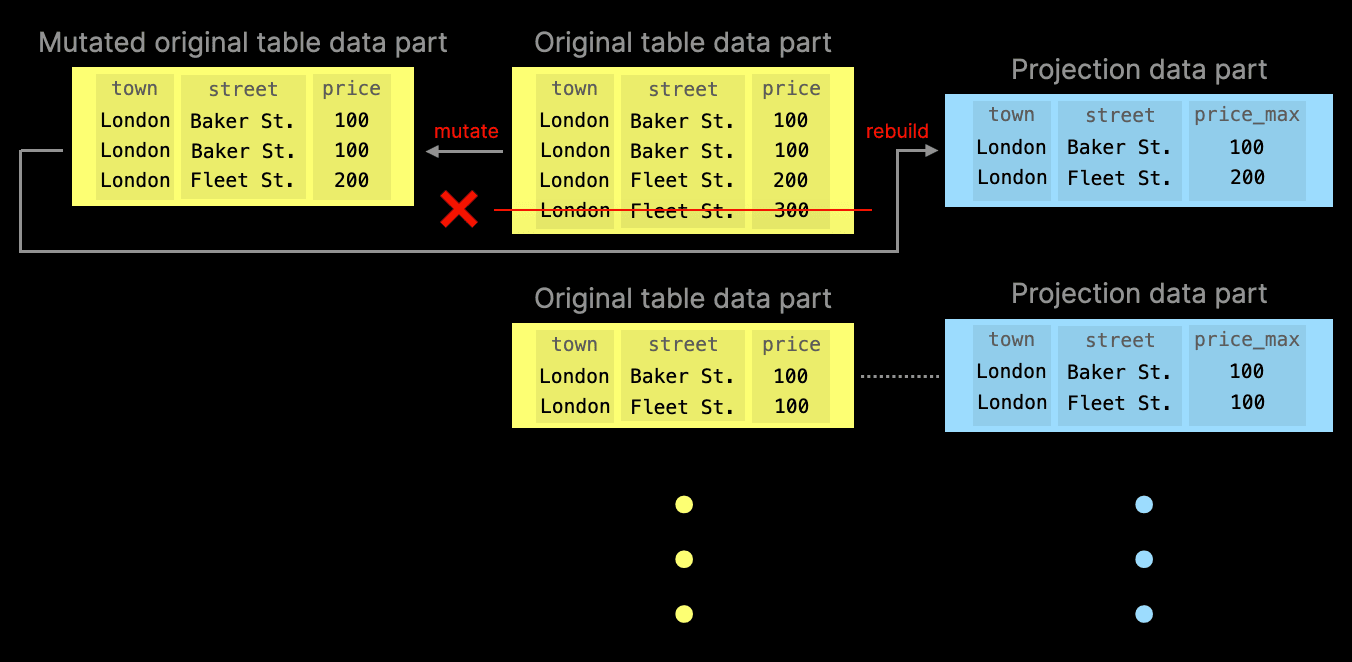
Note that this behavior is a significant advantage over incremental materialized views, which are similar to projections. However, incremental materialized views only react and sync on data inserts in the original table. When the original table data is updated, deleted, replaced, etc., the materialized views go (silently) out of sync.
## TimeSeries Table Engine
### Contributed by Vitaly Baranov
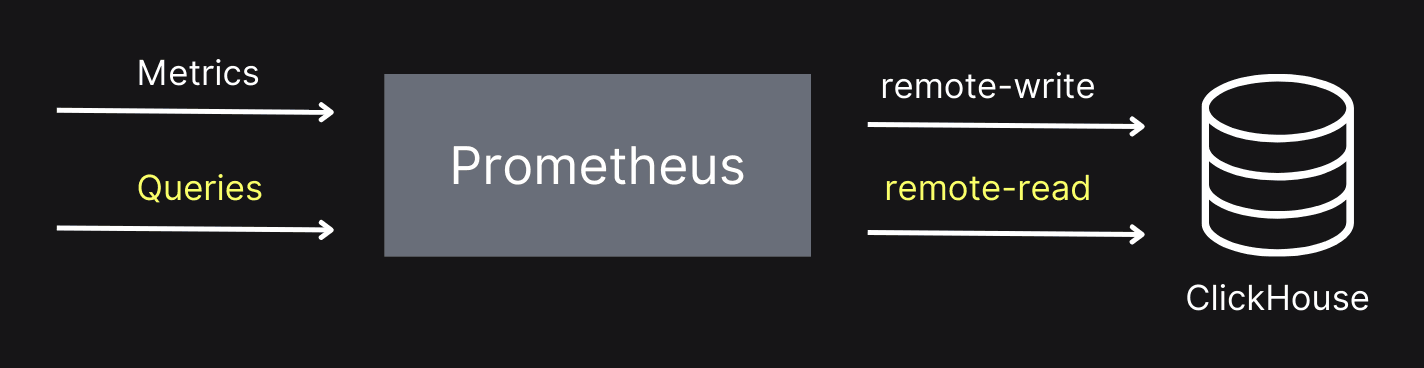
This release also introduces the `TimeSeries` table engine. This table engine lets you use ClickHouse as the storage for Prometheus using the `remote-write` protocol. Prometheus can also query the data from ClickHouse using the `remote-read` protocol, as shown in the diagram below.
The `TimeSeries` table engine is an experimental feature, so you must set the `allow_experimental_time_series_table` property to enable it. We’re going to do that via a server config file:
_config.d/allow_experimental_time_series.xml_
```xml
1
```
We’ll also need to set up some other configuration to enable the `remove-write` and `remote-read` endpoints in ClickHouse.
_config.d/prometheus.xml_
```xml
9092/writeremote_write
default.prometheus
/readremote_read
default.prometheus
```
We can then start ClickHouse. We should see the following lines in the log output:
```
2024.08.27 15:41:19.970465 [ 14489686 ] {} Application: Listening for Prometheus: http://[::1]:9092
...
2024.08.27 15:41:19.970523 [ 14489686 ] {} Application: Listening for Prometheus: http://127.0.0.1:9092
```
Next, we’ll connect to the server using ClickHouse Client and run the following query:
```sql
CREATE TABLE prometheus ENGINE=TimeSeries;
```
Running this query will create three target tables:
* `data,` which contains time series associated with some identifier
* `tags,` which contains identifiers calculated for each combination of a metric name and tags.
* `metrics`, which contains some information about metrics that have been collected, the types of those metrics, and their descriptions.
You can see the names of those tables by running the following query:
```sql
SHOW TABLES
┌─name───────────────────────────────────────────────────┐
│ .inner_id.data.bcd5b4e6-01d3-45d1-ab27-bbe9de2bc74b │
│ .inner_id.metrics.bcd5b4e6-01d3-45d1-ab27-bbe9de2bc74b │
│ .inner_id.tags.bcd5b4e6-01d3-45d1-ab27-bbe9de2bc74b │
│ prometheus │
└────────────────────────────────────────────────────────┘
```
Let’s now run Prometheus and have it collect data about itself in an extremely meta way. We’ll have the following configuration file:
_prometheus.yml_
```yml
global:
scrape_interval: 15s
external_labels:
monitor: 'codelab-monitor'
scrape_configs:
- job_name: 'prometheus'
scrape_interval: 5s
static_configs:
- targets: ['localhost:9090']
remote_write:
- url: "http://localhost:9092/write"
remote_read:
- url: "http://localhost:9092/read"
```
The important parts to note are `remote_write` and `remote_read`, which point to HTTP endpoints running on the ClickHouse Server. You can [download Prometheus](https://prometheus.io/download/), and after you’ve unpacked the tar/zip file, run the following (or similar):
```bash
./prometheus-2.54.0.darwin-amd64/prometheus --config prometheus.yml
```
We can then look at the metrics in Prometheus, or there are some table functions that we can use in ClickHouse. They have the prefix `timeSeries` and take the ``TimeSeries` `table name as an argument. The first one is `timeSeriesMetrics`, which lists all the metrics:
```sql
SELECT *
FROM timeSeriesMetrics(prometheus)
LIMIT 3
FORMAT Vertical
Query id: 07f4cce2-ad47-45e1-b0e3-6903e474d76c
Row 1:
──────
metric_family_name: go_gc_cycles_automatic_gc_cycles_total
type: counter
unit:
help: Count of completed GC cycles generated by the Go runtime.
Row 2:
──────
metric_family_name: go_gc_cycles_forced_gc_cycles_total
type: counter
unit:
help: Count of completed GC cycles forced by the application.
Row 3:
──────
metric_family_name: go_gc_cycles_total_gc_cycles_total
type: counter
unit:
help: Count of all completed GC cycles.
```
We also have `timeSeriesData` and `timeSeriesTags`, which are best queried together:
```sql
SELECT *
FROM timeSeriesData(prometheus) AS data
INNER JOIN timeSeriesTags(prometheus) AS tags ON tags.id = data.id
WHERE metric_name = 'prometheus_tsdb_head_chunks_created_total'
LIMIT 1
FORMAT Vertical
Row 1:
──────
id: a869dbe8-ba86-1416-47d3-c51cda7334b1
timestamp: 2024-08-27 15:54:46.655
value: 8935
tags.id: a869dbe8-ba86-1416-47d3-c51cda7334b1
metric_name: prometheus_tsdb_head_chunks_created_total
tags: {'instance':'localhost:9090','job':'prometheus','monitor':'codelab-monitor'}
min_time: 2024-08-27 13:46:05.725
max_time: 2024-08-27 16:00:26.649
```
In future versions, we will also implement the `/query` endpoint so you can do Prometheus-style queries directly against ClickHouse.
## Join improvements
Since [every](https://presentations.clickhouse.com/release_24.5/index.html#28) ClickHouse release includes JOIN improvements, ClickHouse v24.8 is no exception, delivering even more enhancements.
### More variants of JOIN strictness with inequality conditions
### Contributed by Lgbo-USTC
ClickHouse v24.5 [introduced](https://clickhouse.com/blog/clickhouse-release-24-05#non-equal-join) experimental support for non-equal conditions in the ON clause of a JOIN. This release supports more join strictnesses (`LEFT`/`RIGHT` `SEMI`/`ANTI`/`ANY` JOIN) with unequal conditions involving columns from both the left and right tables.
### OPTIMIZE query on Join tables to reduce their memory footprint
### Contributed by Duc Canh Le
ClickHouse tables with a [join table engine](https://clickhouse.com/docs/en/engines/table-engines/special/join) contain an in-memory [pre-computed hash table with the right-hand side table data](https://clickhouse.com/blog/clickhouse-fully-supports-joins-hash-joins-part2#hash-join) ready for JOINs.
In ClickHouse v24.8, you can now run an [OPTIMIZE TABLE](https://clickhouse.com/docs/en/sql-reference/statements/optimize) statement on a Join table, which will lower memory usage by better packing. This can reduce the table memory footprint by 30%.
## The New Kafka Engine
### Contributed by János Benjamin Antal
We also have a new experimental Kafka engine. This version makes it possible to have exactly- once processing of messages from Kafka.
In the existing engine, Kafka offsets are stored in Kafka and ClickHouse via a non-atomic commit. This leads to the possibility of duplicates in the case of retries.
In the new version, offsets are handled by ClickHouse Keeper. If an insertion attempt fails, it will take the same chunk of data and repeat the insertion, regardless of network or server failures.
We can enable the new engine by using these settings:
```sql
CREATE TABLE ... ENGINE = Kafka(
'localhost:19092', 'topic', 'consumer', 'JSONEachRow')
SETTINGS
kafka_keeper_path = '/clickhouse/{database}/kafka',
kafka_replica_name = 'r1';
```