---
title: "ClickHouse Input format matchup: Which is fastest & most efficient"
date: "2025-02-26T07:41:17.940Z"
author: "Tom Schreiber"
category: "Engineering"
excerpt: "Discover the fastest and most efficient ClickHouse input formats with our benchmark-driven insights—plus how to optimize inserts for maximum performance."
---
# ClickHouse Input format matchup: Which is fastest & most efficient
## Introduction
ClickHouse supports [70+](https://sql.clickhouse.com/?query=c2VsZWN0ICogZnJvbSBzeXN0ZW0uZm9ybWF0cyBXSEVSRSBpc19pbnB1dCBPUkRFUiBCWSBuYW1lOw&chart=eyJ0eXBlIjoibGluZSIsImNvbmZpZyI6eyJ4YXhpcyI6InllYXIiLCJ5YXhpcyI6Ijk5dGhfYXZnX3RlbXAiLCJzZXJpZXMiOiJjb3VudHJ5IiwidGl0bGUiOiJUZW1wZXJhdHVyZSBieSBjb3VudHJ5IGFuZCB5ZWFyIn19&tab=results&run_query=true) input formats out of the box, enabling seamless data ingestion without third-party tools—ideal for one-off imports. But when there’s no predefined format, the sheer number of choices can be overwhelming. Which format is the fastest and most efficient? Do ClickHouse clients automatically pick the best option? And how can you optimize further?
To answer these questions, we developed [FastFormats](https://fastformats.clickhouse.com/)—a benchmark that measures server-side ingestion speed and hardware efficiency across ClickHouse’s supported formats.
This post starts by looking under the hood of ClickHouse insert processing, explores the available input formats, and breaks down benchmark results to reveal the best formats for high-performance ingestion. Finally, we’ll uncover how ClickHouse clients optimize inserts by default—and how you can fine-tune them even further.
> If you’re looking for a quick recommendation, check out [this](http://www.clickhouse.com/docs/interfaces/formats#input-formats) docs page.
> For the full test results, explore the [FastFormats online dashboard](https://fastformats.clickhouse.com/).
## ClickHouse insert processing
[Previous posts](https://clickhouse.com/blog/supercharge-your-clickhouse-data-loads-part2) explored server-side insert scaling for one-off data loads, where the server pulls data without client involvement and the data already has a predefined format.
This post focuses on more common **push** scenarios, where clients regularly or continuously send data and can choose the most efficient format, especially when the source data lacks a natural one. We examine client-side optimizations—most importantly, the choice of input format—to accelerate server-side processing.
First, we briefly review ClickHouse’s MergeTree insert mechanics and key client-side tuning options:
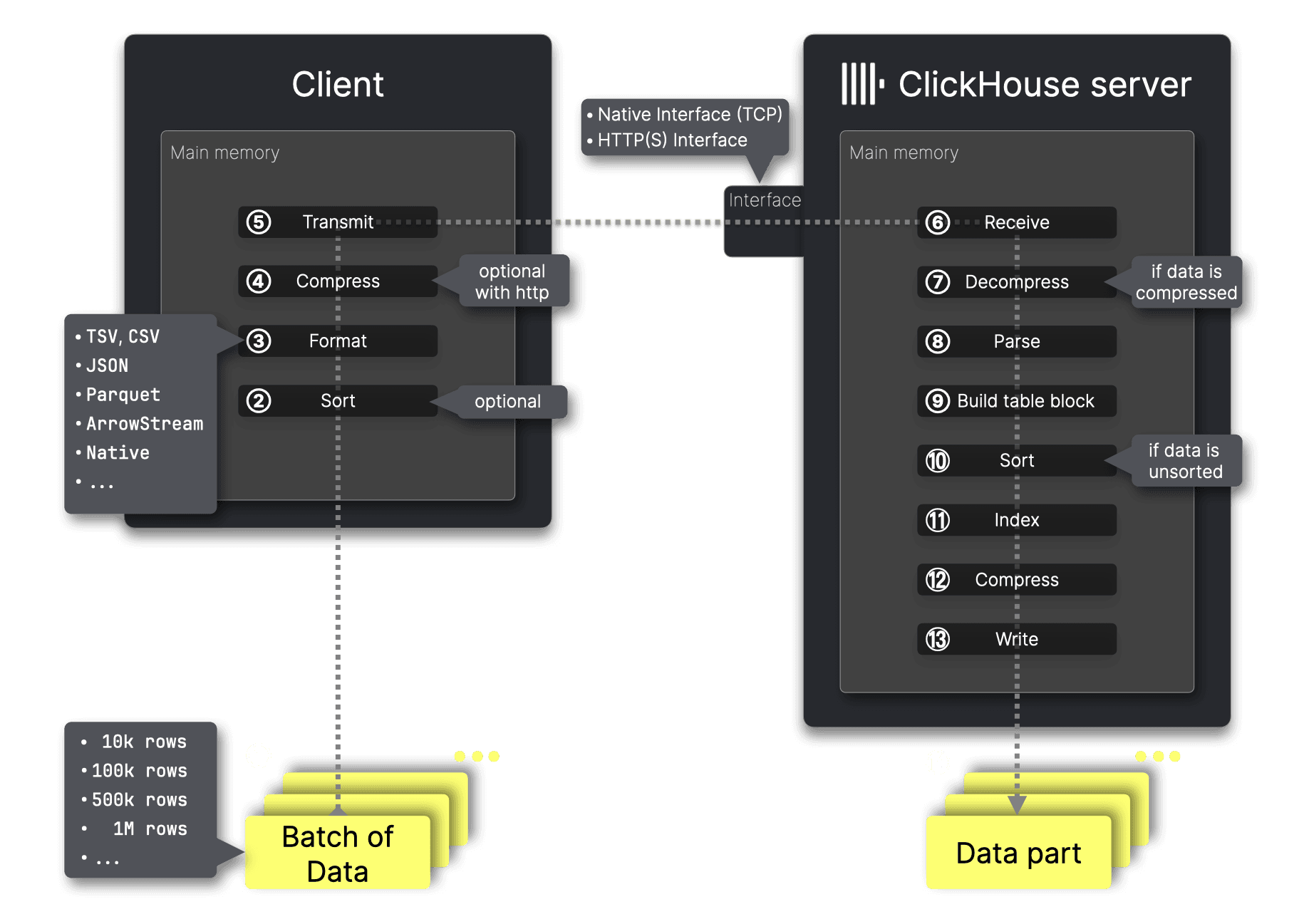
The diagram above illustrates how a client ingests data batches into a table on a remote ClickHouse server. We describe all the processing steps below.
### Client-side steps
For optimal performance, data must be ① [batched](https://clickhouse.com/blog/asynchronous-data-inserts-in-clickhouse#data-needs-to-be-batched-for-optimal-performance), making batch size the **first decision**. If batching isn’t feasible, [asynchronous inserts](https://clickhouse.com/blog/asynchronous-data-inserts-in-clickhouse) can be used, but the server-side insert process remains the same—only a buffer is introduced between step ⑦ (data decompression) and step ⑧ (data parsing).
ClickHouse stores inserted data on disk, [ordered](https://clickhouse.com/docs/en/guides/best-practices/sparse-primary-indexes#data-is-stored-on-disk-ordered-by-primary-key-columns) by the table’s primary key column(s). The **second decision** is whether to ② pre-sort the data before transmission to the server. If a batch arrives pre-sorted by primary key column(s), ClickHouse can [skip](https://github.com/ClickHouse/ClickHouse/blob/94ce8e95404e991521a5608cd9d636ff7269743d/src/Storages/MergeTree/MergeTreeDataWriter.cpp#L595) the ⑨ sorting step, speeding up ingestion. How much of a performance boost does this provide? And is it worth the extra effort on the client side? We’ll demonstrate this later in the post—stay tuned.
If the data to be ingested has no predefined format, the **key decision** is choosing a format. ClickHouse supports inserting data in [over 70 formats](https://clickhouse.com/docs/en/interfaces/formats). However, when using the ClickHouse command-line client or programming language clients, this choice is often handled automatically—selecting an efficient format by default, as we’ll discuss later. If needed, this automatic selection can also be overridden explicitly.
The next **major decision** is ④ whether to compress data before transmission to the ClickHouse server. Compression reduces transfer size and improves network efficiency, leading to faster data transfers and lower bandwidth usage, especially for large datasets.
The data is ⑤ transmitted to a ClickHouse network interface—either the [native](https://clickhouse.com/docs/en/interfaces/tcp) or [HTTP](https://clickhouse.com/docs/en/interfaces/http) interface (which we [compare](/blog/clickhouse-input-format-matchup-which-is-fastest-most-efficient#clickhouse-client-defaults) later in this post).
### Server-side steps
After ⑥ receiving the data, ClickHouse ⑦ decompresses it if compression was used, then ⑧ parses it from the originally sent format.
Using the values from that formatted data and the target table’s [DDL](https://clickhouse.com/docs/en/sql-reference/statements/create/table) statement, ClickHouse ⑨ builds an in-memory [block](https://clickhouse.com/docs/en/development/architecture#block) in the MergeTree format, ⑩ [sorts](https://clickhouse.com/docs/en/parts#what-are-table-parts-in-clickhouse) rows by the primary key columns if they are not already pre-sorted, ⑪ creates a [sparse primary index](https://clickhouse.com/docs/en/guides/best-practices/sparse-primary-indexes), ⑫ applies [per-column compression](https://clickhouse.com/docs/en/parts#what-are-table-parts-in-clickhouse), and ⑬ writes the data as a new ⑭ [data part](https://clickhouse.com/docs/en/parts) to disk.
## Client-side tuning options for inserts
After examining the inner workings of ClickHouse insert processing, we now have the foundation to outline client-side tuning options—key optimizations that improve server-side ingestion performance by reducing the server’s workload. **The core idea is to offload work to the client to maximize efficiency on the server**:
**① Batch the data** to reduce insert overhead and improve processing efficiency.
**② Presort the data** to eliminate the sorting step on the server.
**③ Convert data into a format** that is efficient for the server to process.
**④ Compress the data** to reduce transfer size and improve network efficiency.
These optimizations improve server-side ingestion efficiency and throughput, typically requiring appreciable additional client-side resources.
However, as we will demonstrate, choosing an efficient format (③) has the greatest impact, followed by compression (④). Pre-sorting (②) helps in specific cases but is less critical, while batching (①) is orthogonal to the other optimizations—it reduces insert overhead but does not directly affect format efficiency, compression, or sorting.
With these key optimizations in mind, the next step is understanding ClickHouse’s available input formats, as format choice plays such a crucial role in ingestion performance. In the next section, we provide a brief overview of ClickHouse input formats before diving into our benchmark, which quantifies the impact of format selection, compression, pre-sorting, and batching on ingestion efficiency.
## ClickHouse input formats
ClickHouse supports various data [formats](https://clickhouse.com/docs/interfaces/formats) for input (and output). When clients continuously collect data without a predefined format, it must first be ① formatted before being ② sent to the server, where it is transformed and stored in the [MergeTree table format](https://clickhouse.com/docs/parts):
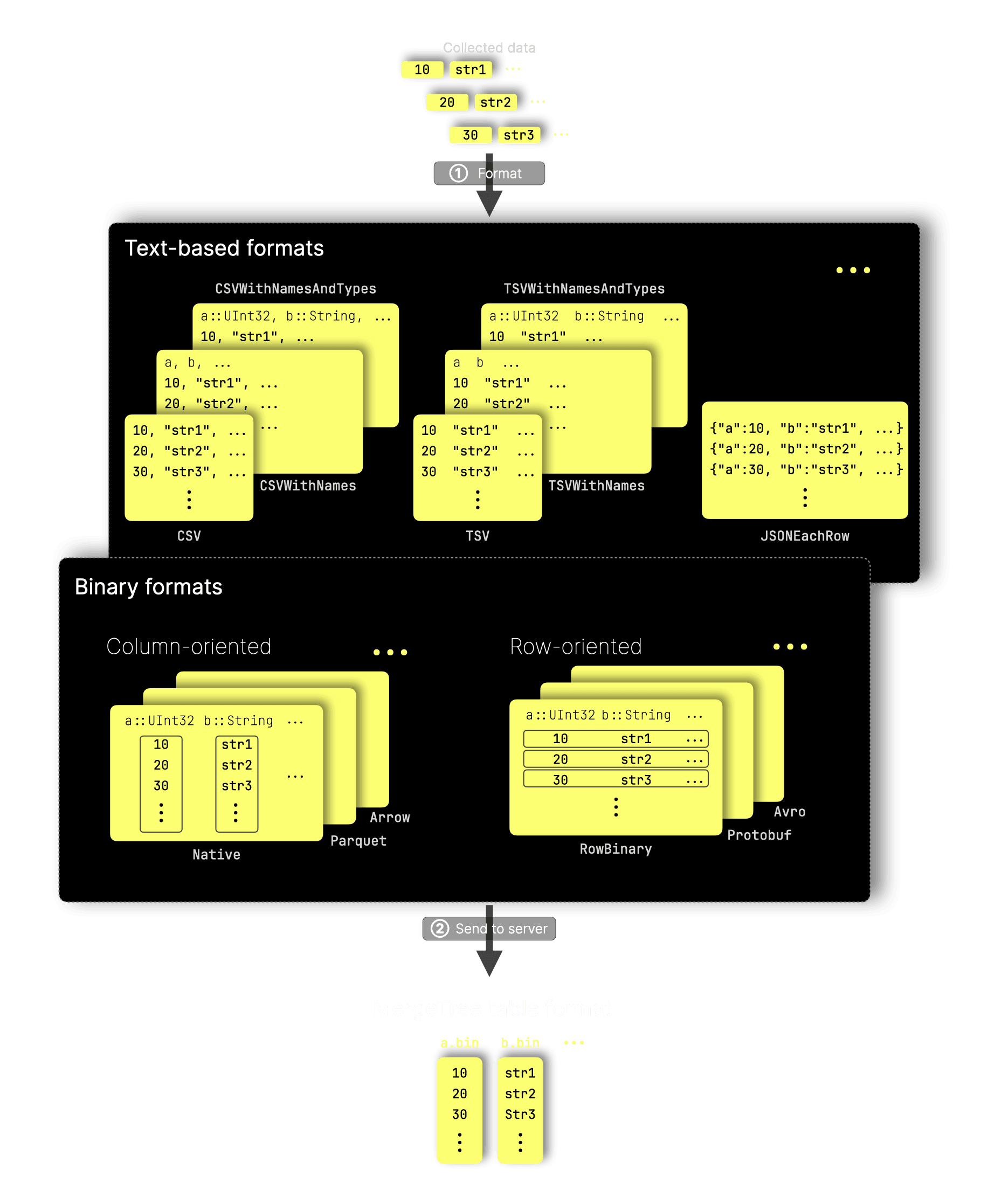
As shown in the diagram, ClickHouse’s [70+ input formats](https://clickhouse.com/docs/interfaces/formats) fall into three broad categories:
**Text-based** formats (e.g. variants of CSV, TSV, and JSON) and **binary** formats, which are further divided into **column-oriented** (e.g. Native, Parquet, Arrow, etc.) and **row-oriented** (e.g. RowBinary, Protobuf, Avro) formats. ClickHouse provides built-in support for all these formats, enabling seamless [data loading](https://clickhouse.com/blog/supercharge-your-clickhouse-data-loads-part2) without third-party tools.
In scenarios where a client continuously pushes data to the server and efficiency is important, the practical choices narrow significantly. ClickHouse’s [Native](https://clickhouse.com/docs/interfaces/formats/Native) format stands out as the most efficient option, as we will demonstrate later. This format is designed for high-performance and low-latency processing, offering high compression ratios for efficient network transport and minimal server-side processing overhead. For example, as shown in the diagram, the columnar structure of the Native format closely matches the MergeTree table format, reducing the need for additional server-side transformations.
To quantify these efficiencies and determine the fastest input formats for high-throughput ingestion, we conducted the FastFormats benchmark. The next section provides a brief overview of its methodology and key mechanics.
## FastFormats benchmark
To systematically evaluate the client-side optimizations outlined earlier, we developed [FastFormats](https://github.com/ClickHouse/FastFormats/)—a dedicated benchmark designed to measure ingestion speed and hardware efficiency across different input formats, as well as the impact of pre-sorting, compression, and batching.
FastFormats focuses on pure server-side processing times, ensuring that only metrics taken after client-side work is completed are used for comparison. The key principle is that server-side hardware remains fixed, while client-side resources can be scaled to speed up processing. This means that while client-side processing times may vary, server-side processing times remain consistent as long as the hardware stays the same.
The next subsections provide an overview of our benchmark mechanics, detailing how we ensured accurate performance comparisons based on this principle. After that, we’ll dive into the results.
### Dataset
FastFormats uses the same web analytics dataset as [ClickBench](https://github.com/ClickHouse/ClickBench), ensuring it reflects real production data of a typical ClickHouse use case rather than synthetic test cases. This dataset, derived from actual web traffic recordings, is anonymized while preserving essential data distributions.
### Benchmark mechanics
At its core, FastFormat runs a [nested loop](https://github.com/ClickHouse/FastFormats/blob/1705a83c301faf6657798b1077098c682202f98a/main.sh#L339) over the dataset split into batches:
For BATCH_SIZE in [10k rows, 100k rows, 1M rows]:
-
Split the
dataset tsv file into
N tsv files with BATCH_SIZE rows per file.
-
For FORMAT in [CSV, TSV, Native, Parquet, Avro, Arrow, ...]:
-
For PRESORT in [yes, no]:
-
Convert all
N tsv files into N files in FORMAT (via
clickhouse-local).
-
Pre-sort each formatted file (if not "no")
(also via
clickhouse-local).
-
For COMPRESSOR in [none, lz4, zstd, ...]:
-
Send all
N formatted files sequentially to ClickHouse (with
curl) for ingestion into the
target table.
-
Compress each file with
COMPRESSOR (if not "none") before sending.
-
Collect server-side insert performance metrics from system tables.
-
Assemble a result document for this run and add it to the
results folder.
With this approach, we collect server-side ingestion performance metrics—after client-side work is completed—for all combinations of batch size, format*, pre-sorting, and compression.
This results in a large volume of test data, generating ~2000 result documents (4 batch sizes × ~60 formats × 2 pre-sort settings × ~4 compressors). Fortunately, we provide an [online dashboard](https://fastformats.clickhouse.com/) that makes it easy to explore and analyze these results.
> These results are not static—since we continuously improve performance, we will regularly update them with newer ClickHouse releases.
*Since we [use](https://github.com/ClickHouse/FastFormats/blob/1705a83c301faf6657798b1077098c682202f98a/convert_tsv-chunks.sh#L77) `clickhouse-local` for easy format conversion, our benchmark is limited to testing only the [~60 formats](https://sql.clickhouse.com/?query=c2VsZWN0IG5hbWUgZnJvbSBzeXN0ZW0uZm9ybWF0cyBXSEVSRSBpc19pbnB1dCBBTkQgaXNfb3V0cHV0IE9SREVSIEJZIG5hbWU7&chart=eyJ0eXBlIjoibGluZSIsImNvbmZpZyI6eyJ4YXhpcyI6InllYXIiLCJ5YXhpcyI6Ijk5dGhfYXZnX3RlbXAiLCJzZXJpZXMiOiJjb3VudHJ5IiwidGl0bGUiOiJUZW1wZXJhdHVyZSBieSBjb3VudHJ5IGFuZCB5ZWFyIn19&tab=results&run_query=true) that ClickHouse supports for both input and output.
The next three subsections cover the corner cases and special conditions our benchmark accounted for to ensure accurate results.
### Formats with built-in compression
Some formats include built-in compression, either at the block level (e.g., [Avro](https://avro.apache.org/docs/1.7.6/spec.html) and [Arrow](https://arrow.apache.org/docs/python/feather.html?utm_source=chatgpt.com)) or at the per-column and block level in modern columnar formats like [Parquet](https://parquet.apache.org/docs/file-format/data-pages/compression/).
For these formats, we [apply](https://github.com/ClickHouse/FastFormats/blob/1705a83c301faf6657798b1077098c682202f98a/main.sh#L22) the appropriate compression [format settings](https://clickhouse.com/docs/en/operations/settings/formats) in `clickhouse-local` when preparing test data and [skip](https://github.com/ClickHouse/FastFormats/blob/1705a83c301faf6657798b1077098c682202f98a/main.sh#L138) the usual compression step before sending it to ClickHouse, as double compression provides little to no gain in ratio but unnecessarily increases CPU usage.
### Formats that are unsupported or redundant
Not all formats are suitable for our dataset, target table, or purpose. For example, **LineAsString** only works with a single String field, **Npy** is designed for NumPy arrays, and **JSONAsObject** requires a single JSON field. Some formats, like **ProtobufSingle**, are meant for individual messages rather than batches and don’t fit our use case. These have been commented out in the benchmark’s test loop. Additionally, some formats are just synonyms—for instance, **NDJSON** and **JSONLines** are aliases for **JSONEachRow**, and **TSV** is a synonym for **TabSeparated**—so we included only one in each case to avoid redundancy.
### ClickHouse Native vs. HTTP interface
Only the [HTTP interface](/blog/clickhouse-input-format-matchup-which-is-fastest-most-efficient#http-interface) allows benchmarking of server-side ingestion performance for any input format in isolation. The [native interface](/blog/clickhouse-input-format-matchup-which-is-fastest-most-efficient#native-interface), in contrast, only accepts Native format.
For completeness, our benchmark includes an [inner loop](https://github.com/ClickHouse/FastFormats/blob/1705a83c301faf6657798b1077098c682202f98a/main.sh#L354) testing both the HTTP and native interfaces. However, results from our [online dashboard](https://fastformats.clickhouse.com/) are not directly comparable. We use `curl` to send pre-sorted, fully formatted, and compressed data over HTTP, so server-side ingestion metrics **exclude** client-side work like sorting, formatting, and compression. This aligns with our goal: evaluating how different formats, compression, and sorting affect server-side performance, **independent** of data preparation costs.
For the native interface, we use `clickhouse-client`, which (1) applies block-level network compression in a streaming fashion and (2) [always](/blog/clickhouse-input-format-matchup-which-is-fastest-most-efficient#native-interface) converts input to Native format before transmission. Consequently, server-side ingestion metrics (1) always reflect the server-side processing of **only** the Native format and (2) inherently **include** compression time.
### Hardware used for our test runs
We used a dedicated AWS EC2 `m6i.8xlarge` instance (32 CPU cores, 128 GiB RAM) as the client machine for FastFormats and a ClickHouse Cloud cluster with three compute nodes (each with 30 CPU cores and 120 GiB RAM) as the server system. Both the client and server machines were located in the same AWS region (`us-east-2`).
## Insert performance of common input formats
In the following sections, we highlight key findings from tests using
* ① a batch size of 10k rows per insert
* ② ClickHouse’s HTTP interface
① Depending on the format, the uncompressed size per insert with 10k rows ranges from [2 MiB](https://github.com/ClickHouse/FastFormats/blob/1705a83c301faf6657798b1077098c682202f98a/results/http_orc_10000_unsorted_no_compression.json#L53) (ORC) to [27 MiB](https://github.com/ClickHouse/FastFormats/blob/1705a83c301faf6657798b1077098c682202f98a/results/http_json_10000_unsorted_no_compression.json#L71) (JSON), with most formats falling between [5 MiB](https://github.com/ClickHouse/FastFormats/blob/1705a83c301faf6657798b1077098c682202f98a/results/http_native_10000_unsorted_no_compression.json#L53) (Native) and [8 MiB](https://github.com/ClickHouse/FastFormats/blob/1705a83c301faf6657798b1077098c682202f98a/results/http_csv_10000_unsorted_no_compression.json#L53) (CSV). This aligns with the [default](https://clickhouse.com/docs/operations/settings/settings#async_insert_max_data_size) 10 MiB buffer flush threshold for [asynchronous inserts](https://clickhouse.com/blog/asynchronous-data-inserts-in-clickhouse#description), meaning the classic batched synchronous inserts used by our benchmark exhibit similar performance characteristics. As a result, testing asynchronous inserts separately is unnecessary.
② [Only](/blog/clickhouse-input-format-matchup-which-is-fastest-most-efficient#clickhouse-native-vs-http-interface) the HTTP interface allows sending non-Native formats, as well as additional compression options.
> For the full test results for the 10k rows batch size, visit this [link](https://fastformats.clickhouse.com/#eyJmb3JtYXQiOnsiQXJyb3ciOnRydWUsIkFycm93U3RyZWFtIjp0cnVlLCJBdnJvIjp0cnVlLCJCU09ORWFjaFJvdyI6dHJ1ZSwiQ2FwblByb3RvIjp0cnVlLCJDU1YiOnRydWUsIkNTVldpdGhOYW1lcyI6dHJ1ZSwiQ1NWV2l0aE5hbWVzQW5kVHlwZXMiOnRydWUsIkN1c3RvbVNlcGFyYXRlZCI6dHJ1ZSwiQ3VzdG9tU2VwYXJhdGVkV2l0aE5hbWVzIjp0cnVlLCJDdXN0b21TZXBhcmF0ZWRXaXRoTmFtZXNBbmRUeXBlcyI6dHJ1ZSwiSlNPTiI6dHJ1ZSwiSlNPTkNvbHVtbnMiOnRydWUsIkpTT05Db2x1bW5zV2l0aE1ldGFkYXRhIjp0cnVlLCJKU09OQ29tcGFjdCI6dHJ1ZSwiSlNPTkNvbXBhY3RDb2x1bW5zIjp0cnVlLCJKU09OQ29tcGFjdEVhY2hSb3ciOnRydWUsIkpTT05Db21wYWN0RWFjaFJvd1dpdGhOYW1lcyI6dHJ1ZSwiSlNPTkNvbXBhY3RFYWNoUm93V2l0aE5hbWVzQW5kVHlwZXMiOnRydWUsIkpTT05Db21wYWN0U3RyaW5nc0VhY2hSb3ciOnRydWUsIkpTT05Db21wYWN0U3RyaW5nc0VhY2hSb3dXaXRoTmFtZXMiOnRydWUsIkpTT05Db21wYWN0U3RyaW5nc0VhY2hSb3dXaXRoTmFtZXNBbmRUeXBlcyI6dHJ1ZSwiSlNPTkVhY2hSb3ciOnRydWUsIkpTT05PYmplY3RFYWNoUm93Ijp0cnVlLCJKU09OU3RyaW5nc0VhY2hSb3ciOnRydWUsIk1zZ1BhY2siOnRydWUsIk5hdGl2ZSI6dHJ1ZSwiT1JDIjp0cnVlLCJQYXJxdWV0Ijp0cnVlLCJQcm90b2J1ZiI6dHJ1ZSwiUm93QmluYXJ5Ijp0cnVlLCJSb3dCaW5hcnlXaXRoTmFtZXMiOnRydWUsIlJvd0JpbmFyeVdpdGhOYW1lc0FuZFR5cGVzIjp0cnVlLCJUYWJTZXBhcmF0ZWQiOnRydWUsIlRhYlNlcGFyYXRlZFdpdGhOYW1lcyI6dHJ1ZSwiVGFiU2VwYXJhdGVkV2l0aE5hbWVzQW5kVHlwZXMiOnRydWUsIlRTS1YiOnRydWUsIlRTViI6dHJ1ZSwiVFNWV2l0aE5hbWVzIjp0cnVlLCJUU1ZXaXRoTmFtZXNBbmRUeXBlcyI6dHJ1ZSwiVmFsdWVzIjp0cnVlfSwiaW50ZXJmYWNlIjp7Imh0dHAiOnRydWUsIm5hdGl2ZSI6ZmFsc2V9LCJiYXRjaF9zaXplIjp7IjEwMDAwIjp0cnVlLCIxMDAwMDAiOmZhbHNlLCI1MDAwMDAiOmZhbHNlLCIxMDAwMDAwIjpmYWxzZX0sInByZXNvcnRlZCI6eyJmYWxzZSI6dHJ1ZSwidHJ1ZSI6dHJ1ZX0sImNvbXByZXNzaW9uIjp7Im5vbmUiOnRydWUsImx6NCI6dHJ1ZSwienN0ZCI6dHJ1ZX0sIm1ldHJpYyI6InNlcnZlci10aW1lIn0=) to the pre-filtered FastFormats online dashboard.
The following chart shows for 8 common input formats the total server-side durations for receiving and executing 1000 inserts with 10k rows per insert sequentially. Each format was tested with separate runs sending the formatted data:
* Uncompressed
* LZ4-compressed
* Pre-sorted and LZ4-compressed
* ZSTD-compressed
* Pre-sorted and ZSTD-compressed
Next to the total durations (durations of all 1000 inserts together), we also display the total size of the server-side received data:
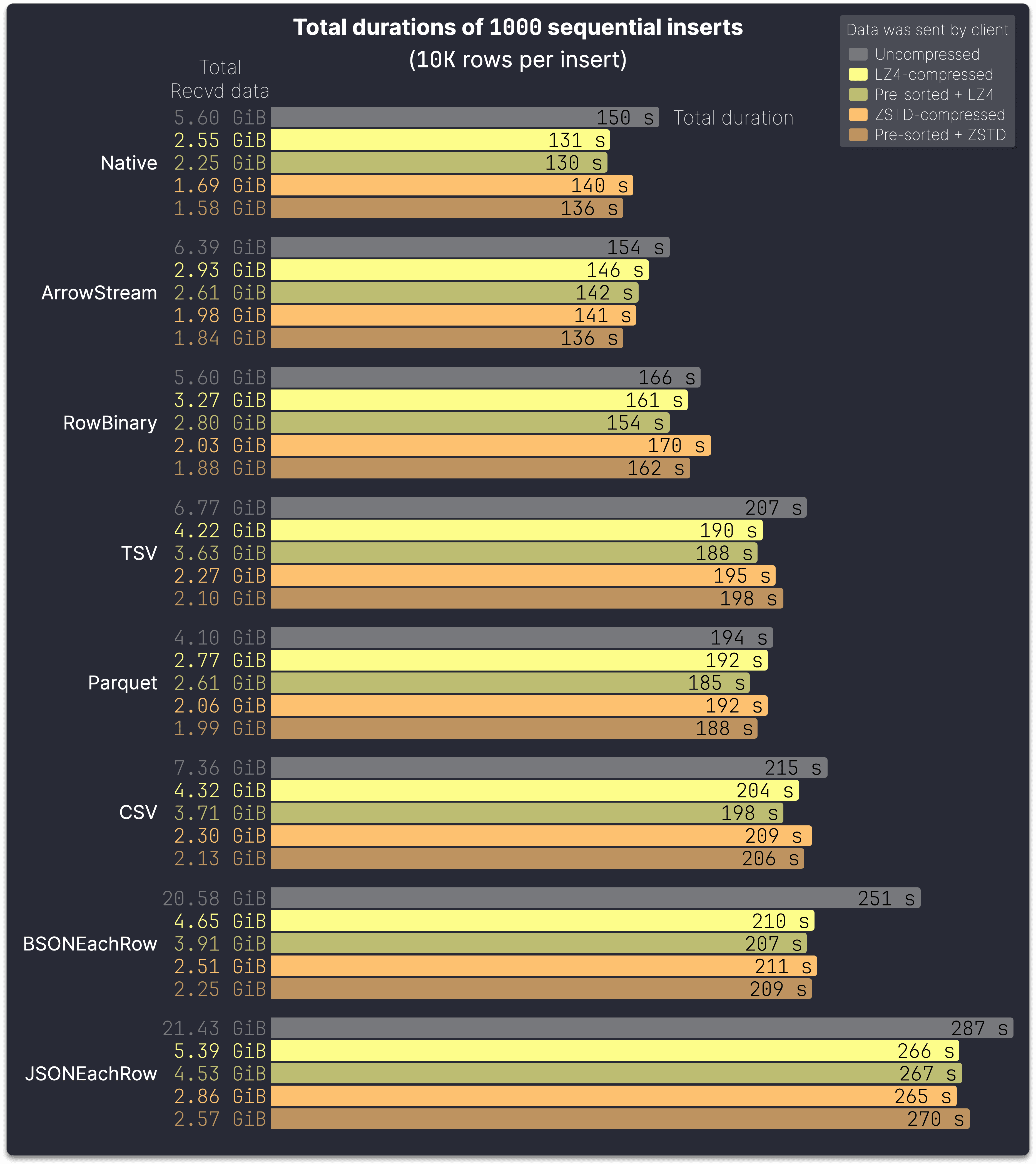
We chose to present results for three common binary column-oriented formats (Native, ArrowStream, and Parquet), one binary row-oriented format (RowBinary), three typical text-based formats (TSV, CSV, and JSONEachRow), and a binary representation of JSON (BSONEachRow).
The Native format is the fastest among all tested formats for the 10k rows batch size, not just in the chart above. For the other formats shown, their relative ranking in the chart accurately reflects their position in the full test results.
Receiving the full dataset in **Native** format with LZ4 compression takes [131 seconds](https://github.com/ClickHouse/FastFormats/blob/1705a83c301faf6657798b1077098c682202f98a/results/http_native_10000_unsorted_lz4.json#L29) on the server to receive and ingest [2.55 GiB](https://github.com/ClickHouse/FastFormats/blob/1705a83c301faf6657798b1077098c682202f98a/results/http_native_10000_unsorted_lz4.json#L23) of data. This is
* **10% faster than ArrowStream** ([146 seconds](https://github.com/ClickHouse/FastFormats/blob/1705a83c301faf6657798b1077098c682202f98a/results/http_arrowstream_10000_unsorted_lz4.json#L29) for [2.93 GiB](https://github.com/ClickHouse/FastFormats/blob/1705a83c301faf6657798b1077098c682202f98a/results/http_arrowstream_10000_unsorted_lz4.json#L23))
* **18% faster than RowBinary** ([161 seconds](https://github.com/ClickHouse/FastFormats/blob/1705a83c301faf6657798b1077098c682202f98a/results/http_rowbinary_10000_unsorted_lz4.json#L29) for [3.27 GiB](https://github.com/ClickHouse/FastFormats/blob/1705a83c301faf6657798b1077098c682202f98a/results/http_rowbinary_10000_unsorted_lz4.json#L23))
* **31% faster than TSV** ([190 seconds](https://github.com/ClickHouse/FastFormats/blob/1705a83c301faf6657798b1077098c682202f98a/results/http_tsv_10000_unsorted_lz4.json#L29) for [4.22 GiB](https://github.com/ClickHouse/FastFormats/blob/1705a83c301faf6657798b1077098c682202f98a/results/http_tsv_10000_unsorted_lz4.json#L23))
* **32% faster than Parquet** ([192 seconds](https://github.com/ClickHouse/FastFormats/blob/1705a83c301faf6657798b1077098c682202f98a/results/http_parquet_10000_unsorted_lz4.json#L29) for [2.77 GiB](https://github.com/ClickHouse/FastFormats/blob/1705a83c301faf6657798b1077098c682202f98a/results/http_parquet_10000_unsorted_lz4.json#L23))
* **36% faster than CSV** ([204 seconds](https://github.com/ClickHouse/FastFormats/blob/1705a83c301faf6657798b1077098c682202f98a/results/http_csv_10000_unsorted_lz4.json#L29) for [4.32 GiB](https://github.com/ClickHouse/FastFormats/blob/1705a83c301faf6657798b1077098c682202f98a/results/http_csv_10000_unsorted_lz4.json#L23))
* **38% faster than BSONEachRow** ([210 seconds](https://github.com/ClickHouse/FastFormats/blob/1705a83c301faf6657798b1077098c682202f98a/results/http_bsoneachrow_10000_unsorted_lz4.json#L29) for [4.65 GiB](https://github.com/ClickHouse/FastFormats/blob/1705a83c301faf6657798b1077098c682202f98a/results/http_bsoneachrow_10000_unsorted_lz4.json#L23))
* **51% faster than JSONEachRow** ([266 seconds](https://github.com/ClickHouse/FastFormats/blob/1705a83c301faf6657798b1077098c682202f98a/results/http_jsoneachrow_10000_unsorted_lz4.json#L29) for [5.39 GiB](https://github.com/ClickHouse/FastFormats/blob/1705a83c301faf6657798b1077098c682202f98a/results/http_jsoneachrow_10000_unsorted_lz4.json#L23))
> We recommend using the Native format for data ingestion.
The Native format can always be used directly for inserts as long as the table’s [DDL](https://clickhouse.com/docs/sql-reference/statements/create/table) does not contain [MATERIALIZED](https://clickhouse.com/docs/sql-reference/statements/create/table#materialized) or [DEFAULT](https://clickhouse.com/docs/sql-reference/statements/create/table#default) expressions with format-specific lookups, such as JSON path lookups.
Otherwise, its use depends on whether the client can compute these values client-side before sending the data in Native format and instruct the server to skip computation—currently supported [only](/blog/clickhouse-input-format-matchup-which-is-fastest-most-efficient#native-interface) by clickhouse-client.
Also, don’t confuse the data transmission format (e.g. JSONEachRow) with the target table’s column type (e.g. JSON)—they are independent. For example, in observability scenarios, you can collect JSON data, send it efficiently in Native format, and store it in a [JSON](https://clickhouse.com/blog/a-new-powerful-json-data-type-for-clickhouse) column. The ClickHouse [Go client](/blog/clickhouse-input-format-matchup-which-is-fastest-most-efficient#support-matrix) can serialize JSON objects as [Variant](https://clickhouse.com/blog/a-new-powerful-json-data-type-for-clickhouse#building-block-1---variant-type) or [Dynamic](https://clickhouse.com/blog/a-new-powerful-json-data-type-for-clickhouse#building-block-2---dynamic-type) columns, convert them to Native format, and apply efficient compression.
### Impact of compression
`LZ4` prioritizes speed over compression ratio, making it ideal for fast network transport with [minimal](/blog/clickhouse-input-format-matchup-which-is-fastest-most-efficient#insert-efficiency-of-common-input-formats) CPU overhead on both the client and server.
`ZSTD`, while still lightweight to decompress on the server, offers a higher compression ratio but requires [slightly more](/blog/clickhouse-input-format-matchup-which-is-fastest-most-efficient#insert-efficiency-of-common-input-formats) CPU for decompression than `LZ4` and significantly more compute for compression on the client side.
The **Native** format is the fastest and achieves the best compression ratio among all tested formats and codecs, making it ideal for scenarios where network transfer costs matter, such as incurring CSP charges for cross-region traffic.
Uncompressed, the server ingests the full [5.60 GiB](https://github.com/ClickHouse/FastFormats/blob/1705a83c301faf6657798b1077098c682202f98a/results/http_native_10000_unsorted_no_compression.json#L23) dataset in Native format in [150 seconds](https://github.com/ClickHouse/FastFormats/blob/1705a83c301faf6657798b1077098c682202f98a/results/http_native_10000_unsorted_no_compression.json#L29). With client-side LZ4 compression, this drops to [131 seconds](https://github.com/ClickHouse/FastFormats/blob/1705a83c301faf6657798b1077098c682202f98a/results/http_native_10000_unsorted_lz4.json#L29) and [2.55 GiB](https://github.com/ClickHouse/FastFormats/blob/1705a83c301faf6657798b1077098c682202f98a/results/http_native_10000_unsorted_lz4.json#L23)—less than half the original size. Switching to ZSTD further reduces data size to [1.69 GiB](https://github.com/ClickHouse/FastFormats/blob/1705a83c301faf6657798b1077098c682202f98a/results/http_native_10000_unsorted_zstd.json#L23) (a 34% gain) but [increases](https://github.com/ClickHouse/FastFormats/blob/1705a83c301faf6657798b1077098c682202f98a/results/http_native_10000_unsorted_zstd.json#L29) server-side processing by 10 seconds due to higher decompression overhead, offsetting the network efficiency benefit. However, in environments with lower network bandwidths, ZSTD may still provide an overall speedup as network transfer time becomes the dominant factor.
**In our test setup, both the client and server were within the same CSP region.** As a result, the difference in server-side insert processing times—[including](https://github.com/ClickHouse/FastFormats/blob/1705a83c301faf6657798b1077098c682202f98a/results/http_native_10000_unsorted_lz4.json#L41) data transmission—between uncompressed and compressed data was moderate.
> If network transfer costs are a concern, use the highest available compression, such as ZSTD. Otherwise, LZ4 is a no-brainer—it reduces data size with minimal overhead, speeding up transfers and lowering overall ingestion time in all cases.
### Impact of pre-sorting
Transmitting data pre-sorted and compressed has a dual benefit. Pre-sorting improves compression efficiency, as compression is more effective on sorted data. Additionally, pre-sorting allows the server to [skip](https://github.com/ClickHouse/ClickHouse/blob/94ce8e95404e991521a5608cd9d636ff7269743d/src/Storages/MergeTree/MergeTreeDataWriter.cpp#L595) the [sorting step](/blog/clickhouse-input-format-matchup-which-is-fastest-most-efficient#clickhouse-insert-processing), further reducing total processing time.
> The overall performance gain from pre-sorting is noticeable but not dramatic.
However, ClickHouse processes data—including sorting—highly efficiently in parallel and is often faster at sorting than client-side custom implementations. We recommend pre-sorting only if it requires minimal extra effort (e.g. if the data is already nearly in order) and if sufficient client-side compute resources are available.
## Insert efficiency of common input formats
Our benchmark evaluates formats using a **single-threaded (one-client)** controlled [sequence](https://github.com/ClickHouse/FastFormats/blob/1705a83c301faf6657798b1077098c682202f98a/ingest.sh#L181) of inserts per format in isolation.
However, in real-world scenarios like observability, hundreds or thousands of clients often send data concurrently. To assess performance under load, we first analyze CPU and memory usage for single-threaded inserts using the eight common input formats from the previous section. We then evaluate concurrent insert performance with a selected format.
The chart below shows per-server node CPU and memory usage (99th percentiles) for each insert in the test runs from the previous section’s chart:
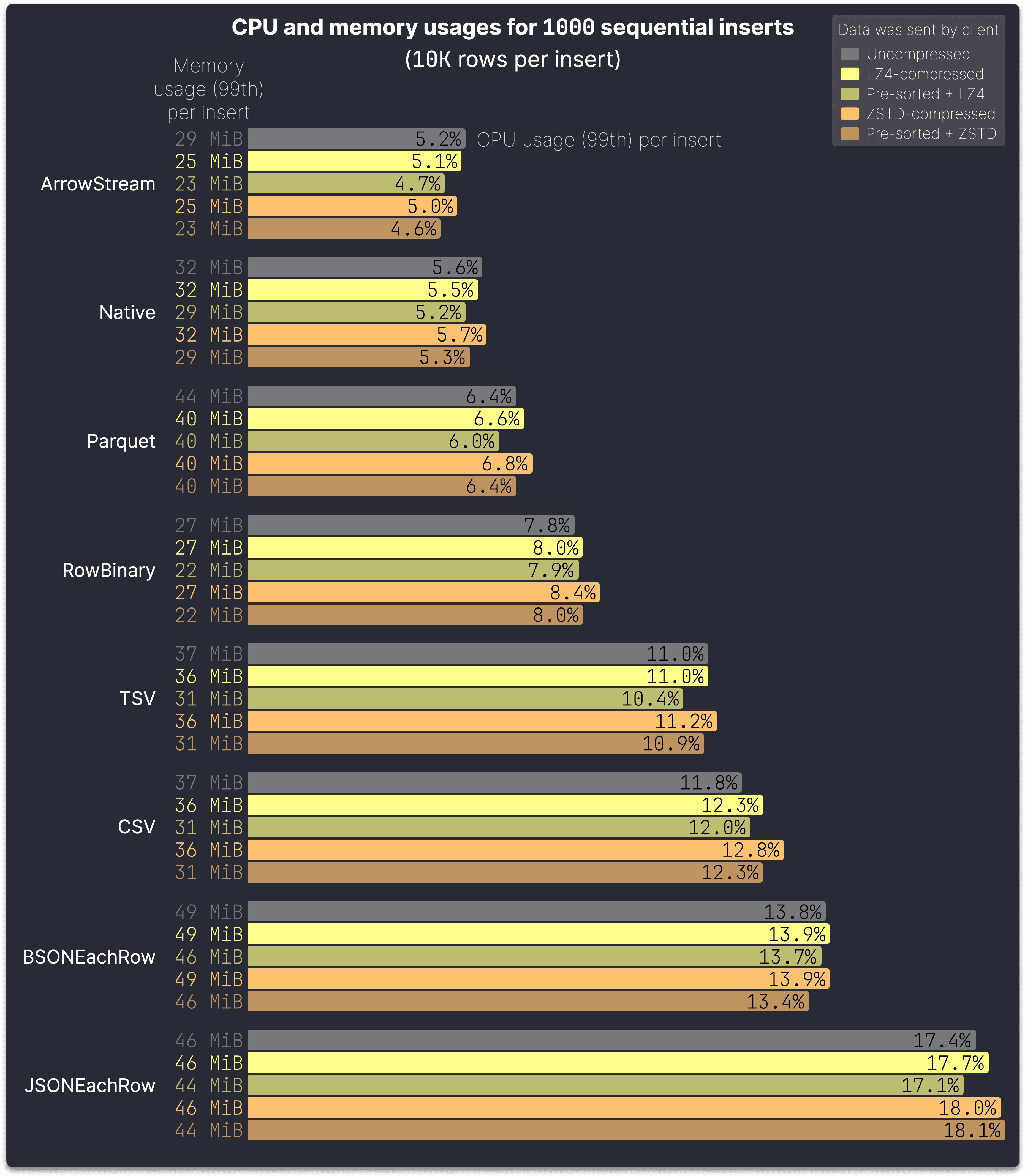
The ranking in the chart above differs slightly from the previous one, as it is based on low CPU and memory consumption rather than overall ingestion speed.
**ArrowStream** [is](https://github.com/ClickHouse/FastFormats/blob/1705a83c301faf6657798b1077098c682202f98a/results/http_arrowstream_10000_unsorted_lz4.json#L74) slightly more efficient per insert [than](https://github.com/ClickHouse/FastFormats/blob/1705a83c301faf6657798b1077098c682202f98a/results/http_native_10000_unsorted_lz4.json#L74) **Native**, while **Parquet** [is](https://github.com/ClickHouse/FastFormats/blob/1705a83c301faf6657798b1077098c682202f98a/results/http_parquet_10000_unsorted_lz4.json#L74) more efficient [than](https://github.com/ClickHouse/FastFormats/blob/1705a83c301faf6657798b1077098c682202f98a/results/http_rowbinary_10000_unsorted_lz4.json#L74) **RowBinary**. However, Native achieves better compression (see the previous section), leading to faster overall inserts.
Text-based formats are 30–51% slower (see previous section) and also exhibit significantly higher CPU consumption compared to Native. For LZ4-compressed data, as an example:
* **TSV**: [11%](https://github.com/ClickHouse/FastFormats/blob/1705a83c301faf6657798b1077098c682202f98a/results/http_tsv_10000_unsorted_lz4.json#L74) vs. Native: 5.5% → **100% higher**
* **CSV**: [12%](https://github.com/ClickHouse/FastFormats/blob/1705a83c301faf6657798b1077098c682202f98a/results/http_csv_10000_unsorted_lz4.json#L74) vs. Native: 5.5% → **118% higher**
* **JSONEachRow**: [17%](https://github.com/ClickHouse/FastFormats/blob/1705a83c301faf6657798b1077098c682202f98a/results/http_jsoneachrow_10000_unsorted_lz4.json#L74) vs. Native: 5.5% → **209% higher**
This makes them less optimal than Native under load, especially with concurrent clients sending data. As noted [earlier](/blog/clickhouse-input-format-matchup-which-is-fastest-most-efficient#insert-performance-of-common-input-formats), JSONEachRow isn’t required to efficiently insert JSON data into a JSON column—Native format can be used instead.
### Impact of compression and pre-sorting
The chart above illustrates the server-side impact of client-side compression and pre-sorting, primarily affecting CPU usage per insert, with a smaller effect on memory consumption. LZ4 compression results in a slight CPU increase, while ZSTD compression has a somewhat larger impact—both more pronounced when data is not pre-sorted.
For some formats, client-side compression even reduces server-side CPU usage, as the lower received data volume offsets the additional decompression workload.
As previously noted, transmitting data pre-sorted and compressed offers a dual benefit. Pre-sorting enhances compression efficiency, further reducing the amount of data received by the server, while also allowing the server to [bypass](https://github.com/ClickHouse/ClickHouse/blob/94ce8e95404e991521a5608cd9d636ff7269743d/src/Storages/MergeTree/MergeTreeDataWriter.cpp#L595) the [sorting step](/blog/clickhouse-input-format-matchup-which-is-fastest-most-efficient#clickhouse-insert-processing).
Observing server-side CPU and memory consumption per insert confirms that the impact of sending data LZ4-compressed is negligible, while ZSTD compression introduces only a moderate increase in CPU usage. At the same time, we have [shown](/blog/clickhouse-input-format-matchup-which-is-fastest-most-efficient#insert-performance-of-common-input-formats) a significant reduction in network data volume achieved through compression, even with LZ4. Sending data both compressed and pre-sorted further enhances server-side resource efficiency.
> Overall, we continue to recommend ingesting data in the Native format with compression.
As it provides the best balance of low resource usage, high compression efficiency, and minimal server-side processing overhead—making it the top choice across all tested formats. While client-side pre-sorting further reduces server-side CPU usage, it is only recommended when the data is already nearly ordered and when sufficient client-side compute resources are available, as ClickHouse can often sort data faster than the client.
### Insert efficiency with concurrent clients
So far, we have analyzed CPU and memory consumption for inserts executed sequentially by a single client, using the [query_log](https://clickhouse.com/docs/operations/system-tables/query_log) system table to [track](https://github.com/ClickHouse/FastFormats/blob/main/metrics.sql) per-insert CPU and memory usage. Real-world ClickHouse workloads often involve multiple concurrent clients—for example, in observability scenarios where hundreds or thousands of agents send metrics simultaneously.
Tracking server-side resource usage becomes more complex with concurrent inserts. While single-client inserts allow straightforward aggregation of per-insert CPU and memory metrics from query_log, concurrent inserts across multiple load-balanced nodes require summarizing resource consumption per server machine in cases where server-side processing overlaps. So far, we also excluded background tasks like [part merges](https://clickhouse.com/docs/merges) and general background resource usage.
To assess performance under load, we use the [metric_log](https://clickhouse.com/docs/operations/system-tables/metric_log) system table to [track](https://github.com/ClickHouse/FastFormats/blob/main/cpu_memory_usage-whole_service.sql) overall server CPU and memory usage. We [measured](https://github.com/ClickHouse/FastFormats/blob/c6457ff17be6016d7b59543b62ad332b6f382858/main_multi_threaded.sh#L22) first [baseline](https://github.com/ClickHouse/FastFormats/blob/main/cpu_memory_usage-whole_service-baseline.sql) idle load, then compared it to the impact of concurrent inserts with varying batch sizes using the fastest format, Native with LZ4 compression:
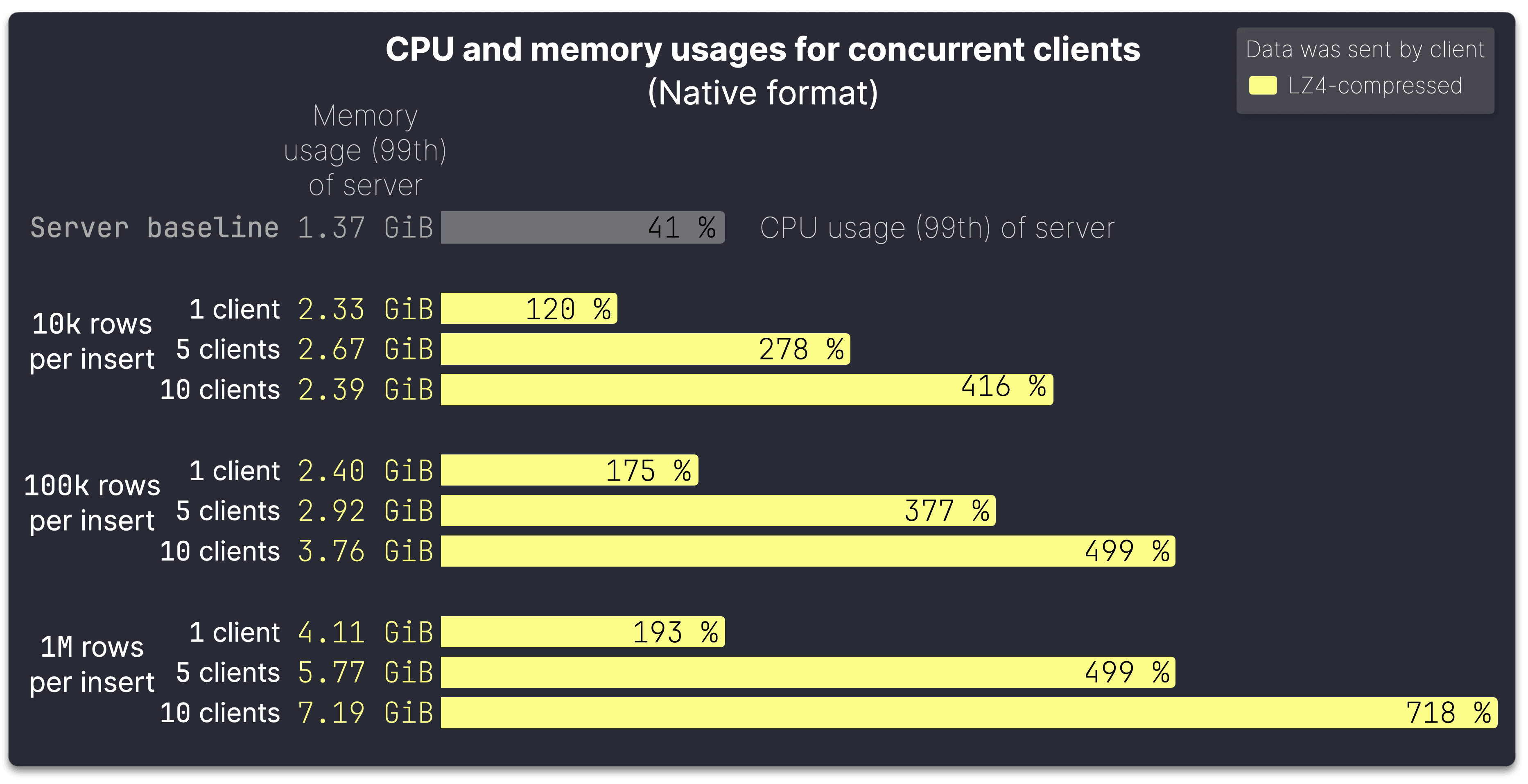
The chart above shows the 99th percentile CPU and memory usage [results](https://github.com/ClickHouse/FastFormats/tree/c6457ff17be6016d7b59543b62ad332b6f382858/results/multi_threaded) per server machine, including background merges, for inserts with varying batch sizes and 1, 5, and 10 concurrent clients. These were simulated using a script on our test machine, which [spawned](https://github.com/ClickHouse/FastFormats/blob/main/multi_threaded_ingest.sh#L71) concurrent ingest sequences. Testing was limited to 10 clients to prevent bottlenecks on the 32-core client machine, ensuring the server remained the primary focus of evaluation.
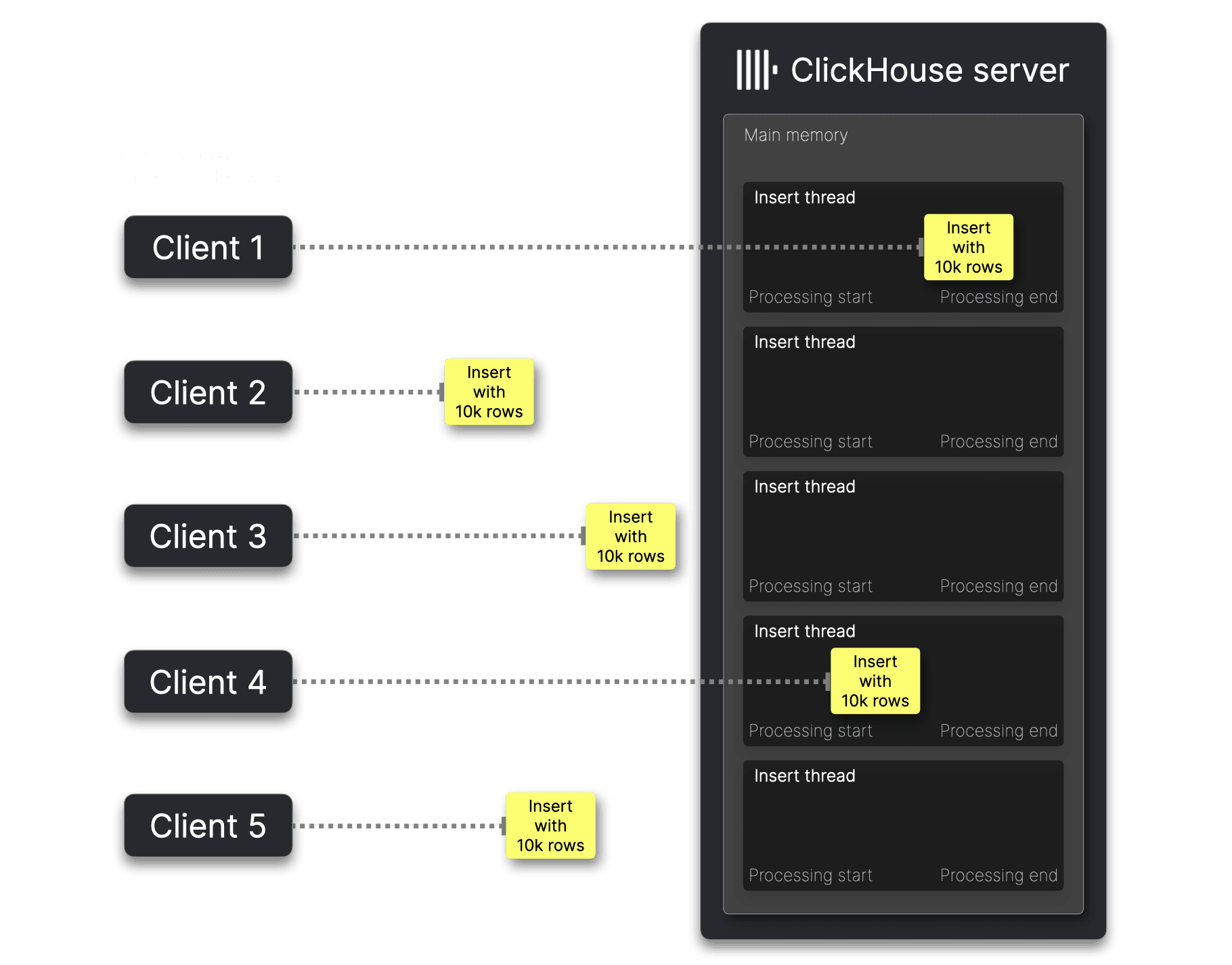
As shown in the chart above, CPU and memory usage increases sub-linearly with the number of concurrent clients, with larger batch sizes causing a steeper rise. This is because inserts from concurrent clients do not arrive exactly simultaneously at the server, and smaller inserts are processed [quickly](https://github.com/ClickHouse/FastFormats/blob/c6457ff17be6016d7b59543b62ad332b6f382858/results/http_native_10000_unsorted_lz4.json#L38). As a result, server-side processing overlaps only occasionally, leading to periodic spikes in CPU and memory usage rather than a consistent linear increase:
With larger inserts, server-side processing takes [longer](https://github.com/ClickHouse/FastFormats/blob/c6457ff17be6016d7b59543b62ad332b6f382858/results/http_native_1000000_unsorted_lz4.json#L38), increasing the likelihood of overlapping execution and leading to more sustained CPU and memory usage growth:
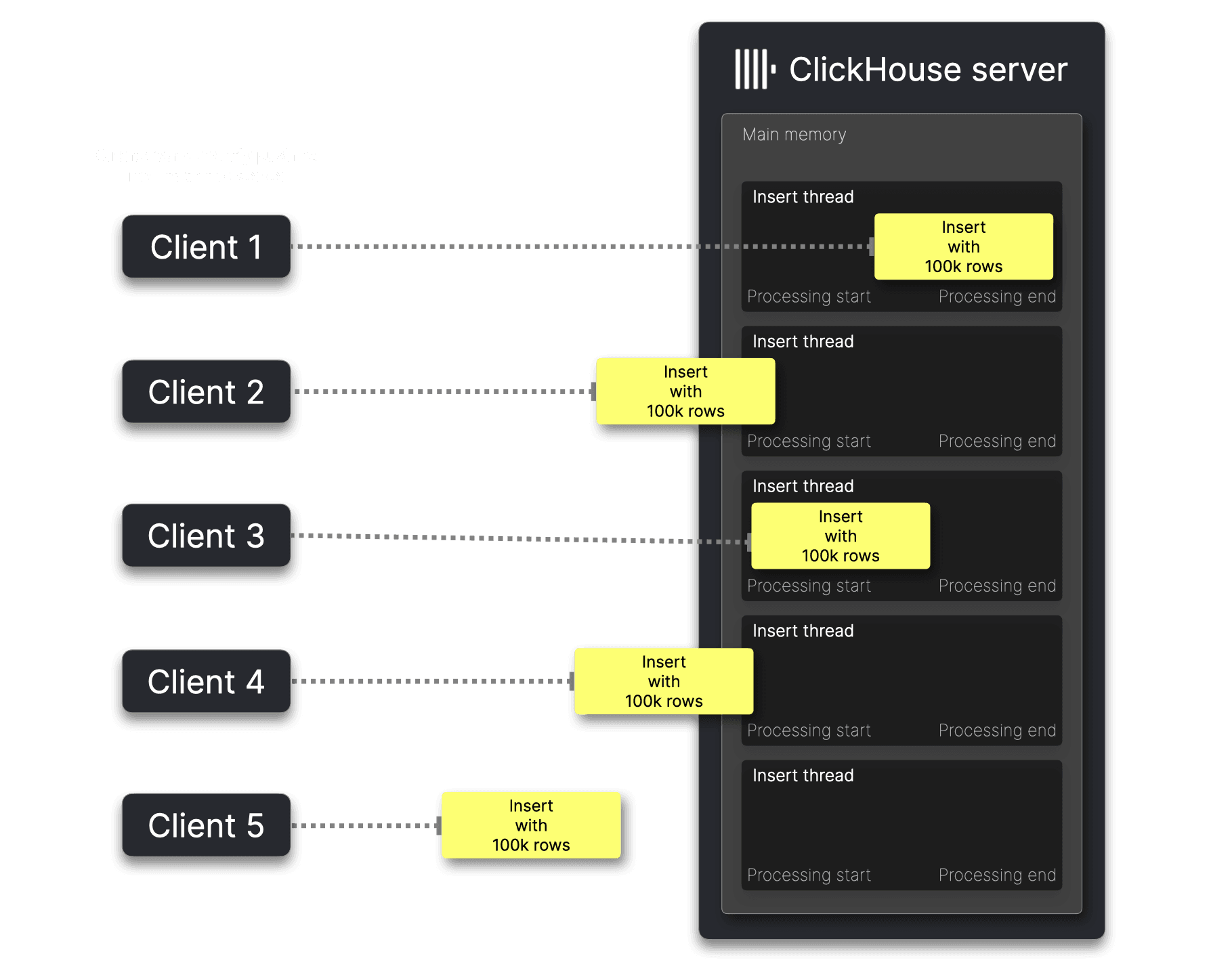
> For small inserts, CPU and memory scale sub-linearly with concurrent clients. As insert size and number of concurrent clients increases, resource usage grows more steeply, peaking when all clients’ inserts are processed simultaneously, reaching the product of per-client usage and concurrency.
Finally, we analyze the impact of batch size on server-side processing efficiency.
## Impact of batch sizes
We mentioned it elsewhere–Using ClickHouse is like driving a high-performance Formula One car 🏎. You have a copious amount of raw horsepower, and you can reach top speed. But to achieve maximum performance, you need to shift up into a high enough gear at the right time and batch data appropriately. The following chart highlights this:
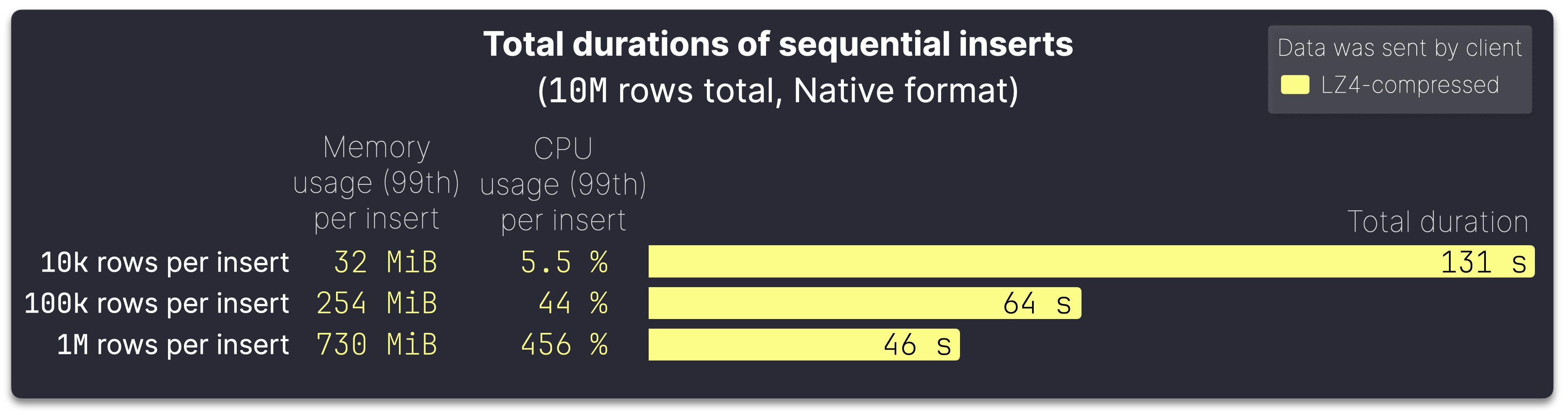
The chart displays the total server-side processing time for ingesting 10M rows from our test dataset using inserts of varying sizes, always in the Native format and LZ4-compressed.
With larger batch sizes, ingestion becomes significantly more efficient, but at the cost of higher per-insert resource usage:
* At **10k rows per insert** (1000 inserts for 10M rows), total ingestion takes [131 seconds](https://github.com/ClickHouse/FastFormats/blob/c6457ff17be6016d7b59543b62ad332b6f382858/results/http_native_10000_unsorted_lz4.json#L29). Each insert consumes [32 MiB](https://github.com/ClickHouse/FastFormats/blob/c6457ff17be6016d7b59543b62ad332b6f382858/results/http_native_10000_unsorted_lz4.json#L71) of memory, with [5.5%](https://github.com/ClickHouse/FastFormats/blob/c6457ff17be6016d7b59543b62ad332b6f382858/results/http_native_10000_unsorted_lz4.json#L74) CPU usage.
* Increasing to **100k rows per insert** (100 inserts for 10M rows) cuts ingestion time nearly in half to [64 seconds](https://github.com/ClickHouse/FastFormats/blob/c6457ff17be6016d7b59543b62ad332b6f382858/results/http_native_100000_unsorted_lz4.json#L29), but memory usage jumps to [254 MiB](https://github.com/ClickHouse/FastFormats/blob/c6457ff17be6016d7b59543b62ad332b6f382858/results/http_native_100000_unsorted_lz4.json#L71) per insert, and CPU utilization rises to [44%](https://github.com/ClickHouse/FastFormats/blob/c6457ff17be6016d7b59543b62ad332b6f382858/results/http_native_100000_unsorted_lz4.json#L74).
* Pushing **1M rows per insert** (just 10 inserts for 10M rows) drives ingestion time down to [46 seconds](https://github.com/ClickHouse/FastFormats/blob/c6457ff17be6016d7b59543b62ad332b6f382858/results/http_native_1000000_unsorted_lz4.json#L29). However, each insert now demands [730 MiB](https://github.com/ClickHouse/FastFormats/blob/c6457ff17be6016d7b59543b62ad332b6f382858/results/http_native_1000000_unsorted_lz4.json#L71) of memory, with CPU usage rising to [456%](https://github.com/ClickHouse/FastFormats/blob/c6457ff17be6016d7b59543b62ad332b6f382858/results/http_native_1000000_unsorted_lz4.json#L74), using multiple cores in parallel.
> We recommend batching as large as your available memory and CPU allow, considering factors like concurrent clients and overall system load. Optimizing batch sizes can significantly improve ingestion speed, but balancing resource constraints is key to maintaining stable performance.
Now that we’ve explored and demonstrated the performance and efficiency of common ClickHouse input formats, let’s examine how ClickHouse clients optimize inserts by default—likely more than you might expect.
## ClickHouse client defaults
The ClickHouse command-line client and language-specific clients automatically select an efficient input format (e.g. Native) based on their typical use cases and the interface in use. The next two sections explore the two interfaces in detail.
### Native interface
To sketch the native interface’s capabilities, we use [clickhouse-client](https://clickhouse.com/docs/en/interfaces/cli), the most advanced client leveraging the full potential of the native interface.
This diagram shows the ingest processing when using the clickhouse-client for sending the data to a ClickHouse server:
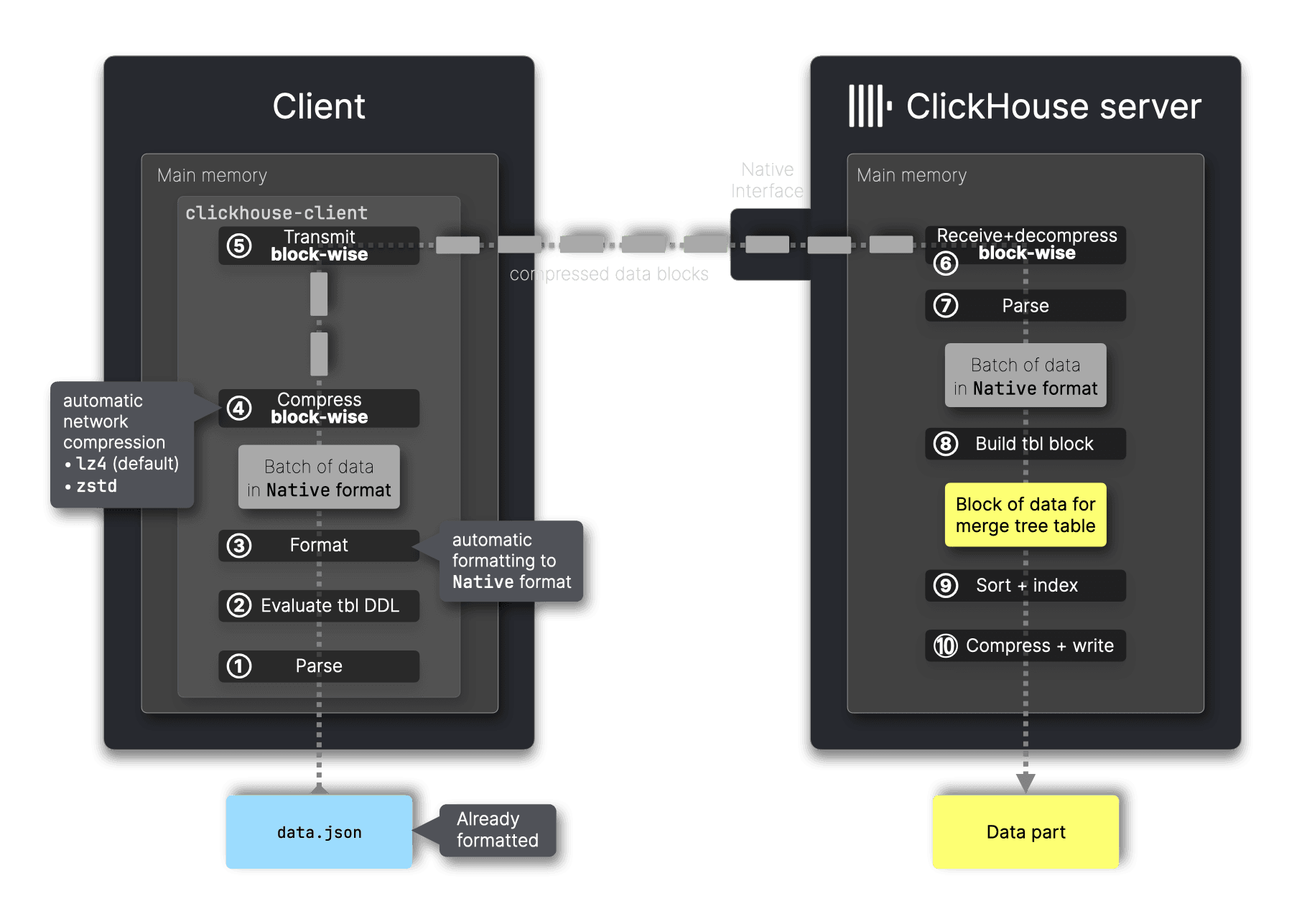
The clickhouse-client exclusively uses the [native interface](https://clickhouse.com/docs/interfaces/tcp), adhering to the [core principle](/blog/clickhouse-input-format-matchup-which-is-fastest-most-efficient#client-side-tuning-options-for-inserts) of offloading work to the client to maximize server efficiency. Instead of sending raw data (e.g. TSV or JSON), it ① first parses and ③ converts input to the efficient Native format, ensuring [optimal compression](/blog/clickhouse-input-format-matchup-which-is-fastest-most-efficient#insert-performance-of-common-input-formats) for network transport and [minimal](/blog/clickhouse-input-format-matchup-which-is-fastest-most-efficient#insert-performance-of-common-input-formats) server-side processing.
Since the Native format and MergeTree tables [share](/blog/clickhouse-input-format-matchup-which-is-fastest-most-efficient#clickhouse-input-formats) the same true columnar structure, ingestion is streamlined via a simple 1:1 copy, minimizing transformation overhead at server-side step ⑧. Native is the only format supported by the native interface.
Additionally, the native interface supports block-wise compression and decompression—clickhouse-client ④ always compresses with [either](https://clickhouse.com/docs/operations/settings/settings#network_compression_method) LZ4 (default) or ZSTD and ⑤ streams data blocks, optimizing transmission efficiency.
### Client-side materialized and default value computations
The automatic conversion of input data to Native format in any case applied by clickhouse-client required additional engineering effort and is only possible thanks to the native interface’s advanced communication mechanisms with the server.
Consider a scenario where data is inserted into a table on the server created with the following DDL statement:
CREATE TABLE test
(
  data JSON,
  c String MATERIALIZED data.b.c
)
ORDER BY();
To construct the data block in MergeTree table format in step ⑧, the ClickHouse server would need access to the original JSON input. This is necessary to compute the [MATERIALIZED](https://clickhouse.com/docs/sql-reference/statements/create/table#materialized) values for column c, which depend on extracting values from the nested path `b.c` in the JSON data.
To solve this, the clickhouse-client uses the native interface to retrieve the target table’s DDL statement from the server, and then offloads the MATERIALZED (or [DEFAULT](https://clickhouse.com/docs/sql-reference/statements/create/table#default)) value computation from server-side step ➇ to the client-side step ②. It also uses the native interface to instruct the server to skip computing these values, enabling the use of the more efficient Native format instead of JSON. By computing materialized and default values locally, the client sends fully prepared data in the most efficient format:
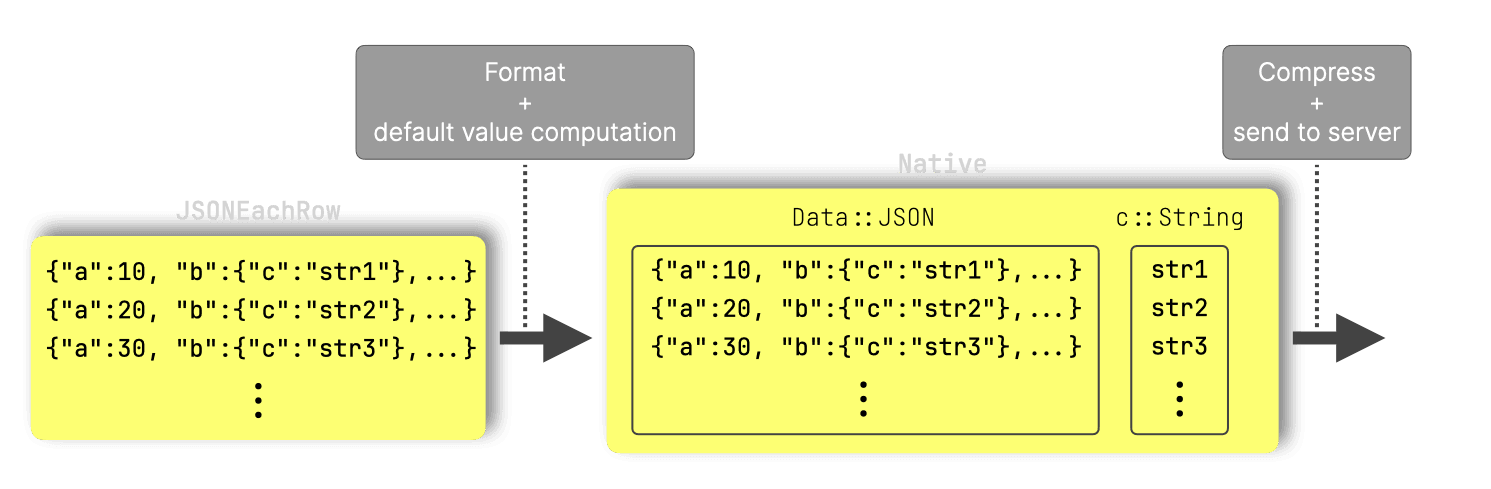
Note that, currently, only clickhouse-client implements client-side computation of MATERIALIZED and DEFAULT values to always use the Native format.
> The ClickHouse server is engineered for high efficiency and speed, and clickhouse-client follows the same principle. The native interface enables advanced techniques to optimize inserts, ensuring efficient transport and minimal server-side processing.
### HTTP interface
We illustrate the HTTP interface by using [curl](https://curl.se/) as the client:
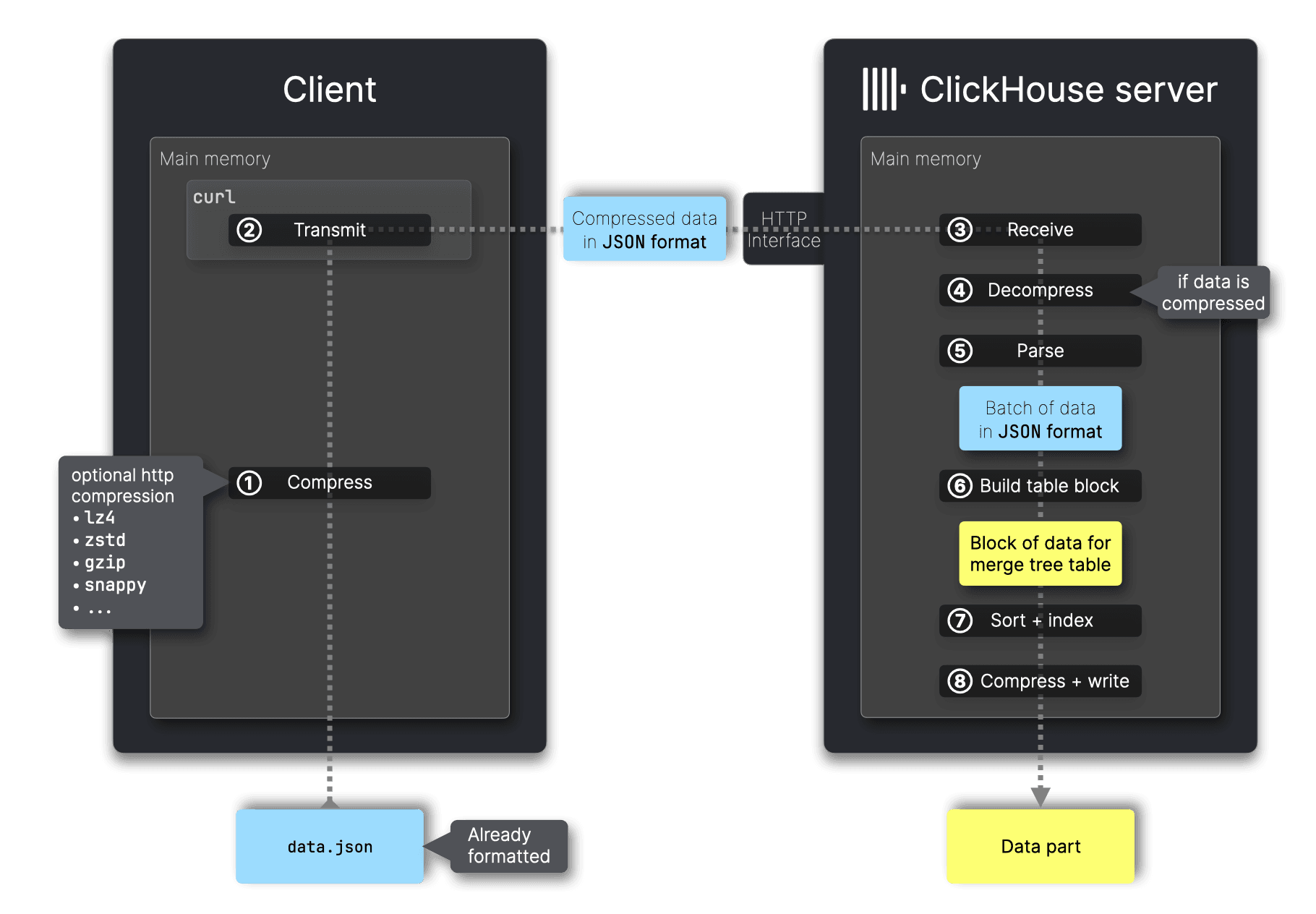
Unlike the native interface, the [HTTP interface](https://clickhouse.com/docs/interfaces/http) supports sending data in any of the supported input formats, not just Native.
For that the HTTP interface supports the [FORMAT](https://clickhouse.com/docs/en/sql-reference/statements/insert-into) clause but not the [COMPRESSION](https://clickhouse.com/docs/en/sql-reference/statements/insert-into) type clause and also does not automatically detect compression. To enable compression for HTTP inserts, [HTTP compression](https://clickhouse.com/docs/en/interfaces/http#compression) must be used with the [Content-Encoding header](https://github.com/ClickHouse/FastFormats/blob/13fe23acc64d37e720f7d1f42c1651574b8d6e0c/ingest.sh#L64). The entire data batch is compressed before transmission.
Note that while the HTTP interface also supports sending data in the Native format, it lacks the advanced communication mechanisms needed for clients to handle MATERIALIZED and DEFAULT values when the target table’s DDL depends on a specific format like JSON. Unlike the native interface, which allows retrieval of the table’s DDL and instructs the server to skip computing these values, the HTTP interface does not support such interactions. As a result, clients using HTTP cannot always automatically convert input data to the Native format.
> The HTTP interface provides greater flexibility than the native interface for selecting input formats sent to the server. It also supports additional compression options beyond LZ4 and ZSTD.
### Support matrix
In the previous sections, we used `clickhouse-client` to illustrate the native interface and `curl` for the HTTP interface. Beyond these command-line tools, various [programming language clients](https://clickhouse.com/docs/integrations/language-clients) provide differing levels of support for each interface. The following support matrix provides an overview, including clickhouse-client for completeness:
| Client | Native interface | HTTP interface | Default format | Auto conversion to Native | Compression | Pre-sorting |
|----------------------------|:---------------:|:-------------:|:--------------------:|:------------------------:|:-----------:|:-----------:|
| [ClickHouse command line client](https://clickhouse.com/docs/en/interfaces/cli) | ✅ | - | Native | ✅ | ✅ | - |
| [C++](https://github.com/ClickHouse/clickhouse-cpp) | ✅ | - | Native | - | ✅ | - |
| [Go](https://clickhouse.com/docs/integrations/go) | ✅ | ✅ | Native | - | ✅ | - |
| [Java](https://clickhouse.com/docs/integrations/java/client-v2) | - | ✅ | RowBinary | - | ✅ | - |
| [Python](https://clickhouse.com/docs/integrations/python) | - | ✅ | Native | - | ✅ | - |
| [JavaScript](https://clickhouse.com/docs/integrations/javascript) | - | ✅ | JSON formats | - | ✅ | - |
| [Rust](https://clickhouse.com/docs/integrations/rust) | Planned | ✅ | RowBinary, Native planned | - | ✅ | - |
Beyond the ClickHouse command-line client, the native interface is currently supported only by the C++ and Go clients, with Rust support planned. All main language clients, except C++, support the HTTP interface.
The clickhouse-client is currently the most advanced client, fully using the native protocol, including automatic conversion of input data to the Native format and client-side computation of MATERIALIZED and DEFAULT values.
None of the clients automatically pre-sort data before transmitting it to the server. This must be implemented manually, which is potentially less efficient than the server-side sorting process.
> Client capabilities vary based on the typical workload patterns of applications. Languages like C++ and Go are commonly used for high-throughput inserts, whereas languages like JavaScript are more often used for query-heavy applications. This distinction is reflected in the feature set of each language-specific client.
## Summary
This post examined ClickHouse’s input formats to identify the most efficient option for server-side ingestion.
A key principle for optimizing inserts sent by clients is **offloading work to the client to reduce server-side processing**. The most impactful factor is **selecting an efficient input format**. Based on [FastFormats](https://fastformats.clickhouse.com/), our benchmark comparing ingestion speed and resource efficiency across all supported formats, we found that:
* **Native is the most efficient format** across all tested scenarios, offering the best compression, low resource usage, and minimal server-side processing overhead.
* **Compression is essential**. LZ4 reduces data size with minimal CPU overhead, improving transfer speed and ingestion time. If network transfer costs are a concern, ZSTD provides higher compression, though with additional CPU overhead.
* **Pre-sorting has a moderate impact**. However, ClickHouse sorts data efficiently, often faster than the client. Pre-sorting is beneficial if data is already nearly ordered and client-side resources allow it.
* **Batching significantly improves efficiency**. We recommend batching as large as memory and CPU allow, as larger batches reduce insert overhead and improve throughput.
ClickHouse clients optimize efficiency by selecting formats suited to their typical use cases, with those designed for high-throughput inserts automatically choosing Native.