---
title: "ClickHouse gets lazier (and faster): Introducing lazy materialization"
date: "2025-04-20T13:44:14.523Z"
author: "Tom Schreiber"
category: "Engineering"
excerpt: "ClickHouse learned to procrastinate strategically. Discover how lazy materialization skips unnecessary column reads to accelerate queries."
---

# ClickHouse gets lazier (and faster): Introducing lazy materialization

![Blog_CHLazyMaterialization_202504_V2.1.png](https://cms.clickhouse-dev.com:1337/uploads/Blog_CH_Lazy_Materialization_202504_V2_1_2ddc299687.png)

Imagine if you could skip packing your bags for a trip because you find out at the airport you’re not going. That’s what ClickHouse is doing with data now.

ClickHouse is one of the fastest analytical databases available, and much of that speed comes from avoiding unnecessary work. The less data it scans and processes, the faster queries run. Now it pushes this idea even further with a new optimization: lazy materialization, which delays reading column data until it’s actually needed.

This seemingly "lazy" behavior turns out to be extremely effective in real-world workloads, especially for `Top N` queries that sort large datasets and apply `LIMIT` clauses, a common pattern in observability and general analytics. In these scenarios, lazy materialization can dramatically accelerate performance, often by orders of magnitude.

> **Spoiler alert**: We’ll show you how a ClickHouse query went from 219 seconds to just 139 milliseconds—**a 1,576× speedup**—without changing a single line of SQL. Same query. Same table. Same machine. The only thing that changed? When ClickHouse reads the data.

In this post, we’ll walk through how lazy materialization works and how it fits into ClickHouse’s broader I/O optimization stack. To give a complete picture, we’ll also briefly demonstrate the other key building blocks of I/O efficiency in ClickHouse, highlighting not just what lazy materialization does, but how it differs from and complements the techniques already in place.

We’ll begin by describing the core I/O-saving techniques ClickHouse already uses, then run a real-world query through them, layer by layer, until lazy materialization kicks in and changes everything.


## The building blocks of I/O efficiency in ClickHouse

Over the years, ClickHouse has introduced a series of layered optimizations to aggressively reduce I/O. These techniques form the foundation of its speed and efficiency:

* **[Columnar storage](https://clickhouse.com/docs/parts)** allows skipping entire columns that aren’t needed for a query and also enables high compression by grouping similar values together, minimizing I/O during data loading. 

* **[Sparse primary indexes](https://clickhouse.com/docs/primary-indexes)**, **[secondary data-skipping indexes](https://clickhouse.com/docs/optimize/skipping-indexes)**, and **[projections](https://clickhouse.com/docs/data-modeling/projections)** prune irrelevant data by identifying which **granules** (row blocks) might match filters on *indexed columns*. These techniques operate at the granule level and can be used individually or in combination. 

* **[PREWHERE](https://clickhouse.com/docs/optimize/prewhere)** checks matches also for filters on *non-indexed* columns to skip data early that would otherwise be loaded and discarded. It can work independently or refine the granules selected by indexes, complementing granule pruning by skipping rows that don’t match *all* column filters. 

* **[The query condition cache (deep dive)](https://clickhouse.com/blog/introducing-the-clickhouse-query-condition-cache)** speeds up repeated queries by remembering which granules matched all filters last time. ClickHouse can then skip reading and filtering granules that didn’t match, even if the query shape changes. Since it simply caches the result of index and PREWHERE filtering, we won’t cover it further here.  **We disabled it in all tests below to avoid skewing results.**

> These techniques, including the lazy materialization introduced below, reduce I/O *during* query processing, which is the focus of this post. An orthogonal approach is to reduce table size (and query work) upfront by precomputing results with [incremental](https://clickhouse.com/docs/materialized-view/incremental-materialized-view) or [refreshable](https://clickhouse.com/docs/materialized-view/refreshable-materialized-view) **materialized views**, which we won’t cover here.


## Completing the stack with lazy materialization

While the aforementioned I/O optimizations can significantly reduce data read, they still assume that all columns for rows passing the `WHERE` clause must be loaded before running operations like sorting, aggregation, or `LIMIT`. But what if some columns aren’t needed until later, or some data, despite passing the `WHERE` clause, is never needed at all?

That’s where **lazy materialization** comes in. An orthogonal enhancement that completes the I/O optimization stack:

* Indexing, together with PREWHERE, ensures that only rows matching column filters in the `WHERE` clause are processed.  

* Lazy materialization builds on this by deferring column reads until they’re actually required by the query execution plan. Even after filtering, only the columns needed for the next operation—such as sorting—are loaded immediately. Others are postponed and, due to `LIMIT`, are often read only partially, just enough to produce the final result. This makes lazy materialization especially powerful for *Top N* queries, where the final result may only require a handful of rows from certain, often large, columns.

> This kind of fine-grained column processing is only possible because ClickHouse stores each column independently. In [row-oriented](https://clickhouse.com/engineering-resources/what-is-columnar-database#row-based-vs-column-based) databases, where all columns are read together, this level of deferred I/O simply isn’t feasible.

To demonstrate its impact, we’ll now walk through a real-world example and show how each layer of optimization plays a role.

:::global-blog-cta:::

## Test setup: Dataset and machine

We’ll use the [Amazon customer reviews](https://clickhouse.com/docs/getting-started/example-datasets/amazon-reviews) dataset, which has around 150 million product reviews from 1995 to 2015.

<p>
We’re running ClickHouse 25.4 on an AWS <code>m6i.8xlarge</code> EC2 instance with:<br>
• 32 vCPUs<br>
• 128 GiB RAM<br>
• 1 TiB gp3 SSD (with default settings: 3000 IOPS, 125 MiB/s max throughput &#128012;)<br>
• Ubuntu Linux 24.04
</p>

On that machine, we first created the Amazon reviews table:
<pre><code type='click-ui' language='sql' show_line_numbers='false'>
CREATE TABLE amazon.amazon_reviews
(
    `review_date` Date CODEC(ZSTD(1)),
    `marketplace` LowCardinality(String) CODEC(ZSTD(1)),
    `customer_id` UInt64 CODEC(ZSTD(1)),
    `review_id` String CODEC(ZSTD(1)),
    `product_id` String CODEC(ZSTD(1)),
    `product_parent` UInt64 CODEC(ZSTD(1)),
    `product_title` String CODEC(ZSTD(1)),
    `product_category` LowCardinality(String) CODEC(ZSTD(1)),
    `star_rating` UInt8 CODEC(ZSTD(1)),
    `helpful_votes` UInt32 CODEC(ZSTD(1)),
    `total_votes` UInt32 CODEC(ZSTD(1)),
    `vine` Bool CODEC(ZSTD(1)),
    `verified_purchase` Bool CODEC(ZSTD(1)),
    `review_headline` String CODEC(ZSTD(1)),
    `review_body` String CODEC(ZSTD(1))
)
ENGINE = MergeTree
ORDER BY (review_date, product_category);
</code></pre>

And then loaded the dataset from Parquet files hosted in our public example datasets S3 bucket:
<pre><code type='click-ui' language='sql' show_line_numbers='false'>
INSERT INTO  amazon.amazon_reviews
SELECT * FROM s3Cluster('default', 'https://datasets-documentation.s3.eu-west-3.amazonaws.com/amazon_reviews/amazon_reviews_*.snappy.parquet');
</code></pre>

We check the table’s size after loading:
<pre><code type='click-ui' language='sql' show_line_numbers='false'>
SELECT
    formatReadableQuantity(sum(rows)) AS rows,
    formatReadableSize(sum(data_uncompressed_bytes)) AS data_size,
    formatReadableSize(sum(data_compressed_bytes)) AS compressed_size
FROM system.parts
WHERE active AND database = 'amazon' AND table = 'amazon_reviews';
</code></pre>

<pre><code type='click-ui' language='text' show_line_numbers='false'>
┌─rows───────────┬─data_size─┬─compressed_size─┐
│ 150.96 million │ 70.47 GiB │ 30.05 GiB       │
└────────────────┴───────────┴─────────────────┘
</code></pre>

After loading, the table contains ~150 million rows and:


* 70 GiB uncompressed data
* ~30 GiB compressed on disk using ZSTD(1)


## ClickHouse is fast, but your disk might not be

150 million rows is hardly a challenge for ClickHouse. For example, this query sorts all 150 million values in the `helpful_votes` column (which isn’t part of the table’s sort key) and returns the top 3, in just 70 milliseconds cold (with the OS filesystem cache [cleared](/blog/clickhouse-gets-lazier-and-faster-introducing-lazy-materialization#with-cold-os-level-filesystem-cache) beforehand) and a processing throughput of 2.15 billion rows/s:

<pre><code type='click-ui' language='sql' show_line_numbers='false'>
SELECT helpful_votes
FROM amazon.amazon_reviews
ORDER BY helpful_votes DESC
LIMIT 3;
</code></pre>

<pre><code type='click-ui' language='text' show_line_numbers='false'>
┌─helpful_votes─┐
│         47524 │
│         41393 │
│         41278 │
└───────────────┘

3 rows in set. Elapsed: 0.070 sec. Processed 150.96 million rows, 603.83 MB (2.15 billion rows/s., 8.61 GB/s.)
Peak memory usage: 3.59 MiB.
</code></pre>

Note that the query doesn’t benefit from indexing, PREWHERE, or other I/O reduction techniques, since it has no filters. But thanks to columnar storage, ClickHouse only reads the `helpful_votes` column and skips the rest.

Here’s another example query that simply selects (with cold filesystem cache) all data from a single `review_body` column: 
<pre><code type='click-ui' language='sql' show_line_numbers='false'>
SELECT review_body
FROM amazon.amazon_reviews
FORMAT Null;
</code></pre>

<pre><code type='click-ui' language='text' show_line_numbers='false'>
Query id: b9566386-047d-427c-a5ec-e90bee027b02

0 rows in set. Elapsed: 176.640 sec. Processed 150.96 million rows, 56.02 GB (854.61 thousand rows/s., 317.13 MB/s.)
Peak memory usage: 733.14 MiB.
</code></pre>

<p>&#128561; Almost 3 minutes! Despite reading just a single column.</p>

But the bottleneck wasn’t ClickHouse, it was the disk’s throughput. This query scanned a much larger column, 56 GB vs. 600 MB in the previous example. On our test machine, which has a [relatively slow disk](/blog/clickhouse-gets-lazier-and-faster-introducing-lazy-materialization#test-setup-dataset-and-machine) and 32 CPU cores, ClickHouse used 32 [parallel streams](https://clickhouse.com/docs/optimize/query-parallelism) to read the data. The [query log](https://clickhouse.com/docs/operations/system-tables/query_log) confirms that the majority of the 3-minute runtime was spent [waiting on the read syscall](https://github.com/ClickHouse/ClickHouse/blob/9d60aa01a83346648eae5dc9572530388271f7b0/src/Common/ProfileEvents.cpp#L101):

<pre><code type='click-ui' language='sql' show_line_numbers='false'>
SELECT 
  round(ProfileEvents['DiskReadElapsedMicroseconds'] / 1e6) AS disk_read_seconds,
  ProfileEvents['ConcurrencyControlSlotsAcquired'] AS parallel_streams,
  formatReadableTimeDelta(round(disk_read_seconds / parallel_streams), 'seconds') AS time_per_stream
FROM system.query_log
WHERE query_id = 'b9566386-047d-427c-a5ec-e90bee027b02' 
  AND type = 'QueryFinish';
</code></pre>

<pre><code type='click-ui' language='text' show_line_numbers='false'>
┌─disk_read_seconds─┬─parallel_streams─┬─time_per_stream─┐
│              5512 │               32 │ 172 seconds     │
└───────────────────┴──────────────────┴─────────────────┘
</code></pre>

Clearly, brute-force scans aren’t ideal, especially with cold caches. Let’s give ClickHouse something to work with.


## A more realistic query—where optimizations matter

Despite the airport [drama](/blog/clickhouse-gets-lazier-and-faster-introducing-lazy-materialization), I’m still set on that beach holiday, and that means loading my eReader with only the best. So I ask ClickHouse to help me find the most helpful 5-star verified reviews for digital ebook purchases since 2010, showing the number of helpful votes, book title, review headline, and the review itself:
<pre><code type='click-ui' language='sql' show_line_numbers='false'>
SELECT
    helpful_votes,
    product_title,
    review_headline,
    review_body
FROM amazon.amazon_reviews
WHERE review_date >= '2010-01-01'
AND product_category = 'Digital_Ebook_Purchase'
AND verified_purchase
AND star_rating > 4
ORDER BY helpful_votes DESC
LIMIT 3
FORMAT Vertical;
</code></pre>

<pre><code type='click-ui' language='text' show_line_numbers='false'>
Row 1:
──────
helpful_votes:   6376
product_title:   Wheat Belly: Lose the Wheat, Lose the Weight, and Find Your Path Back to Health
review_headline: Overweight? Diabetic? Got High Blood Pressure, Arthritis? Get this Book!
review_body:     I've been following Dr. Davis' heart scan blog for the past ...

Row 2:
──────
helpful_votes:   4149
product_title:   The Life-Changing Magic of Tidying Up: The Japanese Art of Decluttering and Organizing
review_headline: Truly life changing
review_body:     I rarely write reviews, but this book truly sparked somethin...

Row 3:
──────
helpful_votes:   2623
product_title:   The Fast Metabolism Diet: Eat More Food and Lose More Weight
review_headline: Fantastic Results **UPDATED 1/23/2015**
review_body:     I have been on this program for 7 days so far.  I know it ma...
</code></pre>

The query above selects four columns, including three (`product_title`, `review_headline`, `review_body`) of the largest in the table:
<pre><code type='click-ui' language='sql' show_line_numbers='false'>
SELECT
    name as column,
    formatReadableSize(sum(data_uncompressed_bytes)) AS data_size,
    formatReadableSize(sum(data_compressed_bytes)) AS compressed_size
FROM system.columns
WHERE database = 'amazon' AND table = 'amazon_reviews'
GROUP BY name
ORDER BY sum(data_uncompressed_bytes) DESC;
</code></pre>

<pre><code type='click-ui' language='text' show_line_numbers='false'>
┌─column────────────┬─data_size──┬─compressed_size─┐
│ review_body       │ 51.13 GiB  │ 21.60 GiB       │
│ product_title     │ 8.12 GiB   │ 3.53 GiB        │
│ review_headline   │ 3.38 GiB   │ 1.58 GiB        │
│ review_id         │ 2.07 GiB   │ 1.35 GiB        │
│ product_id        │ 1.55 GiB   │ 720.97 MiB      │
│ customer_id       │ 1.12 GiB   │ 524.35 MiB      │
│ product_parent    │ 1.12 GiB   │ 571.63 MiB      │
│ helpful_votes     │ 575.86 MiB │ 72.11 MiB       │
│ total_votes       │ 575.86 MiB │ 83.50 MiB       │
│ review_date       │ 287.93 MiB │ 239.43 KiB      │
│ marketplace       │ 144.51 MiB │ 414.92 KiB      │
│ product_category  │ 144.25 MiB │ 838.96 KiB      │
│ star_rating       │ 143.96 MiB │ 41.99 MiB       │
│ verified_purchase │ 143.96 MiB │ 20.50 MiB       │
│ vine              │ 1.75 MiB   │ 844.89 KiB      │
└───────────────────┴────────────┴─────────────────┘
</code></pre>

The example query touches 60+ GiB of (uncompressed) data. As we showed earlier, even with 32 parallel streams, just reading that from the (relatively slow) disk would take 3+ minutes with a cold cache.

But the query includes filters on multiple columns (`review_date`, `product_category`, `verified_purchase`, and `star_rating`), plus a `LIMIT` applied after sorting by `helpful_votes`. This is the perfect setup for ClickHouse’s layered I/O optimizations: 


* **Indexing** prunes rows that don’t match filters on the primary/sorting key (`review_date`, `product_category`). 

* **PREWHERE** pushes filtering deeper and prunes rows that don’t match *all* column filters. 

* **Lazy materialization** delays loading the large `SELECT` columns (`product_title`, `review_headline`, `review_body`) until they’re actually needed—after sorting and applying `LIMIT`. Ideally, most of that large column data is never read at all.

Each layer cuts down I/O further. Together, they reduce data read, memory use, and query time. Let’s see how much of a difference that makes, one layer at a time.


### With cold OS-level filesystem cache

In the following sections, we clear the OS-level filesystem (page) cache before each query run using

`echo 3 | sudo tee /proc/sys/vm/drop_caches >/dev/null`.

on the Linux command line. This simulates the worst-case scenario and ensures the results reflect actual disk reads, not cached data.

<!-----


Conversion time: 0.617 seconds.


Using this Markdown file:

1. Paste this output into your source file.
2. See the notes and action items below regarding this conversion run.
3. Check the rendered output (headings, lists, code blocks, tables) for proper
   formatting and use a linkchecker before you publish this page.

Conversion notes:

* Docs to Markdown version 1.0β44
* Sun Apr 20 2025 07:00:29 GMT-0700 (PDT)
* Source doc: ClickHouse gets lazier (and faster): Introducing lazy materialization
* This is a partial selection. Check to make sure intra-doc links work.
----->


## No shortcuts: the baseline full scan

Before we bring in the optimizations, let’s see what happens when ClickHouse runs the query without any shortcuts—no indexing, no PREWHERE, no lazy materialization.

 
To do this, we run the example query on a version of the table without a sorting/primary key, meaning it won’t benefit from any index-based optimizations. The following command creates that baseline table:
<pre><code type='click-ui' language='sql' show_line_numbers='false'>
CREATE TABLE amazon.amazon_reviews_no_pk
Engine = MergeTree 
ORDER BY ()
AS SELECT * FROM amazon.amazon_reviews;
</code></pre>

Now we run the example query, with both PREWHERE and lazy materialization disabled, on the baseline table:

<pre><code type='click-ui' language='sql' show_line_numbers='false'>
SELECT
    helpful_votes,
    product_title,
    review_headline,
    review_body
FROM amazon.amazon_reviews_no_pk
WHERE review_date >= '2010-01-01'
AND product_category = 'Digital_Ebook_Purchase'
AND verified_purchase
AND star_rating > 4
ORDER BY helpful_votes DESC
LIMIT 3
FORMAT Null
SETTINGS
    optimize_move_to_prewhere = false,
    query_plan_optimize_lazy_materialization = false;
</code></pre>

<pre><code type='click-ui' language='text' show_line_numbers='false'>
3 rows in set. Elapsed: 219.508 sec. Processed 150.96 million rows, 72.13 GB (687.71 thousand rows/s., 328.60 MB/s.)
Peak memory usage: 953.25 MiB.
</code></pre>

The ① query streamed all 150 million rows—organized into [granules](https://clickhouse.com/docs/guides/best-practices/sparse-primary-indexes#data-is-organized-into-granules-for-parallel-data-processing) (the smallest processing units in ClickHouse, each covering 8,192 rows by default)—of ② the 8 required columns from disk to ③ memory, processing 72 GB of data in 220 seconds and peaking at 953 MiB of memory usage:

![01-no-pk.gif](https://clickhouse.com/uploads/01_no_pk_8cbfff9574.gif)

> ClickHouse processes table data in a [streaming fashion](https://clickhouse.com/docs/optimize/query-parallelism), reading and operating on blocks of granules incrementally instead of loading all data into memory at once. That’s why, even for the query above which processed 72 GB of data, peak memory usage stayed under 1 GiB.

With the baseline set, let’s see how the first layer of optimization improves things.


## ① Engaging the primary index

Obviously, scanning the entire dataset is far from optimal. Let’s start applying ClickHouse’s optimizations, beginning with the primary index. We run the example query, still with both PREWHERE and lazy materialization disabled, on the original table, which uses `(review_date, product_category)` as its compound sorting (primary) key:
<pre><code type='click-ui' language='sql' show_line_numbers='false'>
SELECT
    helpful_votes,
    product_title,
    review_headline,
    review_body
FROM amazon.amazon_reviews
WHERE review_date >= '2010-01-01'
AND product_category = 'Digital_Ebook_Purchase'
AND verified_purchase
AND star_rating > 4
ORDER BY helpful_votes DESC
LIMIT 3
FORMAT Null
SETTINGS
   optimize_move_to_prewhere = false,
   query_plan_optimize_lazy_materialization = false;
</code></pre>

<pre><code type='click-ui' language='text' show_line_numbers='false'>
0 rows in set. Elapsed: 95.865 sec. Processed 53.01 million rows, 27.67 GB (552.98 thousand rows/s., 288.68 MB/s.)
Peak memory usage: 629.00 MiB.
</code></pre>

Because the query includes ① filters on the table’s compound sorting (primary) key, ClickHouse ② loads and evaluates the [sparse primary index](https://clickhouse.com/docs/primary-indexes) to ③ select only granules within the primary key columns that might contain matching rows. These potentially relevant granules are then ④ streamed into memory, along with positionally aligned granules from any other columns needed for the query. The remaining filters are applied after this step:

![02-pk.gif](https://clickhouse.com/uploads/02_pk_f072d23d5c.gif)

As a result, only 53 million rows from the eight required columns are streamed from disk to memory, processing 28 GB instead of 72 GB of data, and cutting runtime by more than half: 96 seconds vs. 220 seconds.

> The primary index prunes granules based on filters on the primary key columns. 

However, ClickHouse still loads all other column granules that are positionally aligned with the matching key column granules, even if filters on non-key columns exclude them later. That means unnecessary data is still being read and processed.

To fix that, we now enable PREWHERE.


## ② Adding PREWHERE

We run the same query again, this time with [PREWHERE](https://clickhouse.com/docs/optimize/prewhere) enabled (but still without lazy materialization). PREWHERE adds an additional layer of efficiency filtering out irrelevant data before reading non-filter columns from disk:

<pre><code type='click-ui' language='sql' show_line_numbers='false'>
SELECT
    helpful_votes,
    product_title,
    review_headline,
    review_body
FROM amazon.amazon_reviews
WHERE review_date >= '2010-01-01'
AND product_category = 'Digital_Ebook_Purchase'
AND verified_purchase
AND star_rating > 4
ORDER BY helpful_votes DESC
LIMIT 3
FORMAT Null
SETTINGS
    optimize_move_to_prewhere = true,
    query_plan_optimize_lazy_materialization = false;
</code></pre>

<pre><code type='click-ui' language='text' show_line_numbers='false'>
0 rows in set. Elapsed: 61.148 sec. Processed 53.01 million rows, 16.28 GB (866.94 thousand rows/s., 266.24 MB/s.)
Peak memory usage: 583.30 MiB.
</code></pre>

With PREWHERE enabled, the query processed the same 53 million rows but read significantly less column data, 16.28 GB vs. 27.67 GB, and completed 36% faster (61 seconds vs. 96 seconds), while also slightly reducing peak memory usage.

To understand this improvement, let’s briefly walk through how PREWHERE changes the way ClickHouse processes the query.

Instead of streaming all selected column granules up front, ClickHouse begins PREWHERE processing by ① loading only the primary key column granules identified by the index analysis to check which ones actually contain matches. In this case, all selected granules do match, so ② the positionally aligned granules for the next filter column—`verified_purchase`—are selected to be loaded for further filtering:

![03-PW-01.gif](https://clickhouse.com/uploads/03_PW_01_1992a16e83.gif)

Next, ClickHouse ① reads the selected `verified_purchase` column granules to evaluate the filter `verified_purchase` (which is a shortcut for `verified_purchase == True` ).

In this case, three out of four granules contain matching rows, so only ② their positionally aligned granules from the next filter column—`star_rating`—are selected for further processing:

![03-PW-02.gif](https://clickhouse.com/uploads/03_PW_02_7d17b6f283.gif)

Finally, ClickHouse reads the three selected granules from the `star_rating` column to evaluate the last filter `star_rating > 4`.

Two of the three granules contain matching rows, so just the positionally aligned granules from the remaining columns—`helpful_votes`, `product_title`, `review_headline`, and `review_body`—are selected to be loaded for further processing:

![03-PW-03.gif](https://clickhouse.com/uploads/03_PW_03_08d41def52.gif)

With that, PREWHERE processing is complete.

> Instead of loading all column granules selected by the primary index up front and then applying the remaining filters, PREWHERE pre-filters the selected data early—hence the name. ClickHouse evaluates filters one column at a time, using a [cost-based approach](https://clickhouse.com/docs/optimize/prewhere#prewhere-optimization-is-automatically-applied)—typically starting with the cheapest column to read—and loads data only for rows that pass each step. This progressively narrows the dataset, reducing I/O before the query runs the main operations like sorting, aggregation, `LIMIT`, and `SELECT`.

Note that PREWHERE can also work independently of indexing. If a query has only filters on non-indexed columns, it still helps reduce I/O by skipping non-matching rows early.


### Steps after PREWHERE filtering

After PREWHERE filtering, ClickHouse proceeds to ① load the selected data, ② sort it, and ③ apply the LIMIT clause:

![03-PW-04.gif](https://clickhouse.com/uploads/03_PW_04_9ba300fb10.gif)

Each layer we’ve added so far has chipped away at the query time, skipping unnecessary data, reducing I/O, and streamlining the work.

From a full scan that took 220 seconds, we’re already down to 61 seconds. But we’re not done yet. One last layer brings the biggest reduction yet.


## ③ Activating lazy materialization

Let’s see what happens when lazy materialization joins the stack. We run the query one last time, with all I/O optimizations enabled, including lazy materialization.

<pre><code type='click-ui' language='sql' show_line_numbers='false'>
SELECT
    helpful_votes,
    product_title,
    review_headline,
    review_body
FROM amazon.amazon_reviews
WHERE review_date >= '2010-01-01'
AND product_category = 'Digital_Ebook_Purchase'
AND verified_purchase
AND star_rating > 4
ORDER BY helpful_votes DESC
LIMIT 3
FORMAT Null
SETTINGS
    optimize_move_to_prewhere = true,
    query_plan_optimize_lazy_materialization = true;
</code></pre>

<pre><code type='click-ui' language='text' show_line_numbers='false'>
0 rows in set. Elapsed: 0.181 sec. Processed 53.01 million rows, 807.55 MB (292.95 million rows/s., 4.46 GB/s.)
Peak memory usage: 3.88 MiB.
</code></pre>

<p>&#128558; From 61 seconds to 181 milliseconds, a 338× speedup.</p>

ClickHouse processed the same 53 million rows but read 20× less column data, used 150× less memory, and finished before you could blink. 

Let’s look under the hood to see how that happened.

The explanation is simple: 

After PREWHERE filtering, ClickHouse doesn’t load all remaining columns [right away](/blog/clickhouse-gets-lazier-and-faster-introducing-lazy-materialization#steps-after-prewhere-filtering). 

Instead, it loads only what’s needed next. Since the next step is sorting by `helpful_votes` and applying the LIMIT, ClickHouse ① loads just the selected (and PREWHERE-filtered) `helpful_votes` granules, ② sorts their rows, ③ applies the LIMIT, and only then ④ loads the corresponding rows from the [large](/blog/clickhouse-gets-lazier-and-faster-introducing-lazy-materialization#a-more-realistic-querywhere-optimizations-matter) `product_title`, `review_headline`, and `review_body` columns:
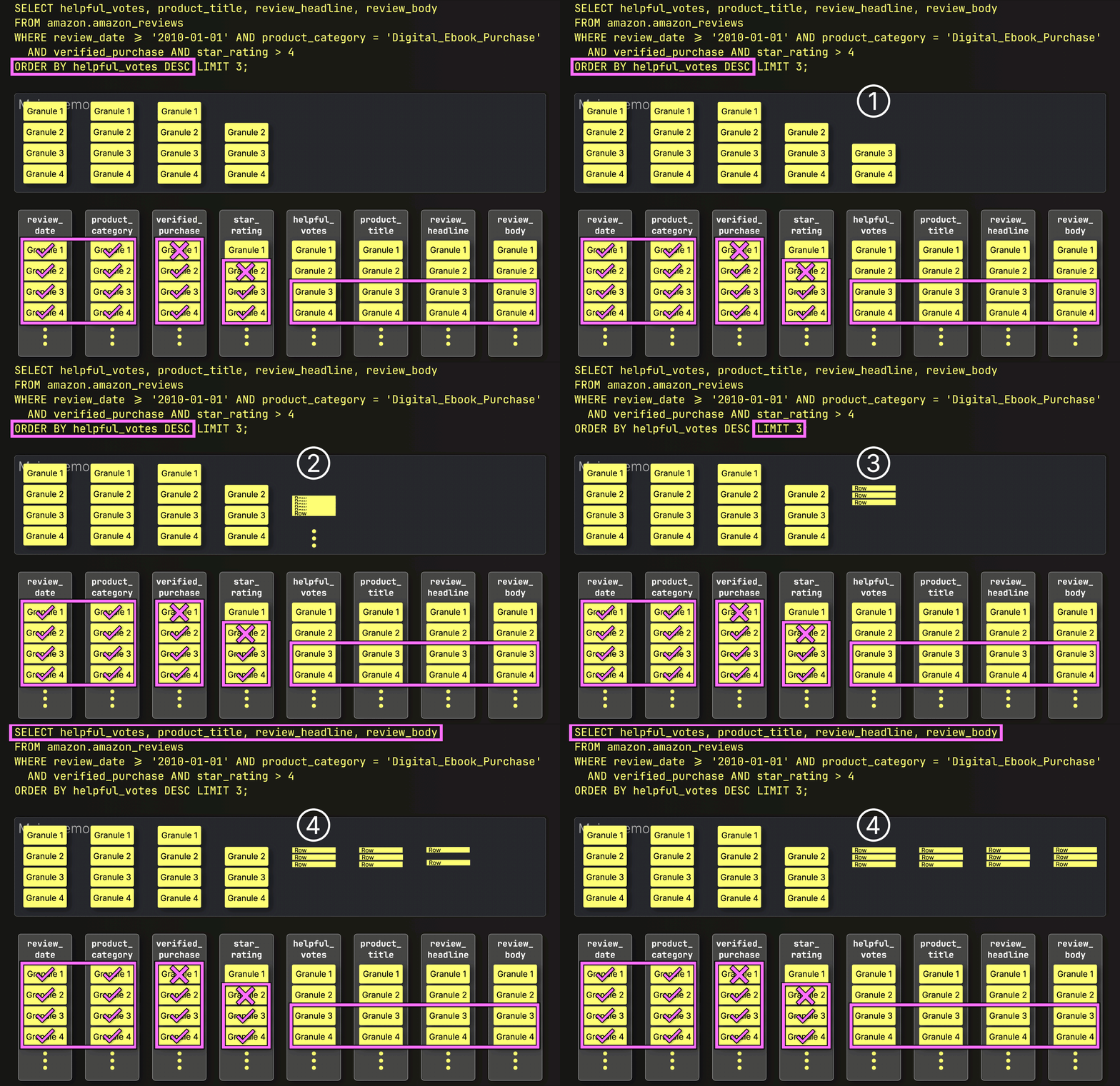
![04-LM.gif](https://clickhouse.com/uploads/04_LM_41cb16c5e0.gif)


And just like that, the final layer clicks into place, bringing execution time down from 220 seconds to just 181 milliseconds. Same query. Same table. Same machine. Same slow disk…just **1,215× faster**. All we changed was how and when data is read.

> In this example, lazy materialization delivers the biggest gain because the query selects large text columns, and thanks to lazy materialization, only 3 rows from them are needed in the end. But depending on the dataset and query shape, earlier optimizations like indexing or PREWHERE may yield greater savings. These techniques work together, each contributes to reducing I/O in a different way.

Note: Lazy materialization is applied automatically for `LIMIT N` queries, but only up to a `N` threshold. This is controlled by the [query_plan_max_limit_for_lazy_materialization](https://clickhouse.com/docs/operations/settings/settings#query_plan_max_limit_for_lazy_materialization) setting (default: 10). If set to 0, lazy materialization applies to all LIMIT values with no upper bound.

## Speed without filters: Lazy materialization in isolation

To benefit from indexing and PREWHERE, a query needs filters, on primary key columns for indexing, and on any columns for PREWHERE. As shown above, lazy materialization layers cleanly on top, but unlike the others, it can also speed up queries with no column filters at all.

To demonstrate this, we remove all filters from our example query to find the reviews with the highest number of helpful votes, regardless of date, product, rating, or verification status, returning the top 3 along with their title, headline, and full text.

We first run that query (with [cold filesystem caches](/blog/clickhouse-gets-lazier-and-faster-introducing-lazy-materialization#with-cold-os-level-filesystem-cache)) with lazy materialization disabled:

<pre><code type='click-ui' language='sql' show_line_numbers='false'>
SELECT
    helpful_votes,
    product_title,
    review_headline,
    review_body
FROM amazon.amazon_reviews
ORDER BY helpful_votes DESC
LIMIT 3
FORMAT Vertical
SETTINGS
    query_plan_optimize_lazy_materialization = false;
</code></pre>

<pre><code type='click-ui' language='text' show_line_numbers='false'>
Row 1:
──────
helpful_votes:   47524
product_title:   Kindle: Amazon's Original Wireless Reading Device (1st generation)
review_headline: Why and how the Kindle changes everything
review_body:     This is less a \"pros and cons\" review than a hopefully use...

Row 2:
──────
helpful_votes:   41393
product_title:   BIC Cristal For Her Ball Pen, 1.0mm, Black, 16ct (MSLP16-Blk)
review_headline: FINALLY!
review_body:     Someone has answered my gentle prayers and FINALLY designed ...

Row 3:
──────
helpful_votes:   41278
product_title:   The Mountain Kids 100% Cotton Three Wolf Moon T-Shirt
review_headline: Dual Function Design
review_body:     This item has wolves on it which makes it intrinsically swee...


0 rows in set. Elapsed: 219.071 sec. Processed 150.96 million rows, 71.38 GB (689.08 thousand rows/s., 325.81 MB/s.)
Peak memory usage: 1.11 GiB.
</code></pre>

Now we rerun the query (again with a cold filesystem cache), but this time with lazy materialization enabled:

<pre><code type='click-ui' language='sql' show_line_numbers='false'>
SELECT
    helpful_votes,
    product_title,
    review_headline,
    review_body
FROM amazon.amazon_reviews
ORDER BY helpful_votes DESC
LIMIT 3
FORMAT Vertical
SETTINGS
    query_plan_optimize_lazy_materialization = true;
</code></pre>

<pre><code type='click-ui' language='text' show_line_numbers='false'>
Row 1:
──────
helpful_votes:   47524
product_title:   Kindle: Amazon's Original Wireless Reading Device (1st generation)
review_headline: Why and how the Kindle changes everything
review_body:     This is less a \"pros and cons\" review than a hopefully use...

Row 2:
──────
helpful_votes:   41393
product_title:   BIC Cristal For Her Ball Pen, 1.0mm, Black, 16ct (MSLP16-Blk)
review_headline: FINALLY!
review_body:     Someone has answered my gentle prayers and FINALLY designed ...

Row 3:
──────
helpful_votes:   41278
product_title:   The Mountain Kids 100% Cotton Three Wolf Moon T-Shirt
review_headline: Dual Function Design
review_body:     This item has wolves on it which makes it intrinsically swee...


0 rows in set. Elapsed: 0.139 sec. Processed 150.96 million rows, 1.81 GB (1.09 billion rows/s., 13.06 GB/s.)
Peak memory usage: 3.80 MiB.
</code></pre>

Boom: a **1,576× speedup**—from 219 seconds to just 139 milliseconds—with 40× less data read and 300× lower memory usage.

This example highlights what makes lazy materialization unique among ClickHouse’s I/O optimizations.

> Lazy materialization doesn’t need column filters to deliver speedups. While indexing and PREWHERE rely on query predicates to skip data, lazy materialization improves performance purely by deferring work, loading only what’s needed, when it’s needed.


## Confirming lazy materialization in the query execution plan

We can observe the lazy materialization for the previous query by inspecting the query’s logical execution plan using the [EXPLAIN](https://clickhouse.com/docs/sql-reference/statements/explain#explain-plan) clause:

<pre><code type='click-ui' language='sql' show_line_numbers='false'>
EXPLAIN actions = 1
SELECT
    helpful_votes,
    product_title,
    review_headline,
    review_body
FROM amazon.amazon_reviews
ORDER BY helpful_votes DESC
LIMIT 3
SETTINGS
    query_plan_optimize_lazy_materialization = true;
</code></pre>

<pre><code type='click-ui' language='text' show_line_numbers='false'>
...
Lazily read columns: review_headline, review_body, product_title 
  Limit                    
    Sorting                             
      ReadFromMergeTree
</code></pre>

We can read the operator plan from bottom to top and observe that ClickHouse defers reading the three large String columns until after sorting and limiting.


## Layer by layer, faster—and now, much lazier

This journey began with a full-table scan: 220 seconds, 72 GB read, and 1 GiB memory used. Through ClickHouse’s layered I/O optimizations, we chipped away at runtime, one technique at a time: 

* ① The **primary index** pruned granules that didn’t match filters on indexed columns (`review_date`, `product_category`).  
 
* ②  **PREWHERE** filtered out granules early that passed the index but failed filters on non-indexed columns (`verified_purchase`, `star_rating`), reducing unnecessary reads. 
  
* ③  **Lazy materialization** deferred reading the large `SELECT` columns (`product_title`, `review_headline`, `review_body`) until after sorting by `helpful_votes` and applying `LIMIT`. 

![Blog-LAZY MATERIALIZATION.001.png](https://clickhouse.com/uploads/Blog_LAZY_MATERIALIZATION_001_d7b4526449.png)

Each layer helped, but for our dataset and query shape lazy materialization changed the game.

The result?

* From 220s → 0.18s = **over 1,200× speedup** on the filtered query
* From 219s → 0.139s = **over 1,500× speedup** on a full-table Top N query

**Same table. Same machine. Same SQL code.** The only thing we changed? How and *when* ClickHouse reads the data.

Lazy materialization doesn’t just make ClickHouse faster, it completes the I/O optimization stack. 
And the laziest part? It (and PREWHERE) are on by default. You get the speed without lifting a finger.