---
title: "Chaining Materialized Views in ClickHouse"
date: "2024-04-16T14:02:15.043Z"
author: "Mark Needham"
category: "Engineering"
excerpt: "In this blog post, we'll learn about the power of chaining ClickHouse materialized views."
---
# Chaining Materialized Views in ClickHouse
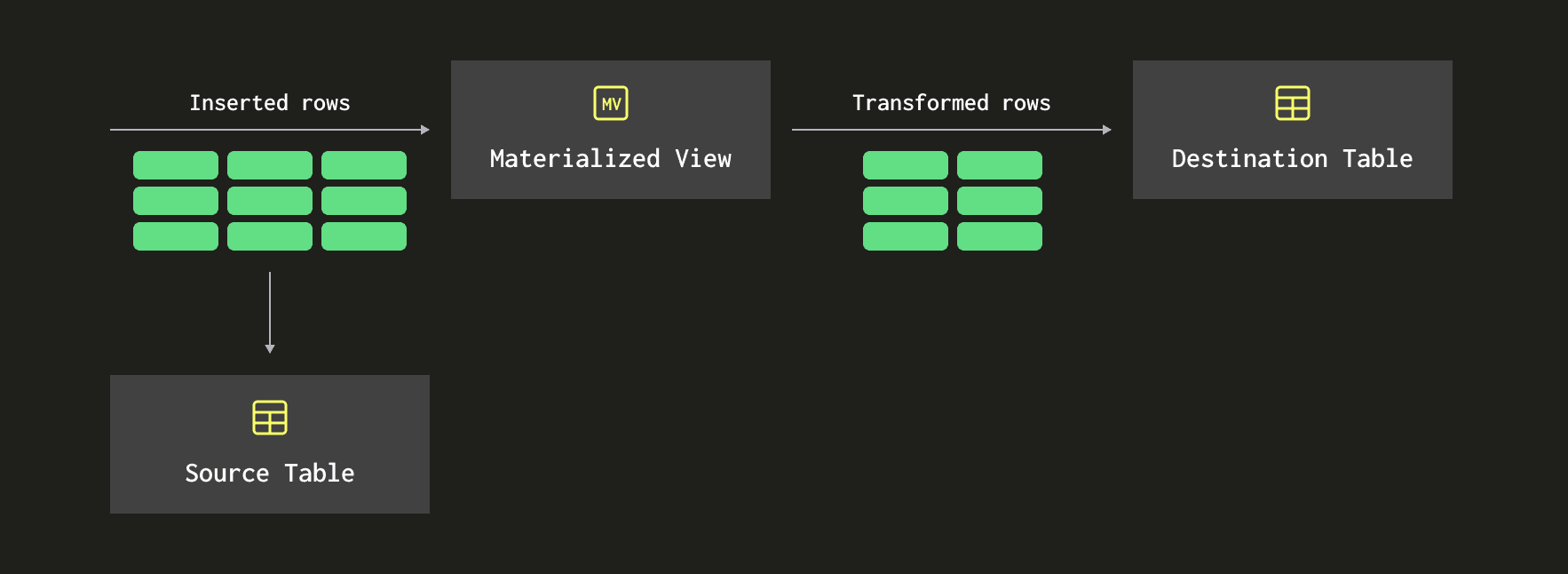
[Materialized views](https://clickhouse.com/docs/en/guides/developer/cascading-materialized-views) in ClickHouse are queries fired whenever a batch of rows arrives in a source table. They will operate on those rows, possibly transforming the data before writing to a destination table.
The diagram below gives a high-level view of how this works:
Over the last couple of weeks, I’ve been learning about [aggregation states](https://clickhouse.com/blog/aggregate-functions-combinators-in-clickhouse-for-arrays-maps-and-states). I created a small demo with two materialized views reading from the same Kafka table engine. One stored raw event data and the other stored aggregation states.
When I showed the example to [Tom](https://www.linkedin.com/in/schreibertom1/), he suggested that rather than have both materialized views read from the Kafka engine table, I could instead chain the materialized views together. The diagram below shows what he had in mind:
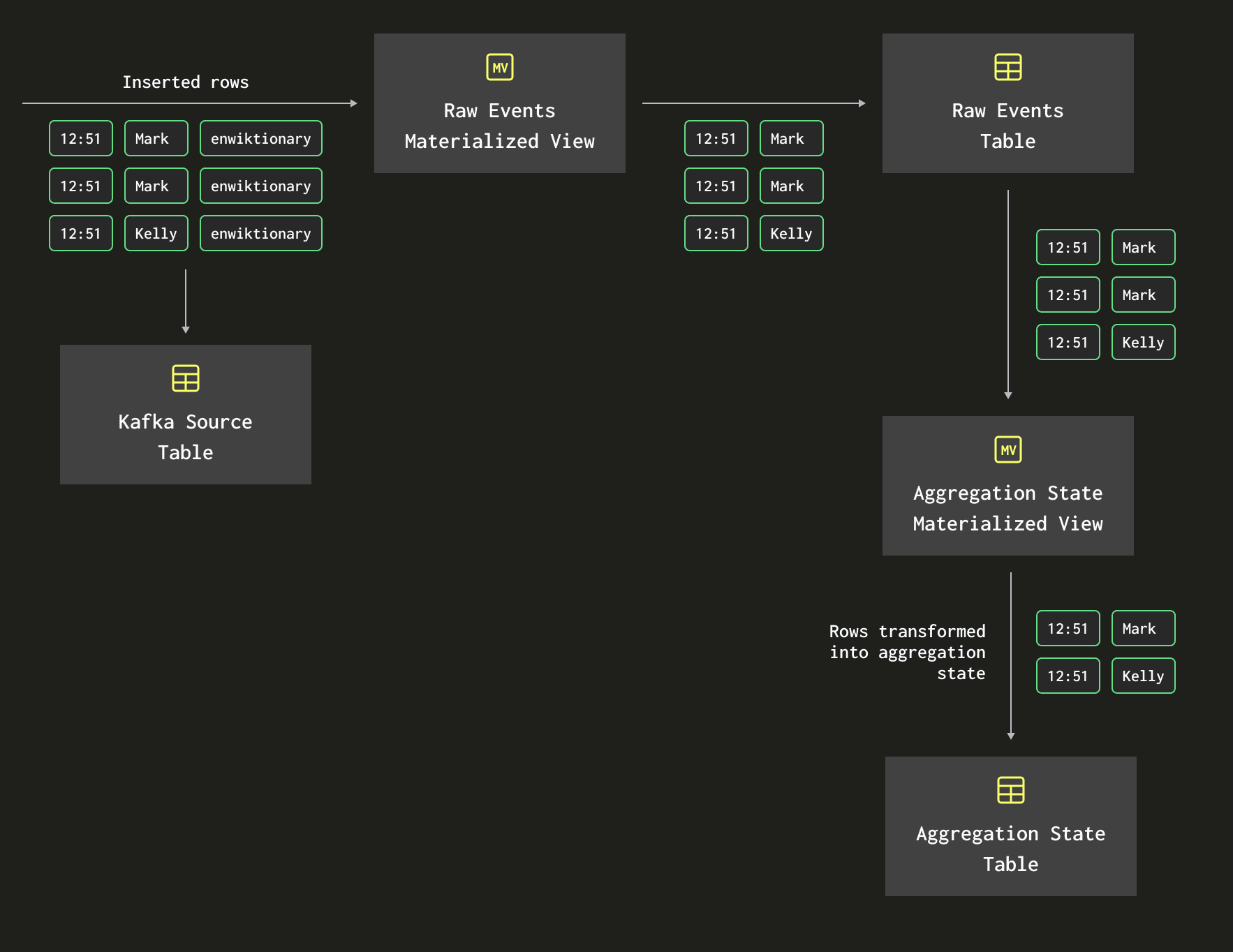
In other words, rather than having the aggregation state materialized view read from the Kafka engine table, I should rather have it read from the raw events that have already been extracted from Kafka.
In the rest of this blog post, we will go through a practical example of how to chain materialized views.
We’ll use the [Wiki recent changes feed](https://stream.wikimedia.org/v2/stream/recentchange), which provides a stream of events that represent changes made to various Wikimedia properties. The data is available as Server Side Events and the `data` property of an example message is shown below:
```json
{
"$schema": "/mediawiki/recentchange/1.0.0",
"meta": {
"uri": "https://en.wiktionary.org/wiki/MP3%E6%92%AD%E6%94%BE%E5%99%A8",
"request_id": "ccbbbe2c-6e1b-4bb7-99cb-317b64cbd5dc",
"id": "41c73232-5922-4484-82f3-34d45f22ee7a",
"dt": "2024-03-26T09:13:09Z",
"domain": "en.wiktionary.org",
"stream": "mediawiki.recentchange",
"topic": "eqiad.mediawiki.recentchange",
"partition": 0,
"offset": 4974797626
},
"id": 117636935,
"type": "edit",
"namespace": 0,
"title": "MP3播放器",
"title_url": "https://en.wiktionary.org/wiki/MP3%E6%92%AD%E6%94%BE%E5%99%A8",
"comment": "clean up some labels; add missing space after *; {{zh-noun}} -> {{head|zh|noun}}, {{zh-hanzi}} -> {{head|zh|hanzi}} per [[WT:RFDO#All templates in Category:Chinese headword-line templates except Template:zh-noun]], [[WT:RFDO#Template:zh-noun]]; fix some lang codes (manually assisted)",
"timestamp": 1711444389,
"user": "WingerBot",
"bot": true,
"notify_url": "https://en.wiktionary.org/w/index.php?diff=78597416&oldid=50133194&rcid=117636935",
"minor": true,
"patrolled": true,
"length": {
"old": 229,
"new": 234
},
"revision": {
"old": 50133194,
"new": 78597416
},
"server_url": "https://en.wiktionary.org",
"server_name": "en.wiktionary.org",
"server_script_path": "/w",
"wiki": "enwiktionary",
"parsedcomment": "clean up some labels; add missing space after *; {{zh-noun}} -> {{head|zh|noun}}, {{zh-hanzi}} -> {{head|zh|hanzi}} per WT:RFDO#All templates in Category:Chinese headword-line templates except Template:zh-noun, WT:RFDO#Template:zh-noun; fix some lang codes (manually assisted)"
}
```
Let’s imagine that we’re building a dashboard to track the changes being made. We aren’t interested in the individual changes but rather want to track, on a minute-by-minute basis, the unique number of users making changes, the unique number of pages being changed, and the total changes made.
We’ll start by creating and then using the `wiki` database:
```sql
CREATE DATABASE wiki;
```
```sql
USE wiki;
```
## Create Kafka Table Engine
Next, let’s create a table called `wikiQueue` that will consume messages from Kafka. The broker is running locally on port 9092, and our topic is called `wiki_events`.
> Note that if you're using ClickHouse Cloud, you'll instead need to use [ClickPipes](https://clickhouse.com/cloud/clickpipes) to handle ingestion of data from Kafka.
```sql
CREATE TABLE wikiQueue(
id UInt32,
type String,
title String,
title_url String,
comment String,
timestamp UInt64,
user String,
bot Boolean,
server_url String,
server_name String,
wiki String,
meta Tuple(uri String, id String, stream String, topic String, domain String)
)
ENGINE = Kafka(
'localhost:9092',
'wiki_events',
'consumer-group-wiki',
'JSONEachRow'
);
```
The `rawEvents` table stores the `dateTime`, `title_url`, `topic`, and `user`.
```sql
CREATE TABLE rawEvents (
dateTime DateTime64(3, 'UTC'),
title_url String,
topic String,
user String
)
ENGINE = MergeTree
ORDER BY dateTime;
```
We’ll then write the following materialized view to write data to `rawEvents`:
```sql
CREATE MATERIALIZED VIEW rawEvents_mv TO rawEvents AS
SELECT toDateTime(timestamp) AS dateTime,
title_url,
tupleElement(meta, 'topic') AS topic,
user
FROM wikiQueue
WHERE title_url <> '';
```
We’re using the `toDateTime` function to convert from an epoch seconds timestamp to a DateTime object. We also use the `tupleElement` function to extract the `topic` property from the `meta` object.
## Storing aggregate states
Next, let’s create a table that stores aggregate states to enable [incremental aggregation](https://www.youtube.com/watch?v=QDAJTKZT8y4).
Aggregate states are stored in a column with the `AggregateFunction(, )` type.
To keep a unique count of `String` values, which we need to do to track unique users and unique pages, we would use the `AggregateFunction(uniq, String)` type. To keep a running total, which we need for total updates, we would use the `AggregateFunction(sum, UInt32`) type. The `UInt32` type gives us a maximum value of `4294967295`, which is way more than the number of updates we’ll receive in one minute.
We’ll call this table `byMinute` and its definition is below:
```sql
CREATE TABLE byMinute
(
dateTime DateTime64(3, 'UTC') NOT NULL,
users AggregateFunction(uniq, String),
pages AggregateFunction(uniq, String),
updates AggregateFunction(sum, UInt32)
)
ENGINE = AggregatingMergeTree()
ORDER BY dateTime;
```
The materialized view that populates this table will read from `rawEvents` and use `-State` combinators to extract the intermediate state. We’ll use the `uniqState` function for users and pages and `sumState` for updates.
```sql
CREATE MATERIALIZED VIEW byMinute_mv TO byMinute AS
SELECT toStartOfMinute(dateTime) AS dateTime,
uniqState(user) as users,
uniqState(title_url) as pages,
sumState(toUInt32(1)) AS updates
FROM rawEvents
GROUP BY dateTime;
```
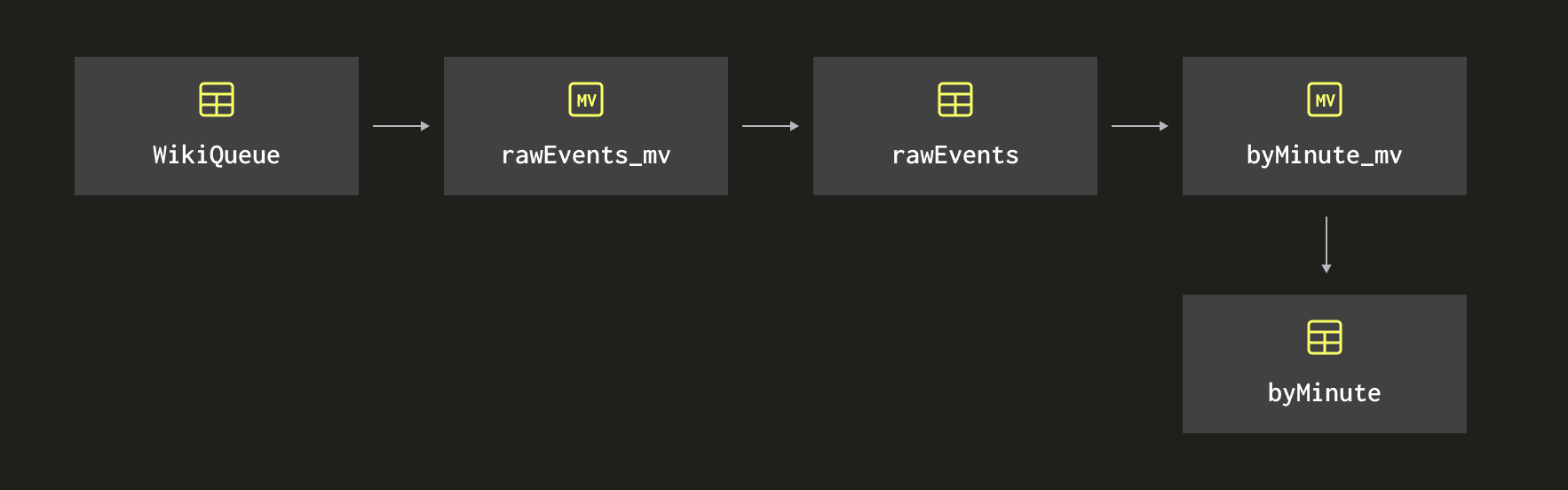
The diagram below shows the chain of materialized views and tables that we’ve created so far:
We don’t have any data flowing into Kafka, so this table won’t have any data. Let’s fix that by running the following commands.
```bash
curl -N https://stream.wikimedia.org/v2/stream/recentchange |
awk '/^data: /{gsub(/^data: /, ""); print}' |
jq -cr --arg sep ø '[.meta.id, tostring] | join($sep)' |
kcat -P -b localhost:9092 -t wiki_events -Kø
```
This command extracts the `data` property from the recent changes feed, constructs a `key:value` pair using jq, and then pipes it into Kafka using kcat.
If we leave that running for a little while, we can then write a query to see how many changes are being made:
```sql
SELECT
dateTime AS dateTime,
uniqMerge(users) AS users,
uniqMerge(pages) AS pages,
sumMerge(updates) AS updates
FROM byMinute
GROUP BY dateTime
ORDER BY dateTime DESC
LIMIT 10;
```
```text
┌────────────────dateTime─┬─users─┬─pages─┬─updates─┐
1. │ 2024-03-26 15:53:00.000 │ 248 │ 755 │ 1002 │
2. │ 2024-03-26 15:52:00.000 │ 429 │ 1481 │ 2164 │
3. │ 2024-03-26 15:51:00.000 │ 406 │ 1417 │ 2159 │
4. │ 2024-03-26 15:50:00.000 │ 392 │ 1240 │ 1843 │
5. │ 2024-03-26 15:49:00.000 │ 418 │ 1346 │ 1910 │
6. │ 2024-03-26 15:48:00.000 │ 422 │ 1388 │ 1867 │
7. │ 2024-03-26 15:47:00.000 │ 423 │ 1449 │ 2015 │
8. │ 2024-03-26 15:46:00.000 │ 409 │ 1420 │ 1933 │
9. │ 2024-03-26 15:45:00.000 │ 402 │ 1348 │ 1824 │
10. │ 2024-03-26 15:44:00.000 │ 432 │ 1642 │ 2142 │
└─────────────────────────┴───────┴───────┴─────────┘
```
That all looks like it’s working well.
## Adding another MV to the chain
Now, after running this for a while, we decide that it would be useful to group and chunk the data in 10-minute buckets rather than just 1-minute ones. We can do this by writing the following query against the byMinute table:
```sql
SELECT
toStartOfTenMinutes(dateTime) AS dateTime,
uniqMerge(users) AS users,
uniqMerge(pages) AS pages,
sumMerge(updates) AS updates
FROM byMinute
GROUP BY dateTime
ORDER BY dateTime DESC
LIMIT 10;
```
This will return something like the following, where the values in the `dateTime` column are now in increments of 10 minutes.
```
┌────────────dateTime─┬─users─┬─pages─┬─updates─┐
1. │ 2024-03-26 15:50:00 │ 977 │ 4432 │ 7168 │
2. │ 2024-03-26 15:40:00 │ 1970 │ 12372 │ 20555 │
3. │ 2024-03-26 15:30:00 │ 1998 │ 11673 │ 20043 │
4. │ 2024-03-26 15:20:00 │ 1981 │ 12051 │ 20026 │
5. │ 2024-03-26 15:10:00 │ 1996 │ 11793 │ 19392 │
6. │ 2024-03-26 15:00:00 │ 2092 │ 12778 │ 20649 │
7. │ 2024-03-26 14:50:00 │ 2062 │ 12893 │ 20465 │
8. │ 2024-03-26 14:40:00 │ 2028 │ 12798 │ 20873 │
9. │ 2024-03-26 14:30:00 │ 2020 │ 12169 │ 20364 │
10. │ 2024-03-26 14:20:00 │ 2077 │ 11929 │ 19797 │
└─────────────────────┴───────┴───────┴─────────┘
```
This works fine with the small data volumes we’re working with, but when we’re working with bigger data, we might want to have another table that stores the data bucketed by 10-minute intervals. Let’s create that table:
```sql
CREATE TABLE byTenMinutes
(
dateTime DateTime64(3, 'UTC') NOT NULL,
users AggregateFunction(uniq, String),
pages AggregateFunction(uniq, String),
updates AggregateFunction(sum, UInt32)
)
ENGINE = AggregatingMergeTree()
ORDER BY dateTime;
```
Next, let’s create a materialized view to populate that table. The materialized view will query the `byMinute` table using a query similar to the one we used to compute the 10-minute buckets above. The only change is that instead of using `-Merge` combinators, we’ll need to use `-MergeState` combinators to return the aggregation state from aggregating the `byMinute` data rather than the underlying result.
In theory, we will save some calculation time, as the `byMinute` MV already aggregated data in one-minute buckets. Now, instead of aggregating the raw by-second data from scratch into 10-minute buckets, we exploit the one-minute buckets instead.
The materialized view is shown below:
```sql
CREATE MATERIALIZED VIEW byTenMinutes_mv TO byTenMinutes AS
SELECT toStartOfMinute(dateTime) AS dateTime,
uniqMergeState(users) as users,
uniqMergeState(pages) as pages,
sumMergeState(updates) AS updates
FROM byMinute
GROUP BY dateTime;
```
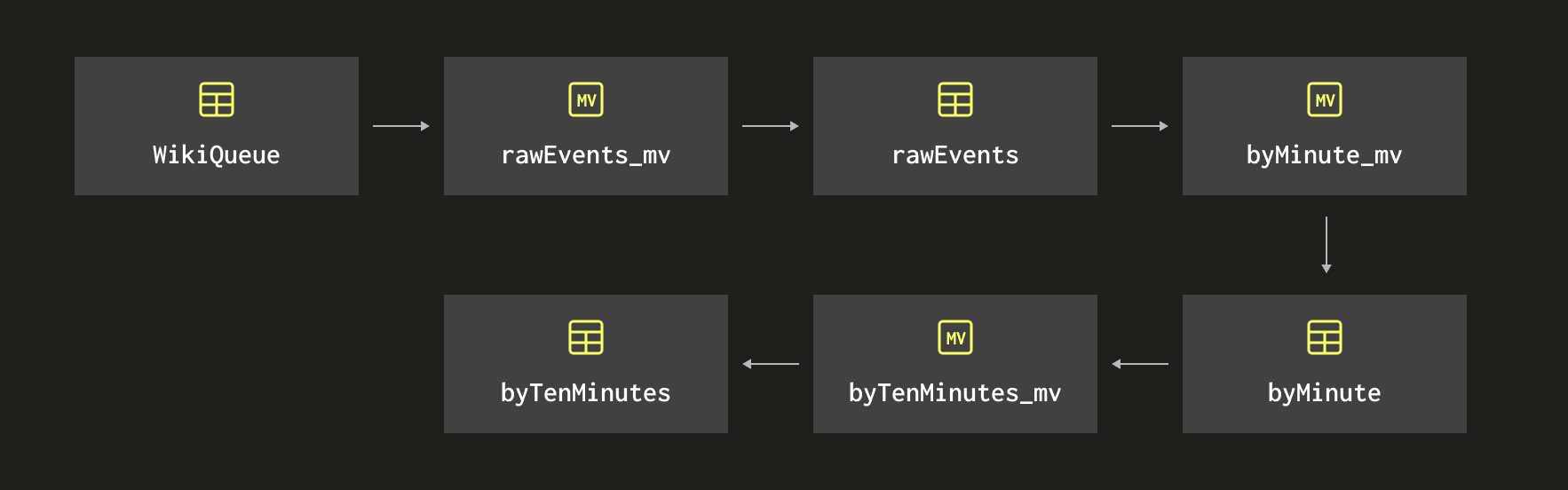
The following diagram shows the chaining of materialized views that we’ve now created:
If we query the `byTenMinutes` table it won’t have any data and once it does start populating, it will only pick up new data ingested into the `byMinute` table. But all is not lost, we can still write a query to backfill the old data:
```sql
INSERT INTO byTenMinutes
SELECT toStartOfTenMinutes(dateTime),
uniqMergeState(users) AS users, uniqMergeState(pages) AS pages,
sumMergeState(updates) AS updates
FROM byMinute
GROUP BY dateTime;
```
We can then write the following query against `byTenMinutes` to return the data grouped by 10-minute buckets:
```sql
SELECT
dateTime AS dateTime,
uniqMerge(users) AS users,
uniqMerge(pages) AS pages,
sumMerge(updates) AS updates
FROM byTenMinutes
GROUP BY dateTime
ORDER BY dateTime DESC
LIMIT 10;
```
We’ll get back the same results as we did when querying the `byMinute` table:
```
┌────────────dateTime─┬─users─┬─pages─┬─updates─┐
1. │ 2024-03-26 15:50:00 │ 977 │ 4432 │ 7168 │
2. │ 2024-03-26 15:40:00 │ 1970 │ 12372 │ 20555 │
3. │ 2024-03-26 15:30:00 │ 1998 │ 11673 │ 20043 │
4. │ 2024-03-26 15:20:00 │ 1981 │ 12051 │ 20026 │
5. │ 2024-03-26 15:10:00 │ 1996 │ 11793 │ 19392 │
6. │ 2024-03-26 15:00:00 │ 2092 │ 12778 │ 20649 │
7. │ 2024-03-26 14:50:00 │ 2062 │ 12893 │ 20465 │
8. │ 2024-03-26 14:40:00 │ 2028 │ 12798 │ 20873 │
9. │ 2024-03-26 14:30:00 │ 2020 │ 12169 │ 20364 │
10. │ 2024-03-26 14:20:00 │ 2077 │ 11929 │ 19797 │
└─────────────────────┴───────┴───────┴─────────┘
```