## Our application To illustrate the benefits of LlamaIndex, let's consider our application "HackBot". This will take questions that aim to obtain a summary of people's opinions from Hacker News and surveys performed by Stack Overflow. In our proof of concept, these questions will take three general forms: 1. **Structured** questions that can be answered from Stack Overflow survey data e.g. "What is the most popular database?". To answer this, a SQL query must be generated before a response is passed back to the user. We've explored the challenge of natural language to SQL generation in [previous blogs](https://clickhouse.com/blog/retrieval-augmented-generation-rag-with-clickhouse-bedrock). 2. **Unstructured** questions summarizing people's opinions on technology e.g. "What are people saying about ClickHouse?". This requires a vector search against Hacker News posts to identify relevant comments. These can then be provided as context to the LLM for the generation of a natural language response. 3. **Structured + Unstructured** questions. In this case, the user may pose a question that requires context to be obtained from both the survey results and the posts. For example, suppose a user asks, "What are people saying about the most popular database?" In this case, we first need to establish the most popular database from survey results before using this to search for opinions in the Hacker News posts. Only then can this context be provided to the LLM for response generation. Supporting these leads to a reasonably complex RAG flow with a pipeline for each of the above containing multiple decision points: 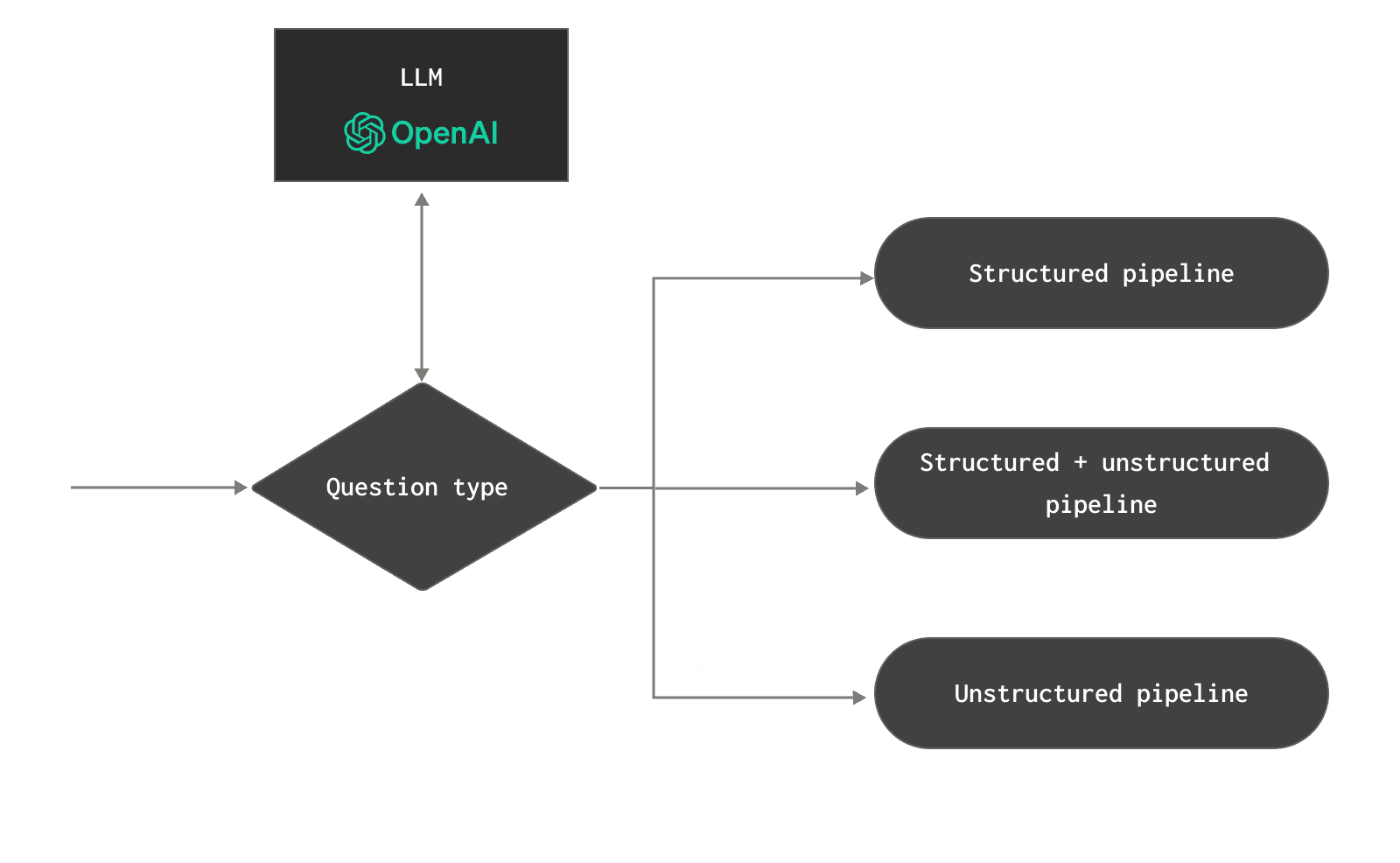 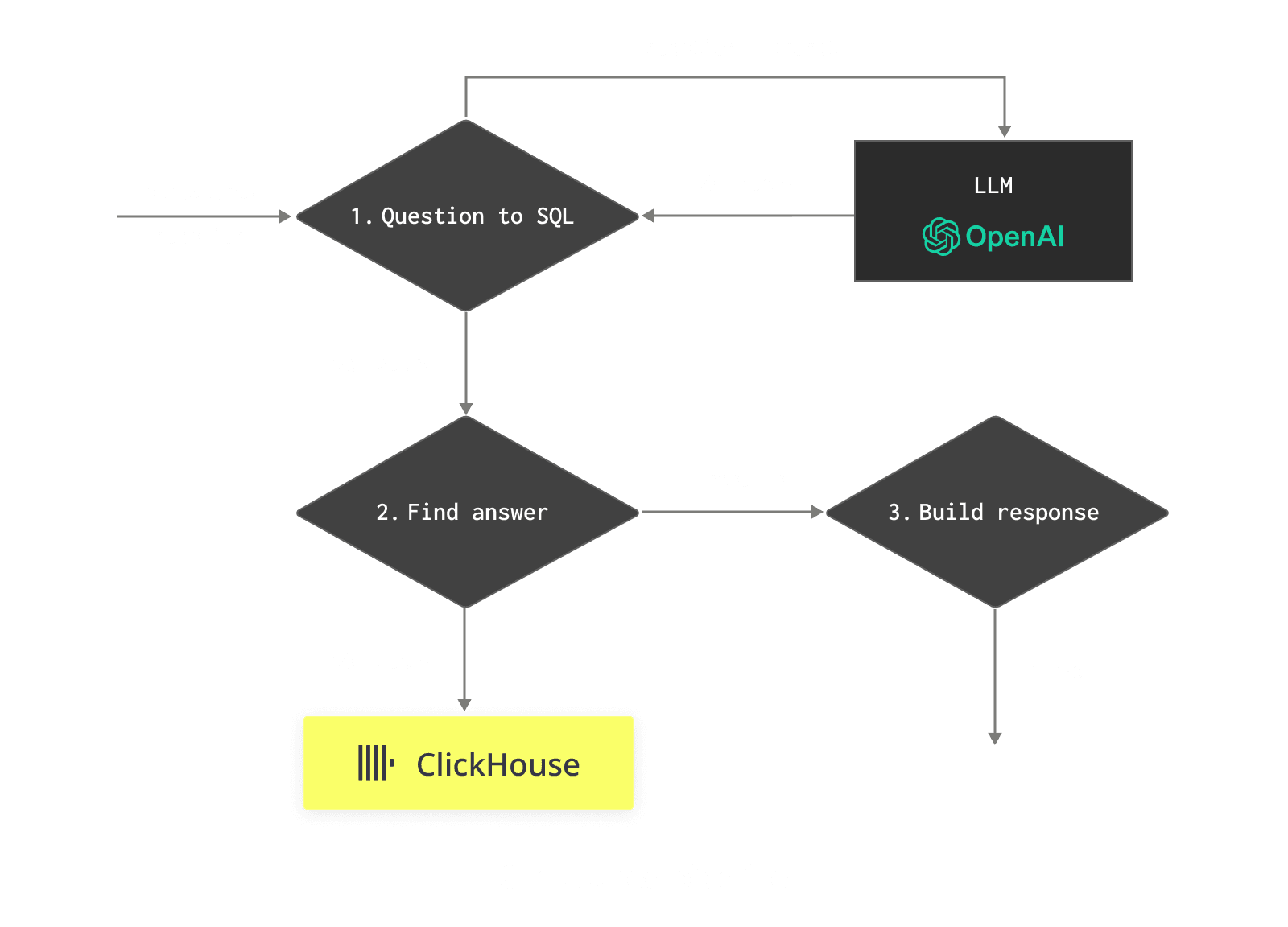 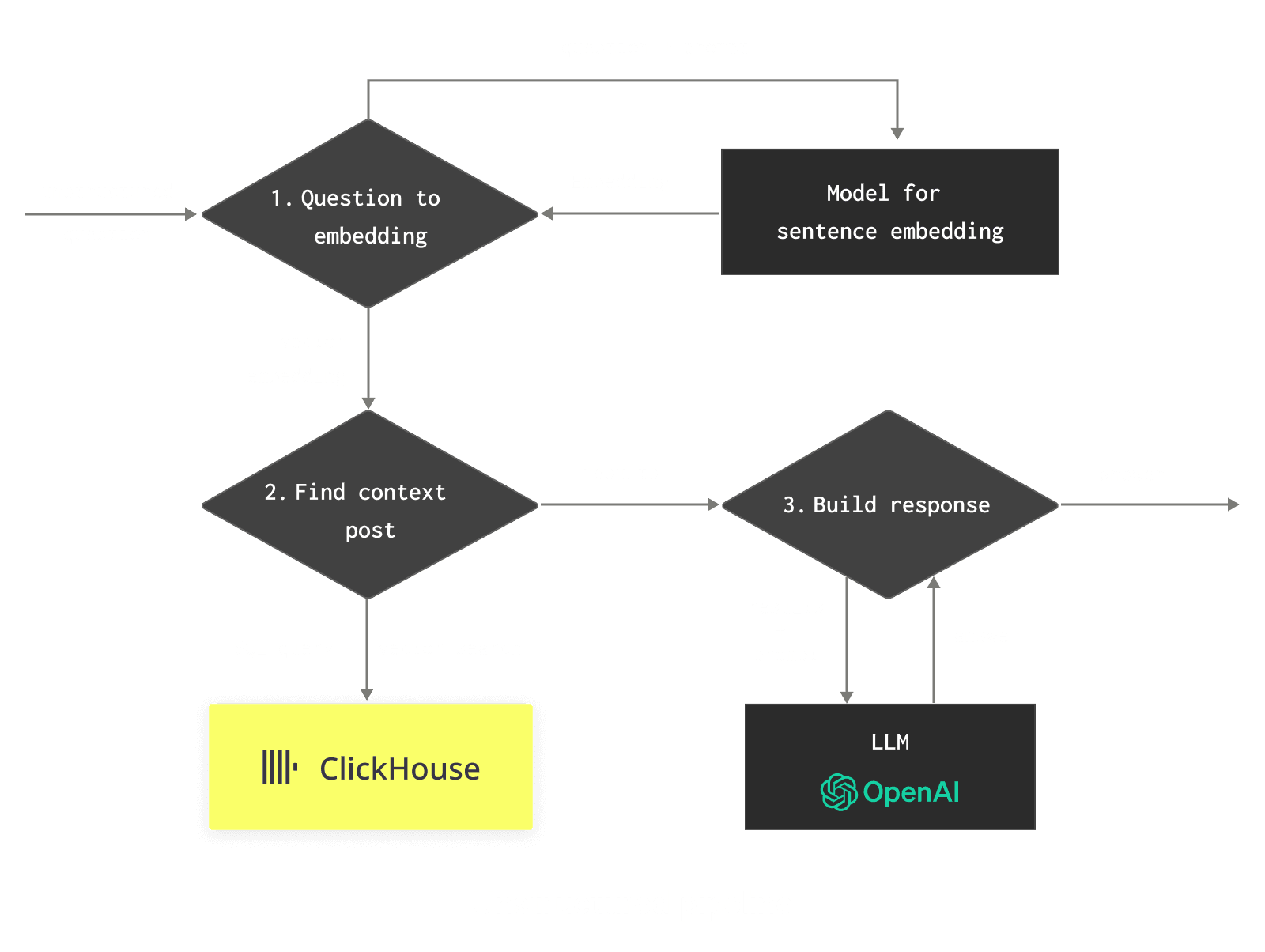 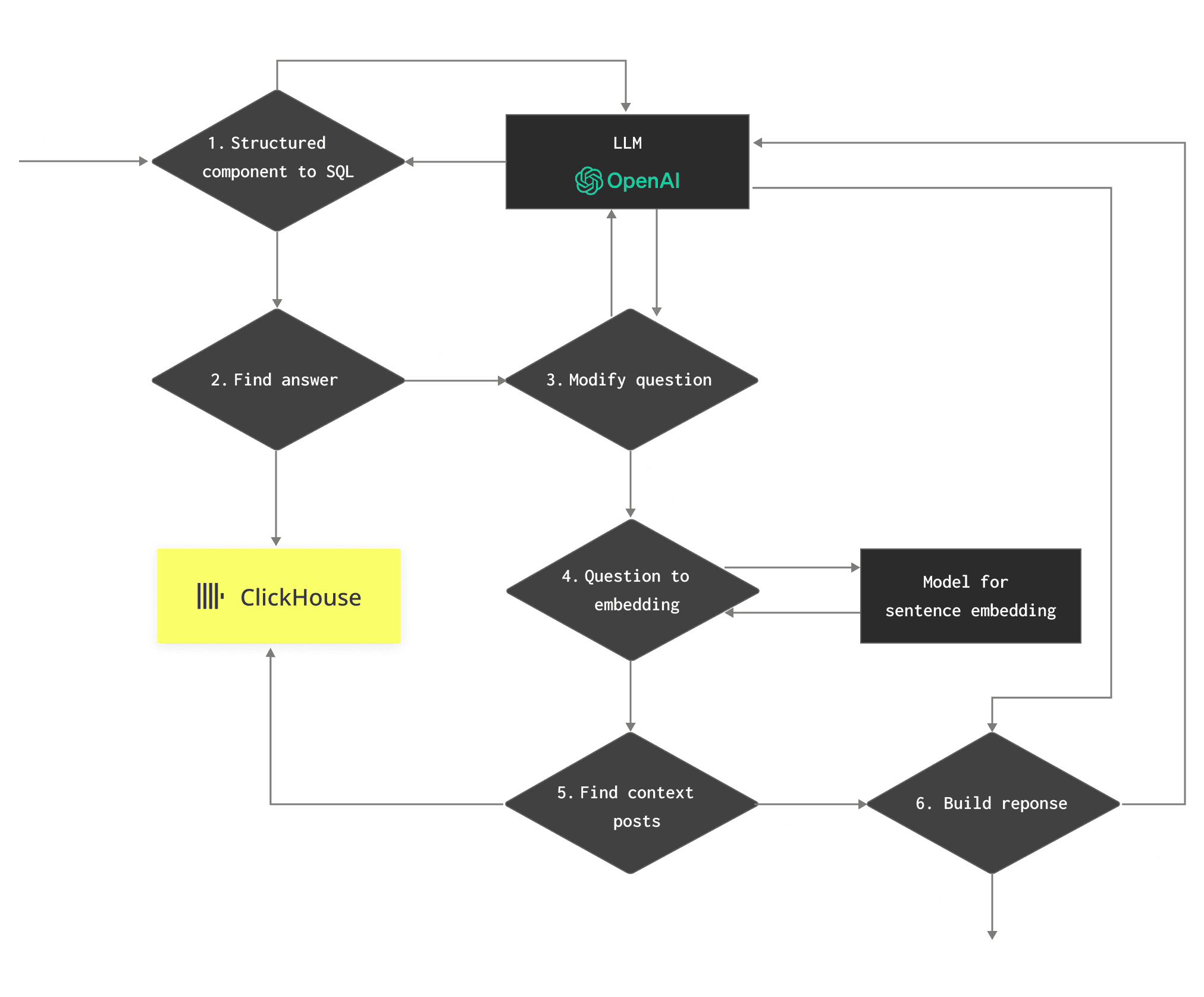 Our problem is simplified by using ClickHouse, which can act as both the structured source of information (surveys) available via SQL and the unstructured via vector search. However, usually, this would require a significant amount of application glue and testing, from making sure prompts were effective to parsing responses at decision points. Fortunately, LlamaIndex allows all of this complexity to be encapsulated and handled through an existing set of library calls. ### Datasets Any good application first needs data. As mentioned, our Hacker News (HN) and Stack Overflow posts represent our structured and unstructured data that will power our app. Our HN data is here over 28m rows and NGiB, while Stack Overflow is significantly smaller at only 83439 responses. Our Hacker News rows consist of the user's comment and associated metadata, e.g. the time it was posted, their username, and the score of the post. The text has been embedded using the `sentence-transformers/all-MiniLM-L6-v2` to produce a 384 dimension vector. This results in the following schema: ```sql CREATE TABLE hackernews ( `id` String, `doc_id` String, `comment` String, `text` String, `vector` Array(Float32), `node_info` Tuple(start Nullable(UInt64), end Nullable(UInt64)), `metadata` String, `type` Enum8('story' = 1, 'comment' = 2, 'poll' = 3, 'pollopt' = 4, 'job' = 5), `by` LowCardinality(String), `time` DateTime, `title` String, `post_score` Int32, `dead` UInt8, `deleted` UInt8, `length` UInt32, `parent` UInt32, `kids` Array(UInt32) ) ENGINE = MergeTree ORDER BY (toDate(time), length, post_score) ``` You may notice we have a `comment` column as well as a `text` column. The latter of these contains both the `comment` as well as the text of the parent and children of the post e.g. if someone responds to a comment, it becomes a child. The goal here is to simply provide more context to the LLM when a row is returned. For how we generated this data, see [here](https://gist.github.com/gingerwizard/fc18cf5a3b9945b626cecb88a2deaa49). The `metadata` column contains the fields which can be queried automatically by LlamaIndex workflows e.g. if they determine additional filters are required to answer a question. For our current implementation, we use a string containing JSON for this column. In the future, once production is ready, we plan to move this to the JSON type for better query performance. For now, we replicate all columns to this string, thus making them available to LlamaIndex e.g. ```json {"deleted":0,"type":"story","by":"perler","time":"2006-10-13 14:46:50","dead":0,"parent":0,"poll":0,"kids":[454479],"url":"http:\/\/www.techcrunch.com\/2006\/10\/13\/realtravel-trip-planner-cut-paste-share-travel-tips\/","post_score":2,"title":"RealTravel Trip Planner: Cut, Paste & Share Travel Tips","parts":[],"descendants":0} ``` Experienced users of ClickHouse will notice the ordering key. This will facilitate fast querying later in our application for queries that are filtered by date, post length (number of tokens in text), and the score assigned by HN. If you want to follow along, we’ve put all the data in a Parquet file in an S3 bucket. You can insert the data by running the following command: ```sql INSERT INTO hackernews SELECT * FROM s3('https://datasets-documentation.s3.eu-west-3.amazonaws.com/hackernews/embeddings/hackernews-llama.parquet') ``` Our HN data covers the period from Oct 2006 to Oct 2021. To ensure our Stack Overflow data aligns with this, we will load just the survey results from 2021.One of the strengths of the LlamaIndex is its ability to operate with a huge range of integrations. As well as a pluggable vector store interface, users can integrate their LLM, embedding model, graph store, and document store, along with the ability to hook in and customize almost any step of the RAG pipeline. All of these integrations can be browsed through the LlamaHub.
This data contains a significant number of columns as shown in the schema below:Extending these datasets would be a reasonably straightforward exercise, although the survey columns do differ across years. Reconciling this data across years would allow questions such as “What were people in 2022 saying about the most popular web technology?” We leave this an exercise for the enthusiastic reader.
CREATE TABLE surveys
(
   `response_id` Int64,
   `development_activity` Enum8('I am a developer by profession' = 1, 'I am a student who is learning to code' = 2, 'I am not primarily a developer, but I write code sometimes as part of my work' = 3, 'I code primarily as a hobby' = 4, 'I used to be a developer by profession, but no longer am' = 5, 'None of these' = 6, 'NA' = 7),
   `employment` Enum8('Independent contractor, freelancer, or self-employed' = 1, 'Student, full-time' = 2, 'Employed full-time' = 3, 'Student, part-time' = 4, 'I prefer not to say' = 5, 'Employed part-time' = 6, 'Not employed, but looking for work' = 7, 'Retired' = 8, 'Not employed, and not looking for work' = 9, 'NA' = 10),
   `country` LowCardinality(String),
   `us_state` LowCardinality(String),
   `uk_county` LowCardinality(String),
   `education_level` Enum8('Secondary school (e.g. American high school, German Realschule or Gymnasium, etc.)' = 1, 'Bachelor's degree (B.A., B.S., B.Eng., etc.)' = 2, 'Master's degree (M.A., M.S., M.Eng., MBA, etc.)' = 3, 'Other doctoral degree (Ph.D., Ed.D., etc.)' = 4, 'Some college/university study without earning a degree' = 5, 'Something else' = 6, 'Professional degree (JD, MD, etc.)' = 7, 'Primary/elementary school' = 8, 'Associate degree (A.A., A.S., etc.)' = 9, 'NA' = 10),
   `age_started_to_code` Enum8('Younger than 5 years' = 1, '5 - 10 years' = 2, '11 - 17 years' = 3, '18 - 24 years' = 4, '25 - 34 years' = 5, '35 - 44 years' = 6, '45 - 54 years' = 7, '55 - 64 years' = 8, 'Older than 64 years' = 9, 'NA' = 10),
   `how_learned_to_code` Array(String),
   `years_coding` Nullable(UInt8),
   `years_as_a_professional_developer` Nullable(UInt8),
   `developer_type` Array(String),
   `organization_size` Enum8('Just me - I am a freelancer, sole proprietor, etc.' = 1, '2 to 9 employees' = 2, '10 to 19 employees' = 3, '20 to 99 employees' = 4, '100 to 499 employees' = 5, '500 to 999 employees' = 6, '1,000 to 4,999 employees' = 7, '5,000 to 9,999 employees' = 8, '10,000 or more employees' = 9, 'I don't know' = 10, 'NA' = 11),
   `compensation_total` Nullable(UInt64),
   `compensation_frequency` Enum8('Weekly' = 1, 'Monthly' = 2, 'Yearly' = 3, 'NA' = 4),
   `language_have_worked_with` Array(String),
   `language_want_to_work_with` Array(String),
   `database_have_worked_with` Array(String),
   `database_want_to_work_with` Array(String),
   `platform_have_worked_with` Array(String),
   `platform_want_to_work_with` Array(String),
   `web_framework_have_worked_with` Array(String),
   `web_framework_want_to_work` Array(String),
   `other_tech_have_worked_with` Array(String),
   `other_tech_want_to_work` Array(String),
   `infrastructure_tools_have_worked_with` Array(String),
   `infrastructure_tools_want_to_work_with` Array(String),
   `developer_tools_have_worked_with` Array(String),
   `developer_tools_want_to_work_with` Array(String),
   `operating_system` Enum8('MacOS' = 1, 'Windows' = 2, 'Linux-based' = 3, 'BSD' = 4, 'Other (please specify):' = 5, 'Windows Subsystem for Linux (WSL)' = 6, 'NA' = 7),
   `frequency_visit_stackoverflow` Enum8('Multiple times per day' = 1, 'Daily or almost daily' = 2, 'A few times per week' = 3, 'A few times per month or weekly' = 4, 'Less than once per month or monthly' = 5, 'NA' = 6),
   `has_stackoverflow_account` Enum8('Yes' = 1, 'No' = 2, 'Not sure/can\'t remember' = 3, 'NA' = 4),
   `frequency_use_in_stackoverflow` Enum8('Multiple times per day' = 1, 'Daily or almost daily' = 2, 'A few times per week' = 3, 'A few times per month or weekly' = 4, 'Less than once per month or monthly' = 5, 'I have never participated in Q&A on Stack Overflow' = 6, 'NA' = 7),
   `consider_self_active_community_member` Enum8('Yes, definitely' = 1, 'Neutral' = 2, 'Yes, somewhat' = 3, 'No, not at all' = 4, 'No, not really' = 5, 'NA' = 6, 'Not sure' = 7),
   `member_other_communities` Enum8('Yes' = 1, 'No' = 2, 'NA' = 4),
   `age` Enum8('Under 18 years old' = 1, '18-24 years old' = 2, '25-34 years old' = 3, '35-44 years old' = 4, '45-54 years old' = 5, '55-64 years old' = 6, '65 years or older' = 7, 'NA' = 8, 'Prefer not to say' = 9),
   `annual_salary` Nullable(UInt64)
)
ENGINE = MergeTree
ORDER BY tuple()
Parsing this data from its original format requires a few SQL functions. While the original commands can be found [here](https://gist.github.com/gingerwizard/d3b32ed801973498e87145ed0c6e4bdb), we again provide the final data in Parquet in the interest of brevity: ```sql INSERT INTO surveys SELECT * FROM s3('https://datasets-documentation.s3.eu-west-3.amazonaws.com/stackoverflow/surveys/2021/surveys-llama.parquet') ``` It is worth noting that data can be inserted into [ClickHouse via LlamaIndex](https://github.com/run-llama/llama_index/blob/main/docs/examples/vector_stores/ClickHouseIndexDemo.ipynb). We chose to do this directly via the ClickHouse client for performance and brevity reasons. ## Building a RAG pipeline in LlamaIndex LlamaIndex is available in both Python and Typescript. For our examples, we’ll use Python for no other reason than I prefer it :). Rather than build our RAG flow in one go, we’ll assemble the building blocks first: testing a separate query engine for structured and unstructured queries.The column names here are very descriptive, e.g.,
infrastructure_tools_have_worked_withdescribes a list of tools a user wants to work with. These column names have been selected for the same reason we’ve also chosen here to liberally use the Enum type over LowCardinality. These choices make the data self-descriptive. Later, our LLM will need to consider this schema when generating SQL queries. By using Enums and self-describing column names, it avoids the need to provide additional context with an explanation of the meaning and possible values in each column.
### Generating SQL with LlamaIndex As mentioned above, we will need to convert some questions to SQL queries against our Stack Overflow data. Rather than building a prompt including our schema, making an HTTP request to ChatGPT, and parsing the response, we can rely on LlamaIndex to do this with a few calls. The following notebook is available [here](https://github.com/ClickHouse/examples/blob/main/blog-examples/llama-index/hacknernews_app/structured_nl_to_sql.ipynb).To install the ClickHouse integration for LlamaIndex, you can simply use
pip install llama-index-vector-stores-clickhouse
CLICKHOUSE_TEXT_TO_SQL_TMPL = (
    "Given an input question, first create a syntactically correct {dialect} "
    "query to run, then look at the results of the query and return the answer. "
    "You can order the results by a relevant column to return the most "
    "interesting examples in the database.\n\n"
    "Never query for all the columns from a specific table, only ask for a "
    "few relevant columns given the question.\n\n"
    "Pay attention to use only the column names that you can see in the schema "
    "description. "
    "Be careful to not query for columns that do not exist. "
    "Pay attention to which column is in which table. "
    "Also, qualify column names with the table name when needed. \n"
    "If needing to group on Array Columns use the ClickHouse function arrayJoin e.g. arrayJoin(columnName) \n"
    "For example, the following query identifies the most popular database:\n"
    "SELECT d, count(*) AS count FROM so_surveys GROUP BY "
    "arrayJoin(database_want_to_work_with) AS d ORDER BY count DESC LIMIT 1\n"
    "You are required to use the following format, each taking one line:\n\n"
    "Question: Question here\n"
    "SQLQuery: SQL Query to run\n"
    "SQLResult: Result of the SQLQuery\n"
    "Answer: Final answer here\n\n"
    "Only use tables listed below.\n"
    "{schema}\n\n"
    "Question: {query_str}\n"
    "SQLQuery: "
)

CLICKHOUSE_TEXT_TO_SQL_PROMPT = PromptTemplate(
    CLICKHOUSE_TEXT_TO_SQL_TMPL,
    prompt_type=PromptType.TEXT_TO_SQL,
)
# (1) Query engine for ClickHouse exposed through SQLAlchemy
engine = create_engine(
    f'clickhouse+native://{username}:{password}@{host}:' +
    f'{native_port}/{database}?compression=lz4&secure={secure}'
)
sql_database = SQLDatabase(engine, include_tables=["surveys"], view_support=True)


# (2) Natural language to SQL query engine
nl_sql_engine = NLSQLTableQueryEngine(
    sql_database=sql_database,
    tables=["surveys"],
    text_to_sql_prompt=CLICKHOUSE_TEXT_TO_SQL_PROMPT,
    llm=OpenAI(model="gpt-4"),
    verbose=True
)

response = nl_sql_engine.query("What is the most popular database?")

print(f"SQL query: {response.metadata['sql_query']}")
print(f"Answer: {str(response)}")
CLICKHOUSE_CUSTOM_SUFFIX = """
The following is the datasource schema to work with.
IMPORTANT: Make sure that filters are only used as needed and only suggest filters for fields in the data source.

Data Source:
{info_str}

User Query:
{query_str}

Structured Request:
"""

CLICKHOUSE_VECTOR_STORE_QUERY_PROMPT_TMPL = PREFIX + EXAMPLES + CLICKHOUSE_CUSTOM_SUFFIX
Settings.embed_model = FastEmbedEmbedding(
       model_name="sentence-transformers/all-MiniLM-L6-v2",
       max_length=384,
       cache_dir="./embeddings/"
   )
client = clickhouse_connect.get_client(
   host=host, port=port, username=username, password=password,
   secure=secure
)
# (1) Build a ClickHouseVectorStore
vector_store = ClickHouseVectorStore(clickhouse_client=client, table="hackernews")
vector_index = VectorStoreIndex.from_vector_store(vector_store)
# (2) Inform the retriever of the available metadata fields
vector_store_info = VectorStoreInfo(
       content_info="Social news posts and comments from users",
       metadata_info=[
           MetadataInfo(
               name="post_score", type="int", description="Score of the comment or post",
           ),
           MetadataInfo(
               name="by", type="str", description="the author or person who posted the comment",
           ),
           MetadataInfo(
               name="time", type="date", description="the time at which the post or comment was made",
           ),
       ]
   )

# (3) A retriever for vector store index that uses an LLM to automatically set vector store query parameters.
vector_auto_retriever = VectorIndexAutoRetriever(
   vector_index, vector_store_info=vector_store_info, similarity_top_k=10,
   prompt_template_str=CLICKHOUSE_VECTOR_STORE_QUERY_PROMPT_TMPL, llm=OpenAI(model="gpt-4"),
)


# Query engine to query engine based on context
retriever_query_engine = RetrieverQueryEngine.from_args(vector_auto_retriever, llm=OpenAI(model="gpt-4"))

response = retriever_query_engine.query("What is the user zX41ZdbW saying about ClickHouse?")

print(f"Answer: {str(response)}")
This can be seen in logs if we run [the notebook](https://github.com/ClickHouse/examples/blob/main/blog-examples/llama-index/hacknernews_app/unstructured_nl_with_vector_store.ipynb). `Using filters: [('by', '==', 'zX41ZdbW')]` Our final response suggests that `zX41ZdbW` is quite knowledgeable on ClickHouse, which is good news as he’s the CTO!We have also adapted the default prompt since we found filters would be injected even if they weren’t present in the metadata.
Under the hood, this code invokes the [`ClickHouseVectorStore`](https://github.com/run-llama/llama_index/tree/main/llama-index-integrations/vector_stores/llama-index-vector-stores-clickhouse), which issues a [cosineDistance](https://clickhouse.com/docs/en/sql-reference/functions/distance-functions#cosinedistance) (similar to those discussed in [our earlier blogs](https://clickhouse.com/blog/vector-search-clickhouse-p1)) query to identify the conceptually similar posts. ### Combining structured and unstructured Armed with the above query engines, we can combine these with the [`SQLAutoVectorQueryEngine`](https://docs.llamaindex.ai/en/stable/examples/query_engine/SQLAutoVectorQueryEngine.html#define-sqlautovectorqueryengine) engine. The docs for this engine summarize its functionality well:"The user zX41ZdbW has shared several insights about ClickHouse. They mentioned that ClickHouse has seen a 1.6 times performance improvement after simply adding __restrict in aggregate functions. They also mentioned that they patched Ryu in ClickHouse to provide nicer representations and to have better performance for floats that appear to be integers. They also shared that ClickHouse can do batch DELETE operations for data cleanup, which can fulfill the needs for data cleanup, retention, and GDPR requirements. They also mentioned that they are looking forward to a blog post for more references for comparison to optimize ClickHouse performance."
Using the `nl_sql_engine` and `retriever_query_engine` engines with the [`SQLAutoVectorQueryEngine`](https://docs.llamaindex.ai/en/stable/examples/query_engine/SQLAutoVectorQueryEngine.html#define-sqlautovectorqueryengine) requires only a few lines of code. For this query engine to determine whether to issue a SQL query or vector search to ClickHouse, we need to provide it with context (2) as to what information these engines provide. This is provided by creating a [`QueryEngineTool`](https://docs.llamaindex.ai/en/stable/examples/query_engine/RetrieverRouterQueryEngine.html#define-query-engine-and-tool-for-these-indices) from each with a description detailing its purpose.SQL + Vector Index Auto Retriever Query Engine.
This query engine can query both a SQL database as well as a vector database. It will first decide whether it needs to query the SQL database or vector store. If it decides to query the SQL database, it will also decide whether to augment information with retrieved results from the vector store. We use the VectorIndexAutoRetriever to retrieve results.
# (1) create engines as above
vector_auto_retriever = VectorIndexAutoRetriever(
    vector_index, vector_store_info=vector_store_info, similarity_top_k=10,
    prompt_template_str=CLICKHOUSE_VECTOR_STORE_QUERY_PROMPT_TMPL, llm=OpenAI(model="gpt-4"),
    # require context to be of a specific length
    vector_store_kwargs={"where": f"length >= 20"}
)

retriever_query_engine = RetrieverQueryEngine.from_args(vector_auto_retriever, llm=OpenAI(model="gpt-4"))

# (2) provide descriptions of each engine to assist SQLAutoVectorQueryEngine
sql_tool = QueryEngineTool.from_defaults(
   query_engine=nl_sql_engine,
   description=(
       "Useful for translating a natural language query into a SQL query over"
       f" a table: {stackoverflow_table}, containing the survey responses on"
       f" different types of technology users currently use and want to use"
   ),
)
vector_tool = QueryEngineTool.from_defaults(
   query_engine=retriever_query_engine,
   description=(
       f"Useful for answering semantic questions abouts users comments and posts"
   ),
)

# (3) engine to query both a SQL database as well as a vector database
sql_auto_vector_engine = SQLAutoVectorQueryEngine(
   sql_tool, vector_tool, llm=OpenAI(model="gpt-4")
)

response = sql_auto_vector_engine.query("What are people's opinions on the web technology that people at companies with less than 100 employees want to work with?")

print(str(response))
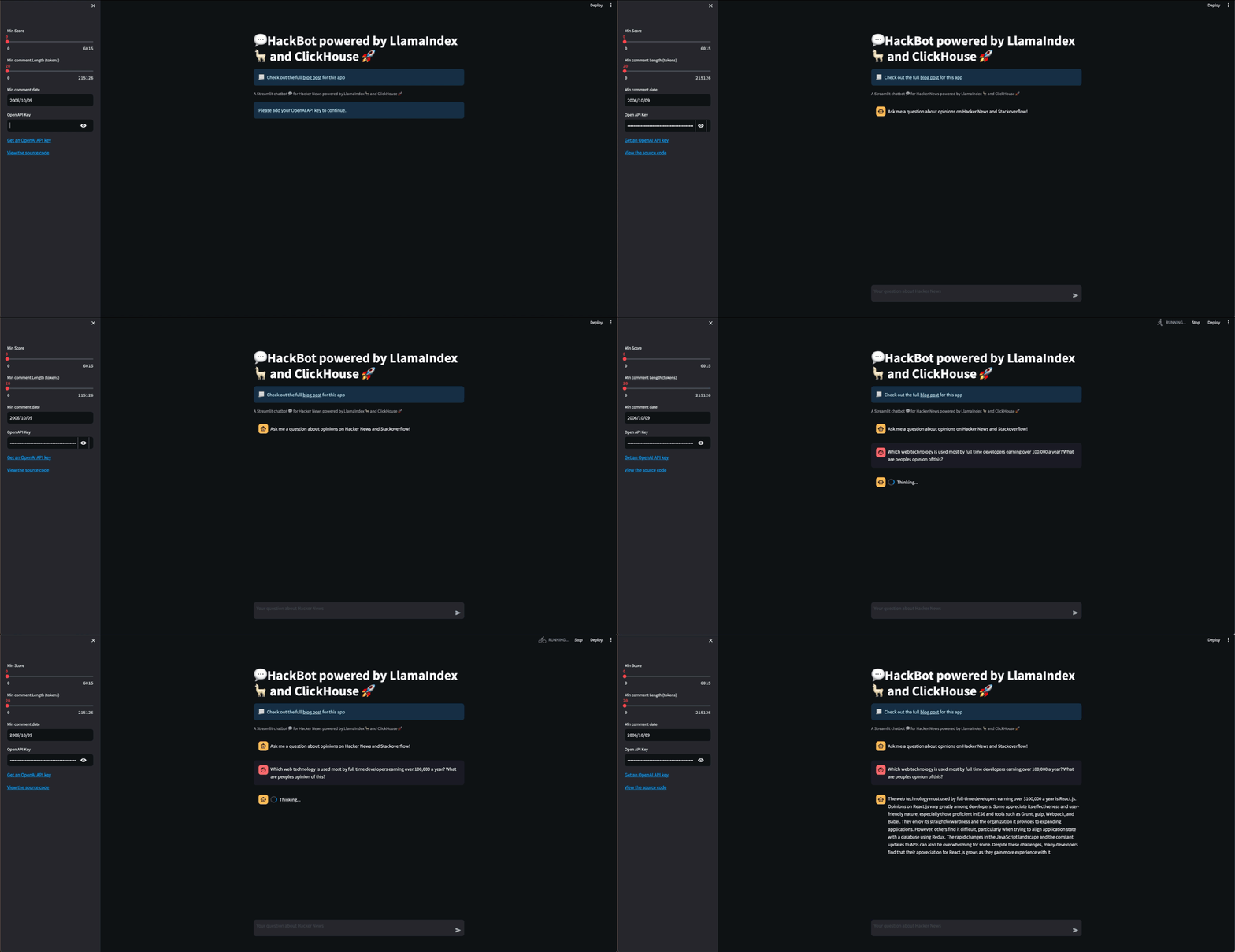
When we run this notebook, the logs are revealing. Initially, we can see an LLM is used to assess the type of question being asked. This establishes we need to query against the surveys. This is achieved using LlamaIndex’s [router functionality](https://docs.llamaindex.ai/en/stable/examples/retrievers/router_retriever.html), capable of choosing between our two different retriever engines by invoking ChatGPT with the descriptions provided above: ```bash INFO:llama_index.core.query_engine.sql_join_query_engine:> Querying SQL database: The first choice is about translating natural language queries into SQL queries over a survey table. This could be used to analyze the responses of people at companies with less than 100 employees about the web technology they want to work with. ``` ChatGPT is, in turn, used to obtain a SQL query. Note the filter on `organization_size` and how the LLM has restricted this to the correct values (thanks to our use of an Enum): ```sql SELECT arrayJoin(web_framework_want_to_work) AS web_tech, COUNT(*) AS count FROM surveys WHERE organization_size IN (1, 2, 3, 4) GROUP BY web_tech ORDER BY count DESC LIMIT 5 ``` This query is executed against ClickHouse, which identifies React.js as the web technology most users want to work with at smaller companies: ```bash Based on the survey results, the top five web technologies that people at companies with less than 100 employees want to work with are React.js (9765 votes), Vue.js (6821 votes), Express (4657 votes), Angular (4415 votes), and jQuery (3397 votes). ``` The results of this query are then used to expand the original question, again using our LLM via a [SQLAugmentQueryTransform](https://docs.llamaindex.ai/en/stable/api_reference/query/query_engines/sql_join_query_engine.html#llama_index.core.query_engine.sql_join_query_engine.SQLAugmentQueryTransform) behind the scenes: ```bash What are the reasons people at companies with less than 100 employees want to work with React.js, Vue.js, Express, Angular, and jQuery? ``` The above question will be embedded using our `sentence-transformers/all-MiniLM-L6-v2` model. This embedding will again be used to query ClickHouse via the `ClickHouseVectorStore` to identify relevant Hacker News comments to provide context and answer our question. ```none People at smaller companies may prefer to work with React.js, Vue.js, Express, Angular, and jQuery for a variety of reasons. These technologies are widely recognized and supported by large communities, which can be advantageous for troubleshooting and learning new methods. They can also streamline and structure the development process. Furthermore, familiarity with these technologies can be a career asset for developers, as they are frequently sought after in job listings. However, the choice of technology may also be influenced by the project's specific requirements and limitations. ``` ## Something prettier with Streamlit While the above provides the mechanics of our application, users expect something a little more visually engaging than a notebook! For building applications quickly, we’re fans of [Streamlit](https://streamlit.io/). This allows users to build applications in just Python, turning data scripts into shareable web apps in a few minutes. For an introduction to using StreamLit with ClickHouse, the following video from Data Mark should get you started: For our application, we really just need a ChatBot interface where users can enter questions. As the above code needs an [API key for OpenAI](https://platform.openai.com/account/api-keys), the user should also be able to provide this through the interface. Additionally, since we found that filtering Hacker News posts to those above a certain length improved the quality of the context, we also ideally wanted to provide this as an optional filter the user could modify. Finally, additional filters on post score and date were desirable since we might later expand the dataset to surveys beyond 2021. Fortunately, Streamlit already has an [excellent gallery of example applications](https://streamlit.io/gallery?category=llms), with even one for [LlamaIndex, which takes only 43 lines of code!](https://blog.streamlit.io/build-a-chatbot-with-custom-data-sources-powered-by-llamaindex/) By combining a few other relevant examples [[1][2]](https://llm-examples.streamlit.app/), familiarizing ourselves with the concepts behind [Streamlit caching](https://docs.streamlit.io/library/advanced-features/caching), and incorporating our `SQLAutoVectorQueryEngine` we can achieve something quite usable in 50 lines of Python!You’ll notice we’ve recreated our
VectorIndexAutoRetrieverwith the parametervector_store_kwargs={"where": f"length >= 20"}at (1). This adds an additional where filter to any vector queries to ClickHouse, restricting results to comments with at least 20 terms. Testing showed this improved the quality of results significantly.
st.set_page_config(
   page_title="Get summaries of Hacker News posts enriched with Stackoverflow survey results, powered by LlamaIndex and ClickHouse",
   page_icon="????????", layout="centered", initial_sidebar_state="auto", menu_items=None)
st.title("????HackBot powered by LlamaIndex ???? and ClickHouse ????")
st.info(
   "Check out the full [blog post](https://clickhouse.com/blog/building-a-hackernews-chat-bot-with-llama-index-with-clickhouse/) for this app",
   icon="????")
st.caption("A Streamlit chatbot ???? for Hacker News powered by LlamaIndex ???? and ClickHouse ????")

# Llama Index code here

# identify the value ranges for our score, length and date widgets
if "max_score" not in st.session_state.keys():
   client = clickhouse()
   st.session_state.max_score = int(
       client.query("SELECT max(post_score) FROM default.hackernews_llama").first_row[0])
   st.session_state.max_length = int(
       client.query("SELECT max(length) FROM default.hackernews_llama").first_row[0])
   st.session_state.min_date, st.session_state.max_date = client.query(
       "SELECT min(toDate(time)), max(toDate(time)) FROM default.hackernews_llama WHERE time != '1970-01-01 00:00:00'").first_row


# set the initial message on load. Store in the session.
if "messages" not in st.session_state:
   st.session_state.messages = [
       {"role": "assistant", "content": "Ask me a question about opinions on Hacker News and Stackoverflow!"}]


# build the sidebar with our filters
with st.sidebar:
   score = st.slider('Min Score', 0, st.session_state.max_score, value=0)
   min_length = st.slider('Min comment Length (tokens)', 0, st.session_state.max_length, value=20)
   min_date = st.date_input('Min comment date', value=st.session_state.min_date, min_value=st.session_state.min_date,
                            max_value=st.session_state.max_date)
   openai_api_key = st.text_input("Open API Key", key="chatbot_api_key", type="password")
   openai.api_key = openai_api_key
   "[Get an OpenAI API key](https://platform.openai.com/account/api-keys)"
   "[View the source code](https://github.com/ClickHouse/examples/blob/main/blog-examples/llama-index/hacknernews_app/hacker_insights.py)"


# grab the users OPENAI api key. Don’t allow questions if not entered.
if not openai_api_key:
   st.info("Please add your OpenAI API key to continue.")
   st.stop()
if prompt := st.chat_input(placeholder="Your question about Hacker News"):
   st.session_state.messages.append({"role": "user", "content": prompt})
# Display the prior chat messages
for message in st.session_state.messages:
   with st.chat_message(message["role"]):
       st.write(message["content"])

# If last message is not from assistant, generate a new response
if st.session_state.messages[-1]["role"] != "assistant":
   with st.chat_message("assistant"):
       with st.spinner("Thinking..."):
           # Query our engine for the answer and write to the page
           response = str(get_engine(min_length, score, min_date).query(prompt))
           st.write(response)
           st.session_state.messages.append({"role": "assistant", "content": response})