---
title: "How we built a new powerful JSON data type for ClickHouse"
date: "2024-10-22T10:19:32.426Z"
author: "Pavel Kruglov"
category: "Engineering"
excerpt: "We’re excited to introduce our new and significantly enhanced JSON data type, purpose-built to deliver high-performance handling of JSON data. Our core engineer, Pavel Kruglov, dives into how we built this feature on top of ClickHouse's columnar storage."
---
# How we built a new powerful JSON data type for ClickHouse
> **Update January 2025**: We’ve now benchmarked ClickHouse’s new JSON implementation against other leading data stores with JSON support—see the results [here](/blog/json-bench-clickhouse-vs-mongodb-elasticsearch-duckdb-postgresql).
> **Update March 2025**: We’ve now [demonstrated](/blog/accelerating-clickhouse-json-queries-for-fast-bluesky-dashboards) how to accelerate JSON queries to consistently achieve sub-100ms analytical performance, regardless of data size or growth.
## Introduction
[JSON](https://www.json.org/json-en.html) has become the lingua franca for handling semi-structured and unstructured data in modern data systems. Whether it’s in logging and [observability](https://clickhouse.com/blog/the-state-of-sql-based-observability) scenarios, real-time data streaming, mobile app storage, or machine learning pipelines, JSON’s flexible structure makes it the go-to format for capturing and transmitting data across distributed systems.
At ClickHouse, we’ve long [recognized](https://github.com/ClickHouse/ClickHouse/issues/23516) the importance of seamless JSON support. But as simple as JSON seems, leveraging it effectively at scale presents unique challenges, which we briefly describe below.
### Challenge 1: True column-oriented storage
ClickHouse [is](https://benchmark.clickhouse.com/) amongst the [fastest](https://www.vldb.org/pvldb/vol17/p3731-schulze.pdf) analytical databases on the market. Such a level of performance can only be achieved with the right data “orientation”. ClickHouse is a [true](https://clickhouse.com/docs/en/about-us/distinctive-features#true-column-oriented-database-management-system) [column-oriented database](https://clickhouse.com/engineering-resources/what-is-columnar-database) that stores tables as a collection of column data files on disk. This enables optimal [compression](https://clickhouse.com/docs/en/data-compression/compression-in-clickhouse) and hardware-efficient, blazing-fast, [vectorized](https://clickhouse.com/docs/en/development/architecture) column operations such as filters or [aggregations](https://clickhouse.com/blog/clickhouse_vs_elasticsearch_mechanics_of_count_aggregations).
To enable the same level of performance for JSON data, we needed to implement [true](https://clickhouse.com/docs/en/about-us/distinctive-features#true-column-oriented-database-management-system) column-oriented storage for JSON, such that JSON paths can be compressed and processed (e.g., filtered and aggregated in a vectorized way) as efficiently as all other column types like numerics.
Therefore, instead of blindly dumping (and later [parsing](https://clickhouse.com/docs/en/sql-reference/functions/json-functions)) JSON documents into a string column, as sketched in the following diagram:

We wanted to store the values of each unique JSON path in a true columnar fashion:

### Challenge 2: Dynamically changing data without type unification
If we can store JSON paths in a true columnar fashion, the next challenge is that JSON allows values with different data types for the same JSON paths. For ClickHouse, such different data types are possibly incompatible and not known beforehand. Furthermore, we needed to find a way to preserve all data types instead of unifying them into the least common type. For example, if we have two integers and a float as values for the same JSON path `a`, we don’t want to store all three as float values on disk, as shown in this figure:

As such an approach would not preserve the integrity of mixed-type data and would also not support more complex scenarios, for example, if the next stored value under the same path `a` is an array:

### Challenge 3: Prevention of avalanche of column data files on disk
Storing JSON paths in a true columnar fashion has advantages for data compression and vectorized data processing. However, blindly creating a new column file per new unique JSON path can end up in an avalanche of column files on disk in scenarios with a high number of unique JSON keys:

This can create performance issues, as this requires a high number of [file descriptors](https://en.wikipedia.org/wiki/File_descriptor) (requiring space in memory each) and affects the performance of merges due to a large number of files to process. As a result, we needed to introduce limits on column creation. This enables JSON storage to scale effectively, ensuring high-performance analytics over petabyte-scale datasets.
### Challenge 4: Dense storage
In scenarios with a high number of unique but sparse JSON keys, we wanted to avoid having to redundantly store (and process) NULL or default values for rows that don’t have a real value for a specific JSON path, as sketched in this diagram:
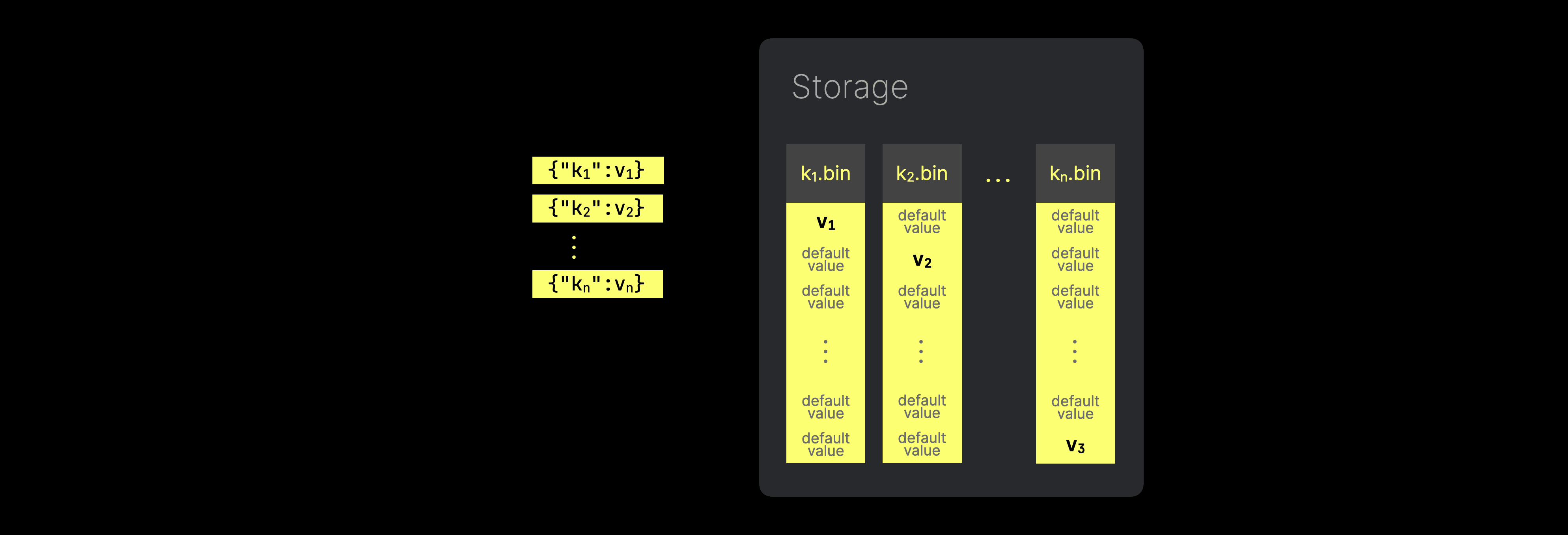
Instead, we wanted to store the values of each unique JSON path in a dense, non-redundant way. Again, this allows JSON storage to scale for high-performance analytics over PB datasets.
### Our new and significantly enhanced JSON data type
We’re excited to introduce our new and significantly enhanced [JSON data type](https://clickhouse.com/docs/en/sql-reference/data-types/newjson), which is purpose-built to deliver high-performance handling of JSON data without the bottlenecks that traditional implementations often face.
In this first post, we’ll dive into how we built this feature, addressing all of the aforementioned challenges (and [past limitations](https://github.com/ClickHouse/ClickHouse/issues/54864)) while showing you why our implementation stands out as the best possible implementation of JSON on top of columnar storage featuring support for:
* **Dynamically changing data**: allow values with different data types (possibly incompatible and not known beforehand) for the same JSON paths without unification into a least common type, preserving the integrity of mixed-type data.
* **High performance and dense, true column-oriented storage:** store and read any inserted JSON key path as a native, dense subcolumn, allowing high data compression and maintaining query performance seen on classic types.
* **Scalability**: allow limiting the number of subcolumns that are stored separately, to scale JSON storage for high-performance analytics over PB datasets.
* **Tuning**: allow hints for JSON parsing (explicit types for JSON paths, paths that should be skipped during parsing, etc).
The rest of this post will explain how we developed our new JSON type by first building foundational components with broader applications beyond JSON.
## Building block 1 - Variant type
The [Variant data type](https://clickhouse.com/docs/en/sql-reference/data-types/variant) is the first building block in implementing our new JSON data type. It was designed as a completely separate feature that [can be used outside of JSON](https://clickhouse.com/blog/clickhouse-release-24-01#variant-type), and allows to efficiently store (and read) values with different data types within the same table column. Without any unification into a least common type. This solves our [first](/blog/a-new-powerful-json-data-type-for-clickhouse#challenge-1-true-column-oriented-storage) and [second](/blog/a-new-powerful-json-data-type-for-clickhouse#challenge-2-dynamically-changing-data-without-type-unification) challenge.
### Traditional data storage in ClickHouse
Without the new variant data type, the columns of a ClickHouse table all have a fixed type, and all inserted values must either be in the correct data type of the targeted column or are implicitly coerced into the required type.
As a preparation to better understand how the Variant type works, the following diagram shows how ClickHouse traditionally stores the data of a [MergeTree](https://clickhouse.com/docs/en/engines/table-engines/mergetree-family) family table with fixed data type columns on disk (per [data part](https://clickhouse.com/docs/en/engines/table-engines/mergetree-family/mergetree#mergetree-data-storage)):
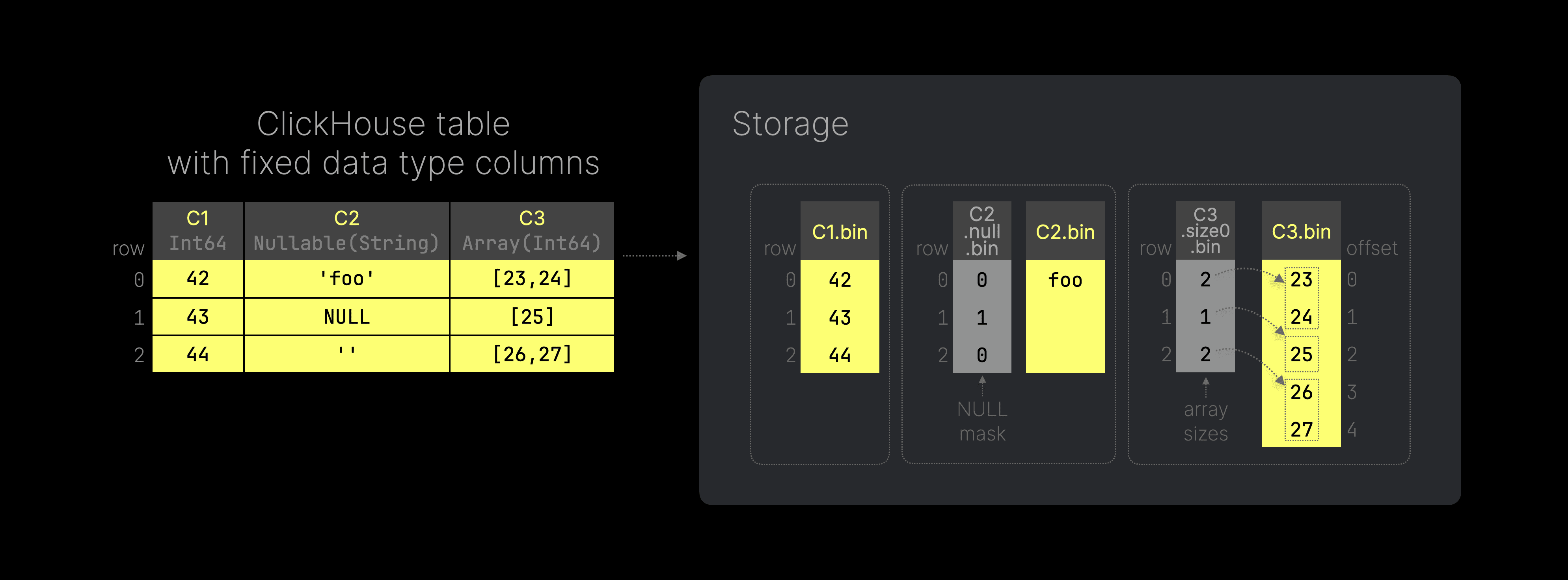
The SQL code to reproduce the example table in the diagram above is [here](https://gist.github.com/tom-clickhouse/558b82bb6e7dbb00dbbf0f669012b64a). Note that we have annotated each column with its data type, e.g. column `C1` has the type `Int64`. As ClickHouse is a [columnar database](https://clickhouse.com/docs/en/faq/general/columnar-database), the values from each table column are stored on disk in separate (highly [compressed](https://clickhouse.com/docs/en/data-compression/compression-in-clickhouse)) column files. Because column `C2` is [Nullable](https://clickhouse.com/docs/en/sql-reference/data-types/nullable), ClickHouse [uses](https://clickhouse.com/docs/en/sql-reference/data-types/nullable#storage-features) a separate file with NULL masks in addition to the normal column file with values, to differentiate between NULL and empty (default) values. For table column `C3`, the diagram above shows how ClickHouse natively supports storing [Arrays](https://clickhouse.com/docs/en/sql-reference/data-types/array) by using a separate file on disk storing the size of each array from each table row. These size values are used to calculate the corresponding offsets for accessing array elements in the data file.
### Storage extension for dynamically changing data
With the new Variant data type, we can store all values from all columns of the table above inside a single column. The next figure (you can click on it to enlarge it) sketches how such a column works and how it is implemented on top of ClickHouse’s columnar storage on disk (per data part):
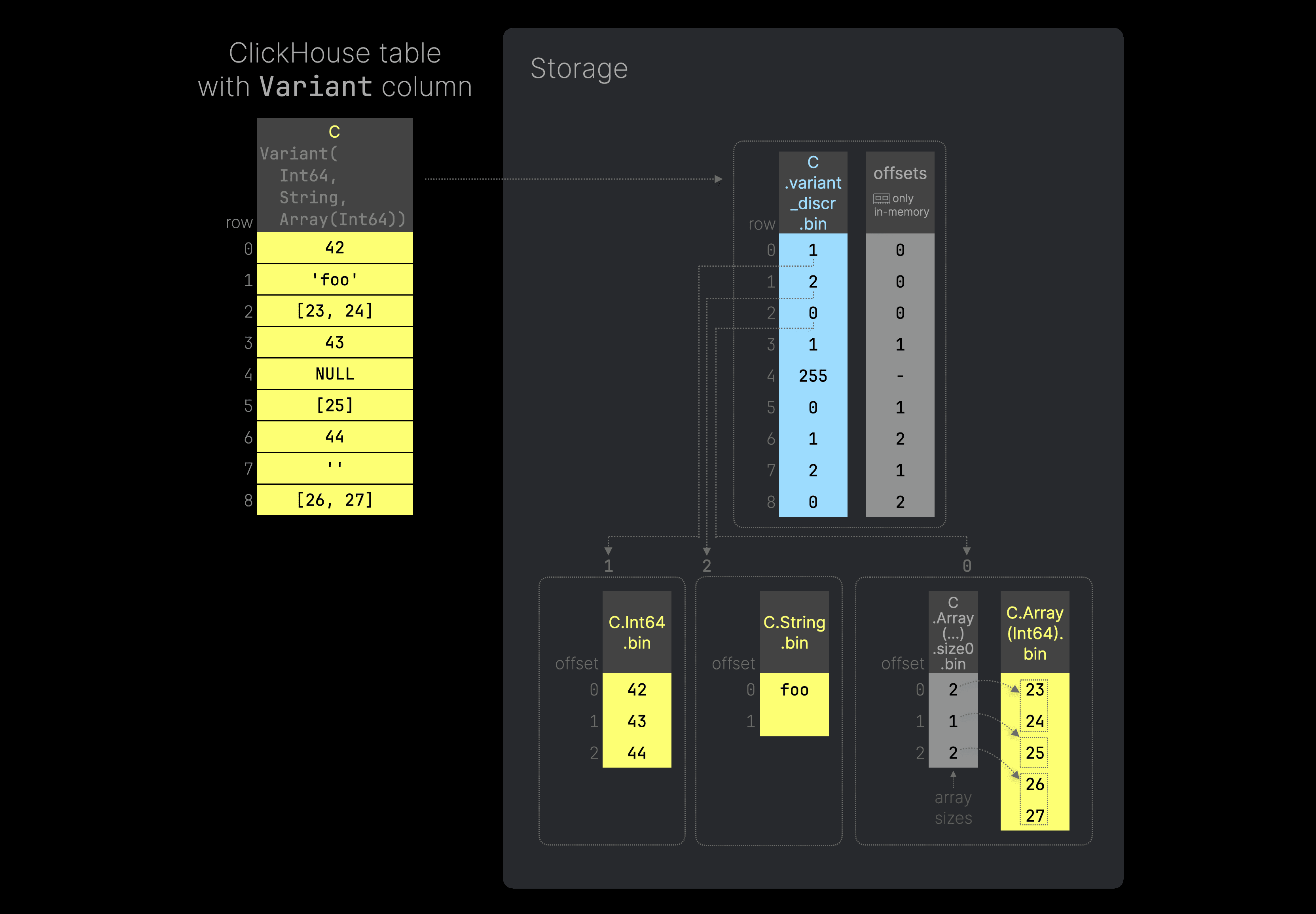 [Here](https://gist.github.com/tom-clickhouse/c4f3da235843252b7b5c38472bdeba5d) is the SQL code to recreate the example table shown in the diagram above. We annotated the ClickHouse table column `C` with its Variant type, [specifying](https://clickhouse.com/docs/en/sql-reference/data-types/variant) that we want to store a mix of integers, strings, and integer arrays as values for `C`. For such a column, ClickHouse stores all values with the same concrete data type in separate subcolumns (type variant column data files, which by themselves look almost identical to the column data files in the [previous](/blog/a-new-powerful-json-data-type-for-clickhouse#traditional-data-storage-in-clickhouse) example). For example, all integer values are stored in the `C.Int64
.bin` file, all String values are stored in `C.String
.bin`, and so on.
### Discriminator column for switching between subtypes
To know which type is used per row of the ClickHouse table, ClickHouse assigns a discriminator value to each data type and stores a corresponding additional (`UInt8`) column data file with these discriminators ( `C
.variant
_discr
.bin` in the figure above). Each discriminator value represents an index into a list of sorted used type names. Discriminator 255 is reserved for `NULL` values, which means that by design, a Variant can have a maximum of 255 different concrete types.
Note that we don’t need a separate [NULL mask file](/blog/a-new-powerful-json-data-type-for-clickhouse#traditional-data-storage-in-clickhouse) to differentiate between NULL and default values.
Further, note that there is a [special compact form](/blog/a-new-powerful-json-data-type-for-clickhouse#one-more-detail---compact-discriminator-serialization) of discriminator serialization (to optimize for typical JSON scenarios).
### Dense data storage
The separate type variant column data files are dense. We don’t store `NULL` values in these files. In scenarios with many unique but sparse JSON keys, we don't store default values for rows that don’t have a real value for a specific JSON path, as sketched in [this](/blog/a-new-powerful-json-data-type-for-clickhouse#challenge-4-dense-storage) diagram above (as a counter-example). This solves our [fourth](/blog/a-new-powerful-json-data-type-for-clickhouse#challenge-4-dense-storage) challenge.
Because of this dense storage of type variants, we also need a mapping from a row in the discriminators column to the row in the corresponding type variant column data file. For this purpose, we use an additional `UInt64` offsets column (see `offsets` in the figure above) that only exists in memory but is not stored on disk (the in-memory representation can be created on-the-fly from the discriminators column file).
As an example, to get the value in the ClickHouse table row 6 in the diagram above, ClickHouse inspects row 6 in the discriminators column to identify the type variant column data file that contains the requested value: `C.Int64
.bin`. Additionally, ClickHouse knows the concrete offset of the requested value within the `C.Int64
.bin` file, by inspecting row 6 of the `offsets` file: offset 2. Therefore the requested value for ClickHouse table row 6 is 44.
### Arbitrary nesting of Variant types
The order of types nested in a Variant column doesn't matter: `Variant(T1, T2)` = `Variant(T2, T1)`. Furthermore, the Variant type allows arbitrary nesting, e.g. you can use the Variant type as one of the type variants inside a Variant type. We demonstrate this with another diagram (you can click on it to enlarge it):
[Here](https://gist.github.com/tom-clickhouse/c4f3da235843252b7b5c38472bdeba5d) is the SQL code to recreate the example table shown in the diagram above. We annotated the ClickHouse table column `C` with its Variant type, [specifying](https://clickhouse.com/docs/en/sql-reference/data-types/variant) that we want to store a mix of integers, strings, and integer arrays as values for `C`. For such a column, ClickHouse stores all values with the same concrete data type in separate subcolumns (type variant column data files, which by themselves look almost identical to the column data files in the [previous](/blog/a-new-powerful-json-data-type-for-clickhouse#traditional-data-storage-in-clickhouse) example). For example, all integer values are stored in the `C.Int64
.bin` file, all String values are stored in `C.String
.bin`, and so on.
### Discriminator column for switching between subtypes
To know which type is used per row of the ClickHouse table, ClickHouse assigns a discriminator value to each data type and stores a corresponding additional (`UInt8`) column data file with these discriminators ( `C
.variant
_discr
.bin` in the figure above). Each discriminator value represents an index into a list of sorted used type names. Discriminator 255 is reserved for `NULL` values, which means that by design, a Variant can have a maximum of 255 different concrete types.
Note that we don’t need a separate [NULL mask file](/blog/a-new-powerful-json-data-type-for-clickhouse#traditional-data-storage-in-clickhouse) to differentiate between NULL and default values.
Further, note that there is a [special compact form](/blog/a-new-powerful-json-data-type-for-clickhouse#one-more-detail---compact-discriminator-serialization) of discriminator serialization (to optimize for typical JSON scenarios).
### Dense data storage
The separate type variant column data files are dense. We don’t store `NULL` values in these files. In scenarios with many unique but sparse JSON keys, we don't store default values for rows that don’t have a real value for a specific JSON path, as sketched in [this](/blog/a-new-powerful-json-data-type-for-clickhouse#challenge-4-dense-storage) diagram above (as a counter-example). This solves our [fourth](/blog/a-new-powerful-json-data-type-for-clickhouse#challenge-4-dense-storage) challenge.
Because of this dense storage of type variants, we also need a mapping from a row in the discriminators column to the row in the corresponding type variant column data file. For this purpose, we use an additional `UInt64` offsets column (see `offsets` in the figure above) that only exists in memory but is not stored on disk (the in-memory representation can be created on-the-fly from the discriminators column file).
As an example, to get the value in the ClickHouse table row 6 in the diagram above, ClickHouse inspects row 6 in the discriminators column to identify the type variant column data file that contains the requested value: `C.Int64
.bin`. Additionally, ClickHouse knows the concrete offset of the requested value within the `C.Int64
.bin` file, by inspecting row 6 of the `offsets` file: offset 2. Therefore the requested value for ClickHouse table row 6 is 44.
### Arbitrary nesting of Variant types
The order of types nested in a Variant column doesn't matter: `Variant(T1, T2)` = `Variant(T2, T1)`. Furthermore, the Variant type allows arbitrary nesting, e.g. you can use the Variant type as one of the type variants inside a Variant type. We demonstrate this with another diagram (you can click on it to enlarge it):
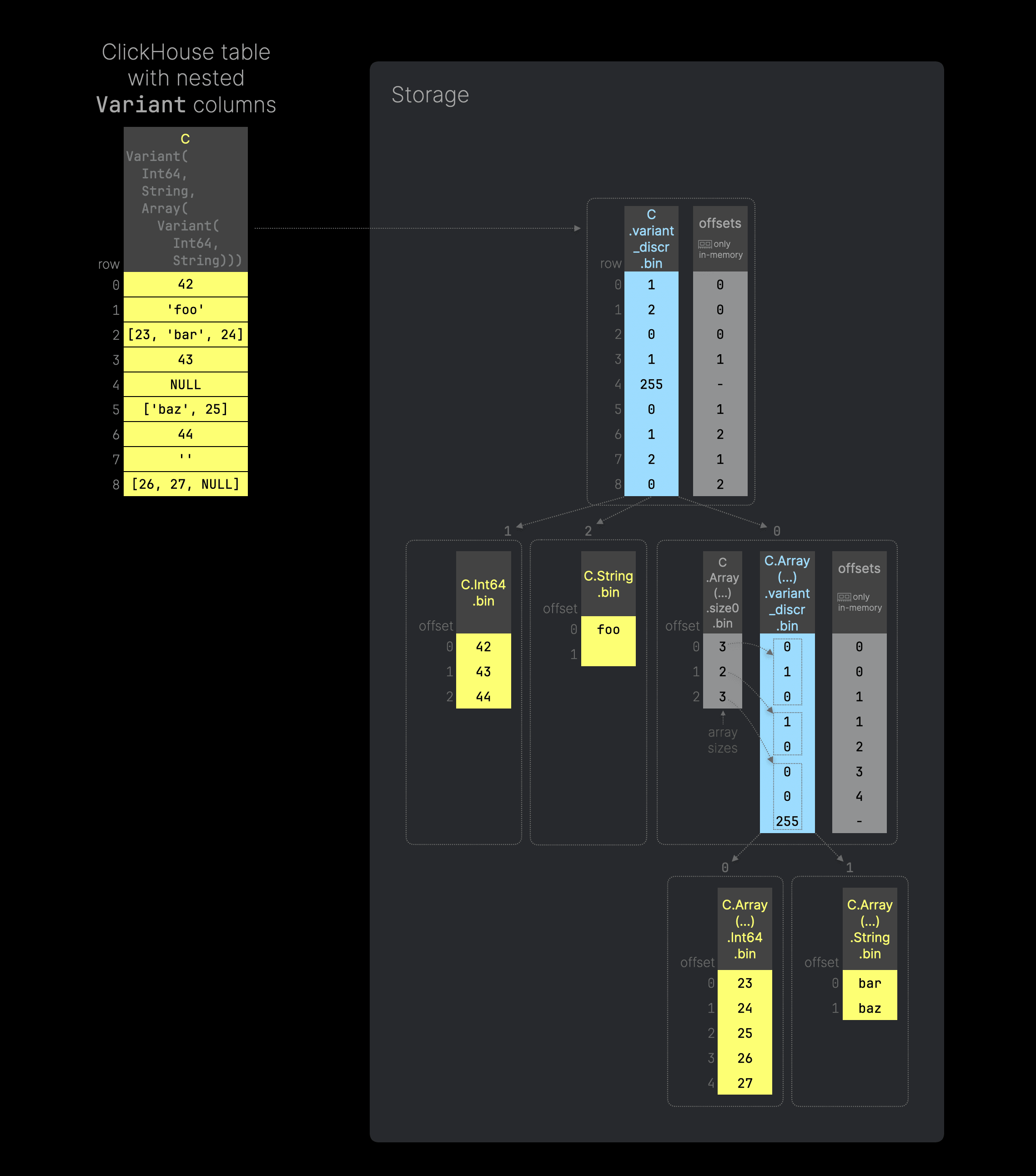 The SQL code to replicate the example table from the diagram above can be found [here](https://gist.github.com/tom-clickhouse/56b56271239eb2b7c9a8ca970f62611f). This time, we specified that we want to use Variant column `C` to store integers, strings, and arrays that contain Variant values—a mix of integers and strings. The figure above sketches how ClickHouse uses the Variant storage approach that we explained above, nested within the array column data file, to implement a nested Variant type.
### Reading Variant nested types as subcolumns
The Variant type [supports](https://clickhouse.com/docs/en/sql-reference/data-types/variant#reading-variant-nested-types-as-subcolumns) reading the values of a single nested type from a Variant column using the type name as a subcolumn. For example, you can read all integer values of the `Int64` `C`-subcolumn from the table above using the syntax `C.Int64`:
```
SELECT C.Int64
FROM test;
┌─C.Int64─┐
1. │ 42 │
2. │ ᴺᵁᴸᴸ │
3. │ ᴺᵁᴸᴸ │
4. │ 43 │
5. │ ᴺᵁᴸᴸ │
6. │ ᴺᵁᴸᴸ │
7. │ 44 │
8. │ ᴺᵁᴸᴸ │
9. │ ᴺᵁᴸᴸ │
└─────────┘
```
## Building block 2 - Dynamic type
The next step after the Variant type was implementing the [Dynamic](https://clickhouse.com/docs/en/sql-reference/data-types/dynamic) type on top of it. Like the Variant type, the Dynamic type is implemented as a standalone feature that [can be used on its own](https://clickhouse.com/blog/clickhouse-release-24-05#dynamic-data-type) outside of a JSON context.
The Dynamic type can be seen as an enhancement of the Variant type, introducing two key new features:
1. Storing values of any data type inside a single table column without knowing and having to specify all the types in advance.
2. Possibility to limit the number of types that are stored as separate column data files. This ([partially](/blog/a-new-powerful-json-data-type-for-clickhouse#preventing-an-avalanche-of-column-files)) solves our [third](/blog/a-new-powerful-json-data-type-for-clickhouse#challenge-3-prevention-of-avalanche-of-column-data-files-on-disk) challenge.
We will briefly describe these two new features in the following.
### No need to specify subtypes
The next diagram (you can click on it to enlarge it) shows a ClickHouse table with a single Dynamic column and its storage on disk (per data part):
The SQL code to replicate the example table from the diagram above can be found [here](https://gist.github.com/tom-clickhouse/56b56271239eb2b7c9a8ca970f62611f). This time, we specified that we want to use Variant column `C` to store integers, strings, and arrays that contain Variant values—a mix of integers and strings. The figure above sketches how ClickHouse uses the Variant storage approach that we explained above, nested within the array column data file, to implement a nested Variant type.
### Reading Variant nested types as subcolumns
The Variant type [supports](https://clickhouse.com/docs/en/sql-reference/data-types/variant#reading-variant-nested-types-as-subcolumns) reading the values of a single nested type from a Variant column using the type name as a subcolumn. For example, you can read all integer values of the `Int64` `C`-subcolumn from the table above using the syntax `C.Int64`:
```
SELECT C.Int64
FROM test;
┌─C.Int64─┐
1. │ 42 │
2. │ ᴺᵁᴸᴸ │
3. │ ᴺᵁᴸᴸ │
4. │ 43 │
5. │ ᴺᵁᴸᴸ │
6. │ ᴺᵁᴸᴸ │
7. │ 44 │
8. │ ᴺᵁᴸᴸ │
9. │ ᴺᵁᴸᴸ │
└─────────┘
```
## Building block 2 - Dynamic type
The next step after the Variant type was implementing the [Dynamic](https://clickhouse.com/docs/en/sql-reference/data-types/dynamic) type on top of it. Like the Variant type, the Dynamic type is implemented as a standalone feature that [can be used on its own](https://clickhouse.com/blog/clickhouse-release-24-05#dynamic-data-type) outside of a JSON context.
The Dynamic type can be seen as an enhancement of the Variant type, introducing two key new features:
1. Storing values of any data type inside a single table column without knowing and having to specify all the types in advance.
2. Possibility to limit the number of types that are stored as separate column data files. This ([partially](/blog/a-new-powerful-json-data-type-for-clickhouse#preventing-an-avalanche-of-column-files)) solves our [third](/blog/a-new-powerful-json-data-type-for-clickhouse#challenge-3-prevention-of-avalanche-of-column-data-files-on-disk) challenge.
We will briefly describe these two new features in the following.
### No need to specify subtypes
The next diagram (you can click on it to enlarge it) shows a ClickHouse table with a single Dynamic column and its storage on disk (per data part):
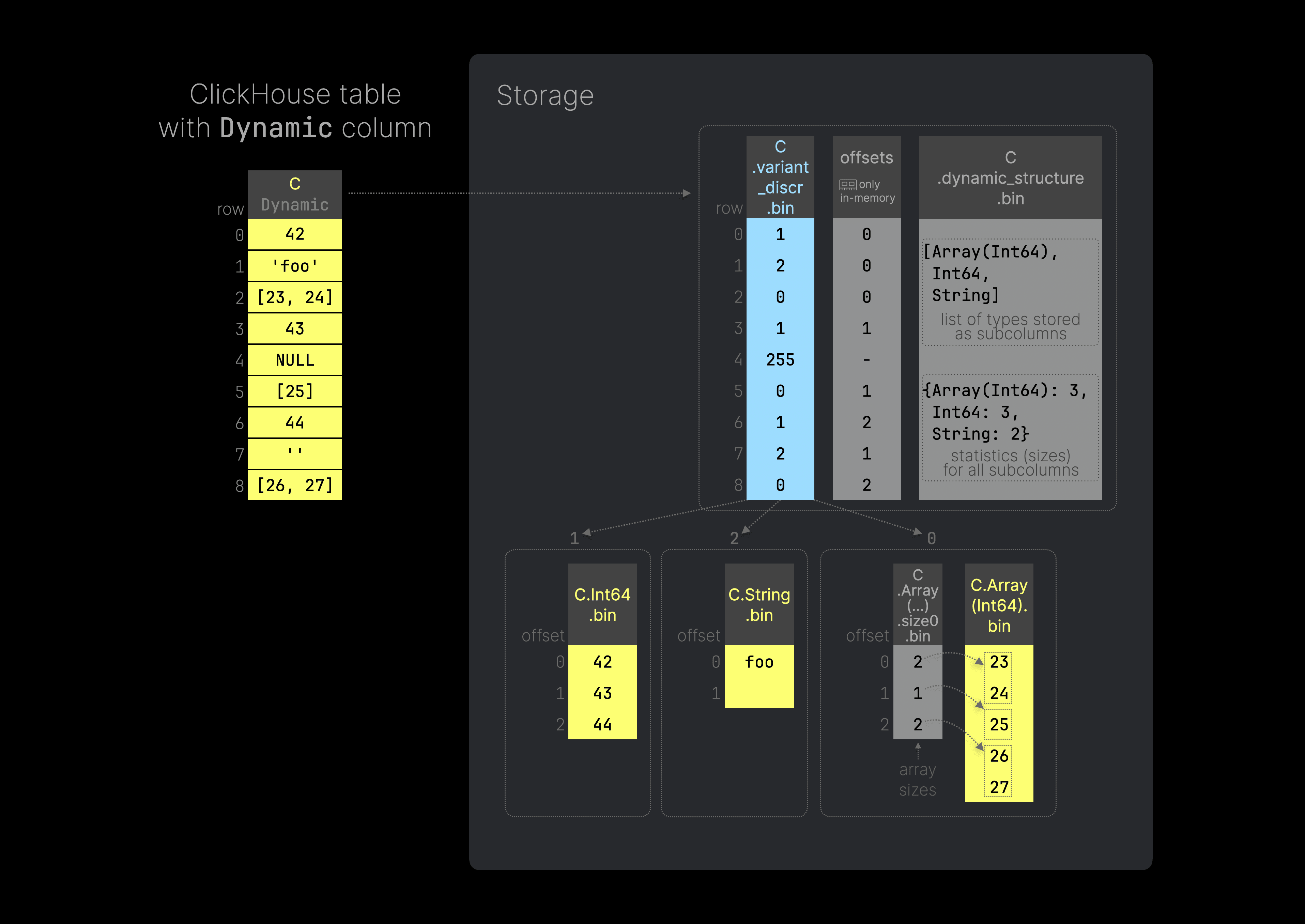 You can use [this](https://gist.github.com/tom-clickhouse/cba68ca35a5926d2145a186bec695d73) SQL code to recreate the table depicted in the diagram above. We can insert values of any type into the Dynamic column `C` without specifying the types in advance as we do in the Variant type.
Internally, a Dynamic column stores data on disk in the [same](/blog/a-new-powerful-json-data-type-for-clickhouse#storage-extension-for-dynamically-changing-data) way as a Variant column, plus some additional information about the types stored in a particular column. The figure above shows that the storage differs from the Variant column only in that it has one additional file, `C.dynamic_structure.bin` that contains information about the list of types stored as subcolumns plus statistics of the sizes of the type variant column data files. This metadata is used for subcolumns reading and data part merging.
### Preventing column file avalanche
The Dynamic type also supports limiting the number of types that are stored as separate column data files by specifying the `max_types` parameter in the type declaration: `Dynamic(max_types=N)` where 0 <= N < 255. The default value of `max_types` is 32. When this limit is reached, all remaining types are stored in a single column data file with a special structure. The following diagram shows an example of this (you can click on it to enlarge it):
You can use [this](https://gist.github.com/tom-clickhouse/cba68ca35a5926d2145a186bec695d73) SQL code to recreate the table depicted in the diagram above. We can insert values of any type into the Dynamic column `C` without specifying the types in advance as we do in the Variant type.
Internally, a Dynamic column stores data on disk in the [same](/blog/a-new-powerful-json-data-type-for-clickhouse#storage-extension-for-dynamically-changing-data) way as a Variant column, plus some additional information about the types stored in a particular column. The figure above shows that the storage differs from the Variant column only in that it has one additional file, `C.dynamic_structure.bin` that contains information about the list of types stored as subcolumns plus statistics of the sizes of the type variant column data files. This metadata is used for subcolumns reading and data part merging.
### Preventing column file avalanche
The Dynamic type also supports limiting the number of types that are stored as separate column data files by specifying the `max_types` parameter in the type declaration: `Dynamic(max_types=N)` where 0 <= N < 255. The default value of `max_types` is 32. When this limit is reached, all remaining types are stored in a single column data file with a special structure. The following diagram shows an example of this (you can click on it to enlarge it):
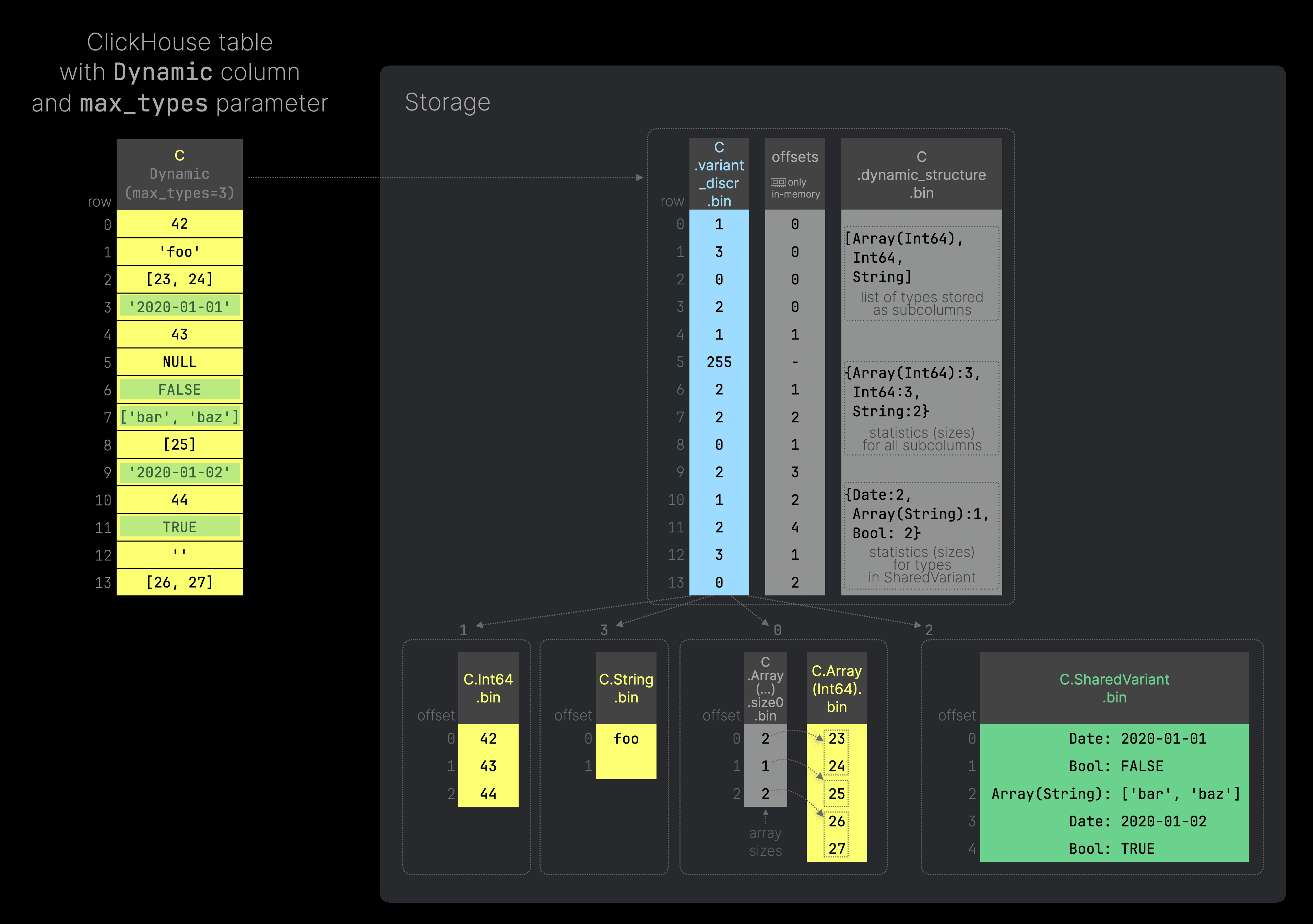 [Here](https://gist.github.com/tom-clickhouse/c30b287d0a4a514b1019fcbed1584467)’s the SQL script to generate the example table illustrated in the diagram above. This time we use a Dynamic column `C` with the `max_types` parameter set to 3.
Therefore only the first three used types are stored in separate column data files (which is efficient for compression and analytical queries). All values from additionally used types (marked with green highlights in the example table above) are stored together in a single column data file (`C.SharedVariant.bin`) that has type `String`. Each row in SharedVariant contains a string value that contains the following data: <[binary_encoded_data_type](https://clickhouse.com/docs/en/sql-reference/data-types/data-types-binary-encoding)><binary_value>. Using this structure, we can store (and retrieve) values of different types inside a single column.
### Reading dynamic nested types as subcolumns
Like the Variant type, the Dynamic type [supports](https://clickhouse.com/docs/en/sql-reference/data-types/dynamic#reading-dynamic-nested-types-as-subcolumns) reading the values of a single nested type from a Dynamic column using the type name as a subcolumn:
```
SELECT C.Int64
FROM test;
┌─C.Int64─┐
1. │ 42 │
2. │ ᴺᵁᴸᴸ │
3. │ ᴺᵁᴸᴸ │
4. │ 43 │
5. │ ᴺᵁᴸᴸ │
6. │ ᴺᵁᴸᴸ │
7. │ 44 │
8. │ ᴺᵁᴸᴸ │
9. │ ᴺᵁᴸᴸ │
└─────────┘
```
## ClickHouse JSON Type: Bringing it all together
After implementing the Variant and the Dynamic type, we had all the required building blocks to implement a new powerful JSON type on top of ClickHouse’s columnar storage, overcoming all of our [challenges](/blog/a-new-powerful-json-data-type-for-clickhouse#introduction) with support for:
* **Dynamically changing data**: allow values with different data types (possibly incompatible and not known beforehand) for the same JSON paths without unification into a least common type, preserving the integrity of mixed-type data.
* **High performance and dense, true column-oriented storage:** store and read any inserted JSON key path as a native, dense subcolumn, allowing high data compression and maintaining query performance seen on classic types.
* **Scalability**: allow limiting the number of subcolumns that are stored separately, to scale JSON storage for high-performance analytics over PB datasets.
* **Tuning**: allow hints for JSON parsing (explicit types for JSON paths, paths that should be skipped during parsing, etc).
Our new [JSON type](https://clickhouse.com/docs/en/sql-reference/data-types/newjson) allows for the storage of JSON objects with any structure and the reading of every JSON value from it using the JSON path as a subcolumn.
### JSON type declaration
The new type has several optional parameters and hints in its declaration:
```
JSON(
max_dynamic_paths=N,
max_dynamic_types=M,
some.path TypeName,
SKIP path.to.skip,
SKIP REGEXP 'paths_regexp')
```
Where:
* `max_dynamic_paths` (default value `1024`) specifies how many JSON key paths are stored separately as subcolumns. If this limit is exceeded, all other paths will be stored together in a single subcolumn with a special structure.
* `max_dynamic_types` (default value `32`) is between `0` and `254` and specifies how many different data types are stored as separate column data files for a single JSON key path column with type `Dynamic` . If this limit is exceeded, all new types will be stored together in a single column data file with a special structure.
* `some.path TypeName` is a type hint for a particular JSON path. Such paths are always stored as subcolumns with the specified type, providing performance guarantees.
* `SKIP path.to.skip` is a hint for particular JSON path that should be skipped during JSON parsing. Such paths will never be stored in the JSON column. If the specified path is a nested JSON object, the whole nested object will be skipped.
* `SKIP REGEXP 'path_regexp'` is a hint with a regular expression that is used to skip paths during JSON parsing. All paths that match this regular expression will never be stored in the JSON column.
### True columnar JSON storage
The following diagram (you can click on it to enlarge it) shows a ClickHouse table with a single JSON column and how the JSON data of that column is efficiently implemented on top of ClickHouse’s columnar storage on disk (per data part):
[Here](https://gist.github.com/tom-clickhouse/c30b287d0a4a514b1019fcbed1584467)’s the SQL script to generate the example table illustrated in the diagram above. This time we use a Dynamic column `C` with the `max_types` parameter set to 3.
Therefore only the first three used types are stored in separate column data files (which is efficient for compression and analytical queries). All values from additionally used types (marked with green highlights in the example table above) are stored together in a single column data file (`C.SharedVariant.bin`) that has type `String`. Each row in SharedVariant contains a string value that contains the following data: <[binary_encoded_data_type](https://clickhouse.com/docs/en/sql-reference/data-types/data-types-binary-encoding)><binary_value>. Using this structure, we can store (and retrieve) values of different types inside a single column.
### Reading dynamic nested types as subcolumns
Like the Variant type, the Dynamic type [supports](https://clickhouse.com/docs/en/sql-reference/data-types/dynamic#reading-dynamic-nested-types-as-subcolumns) reading the values of a single nested type from a Dynamic column using the type name as a subcolumn:
```
SELECT C.Int64
FROM test;
┌─C.Int64─┐
1. │ 42 │
2. │ ᴺᵁᴸᴸ │
3. │ ᴺᵁᴸᴸ │
4. │ 43 │
5. │ ᴺᵁᴸᴸ │
6. │ ᴺᵁᴸᴸ │
7. │ 44 │
8. │ ᴺᵁᴸᴸ │
9. │ ᴺᵁᴸᴸ │
└─────────┘
```
## ClickHouse JSON Type: Bringing it all together
After implementing the Variant and the Dynamic type, we had all the required building blocks to implement a new powerful JSON type on top of ClickHouse’s columnar storage, overcoming all of our [challenges](/blog/a-new-powerful-json-data-type-for-clickhouse#introduction) with support for:
* **Dynamically changing data**: allow values with different data types (possibly incompatible and not known beforehand) for the same JSON paths without unification into a least common type, preserving the integrity of mixed-type data.
* **High performance and dense, true column-oriented storage:** store and read any inserted JSON key path as a native, dense subcolumn, allowing high data compression and maintaining query performance seen on classic types.
* **Scalability**: allow limiting the number of subcolumns that are stored separately, to scale JSON storage for high-performance analytics over PB datasets.
* **Tuning**: allow hints for JSON parsing (explicit types for JSON paths, paths that should be skipped during parsing, etc).
Our new [JSON type](https://clickhouse.com/docs/en/sql-reference/data-types/newjson) allows for the storage of JSON objects with any structure and the reading of every JSON value from it using the JSON path as a subcolumn.
### JSON type declaration
The new type has several optional parameters and hints in its declaration:
```
JSON(
max_dynamic_paths=N,
max_dynamic_types=M,
some.path TypeName,
SKIP path.to.skip,
SKIP REGEXP 'paths_regexp')
```
Where:
* `max_dynamic_paths` (default value `1024`) specifies how many JSON key paths are stored separately as subcolumns. If this limit is exceeded, all other paths will be stored together in a single subcolumn with a special structure.
* `max_dynamic_types` (default value `32`) is between `0` and `254` and specifies how many different data types are stored as separate column data files for a single JSON key path column with type `Dynamic` . If this limit is exceeded, all new types will be stored together in a single column data file with a special structure.
* `some.path TypeName` is a type hint for a particular JSON path. Such paths are always stored as subcolumns with the specified type, providing performance guarantees.
* `SKIP path.to.skip` is a hint for particular JSON path that should be skipped during JSON parsing. Such paths will never be stored in the JSON column. If the specified path is a nested JSON object, the whole nested object will be skipped.
* `SKIP REGEXP 'path_regexp'` is a hint with a regular expression that is used to skip paths during JSON parsing. All paths that match this regular expression will never be stored in the JSON column.
### True columnar JSON storage
The following diagram (you can click on it to enlarge it) shows a ClickHouse table with a single JSON column and how the JSON data of that column is efficiently implemented on top of ClickHouse’s columnar storage on disk (per data part):
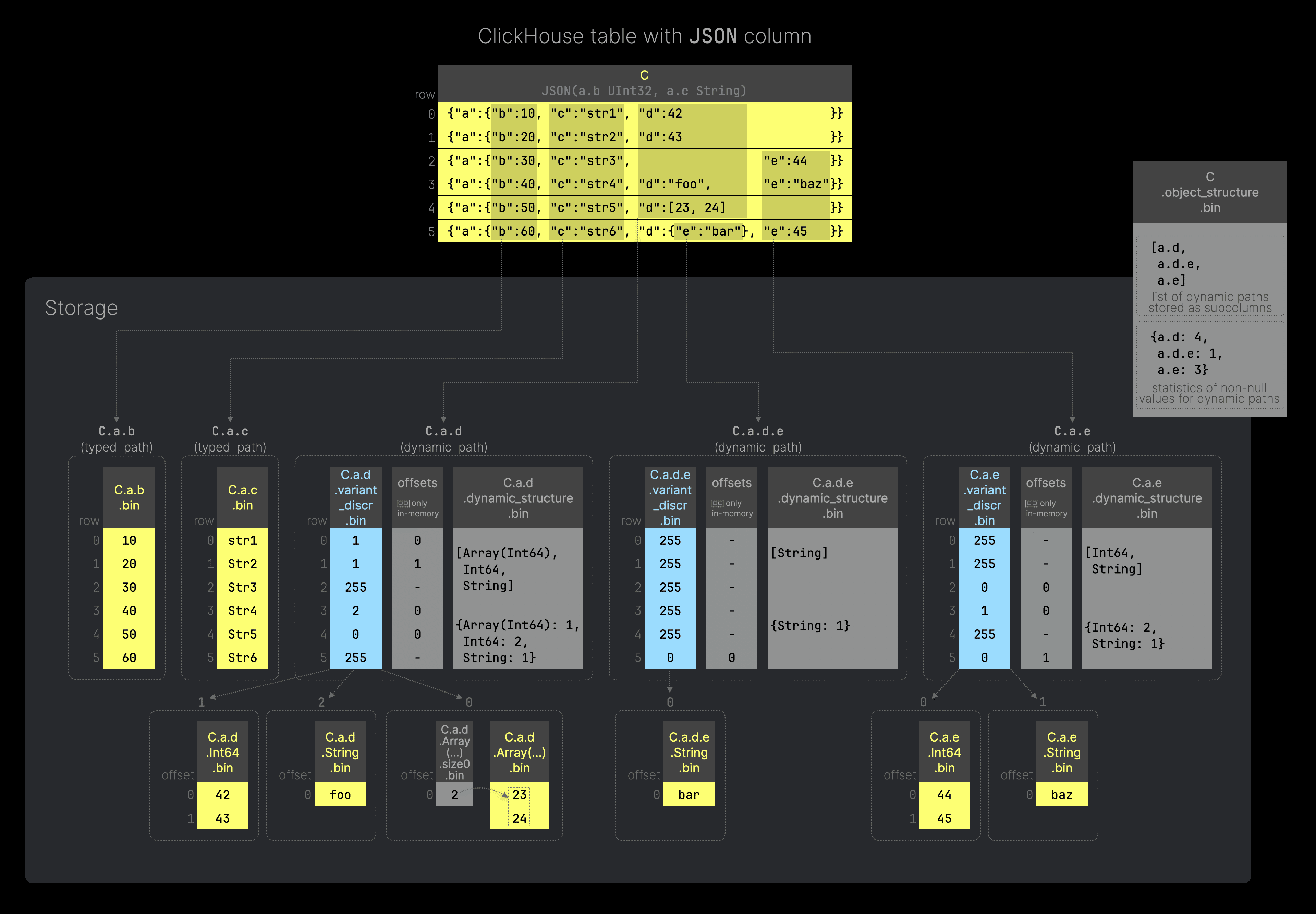 Use [this](https://gist.github.com/tom-clickhouse/c52ab757aca15723427032f305c73656) SQL code below to recreate the table as illustrated in the diagram above. Column `C` of our example table is of type `JSON`, and we provided two type hints specifying the types for JSON paths `a.b` and `a.c`.
Our table column contains 6 JSON documents, and the leaf values of each unique JSON key path are stored on disk either as regular column data files (for typed JSON paths–paths with a type hint, see `C.a.b` and `C.a.c` in the diagram above) or as a dynamic subcolumn (for dynamic JSON paths - paths with potentially dynamically changing data, see `C.a.d`, `C.a.d.e`, and `C.a.e` in the diagram above). For the latter, ClickHouse uses the [Dynamic data type](/blog/a-new-powerful-json-data-type-for-clickhouse#building-block-2---dynamic-type).
In addition, the JSON type uses a special file (`object_structure`) containing metadata information about the dynamic paths and statistics of non-null values for each dynamic path (calculated during column serialization). This metadata is used for reading subcolumns and merging data parts.
### Preventing an avalanche of column files
To prevent an explosion of the number of column files on disk in scenarios with (1) a large number of dynamic types within a single JSON key path, and (2) a huge number of unique dynamic JSON key paths, the JSON type allows to:
(1) restrict how many different data types are stored as separate column data files for a single JSON key path with the `max_dynamic_types` (default value `32`) parameter.
(2) restrict how many JSON key paths are stored separately as subcolumns with the `max_dynamic_paths` (default value `1024`) parameter.
This solves our [third](/blog/a-new-powerful-json-data-type-for-clickhouse#challenge-3-prevention-of-avalanche-of-column-data-files-on-disk) challenge.
We gave an example for (1) further [above](/blog/a-new-powerful-json-data-type-for-clickhouse#preventing-column-file-avalanche). And we demonstrate (2) with another diagram (you can click on it to enlarge it):
Use [this](https://gist.github.com/tom-clickhouse/c52ab757aca15723427032f305c73656) SQL code below to recreate the table as illustrated in the diagram above. Column `C` of our example table is of type `JSON`, and we provided two type hints specifying the types for JSON paths `a.b` and `a.c`.
Our table column contains 6 JSON documents, and the leaf values of each unique JSON key path are stored on disk either as regular column data files (for typed JSON paths–paths with a type hint, see `C.a.b` and `C.a.c` in the diagram above) or as a dynamic subcolumn (for dynamic JSON paths - paths with potentially dynamically changing data, see `C.a.d`, `C.a.d.e`, and `C.a.e` in the diagram above). For the latter, ClickHouse uses the [Dynamic data type](/blog/a-new-powerful-json-data-type-for-clickhouse#building-block-2---dynamic-type).
In addition, the JSON type uses a special file (`object_structure`) containing metadata information about the dynamic paths and statistics of non-null values for each dynamic path (calculated during column serialization). This metadata is used for reading subcolumns and merging data parts.
### Preventing an avalanche of column files
To prevent an explosion of the number of column files on disk in scenarios with (1) a large number of dynamic types within a single JSON key path, and (2) a huge number of unique dynamic JSON key paths, the JSON type allows to:
(1) restrict how many different data types are stored as separate column data files for a single JSON key path with the `max_dynamic_types` (default value `32`) parameter.
(2) restrict how many JSON key paths are stored separately as subcolumns with the `max_dynamic_paths` (default value `1024`) parameter.
This solves our [third](/blog/a-new-powerful-json-data-type-for-clickhouse#challenge-3-prevention-of-avalanche-of-column-data-files-on-disk) challenge.
We gave an example for (1) further [above](/blog/a-new-powerful-json-data-type-for-clickhouse#preventing-column-file-avalanche). And we demonstrate (2) with another diagram (you can click on it to enlarge it):
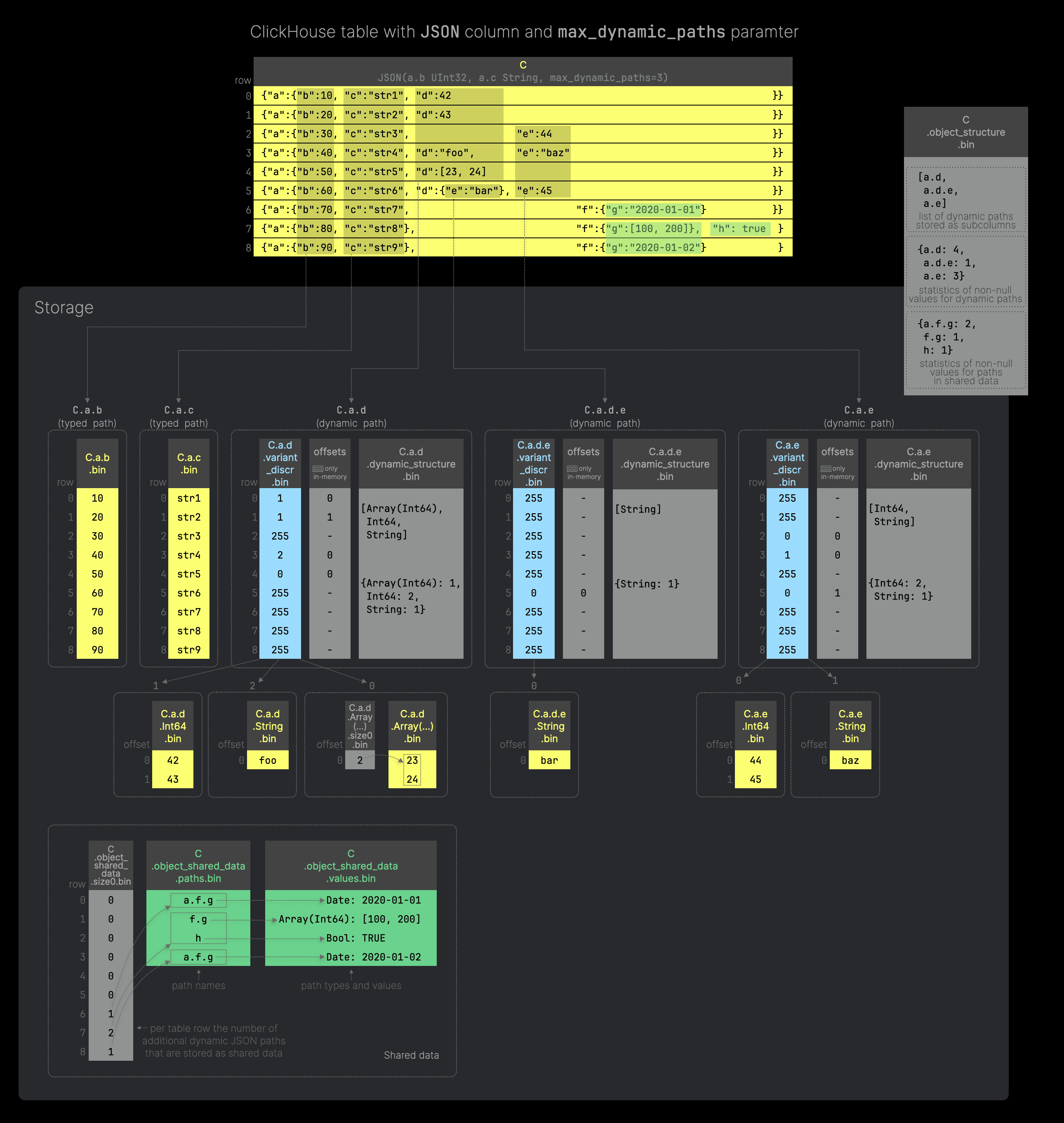 [This](https://gist.github.com/tom-clickhouse/c02b49fc5ec275aaa6e9d463311048ba) is the SQL code to reproduce the table from the above diagram. As in the previous example, Column `C` of our ClickHouse table is of type `JSON,` and we provided the same two type hints specifying the types for JSON paths `a.b` and `a.c`.
Additionally, we set the `max_dynamic_paths` parameter to 3. This causes ClickHouse to store only the leaf values of the first three dynamic JSON paths as dynamic subcolumns (using the Dynamic type).
All additional dynamic JSON paths with their type information and values (marked with green highlights in the example table above) are stored as shared data - see the files `C
.object_
shared_
data
.size0.bin`, `C
.object_shared_data.paths.bin` and `C.object_shared_data.values.bin` in the figure above. Note that the shared data file (`object_shared_data.values`) has type `String`. Each entry is a string value that contains the following data: <[binary_encoded_data_type](https://clickhouse.com/docs/en/sql-reference/data-types/data-types-binary-encoding)><binary_value>.
With shared data, we also store additional statistics (used for reading subcolumns and merging data parts) in the `object_structure.bin` file. We store statistics for non-null values for (currently the first 10000) paths stored in the shared data column.
### Reading JSON paths
The JSON type [supports](https://clickhouse.com/docs/en/sql-reference/data-types/newjson#reading-json-paths-as-subcolumns) reading the leave values of every path using the pathname as a subcolumn. For example, all values for JSON path `a.b` in our example table above can be read using the syntax `C.a.b`:
```
SELECT C.a.b
FROM test;
┌─C.a.b─┐
1. │ 10 │
2. │ 20 │
3. │ 30 │
4. │ 40 │
5. │ 50 │
6. │ 60 │
└───────┘
```
If the type of the requested path was not specified in the JSON type declaration by a type hint, the path values will always have the type Dynamic:
```
SELECT
C.a.d,
toTypeName(C.a.d)
FROM test;
┌─C.a.d───┬─toTypeName(C.a.d)─┐
1. │ 42 │ Dynamic │
2. │ 43 │ Dynamic │
3. │ ᴺᵁᴸᴸ │ Dynamic │
4. │ foo │ Dynamic │
5. │ [23,24] │ Dynamic │
6. │ ᴺᵁᴸᴸ │ Dynamic │
└─────────┴───────────────────┘
```
It is also possible to read subcolumns of a Dynamic type using special JSON syntax `JSON_column.some.path.:TypeName`:
```
SELECT C.a.d.:Int64
FROM test;
┌─C.a.d.:`Int64`─┐
1. │ 42 │
2. │ 43 │
3. │ ᴺᵁᴸᴸ │
4. │ ᴺᵁᴸᴸ │
5. │ ᴺᵁᴸᴸ │
6. │ ᴺᵁᴸᴸ │
└────────────────┘
```
Additionally, the JSON type [supports](https://clickhouse.com/docs/en/sql-reference/data-types/newjson#reading-json-sub-objects-as-subcolumns) reading nested JSON objects as subcolumns with type JSON using the special syntax `JSON_column.^some.path`:
```
SELECT C.^a
FROM test;
┌─C.^`a`───────────────────────────────────────┐
1. │ {"b":10,"c":"str1","d":"42"} │
2. │ {"b":20,"c":"str2","d":"43"} │
3. │ {"b":30,"c":"str3","e":"44"} │
4. │ {"b":40,"c":"str4","d":"foo","e":"baz"} │
5. │ {"b":50,"c":"str5","d":["23","24"]} │
6. │ {"b":60,"c":"str6","d":{"e":"bar"},"e":"45"} │
└──────────────────────────────────────────────┘
```
```
SELECT toTypeName(C.^a)
FROM test
LIMIT 1;
┌─toTypeName(C.^`a`)───────┐
1. │ JSON(b UInt32, c String) │
└──────────────────────────┘
```
> Currently, the dot syntax doesn’t read nested objects for performance reasons. The data is stored so that reading literal values by paths is very efficient, but reading all subobjects by path requires reading much more data and can sometimes be slower. Therefore, when we want to return an object, we need to use .^ instead. We are [planning](https://github.com/ClickHouse/ClickHouse/issues/68428) to unify the two different `.` syntaxes.
## One more detail - compact discriminator serialization
In many scenarios, dynamic JSON paths will have values of mostly the same type. In this case, the Dynamic type’s [discriminators file](/blog/a-new-powerful-json-data-type-for-clickhouse#discriminator-column-for-switching-between-subtypes) will mainly contain the same numbers (type discriminators).
Similarly, when storing a high number of unique but sparse JSON paths, the discriminators file for each path will mainly contain the value 255 (indicating a NULL value).
In both cases the discriminators file will be compressed well but still can be quite redundant when all the rows have the same values.
To optimize this, we implemented a special compact format of the discriminators serialization. Instead of just writing the discriminators as the [usual](/blog/a-new-powerful-json-data-type-for-clickhouse#discriminator-column-for-switching-between-subtypes) `UInt8` values, if all discriminators are the same in the [target granule](https://clickhouse.com/docs/en/optimize/sparse-primary-indexes#data-is-organized-into-granules-for-parallel-data-processing), we serialize only 3 values (instead of [8192](https://clickhouse.com/docs/en/operations/settings/merge-tree-settings#index_granularity) values):
1. an indicator of compact granule format
2. an indicator of the amount of values in this granule
3. the discriminator value
This optimization can be controlled by the MergeTree setting `use_compact_variant_discriminators_serialization` (enabled by default).
## We’re just getting started
In this post, we outlined how we developed our new JSON type from scratch by first creating foundational building blocks that also have broader applications beyond JSON.
This new JSON type was designed to replace the now deprecated [Object('json')](https://clickhouse.com/docs/en/sql-reference/data-types/object-data-type) data type, addressing its limitations and improving overall functionality.
The new implementation is currently [released](https://clickhouse.com/blog/clickhouse-release-24-08#json-data-type) as experimental for testing purposes, and we’re not finished yet with the feature set. Our [JSON roadmap](https://github.com/ClickHouse/ClickHouse/issues/68428) includes some powerful enhancements, such as using JSON key paths inside a table’s primary key or in data-skipping indices.
Last but not least, the building blocks we created to finally implement the new JSON type have paved the way for extending ClickHouse to support additional semi-structured types like XML, YAML, and more.
Stay tuned for upcoming posts, in which we’ll showcase the new JSON type's main query features with real-world data along with benchmarks for data compression and query performance. We’ll also dive deeper into the inner workings of JSON’s implementation to uncover how data is efficiently merged and processed in memory.
If you are using ClickHouse Cloud and want to test our new JSON data type, please [contact our support](https://clickhouse.com/docs/en/cloud/support) to get private preview access.
[This](https://gist.github.com/tom-clickhouse/c02b49fc5ec275aaa6e9d463311048ba) is the SQL code to reproduce the table from the above diagram. As in the previous example, Column `C` of our ClickHouse table is of type `JSON,` and we provided the same two type hints specifying the types for JSON paths `a.b` and `a.c`.
Additionally, we set the `max_dynamic_paths` parameter to 3. This causes ClickHouse to store only the leaf values of the first three dynamic JSON paths as dynamic subcolumns (using the Dynamic type).
All additional dynamic JSON paths with their type information and values (marked with green highlights in the example table above) are stored as shared data - see the files `C
.object_
shared_
data
.size0.bin`, `C
.object_shared_data.paths.bin` and `C.object_shared_data.values.bin` in the figure above. Note that the shared data file (`object_shared_data.values`) has type `String`. Each entry is a string value that contains the following data: <[binary_encoded_data_type](https://clickhouse.com/docs/en/sql-reference/data-types/data-types-binary-encoding)><binary_value>.
With shared data, we also store additional statistics (used for reading subcolumns and merging data parts) in the `object_structure.bin` file. We store statistics for non-null values for (currently the first 10000) paths stored in the shared data column.
### Reading JSON paths
The JSON type [supports](https://clickhouse.com/docs/en/sql-reference/data-types/newjson#reading-json-paths-as-subcolumns) reading the leave values of every path using the pathname as a subcolumn. For example, all values for JSON path `a.b` in our example table above can be read using the syntax `C.a.b`:
```
SELECT C.a.b
FROM test;
┌─C.a.b─┐
1. │ 10 │
2. │ 20 │
3. │ 30 │
4. │ 40 │
5. │ 50 │
6. │ 60 │
└───────┘
```
If the type of the requested path was not specified in the JSON type declaration by a type hint, the path values will always have the type Dynamic:
```
SELECT
C.a.d,
toTypeName(C.a.d)
FROM test;
┌─C.a.d───┬─toTypeName(C.a.d)─┐
1. │ 42 │ Dynamic │
2. │ 43 │ Dynamic │
3. │ ᴺᵁᴸᴸ │ Dynamic │
4. │ foo │ Dynamic │
5. │ [23,24] │ Dynamic │
6. │ ᴺᵁᴸᴸ │ Dynamic │
└─────────┴───────────────────┘
```
It is also possible to read subcolumns of a Dynamic type using special JSON syntax `JSON_column.some.path.:TypeName`:
```
SELECT C.a.d.:Int64
FROM test;
┌─C.a.d.:`Int64`─┐
1. │ 42 │
2. │ 43 │
3. │ ᴺᵁᴸᴸ │
4. │ ᴺᵁᴸᴸ │
5. │ ᴺᵁᴸᴸ │
6. │ ᴺᵁᴸᴸ │
└────────────────┘
```
Additionally, the JSON type [supports](https://clickhouse.com/docs/en/sql-reference/data-types/newjson#reading-json-sub-objects-as-subcolumns) reading nested JSON objects as subcolumns with type JSON using the special syntax `JSON_column.^some.path`:
```
SELECT C.^a
FROM test;
┌─C.^`a`───────────────────────────────────────┐
1. │ {"b":10,"c":"str1","d":"42"} │
2. │ {"b":20,"c":"str2","d":"43"} │
3. │ {"b":30,"c":"str3","e":"44"} │
4. │ {"b":40,"c":"str4","d":"foo","e":"baz"} │
5. │ {"b":50,"c":"str5","d":["23","24"]} │
6. │ {"b":60,"c":"str6","d":{"e":"bar"},"e":"45"} │
└──────────────────────────────────────────────┘
```
```
SELECT toTypeName(C.^a)
FROM test
LIMIT 1;
┌─toTypeName(C.^`a`)───────┐
1. │ JSON(b UInt32, c String) │
└──────────────────────────┘
```
> Currently, the dot syntax doesn’t read nested objects for performance reasons. The data is stored so that reading literal values by paths is very efficient, but reading all subobjects by path requires reading much more data and can sometimes be slower. Therefore, when we want to return an object, we need to use .^ instead. We are [planning](https://github.com/ClickHouse/ClickHouse/issues/68428) to unify the two different `.` syntaxes.
## One more detail - compact discriminator serialization
In many scenarios, dynamic JSON paths will have values of mostly the same type. In this case, the Dynamic type’s [discriminators file](/blog/a-new-powerful-json-data-type-for-clickhouse#discriminator-column-for-switching-between-subtypes) will mainly contain the same numbers (type discriminators).
Similarly, when storing a high number of unique but sparse JSON paths, the discriminators file for each path will mainly contain the value 255 (indicating a NULL value).
In both cases the discriminators file will be compressed well but still can be quite redundant when all the rows have the same values.
To optimize this, we implemented a special compact format of the discriminators serialization. Instead of just writing the discriminators as the [usual](/blog/a-new-powerful-json-data-type-for-clickhouse#discriminator-column-for-switching-between-subtypes) `UInt8` values, if all discriminators are the same in the [target granule](https://clickhouse.com/docs/en/optimize/sparse-primary-indexes#data-is-organized-into-granules-for-parallel-data-processing), we serialize only 3 values (instead of [8192](https://clickhouse.com/docs/en/operations/settings/merge-tree-settings#index_granularity) values):
1. an indicator of compact granule format
2. an indicator of the amount of values in this granule
3. the discriminator value
This optimization can be controlled by the MergeTree setting `use_compact_variant_discriminators_serialization` (enabled by default).
## We’re just getting started
In this post, we outlined how we developed our new JSON type from scratch by first creating foundational building blocks that also have broader applications beyond JSON.
This new JSON type was designed to replace the now deprecated [Object('json')](https://clickhouse.com/docs/en/sql-reference/data-types/object-data-type) data type, addressing its limitations and improving overall functionality.
The new implementation is currently [released](https://clickhouse.com/blog/clickhouse-release-24-08#json-data-type) as experimental for testing purposes, and we’re not finished yet with the feature set. Our [JSON roadmap](https://github.com/ClickHouse/ClickHouse/issues/68428) includes some powerful enhancements, such as using JSON key paths inside a table’s primary key or in data-skipping indices.
Last but not least, the building blocks we created to finally implement the new JSON type have paved the way for extending ClickHouse to support additional semi-structured types like XML, YAML, and more.
Stay tuned for upcoming posts, in which we’ll showcase the new JSON type's main query features with real-world data along with benchmarks for data compression and query performance. We’ll also dive deeper into the inner workings of JSON’s implementation to uncover how data is efficiently merged and processed in memory.
If you are using ClickHouse Cloud and want to test our new JSON data type, please [contact our support](https://clickhouse.com/docs/en/cloud/support) to get private preview access.